Free analytics lesson
Spot missing, repeated and changed analytics requests
A missing event, a request sent twice or a changed currency can be easy to miss after a release. Practise reading those differences with three small fictional examples, then run the same files locally.
Original fictional lesson by Perunlight, prepared by the Codex coordinator with AI assistance. The browser exercise and CLI practice kit were independently reviewed before their earlier publication. Published .
Compare the requests, then reveal what to investigate
Open a case below and compare its before and after columns. Decide what you would check, then open Show what to investigate. These are fixed teaching examples from the free practice kit, not a parser for uploaded HAR files. No account or purchase is needed.
Free practice · Fictional data
Open a case, compare the requests, then reveal what to investigate. These are fixed examples from the free HAR practice kit.
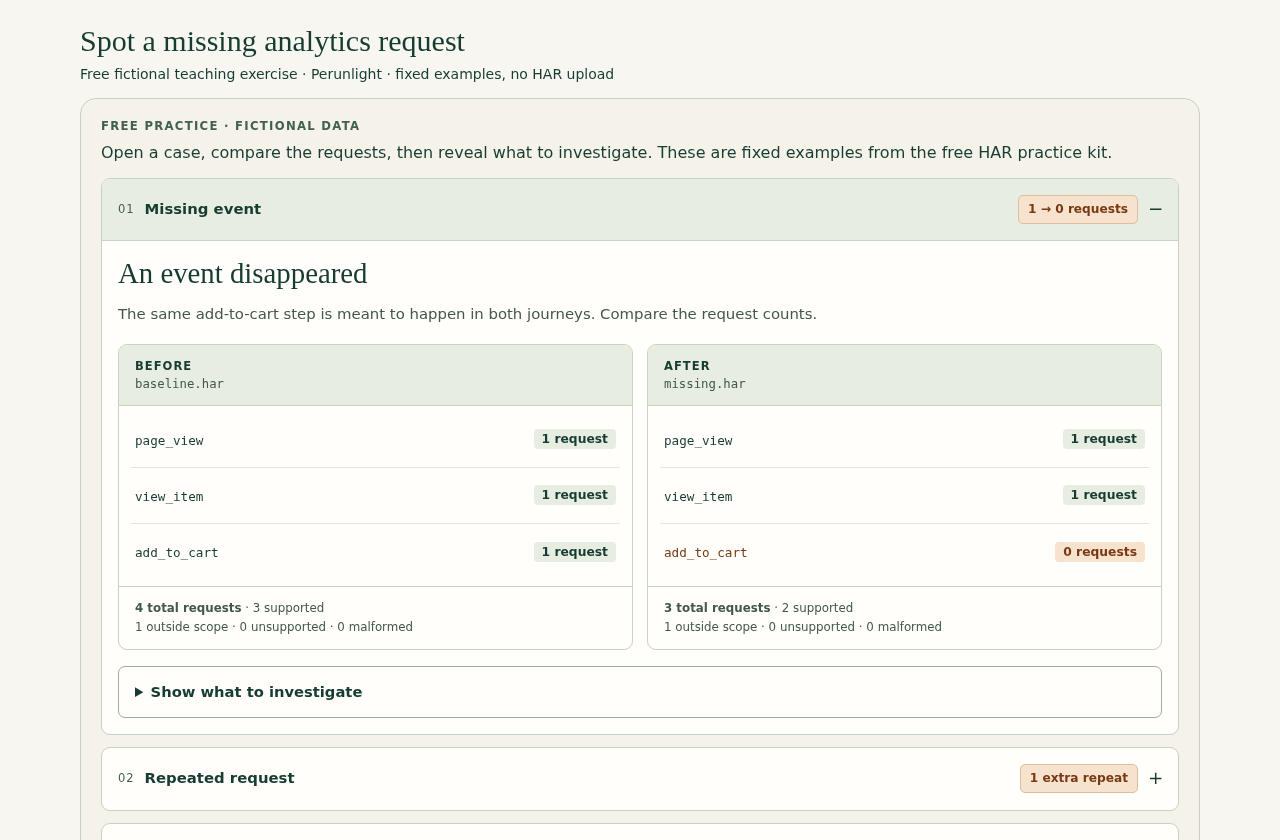
01Missing event1 → 0 requests
An event disappeared
The same add-to-cart step is meant to happen in both journeys. Compare the request counts.
Before
baseline.harpage_view- 1 request
view_item- 1 request
add_to_cart- 1 request
4 total requests · 3 supported
1 outside scope · 0 unsupported · 0 malformed
After
missing.harpage_view- 1 request
view_item- 1 request
add_to_cart- 0 requests
3 total requests · 2 supported
1 outside scope · 0 unsupported · 0 malformed
Show what to investigate
add_to_cart appears once before and zero times after. The CLI reports removed.
Next check. Check that both journeys included the same click and consent choices. Then inspect the tag or handler on the changed page. The files alone cannot tell you why the request disappeared.
02Repeated request1 extra repeat
One request became two
The fictional after file contains an extra identical add-to-cart request. Find the row that changed.
Before
baseline.harpage_view- 1 request
view_item- 1 request
add_to_cart- 1 request
4 total requests · 3 supported
1 outside scope · 0 unsupported · 0 malformed
After
duplicate.harpage_view- 1 request
view_item- 1 request
add_to_cart- 2 requests
5 total requests · 4 supported
1 outside scope · 0 unsupported · 0 malformed
Show what to investigate
add_to_cart grows from one to two supported requests. The CLI reports changed and repeated_after: 1: one extra identical occurrence, not one event group.
Next check. Inspect the click handler and tag triggers for an unintended second send. Repetition may also be intentional. This request evidence does not prove that Analytics recorded a duplicate conversion.
03Changed parameterEUR → USD
Same count. Different currency.
The number of requests stays the same. Look at the currency annotation on view_item.
Before
baseline.harpage_view- 1 request
view_itemFictional cu: EUR- 1 request
add_to_cart- 1 request
4 total requests · 3 supported
1 outside scope · 0 unsupported · 0 malformed
After
parameter-change.harpage_view- 1 request
view_itemFictional cu: USD- 1 request
add_to_cart- 1 request
4 total requests · 3 supported
1 outside scope · 0 unsupported · 0 malformed
Show what to investigate
view_item stays at one request, but its fictional cu parameter changes from EUR to USD. The CLI reports changed; it does not print those parameter values.
Next check. The currency annotations here come from the authored HAR files. Check whether the currency change was intended, then inspect the payload. Equal request counts alone would miss this difference.
Each supported request in these examples carries one event. The narrow GA4-style comparison excludes Adobe, batches and custom collectors. The files use invented .example hosts and responses; these are not browser captures. Request counts do not prove delivery to Analytics, tracking correctness or consent.
Four fictional HARs, a local Node CLI, source, tests and a worked lesson. Run the examples yourself with Node; tested on Node 22.22.2 / Linux. This browser example is a teaching diagram, not the MuninCompare extension.
What the three differences tell you
- Missing event:
add_to_cartgoes from one supported request to none. Check the tag trigger, browser errors and the capture conditions. A missing request is a clue, not proof that the release caused it. - Repeated request:
add_to_cartgoes from one request to two identical requests. Investigate a duplicate trigger or handler. One extra occurrence does not prove the analytics service counted it twice. - Changed parameter: the fictional
view_itemrequest changes itscuvalue from EUR to USD. Check the intended currency and compare the payload; the CLI output deliberately withholds the values.
Run the same examples on your computer
Download the free MIT-licensed HAR practice kit and extract it. The ZIP includes source, tests, a README, a diagram and four originally authored fictional HAR files. Node must already be installed; the tested version is 22.22.2 on Linux. Open a terminal in the extracted kit folder and run:
node har-diff.mjs fixtures/baseline.har fixtures/duplicate.har
node har-diff.mjs fixtures/baseline.har fixtures/missing.har
node har-diff.mjs fixtures/baseline.har fixtures/parameter-change.har- The duplicate comparison reports
add_to_cartchanging from 1 to 2 supported requests andrepeated_afterof 1. - The missing comparison reports
add_to_cartremoved. - The parameter comparison reports
view_itemchanged. Inspect the fictional HAR to see EUR change to USD; the reduced CLI report withholds parameter values.
The CLI reads a narrow GA4-style query/form format with one event per supported request. It counts unsupported, malformed and outside-scope requests. Adobe, GA4 batches and custom collectors are outside its coverage. Its limits are 8 MiB and 20,000 entries per file. See the bundled README for parsing rules and the example output.
Files are compared locally without upload or rewriting. Reports withhold raw URLs, parameter keys and values, and custom event names. Real customer captures, other Node versions and other platforms were not part of the test. Review even a reduced report before sharing it.
Keep a real before/after test comparable
- Choose one short journey on a site you are authorised to test, with a test account and test data. Write down the pages, clicks and consent choices.
- In Chrome DevTools, open Network and enable Preserve log. Walk the journey on the current build and select Export HAR (sanitized).
- Repeat the same journey on the next build using the same consent choices and browser conditions. Export a second HAR and name the files clearly, for example checkout-before.har and checkout-after.har.
Chrome’s Network reference explains that sanitized HAR export excludes Cookie, Set-Cookie and Authorization headers. URLs, query strings, form fields, response bodies and analytics parameters may still contain sensitive data. Keep captures private, use authorised test data and delete files when you no longer need them.
Separate request evidence from analytics results
A HAR shows browser request evidence. It does not prove analytics receipt, tracking correctness, consent compliance or equivalence between two journeys. A blocked request, an extra click or a different consent choice can change the result.
For Adobe Analytics, inspect the relevant requests and payloads manually in Network or use an appropriate separate tool. The free CLI on this page does not analyse Adobe requests. Unsupported traffic needs its own check; it is not a clean result.
Turn a difference into a useful investigation
- Confirm the same steps and consent choices were used in both captures.
- Check removed events and changed parameters on the important steps first.
- Investigate repeated requests and confirm that added events were intended.
- Review unsupported and malformed traffic separately.
- Verify collection in the relevant analytics service before concluding that tracking works.
Start with the fictional lesson when learning the result format. For your own captures, record the difference, the test conditions and what you checked next; keep sensitive payloads out of shared notes.