Step-by-step guide
BylinaRounds
Compare a revised comic script with the version you already lettered. Review changed balloons by their earlier IDs and export a correction packet for the next lettering round.
You have already lettered a comic script and need a reviewed correction list when the writer supplies a revision.
Before you start
- Extract the buyer ZIP and open BylinaRounds.html in desktop Google Chrome. Use Load example to try the three supplied script versions. The single-file app needs no installation, account, server or internet connection.
- Verified in Google Chrome 152 on Linux, including a run without networking and a 390px layout. Other browsers and operating systems are unverified. Desktop is recommended for reviewing scripts.
- Use scripts with PAGE headings, Panel headings and NAME: dialogue. Check that the parsed page list matches the source before locking.
- Keep the exact script used for the current lettering and a separate copy of the revised script.
Your first result
Open the supplied example
Open BylinaRounds.html and choose Load example: Saltmarsh Courier (round 0). Check 4 pages, 11 panels and 24 lettered items.
Decide what counts as lettering
The quoted GULL ROCK — KEEP CLEAR sign is a flagged art-direction line. Choose Not lettered, then Lock round 0 (baseline). With your own script, inspect every flagged line and the page list.
Review round 1
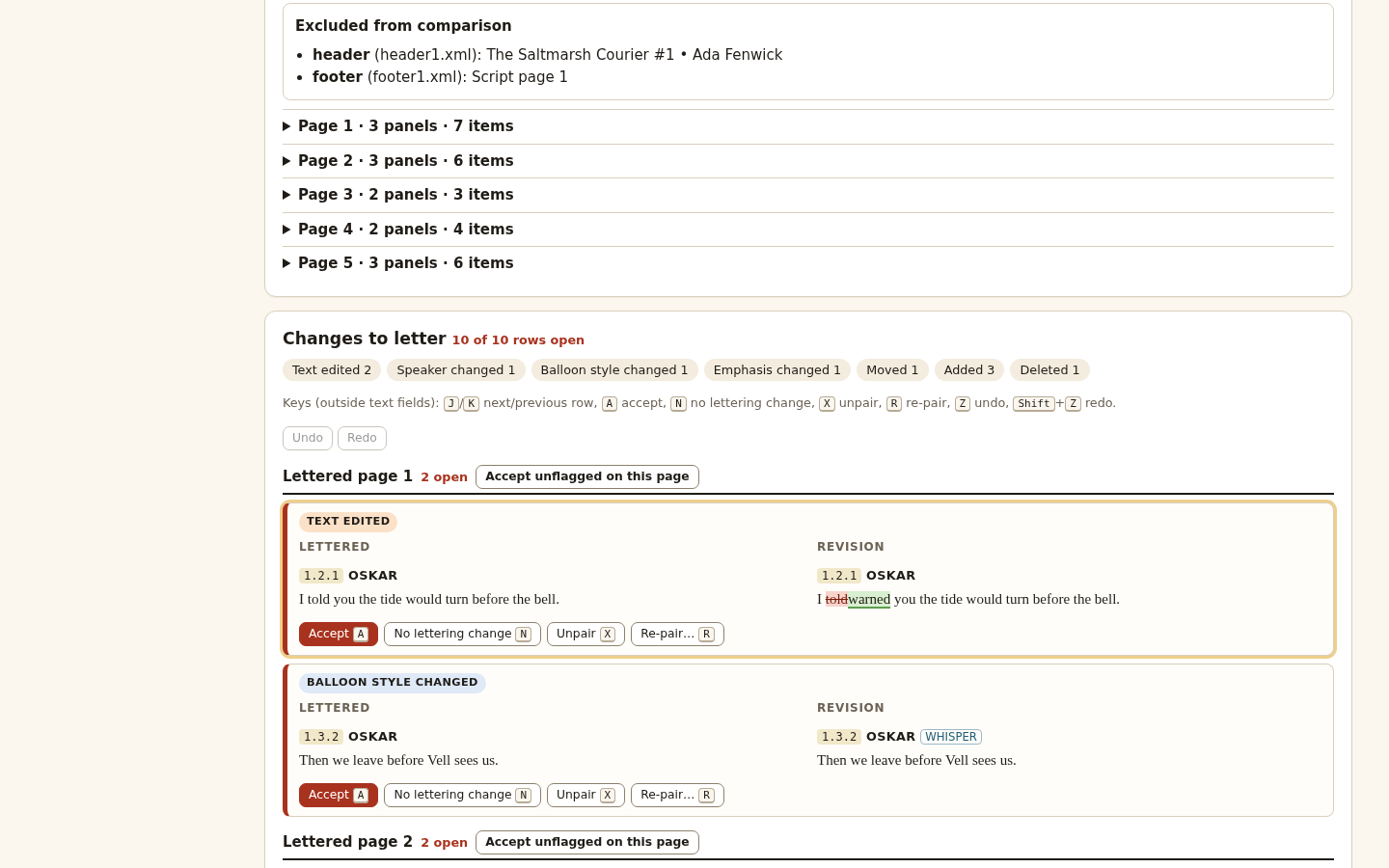
Choose Load example revision (round 1). The inserted page 3 shifts lettered pages 3 and 4 to revision pages 4 and 5. Review 10 change rows: 2 text edits, 1 speaker, 1 style, 1 emphasis, 1 move, 3 additions and 1 deletion.
Confirm or repair each proposal
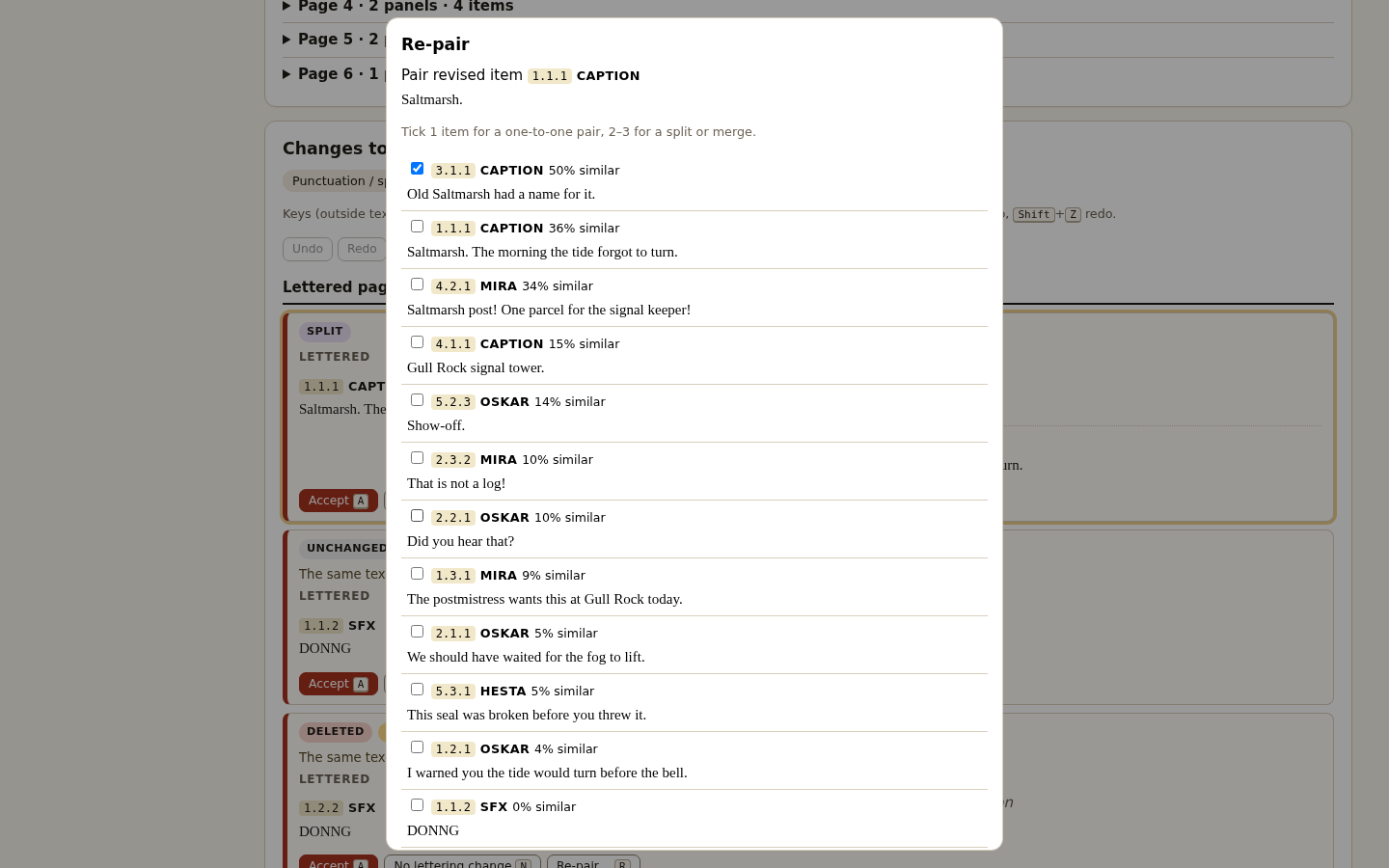
Use Accept for the intended correction, No lettering change where appropriate, or Re-pair / Unpair to correct matching. Outside text fields, J/K moves between rows, A accepts, N marks no lettering change, R opens re-pair and Z undoes. Review any Check pairing warning individually.
Download the handoff packet
When no rows remain open, choose Download packet (.zip). Use the printable correction HTML, old/new ID ledger, JSON, CSV and paste packs. Plain paste text lists emphasis; rich paste HTML preserves the supported formatting. Use the spreadsheet-safe CSV when opening formula-like text in a spreadsheet. Each row names its own old and new destination pages; a split page lists all revised destinations in the print heading and ledger.
Keep an approved round
After applying and checking the lettering changes, choose Lock correction round 1, then Save book. Verify that the book downloaded. The next revision compares against this newly locked script. Save book also preserves an unfinished review.
Try the split and duplicate case
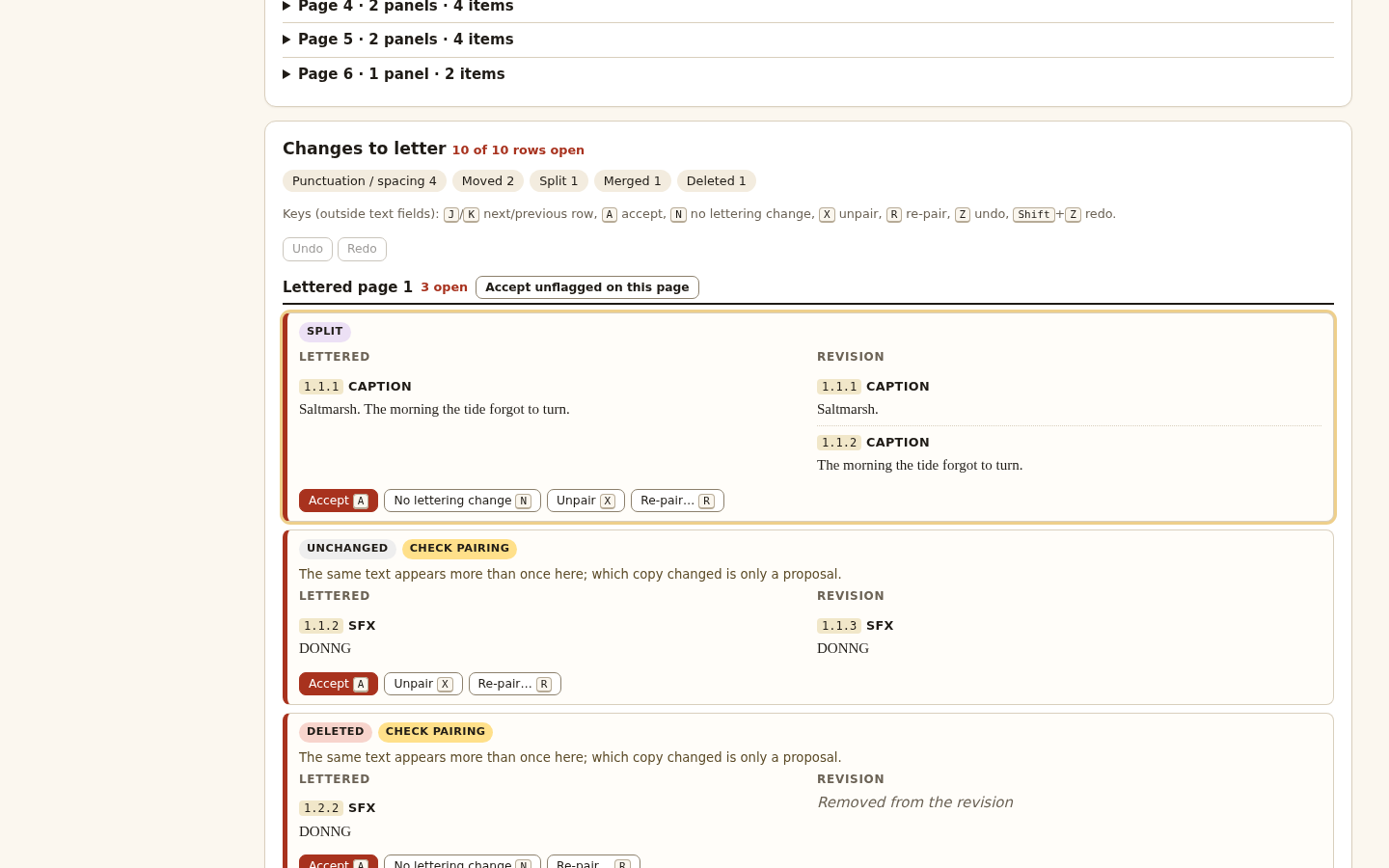
Load round 2. Expect 10 rows to decide: nine changed rows plus one unchanged row with ambiguous pairing. The caption splits, two spoken balloons merge, and one of two identical DONNG effects disappears. Decide which effect remains before exporting.
Reopen before relying on saved work
Use Open book with the unchanged downloaded file. It restores script history, decisions and the pending review. If the fingerprint check refuses an edited file, recover the exact saved copy. Start a new book from the latest script when reaching the round or size limit.
A worked example
The Saltmarsh Courier — original fictional comic scripts
Input: Round 0: 4 pages, 11 panels and 24 lettered items. Round 1 adds a page and changes text, speaker, style, emphasis and placement. Round 2 includes a split, merge and duplicate sound effects.
- Mark the painted sign as Not lettered and lock round 0.
- Review all 10 round-1 rows. Follow old page 3 to page 4 and old page 4 to page 5.
- Export and lock round 1, save the book, then review round 2 with special attention to both DONNG rows.
Expected result: Round 1: 24 − 1 deleted + 3 added = 26 items. Round 2: 26 + 1 from splitting − 1 from merging − 1 deleted = 25 items. Nine changed rows plus one ambiguous unchanged row require 10 decisions.
From the revised script to a reviewed correction packet
Actual BylinaRounds screens in Chrome on Linux. The Saltmarsh Courier is original fictional practice material.
1. Review the script against the lettering
2. Decide ambiguous pairings
3. Repair the proposed match
Troubleshooting
"contains tracked changes"
Accept or reject all changes in your word processor, save a copy and import the copy.
"No PAGE headings were found"
Put headings such as PAGE ONE or PAGE 1 on their own line.
Lock button disabled
Decide every flagged line (New lettered item, Join previous balloon, Speaker cue or Not lettered).
A change is paired with the wrong balloon
Use Re-pair or Unpair; Undo reverses it.
Export buttons disabled
Some rows are still open; the page list shows open rows per page.
Book refused when reopening
The file was changed after BylinaRounds saved it (by hand, a script or a sync tool) or came from a pre-release build. Open the copy exactly as it was saved.
A round cannot be locked or the book cannot be saved because it is full
A book holds round 0 plus 12 correction rounds and up to 64 MiB. Export the round’s corrections, then start a new book with the latest script as round 0.
Compatibility & limits
- Verified in Google Chrome 152 on Linux, including a run without networking and a 390px layout. Other browsers and operating systems are unverified. Desktop is recommended for reviewing scripts.
- Inputs must follow the documented PAGE / Panel / NAME: text grammar. It reads body paragraphs, basic emphasis and numbering from .docx, or .txt/.md/.fountain text. Microsoft Word and Google Docs exports were not tested; the supplied DOCX examples were generated as OOXML fixtures.
- Headers, footers, comments, notes and images are excluded and listed. PDF and legacy .doc input are unsupported. Accept or reject tracked changes before importing a copy. Ambiguous lines need a decision before locking.
- Pairing proposals can be wrong, especially with heavy rewrites and repeated dialogue. Inspect the parsed script and every proposed correction. No integration with lettering apps; paste or retype the corrections yourself.
- Per script: 8 MiB, 30,000 lines/paragraphs, 200 pages, 3,000 lettered items and 2,000 characters per item. DOCX: 1,000 ZIP entries and 32 MiB of XML. Books: baseline plus 12 correction rounds and 64 MiB. Locking or saving beyond the book limits is refused.
- No autosave or cloud storage. Download Save book before closing. Decisions and pairings are restored when reopening; undo history is not. Book fingerprints detect accidental and casual edits, not deliberate recomputation by someone editing the file.
- Plain paste text lists emphasis instructions; use the rich paste HTML when you need formatted text. Canonical CSV preserves the source text; use the separate spreadsheet-safe CSV for formula-like cells.
- For your personal or commercial lettering work on your own computers. Included source may be modified for your own use; redistribution or resale of the app or source is not permitted. The manual and sample scripts may be shared unmodified.
- Exports use each correction row’s actual old and new pages. If one old page is split across revised pages, the print heading and page ledger list all destinations; an absent side is null in JSON and blank in CSV. Page-level suggestions do not replace the per-row destination.
Need a hand?
Tell us the product, host application and version, what you tried, and the exact error. Contact support with a fictional example; keep private customer files and passwords out of your message.