Step-by-step guide
FolioMend
Revise an existing book index after pages change. Inspect old and new proofs, approve each reference and export a corrected index with a record of your decisions.
You already have an editable index and need to revise page references after text moves between pages in a short book or proof section.
Before you start
- Python 3 and desktop Google Chrome. Independently checked on Linux x86_64, Python 3.10.12 and Chrome 152.0.7977.82.
- Extract the whole buyer ZIP, open a terminal in its FolioMend folder and run python3 serve.py. Open http://127.0.0.1:8765/app/ in desktop Chrome and choose Load practice case. Python 3 is required. All runtime assets are included; no npm install or internet connection is needed. Opening app/index.html directly will not work.
- Two unencrypted text PDFs and an index with unique nonblank column headers. Map a heading, locator and optional cross-reference column. Additional columns remain in the canonical output.
- Use UTF-8 CSV with standard quoted fields, or simple TSV without tabs/newlines inside fields. Your index and approved destinations must use labels present in the confirmed proofs.
Your first result
Open the practice case
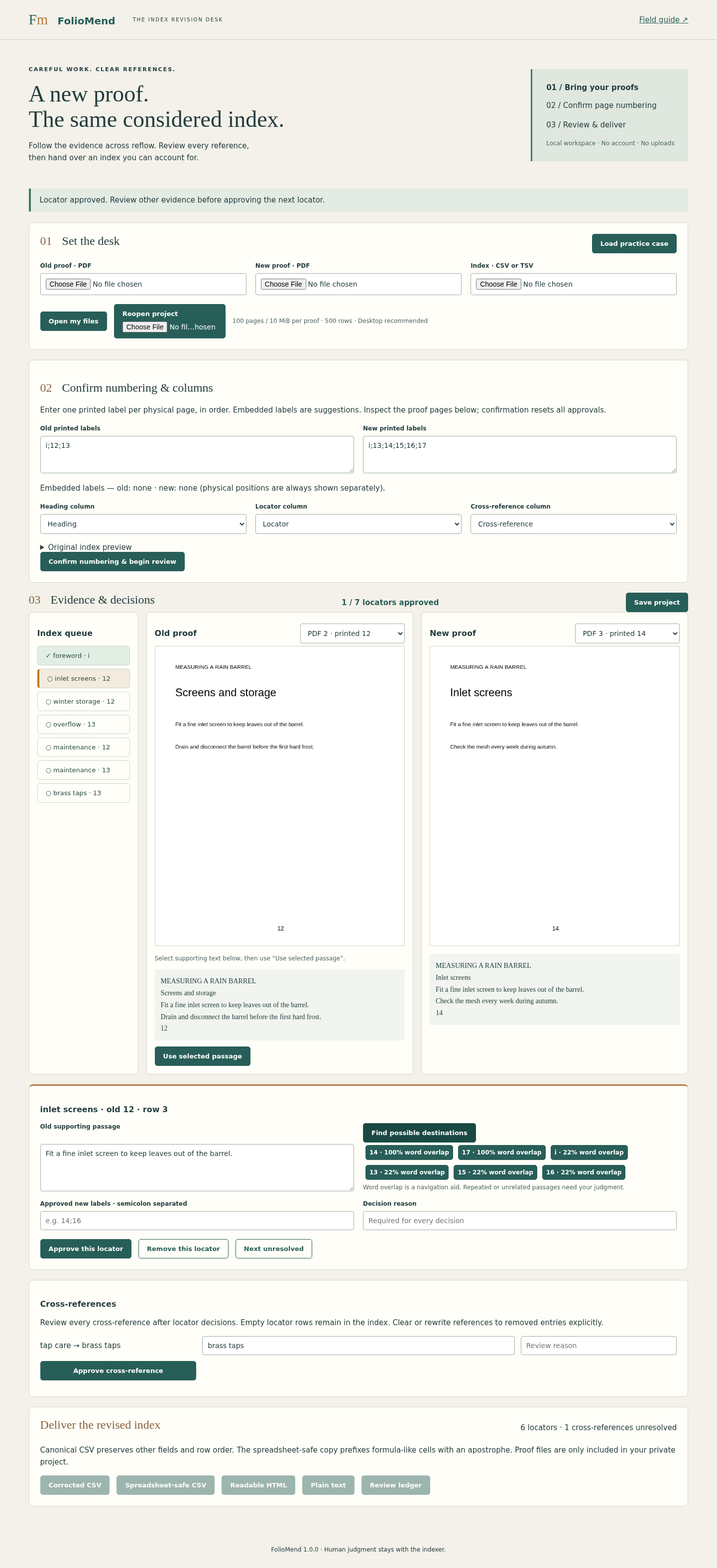
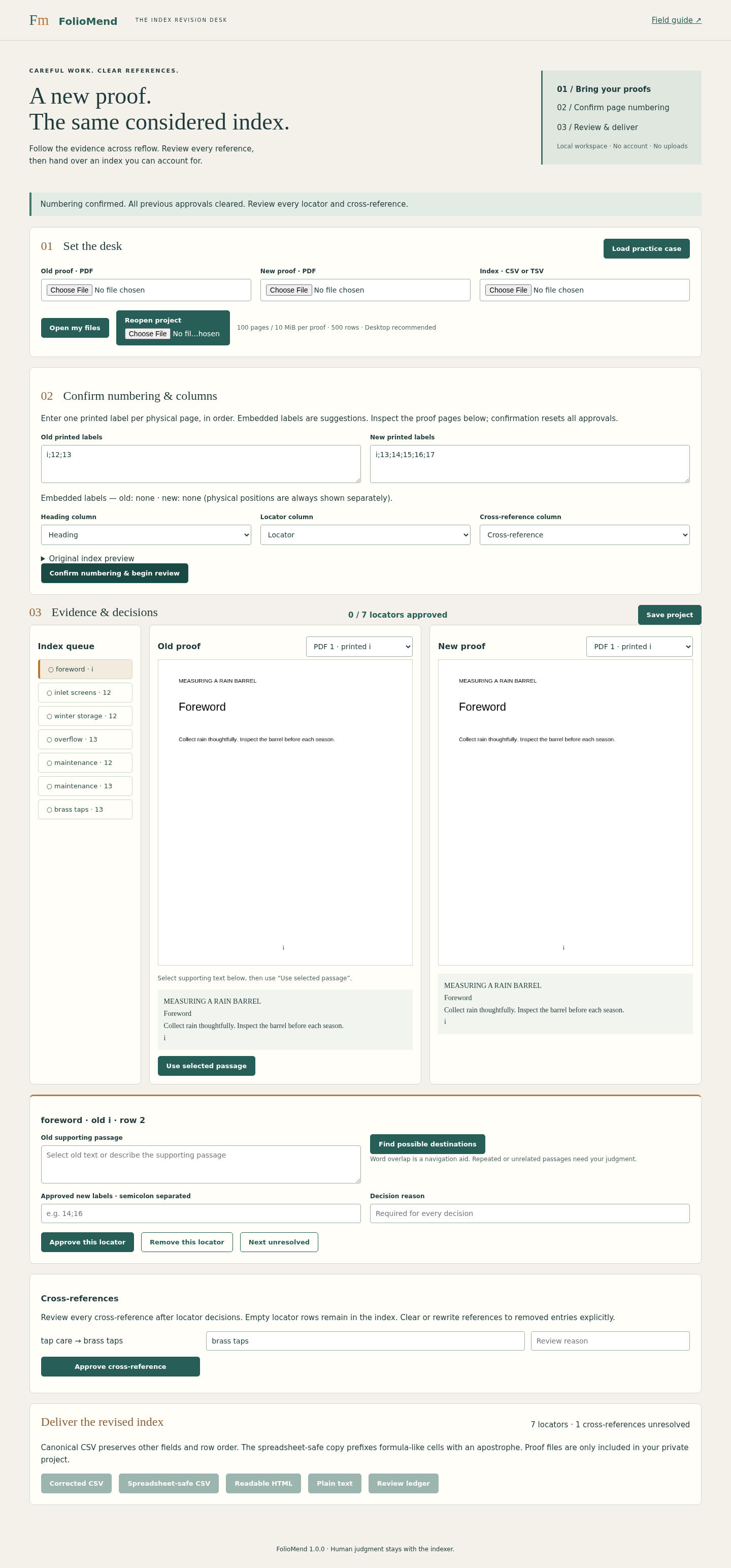
Start the supplied local server, open its loopback address and choose Load practice case. The old proof has printed labels i;12;13; the new proof has i;13;14;15;16;17. Inspect the page renders and choose Confirm numbering & begin review.
Review foreword, screens and storage
Approve foreword → i even though it is unchanged. Select the inlet-screen sentence in the old proof and choose Use selected passage, then Find possible destinations. Pages 14 and 17 repeat the sentence; inspect them and approve the main discussion on 14. For winter storage, select the “Drain and disconnect…” passage and approve 15. Give each decision a reason.
Resolve split and deleted material
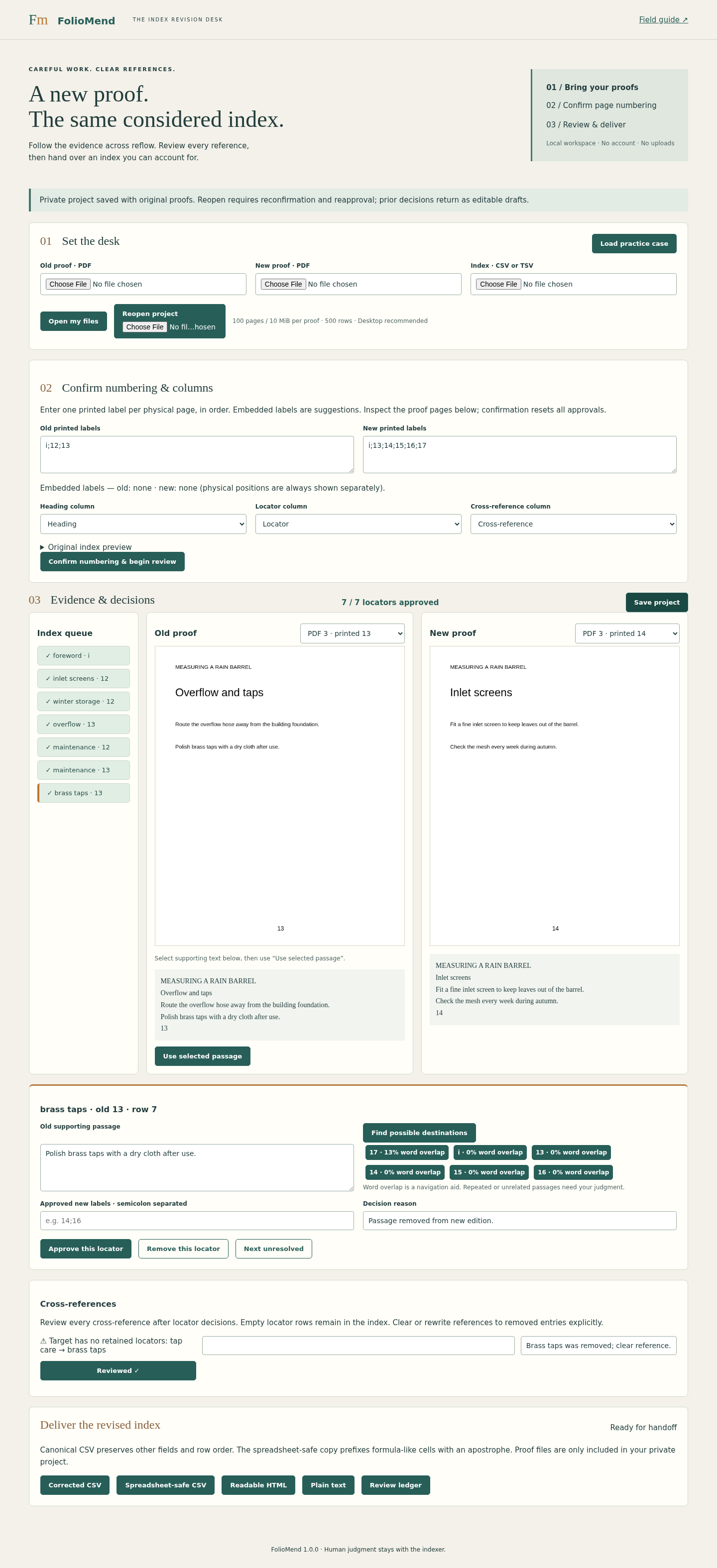
Approve overflow → 16. Maintenance has two separate old locators: approve old 12 → 14 using the screen passage and old 13 → 16 using the overflow passage. For brass taps, select the old passage, record that it was removed from the new proof and choose Remove this locator.
Clear the cross-reference
After all seven locator decisions, clear the brass taps target in the tap care cross-reference, explain the removal and approve it. Any later locator decision resets cross-reference approval.
Download and inspect the handoff
Download Corrected CSV, Spreadsheet-safe CSV, Readable HTML, Plain text and Review ledger as separate files. Compare the canonical CSV with the expected answers. The maintenance locator is 14;16, not a continuous range. Use the safe copy when viewing in a spreadsheet; it deliberately prefixes formula-like cells.
Save before closing
Choose Save project and verify the JSON download. It contains original proofs and is private working material. Reopen it through Reopen project, confirm numbering and reapprove the draft decisions. Stop the server with Ctrl+C when finished. Nothing is automatically saved or overwritten.
A worked example
Measuring a Rain Barrel — original fictional practice case
Input: Old page 12 contains screen and winter-storage passages; old 13 contains overflow and a brass-tap passage. The new proof splits, repeats and removes material.
- Approve foreword i, inlet screens 14, winter storage 15 and overflow 16 after inspecting their passages.
- Approve the two maintenance atoms separately as 14 and 16; remove the brass-tap locator with a reason.
- Clear and approve the tap care cross-reference, then compare the downloaded CSV with expected.json.
Expected result: foreword i; inlet screens 14; winter storage 15; overflow 16; maintenance 14;16; brass taps has an empty locator; tap care has a cleared cross-reference. Source row order and other fields remain. Seven locator decisions and one cross-reference decision are recorded.
Follow the evidence before changing the reference
Actual FolioMend screens in Chrome on Linux with the original fictional Rain Barrel case.
1. Confirm the numbering
2. Follow the passage
3. Deliver the revised index
Troubleshooting
Opening the HTML file fails
Run python3 serve.py from the extracted FolioMend folder and open http://127.0.0.1:8765/app/. The Python local server is required.
The local port is already in use
Stop your previous FolioMend server with Ctrl+C. Do not stop unrelated processes; this version has no custom-port setting.
A proof is rejected or extracts poorly
Use an unencrypted text PDF with text on every page. There is no OCR. Compare extracted text with the rendered page and enter destinations manually when reading order is poor.
Numbering cannot be confirmed
Enter exactly one unique supported printed label per physical page. Do not confuse a PDF position with its printed page number.
Export is still disabled
Approve every atomic locator, including unchanged ones, then review every cross-reference. Changing numbering or mapping invalidates approvals; changing a locator resets cross-reference review.
Reopened decisions are no longer approved
This is expected. Confirm numbering and reapprove the restored drafts before delivery. Save a project before loading another job.
Compatibility & limits
- 100 physical pages, 10 MiB and one million extracted characters per proof. Every page must contain extractable text; scans, blank pages and encrypted PDFs are rejected.
- 500 index rows, 1,500 expanded locators, 30 columns and 1 MiB of UTF-8 CSV or TSV. Saved projects have a 64 MiB cap.
- Arabic labels 1–9999 and lowercase Roman i–xxx. Use full ranges and semicolon lists. Abbreviated ranges, page suffixes, volume prefixes and duplicate printed labels are unsupported.
- Every locator needs human approval. Word overlap helps navigate; it does not establish semantic correctness. No OCR, native Cindex/SKY import or publisher-specific typesetting.
- No autosave or undo history. Save before changing jobs. Reopened decisions are drafts and require reapproval. Private project files embed the original proofs.
- Verified on Linux x86_64 with Python 3.10.12 and Chrome 152. Other operating systems and browsers are unverified. Desktop is recommended; a 390px layout was checked.
- Canonical CSV preserves field strings and row/column order, except explicit locator and cross-reference edits; byte-level quoting is regenerated. Use the separate safe CSV for spreadsheet viewing.
- CSV supports commas, doubled quotes and quoted newlines; TSV is simple tab-separated text. HTML/TXT are readable outputs, not a publisher-specific hierarchy or layout.
- The launcher binds only to 127.0.0.1; input files are processed in the browser. Source proofs are included in saved private projects, not in exported index files. No accounts, cloud sync or external runtime requests.
Need a hand?
Tell us the product, host application and version, what you tried, and the exact error. Contact support with a fictional example; keep private customer files and passwords out of your message.