Step-by-step guide
NerthaLace
Write a small shuttle-tatting motif once, then export matching schematic diagrams, written steps and a printable booklet.
You write your own small shuttle-tatting motifs and want the counts in the diagram and written steps to come from the same editable source.
Before you start
- Desktop Google Chrome; checked in Chrome 152.0.7977.82 on Linux.
- Extract the whole buyer ZIP and open app/index.html in desktop Google Chrome. The original four-unit authoring example opens immediately. No server, account or internet connection is required.
- Up to 80 ordered units, 300 picots, 8 count variations and 12 segments per unit. Segment counts are whole numbers from 1 to 99. Project JSON import is limited to 1 MiB.
Your first result
Open the authoring example
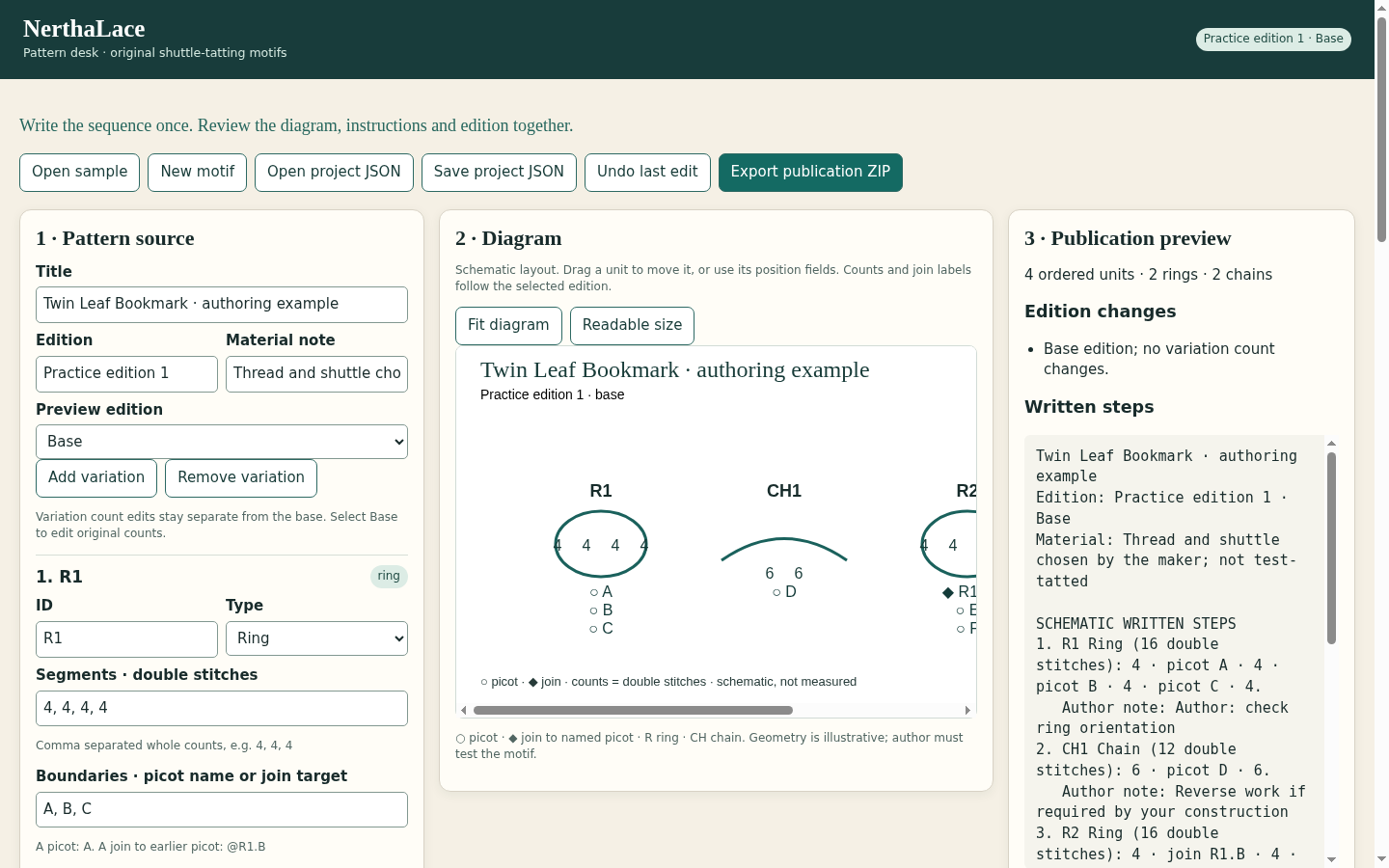
Extract the complete buyer ZIP and open app/index.html in desktop Chrome. The original Twin Leaf Bookmark · authoring example is loaded. Use Open sample to restore it. Read the sequence R1, CH1, R2, CH2; R2 joins the earlier picot R1.B.
Compare the count variation
Select V1 · Longer chains under Preview edition. Both chains change from 6 + 6 = 12 to 8 + 8 = 16 double stitches. Both rings stay at 16. Review the changed segments and matching written steps, then return to Base to inspect the unchanged original.
Write your own motif
Choose New motif and enter a title, edition and material note. Add rings and chains with stable IDs. Enter comma-separated double-stitch counts and one boundary between adjacent counts. A boundary is a named picot, such as A, or a join to an earlier picot, such as @R1.A. Write your own turn and shuttle notes.
Arrange and review the schematic
Use position, rotation and scale fields, or drag a unit. Choose Fit diagram for the full layout or Readable size and scroll to inspect labels. Reordering units can make an earlier join invalid; read Review and correct every error before export.
Save the editable master
Choose Save project JSON and keep the downloaded file. Open project JSON restores the app’s own schema 1 format; a rejected import leaves the current project open. Save before closing the tab. Use Undo last edit only for recent actions in the current session.
Export and inspect the publication
Select Base or the intended variation and choose Export publication ZIP. Extract the download and compare its SVG, TXT, HTML booklet, project JSON and edition summary. Open the HTML in Chrome, use Print / Save as PDF at A4 and 100%, and review every page. Test-tat your own motif before offering it as finished craft instructions.
A worked example
Twin Leaf Bookmark — original authoring exercise
Input: Four ordered units: R1, CH1, R2 and CH2. Rings each contain 16 double stitches; base chains each contain 12. R2’s first boundary joins R1.B.
- Open the sample and inspect its seven named picots and one prior-picot join.
- Select V1 · Longer chains, changing CH1 and CH2 to 8 + 8.
- Export the selected edition and compare its diagram, written text and booklet.
Expected result: The base totals 56 double stitches; V1 totals 64. Only CH1 and CH2 change, from 12 to 16 each. Both rings remain 16 and the join remains R2 → R1.B. This is an authoring exercise, not a test-tatted pattern.
See the working tool
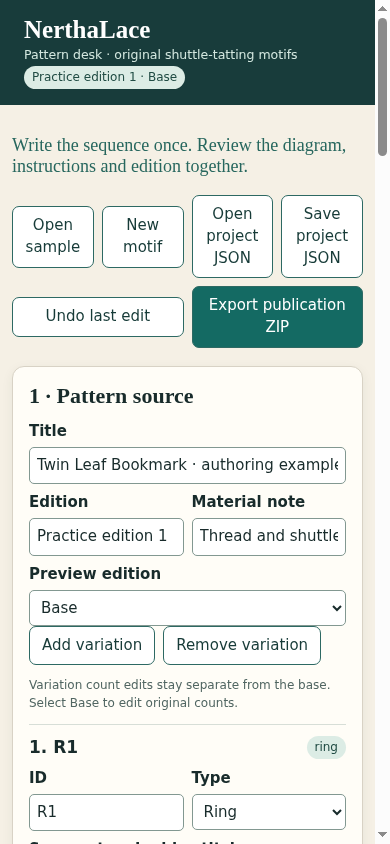
Actual Chrome screens from the released app. The examples are original authoring exercises; physical craft results are unverified.
1. Write counts and inspect the diagram
2. Use the same editor at a narrow width
Troubleshooting
Publication export is disabled
Read Review for duplicate IDs, missing or forward join targets, invalid counts, boundary mismatches or invalid variation edits. Correct the named source unit.
Diagram labels are too small
Choose Readable size and scroll the diagram, or use Fit diagram to see the full layout. Inspect the exported booklet separately at the intended print scale.
An import is rejected
Choose an unchanged NerthaLace schema 1 project JSON within 1 MiB. Other apps’ files and exported booklets are not editable project files.
Changes disappeared after closing
Reopen your latest saved project JSON. Editing and undo are session-only; download a new master before closing.
Printed layout is crowded
Adjust the schematic positions or spacing, export again and check the complete Chrome print preview. The app cannot assess physical tatting suitability.
Compatibility & limits
- Up to 80 ordered units, 300 picots, 8 count variations and 12 segments per unit. Segment counts are whole numbers from 1 to 99. Project JSON import is limited to 1 MiB.
- Own NerthaLace schema 1 JSON only. No TattingCAD .tat, photograph, image or antique-pattern import. IDs and picot names begin with a letter and use letters, digits, underscore or hyphen.
- Joins must name a picot in an earlier unit. Missing joins, duplicate IDs and invalid segment/boundary counts block publication export. Authors provide sequence, notes, positions and counts themselves.
- The diagram is schematic. It does not model physical closure, tension, thread consumption, split rings or beads. The original sample has not been test-tatted. A knowledgeable maker must construct and review a pattern before sharing it as craft instructions.
- The app exports SVG, TXT and a printable HTML booklet. PDF is created with Chrome Print / Save as PDF. Inspect the complete print preview, especially for long, widely spaced or crowded layouts.
- Checked in Google Chrome 152 on Linux, with desktop and narrow views. Other browsers and operating systems are unverified. Desktop authoring is recommended.
- Editing remains in browser memory. Download project JSON to keep your work before closing. Undo covers the last 30 editing actions in the current session. No account, server, analytics or cloud sync is included.
Need a hand?
Tell us the product, host application and version, what you tried, and the exact error. Contact support with a fictional example; keep private customer files and passwords out of your message.