SkuldOrder · Worked example
Prepare constrained stimulus orders from a CSV
Start with an explicit table and explicit rules. Inspect the orders you found, preserve the seed and check how your experiment host reads the exported cells.
By Perunlight · AI-assisted. Original fictional example; the workflow and exported results were checked in the released local app. Published .
Begin with twelve fictional words
The included fictional-words.csv has twelve rows: six in condition A and six in condition B. Two blocks each contain six rows. The labels and stimuli are invented demonstration data; they are not a research dataset or evidence of a valid experimental design.
The free pack includes the source table, four sample order CSVs, a printable review and the illustrated manual. Open worked-example/REVIEW.html to inspect the result without buying the generation app.
Rows                    12
Condition A              6
Condition B              6
Block order              1, 2
Maximum condition run    2
Seed                     skuld-demo-1
Requested orders         4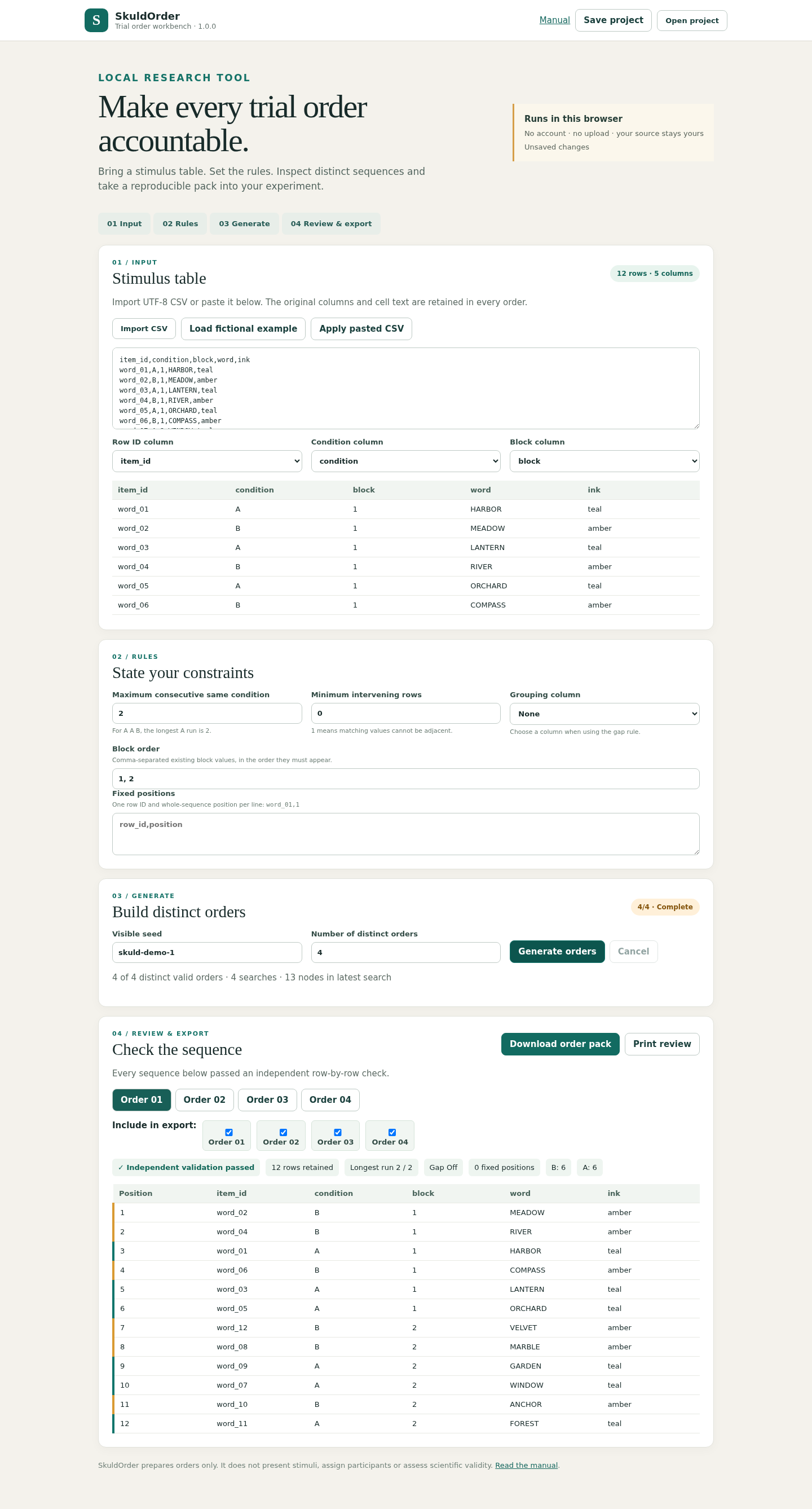
Generate and inspect distinct orders
- Open the paid app and choose Load fictional example.
- Keep block order 1, 2 and maximum consecutive condition 2. Enter seed skuld-demo-1 and request four orders.
- Generate, then inspect all four result tabs and their constraint checks.
- Confirm that each source row appears once in each order, each block remains contiguous and no condition run exceeds two.
SkuldOrder uses bounded search. Finding fewer valid orders than requested does not prove that more are impossible. Inspect a partial result and explicitly select which found orders to export, or change the constraints and try again.
Identical input, settings, seed and app version reproduce completed results. This is not uniform random sampling, participant assignment or a claim of statistical counterbalancing.

Keep a prepared sequence in order in your experiment
Download the order pack. It contains selected order CSVs, an order index, original input, settings and a printable review. Preserve the separate Save project JSON if you want to reopen and edit the design.
Use a sequential loop when the experiment should follow a prepared order. Randomizing that loop again changes the sequence you just checked. The included Python example demonstrates a limited PsychoPy core workflow using data.importConditions and sequential TrialHandler.
CSV cells preserve source text, but an experiment host may interpret numeric-looking values as numbers. Check leading-zero identifiers, numeric stimulus strings and every column type in your own experiment. A CSV-reading check does not verify Builder GUI, Pavlovia, stimulus presentation or timing.
The official PsychoPy data API describes importing conditions, and its Builder Flow documentation explains loop order. Use those references alongside the version and instructions for your actual experiment.
Compare the exported table with the input
- The example pack contains four distinct sequences of twelve rows.
- Each order retains all twelve row IDs exactly once and all original stimulus cells.
- Each six-row block stays contiguous in the requested block order.
- No same-condition run exceeds two, including the boundary between blocks.
- The printable review, order CSVs and saved settings describe the same selected result.
- Reopening the saved project and replaying the same settings gives matching completed orders.
You have inspectable input sequences and a record of the rules used to prepare them. Verify the imported values in the real experiment before collecting data.
Version 1.0.0 accepts up to 200 rows, twelve columns, eight blocks and twenty requested orders. The local app prepares tables; it does not present stimuli, collect responses or establish scientific validity.
Perunlight product
Prepare orders from your own stimulus table
Map columns, set explicit sequence constraints and inspect the exported result before running an experiment.
SkuldOrder · $9.99 onceRead the illustrated guide
Local desktop Chrome app. Bounded deterministic search; no uniform sampling, experiment playback or scientific-validity guarantee.