Step-by-step guide
SkuldOrder
Set order rules, inspect distinct sequences and take the reviewed CSV files into your experiment.
Use it before an experiment when a simple spreadsheet shuffle does not express your block, repetition, spacing or fixed-position rules.
Before you start
- Desktop Chrome that can open extracted local HTML files; Chrome 152 on Linux was verified.
- A UTF-8 stimulus CSV with unique row IDs; no account, upload or server is required.
- A separately installed experiment host if you intend to run the exported sequences.
Your first result
Open the example
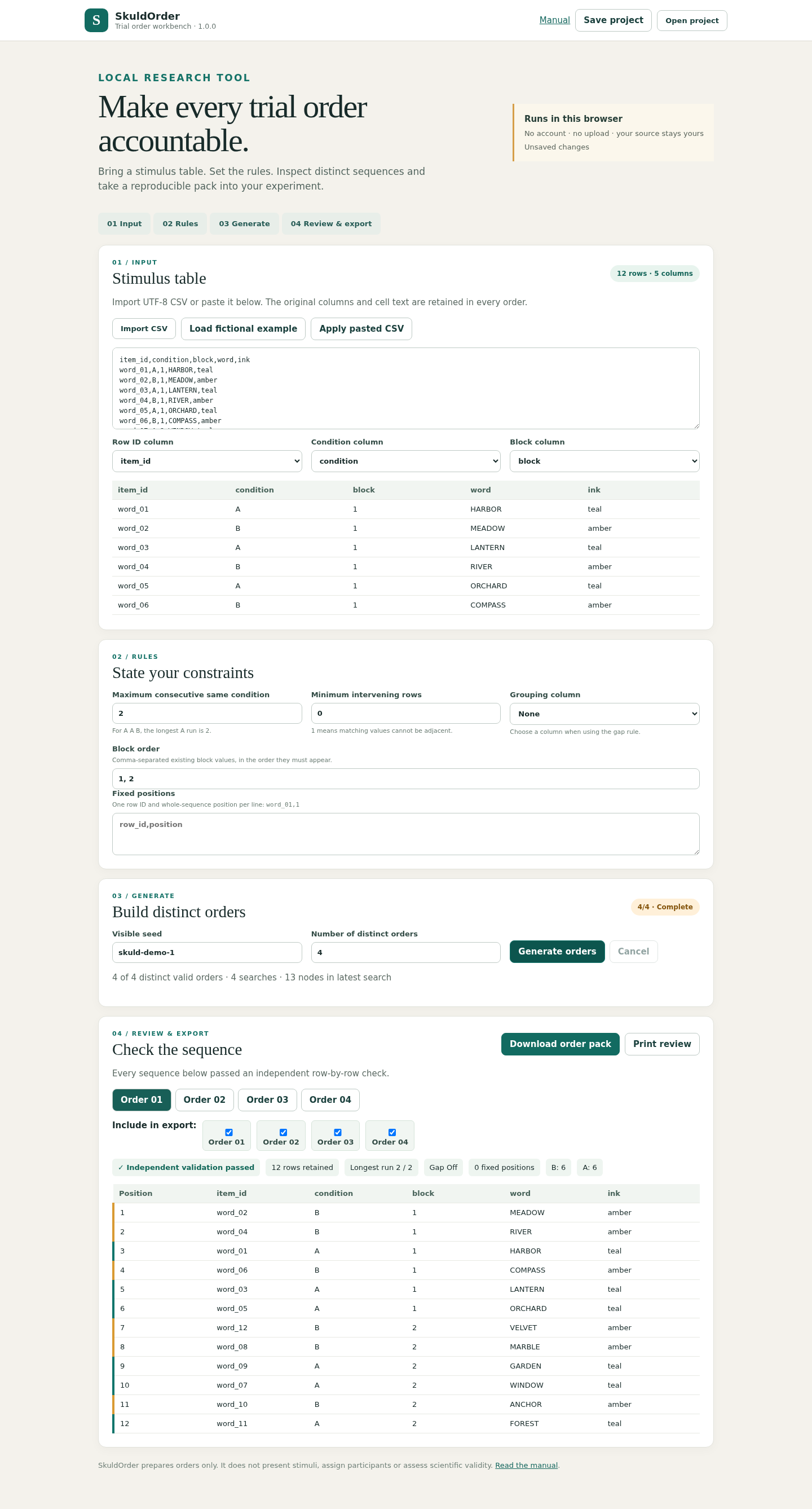
Extract the complete ZIP, open app/SkuldOrder.html and choose Load fictional example to show the 12-word table. The manual is included beside the app.
Map your own table
Import CSV or paste and apply it. Choose the row ID, condition and optional block columns. Inspect the preview before generating; the original stimulus columns remain in the order CSVs.
Set explicit constraints
Choose maximum condition run, optional minimum intervening rows, block order and any fixed row positions. Enter a seed and the number of distinct orders to request.
Review the found orders
Inspect each tab and its row counts, condition counts and constraint checks. A partial result needs you to select which found orders to export. Search exhaustion does not prove that a design is impossible.
Save, export and check in your host
Save project keeps an editable JSON file. Download order pack produces the selected CSV sequences and an audit. Keep a prepared sequence in sequential order when importing into an experiment, and verify how your host interprets each column.
A worked example
Four orders from twelve fictional words
Input: The included fictional-words.csv has 12 rows, six A and six B, and two blocks of six rows.
- Load fictional example.
- Keep block order 1, 2; maximum consecutive condition 2; seed skuld-demo-1; request 4 orders.
- Generate, inspect all four tabs and download the order pack.
Expected result: Four distinct 12-row sequences. Every row appears once; each six-row block stays contiguous; no same-condition run exceeds two. The pack includes four order CSVs, an index, original input, settings and a printable review.
See the real workflow
Screenshots from the included fictional example in the tested Chrome environment.
1. Generate and inspect the example
2. Review the sequence at a narrow width

Troubleshooting
An import is rejected
Check unique nonblank IDs, matching CSV column counts and supported headers. Headers start with an ASCII letter and use letters, digits or underscores. Row IDs and block values cannot contain commas.
Generation finds fewer orders than requested
Inspect the reported constraints. Explicitly select valid found orders for export, or change the rules or seed. The bounded search does not prove impossibility.
A saved file will not open
Use the JSON downloaded by Save project. settings.json inside an exported order pack describes an export and is not an editable project.
Values look different in the experiment host
The order CSV preserves source cell text. A host may interpret numeric-looking text as numbers. Check identifier and stimulus types in your own experiment before collecting data.
Compatibility & limits
- 200 data rows
- 12 columns
- 8 contiguous blocks
- 20 requested distinct orders
- 1 MiB imported CSV
- 8 MiB opened project
- 10,000 characters per field
- 20,000 search nodes per attempt; difficult feasible cases may remain unresolved
- ASCII identifier headers; comma-free row IDs and block values
- Rejects formula-like nonnumeric text before export
- Prepares input tables only; it does not present stimuli, assign participants, collect responses or establish scientific validity.
- Search is deterministic for matching input, settings, seed and version; it is bounded and does not sample uniformly.
- PsychoPy core CSV reading is a limited integration check. Builder GUI, Pavlovia, stimulus presentation and timing were not verified.
Need a hand?
Tell us the product, host application and version, what you tried, and the exact error. Contact support with a fictional example; keep private customer files and passwords out of your message.