Step-by-step guide
ReginGuide
Write illustrated kit instructions, account for listed parts and revise a guide while keeping its released edition intact.
You make a small kit and need to write, check and revise its illustrated instructions from a generic parts table.
Before you start
- Desktop Google Chrome; independently checked in Chrome 152.0.7977.82 on Linux. Other platforms are unverified.
- Extract the whole buyer ZIP and open app/index.html in desktop Google Chrome. Choose Try Lantern Dial example to follow the first-use exercise. No server, installation, account or internet connection is required. Keep the extracted folders together.
- Your own UTF-8 CSV/TSV table, exact part IDs, quantities, instructions and PNG/JPEG images. Keep original images separately.
- Readers need a browser and the complete extracted recipient ZIP; they do not need the paid editor.
Your first result
Make the first Lantern Dial guide
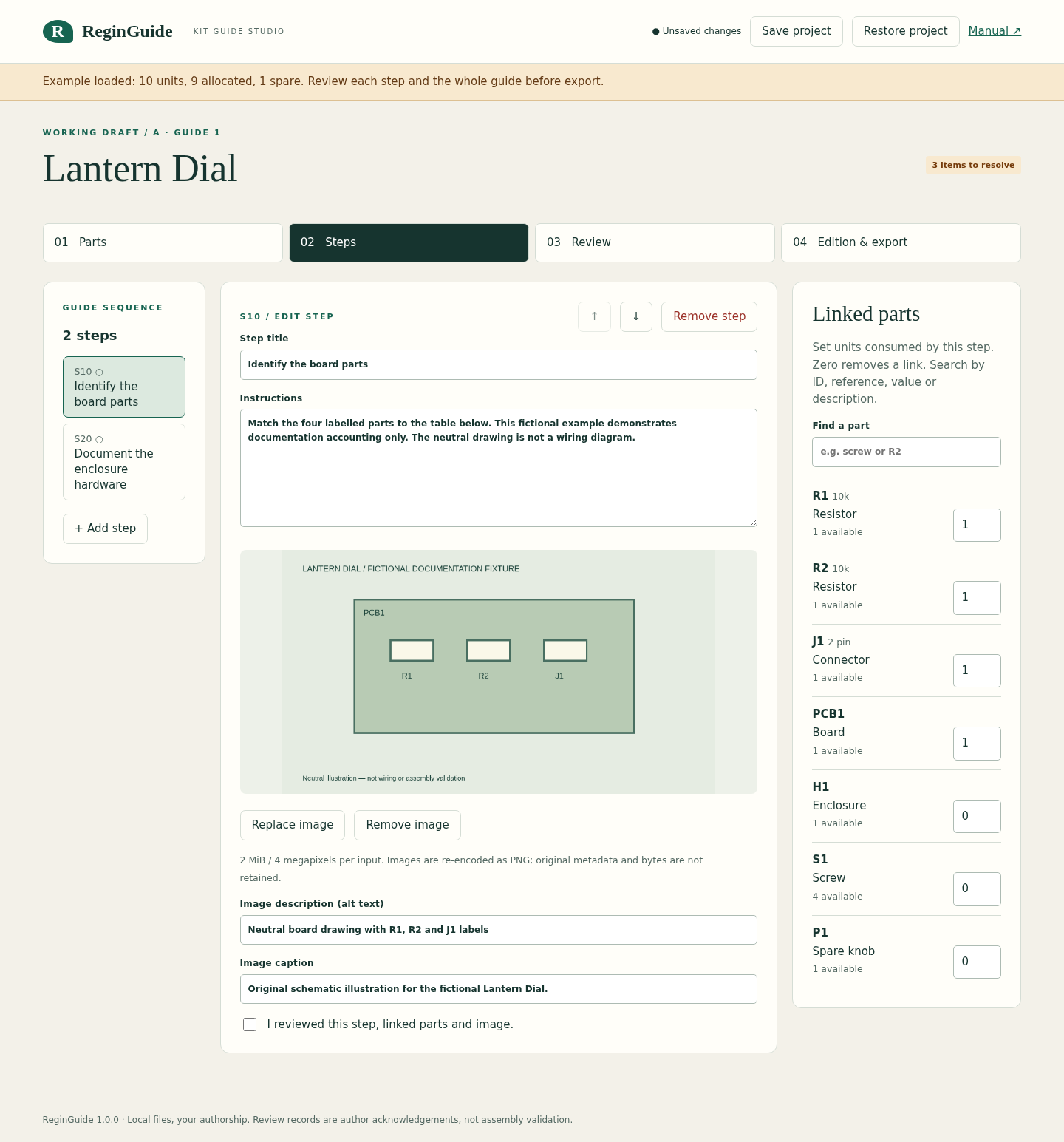
Extract the buyer ZIP, open app/index.html and choose Try Lantern Dial example. S10 consumes four units. S20 uses one enclosure and four screws. The spare knob is recorded separately.
Review and export edition A
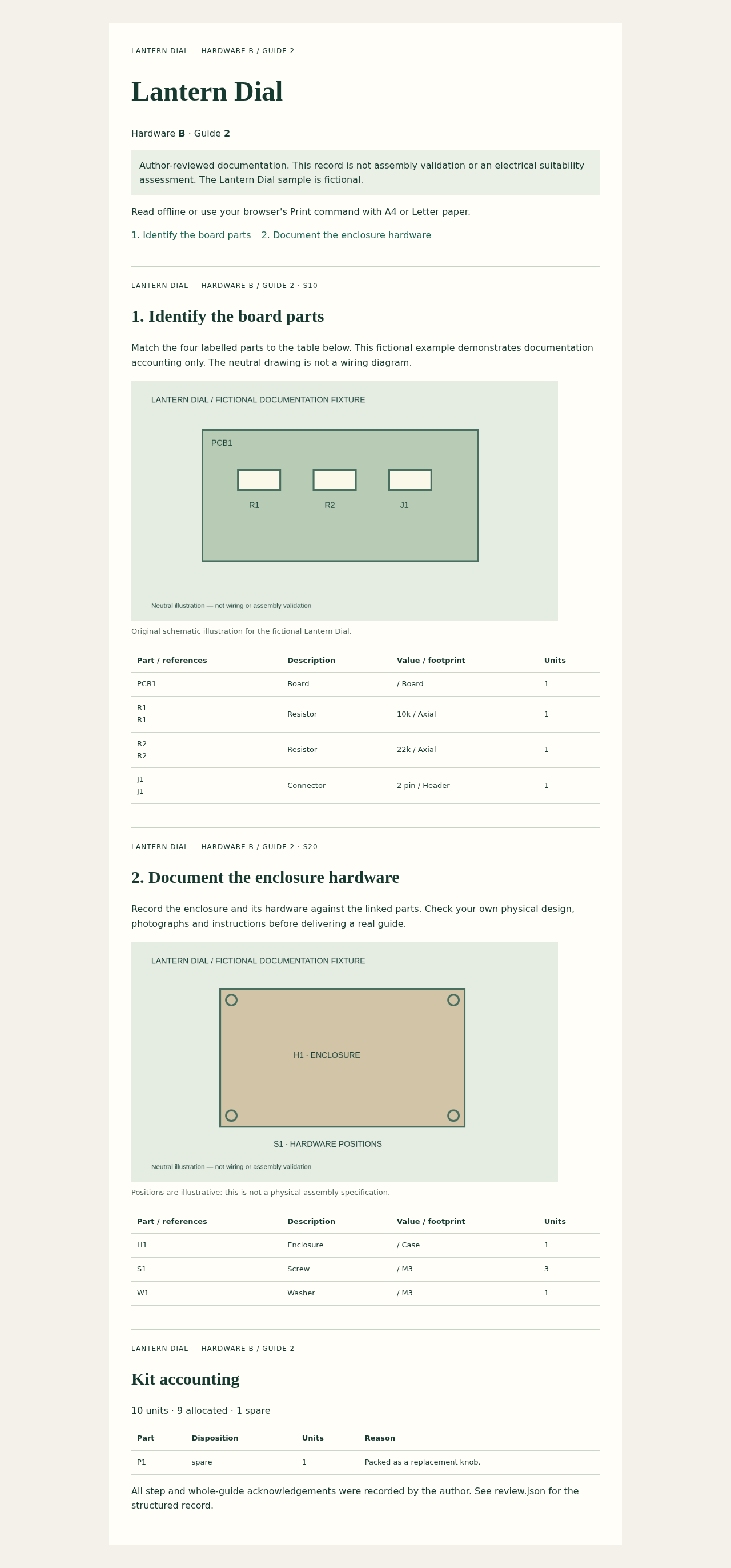
On Steps, read and acknowledge both steps. On Review, inspect 10 total / 9 allocated / 1 spare and acknowledge the whole guide. On Edition & export, choose Export draft guide ZIP. Extract it and open index.html to see the reader’s result.
Keep the released baseline
Choose Freeze released baseline, then Save project. Check that the editable ZIP was downloaded. There is one fixed baseline per project; draft changes leave it intact.
Introduce edition B
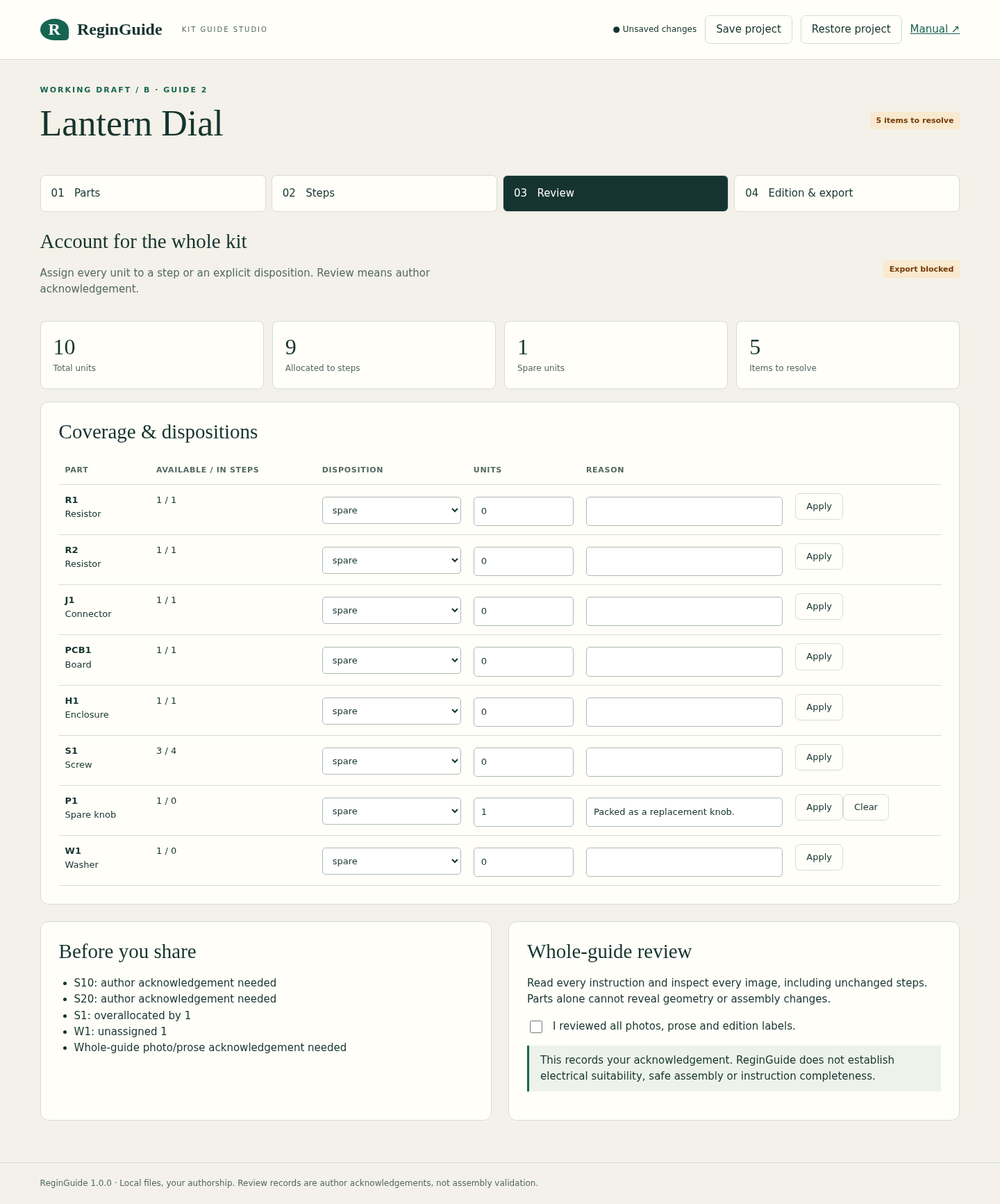
On Parts, choose Load fictional edition B table, or import Lantern-Dial-B.csv and set the labels yourself. R2 changes from 10k to 22k, screws decrease from 4 to 3, and W1, one washer, is added. The old allocation is now wrong: S1 overallocated by 1; W1 unassigned 1. Both steps need review.
Repair and share B
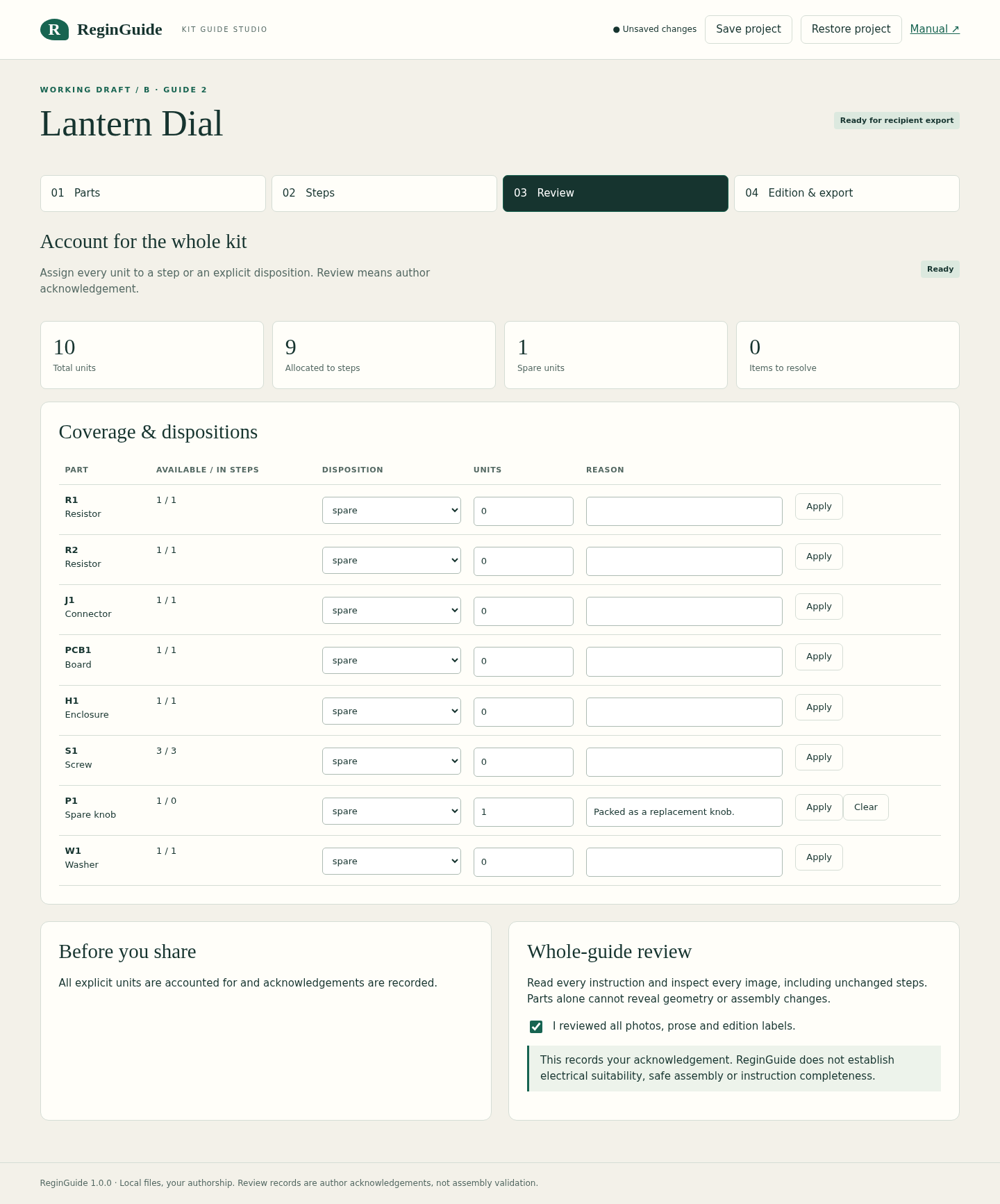
On Steps, select S20 and set S1 to 3 and W1 to 1. Review both steps and the whole guide. B returns to 10 total / 9 allocated / 1 spare, with no unresolved items. Export B from the draft panel; use Export released guide ZIP for A. Save the project again.
Author your own guide
Choose Create a guide, set the title and edition labels, then select your CSV/TSV file. Map each required field to one unique column and choose Use this parts table. Add steps, instructions and images. Set linked quantities and explicit spare/preassembled/excluded dispositions. Any changed content needs renewed author review.
Reopen the right file
Use Restore project for the unchanged editable ZIP. A recipient ZIP is a separate, static output and cannot restore editing. Extract recipient files fully before opening index.html; keep images/ beside it. For PDF, use Chrome Print, A4 or Letter, with headers/footers disabled.
A worked example
Lantern Dial — original fictional edition exercise
Input: A has two resistors, one connector, one board, one enclosure, four screws and a spare knob: 10 units. B changes one resistor’s value, removes one screw and adds one washer.
- A: allocate four units to S10 and five to S20, record one spare, review and freeze the released baseline.
- Load B. Inspect the excess screw, unassigned washer and revoked review acknowledgements.
- Change S20 to one enclosure, three screws and one washer. Review and export B; export A separately.
Expected result: Both editions total 10 units: 9 allocated and 1 spare. A keeps R2=10k and four screws; B has R2=22k, three screws and one washer. The fictional sample demonstrates documentation accounting, not a functioning circuit.
Write, revise and share the guide
Actual ReginGuide screens in Chrome on Linux. Lantern Dial, its tables and drawings are original fictional examples.
1. Write the step and link its parts
2. See what a revision leaves unresolved
3. Account for every listed unit
4. Share a separate reader guide
Troubleshooting
Export stays disabled
Resolve every item on Review. Check step titles/instructions, image alt text, allocations and dispositions, then acknowledge each step and the whole guide.
An import is rejected
Use UTF-8, unique headers and exact IDs, one consistent row width and explicit integer quantities. Quote embedded delimiters or newlines. References must be individual tokens, not ranges.
A removed part is still linked
The app keeps unknown links visible. Remove that link explicitly and assign the correct part.
An image is rejected
Keep each PNG/JPEG within 2 MiB and 4 megapixels; reduce combined normalized images below 8 MiB across draft and baseline.
A project will not restore
Select the original Save project ZIP. Do not use a recipient package or recompress its contents. A failed restore leaves the current project intact.
Edits vanished after closing
There is no autosave. Download and keep an editable project before closing; use a saved copy for recovery.
Compatibility & limits
- Generic UTF-8 CSV/TSV only: up to 256 KiB, 100 part rows, 20 columns and 2,000 characters per cell. Map exact, unique part IDs; quantities are integers 0–9999. No verified CAD or supplier-specific integration, XLSX/PDF import or DOCX export.
- Up to 30 steps with plain-text instructions, linked quantities and one PNG/JPEG per step. Image input is limited to 2 MiB and 4,000,000 pixels. Images are re-encoded as PNG; original image bytes and metadata are not retained.
- Normalized image payload across the draft and released baseline is limited to 8 MiB; an image present in both counts twice. Project JSON is limited to 16 MiB and its ZIP to 17 MiB.
- One immutable released baseline and one working draft per project. The baseline cannot be replaced in the editor; this is not unlimited release history. Save project downloads an editable copy. There is no autosave, cloud sync or undo.
- Restore accepts only an intact ReginGuide ZIP containing one uncompressed project.json entry. It is not a general ZIP importer. Keep backup copies before major edits.
- Allocations record quantities against a part row, not consumption of individual reference tokens. Explicit spare, preassembled or excluded dispositions account for leftovers; omitted source parts cannot be discovered automatically.
- Step and whole-guide acknowledgements record the author’s review. They do not establish assembly safety, electrical suitability, physical fit or instruction completeness. Review your own prose, images and design before sharing.
- Checked in Google Chrome 152 on Linux, with offline desktop and 390px views and A4/Letter PDF output. Other browser/OS combinations, real kit assembly and physical printing are unverified. Desktop authoring is recommended.
- The runtime makes no network requests and keeps edits in browser memory. Imported source tables are retained byte for byte. Saved projects include both editions and their source tables; share a recipient guide when only one edition should be visible.
- Buyer license permits personal/commercial documentation work and modification on your own devices, and distribution of generated guides. It does not permit redistribution or resale of the editor or buyer package. Fictional example tables, drawings and recipient guide are CC0; the manual may be copied unchanged with attribution.
Need a hand?
Tell us the product, host application and version, what you tried, and the exact error. Contact support with a fictional example; keep private customer files and passwords out of your message.