Step-by-step guide
RequestParcel
Create one support-case ZIP containing a supported cURL request, its selected files and instructions the recipient can inspect before sending.
Use this when a support engineer needs to share one upload request and its dependencies outside an API workspace. The authoring app does not contact the API. A recipient can validate the packet offline; explicitly sending it may change the target service. A complete packet or matching status does not prove reproduction of an arbitrary bug.
Before you start
- Author: Linux Chrome, with the entire buyer ZIP extracted. Open app/index.html; no runtime install, server or sign-in is required.
- Recipient: Linux, Python 3.10+ and cURL 7.81+. Tested with Ubuntu 22.04.5, Chrome 152, Python 3.10.12 and cURL 7.81.0. Other platforms remain unverified.
- One supported POSIX-style cURL command, explicitly selected attachments, and permission to share those files. A terminal is required for recipient execution and any runtime credential prompt.
Your first result
Open the extracted app
Extract RequestParcel-1.0.1.zip completely and open
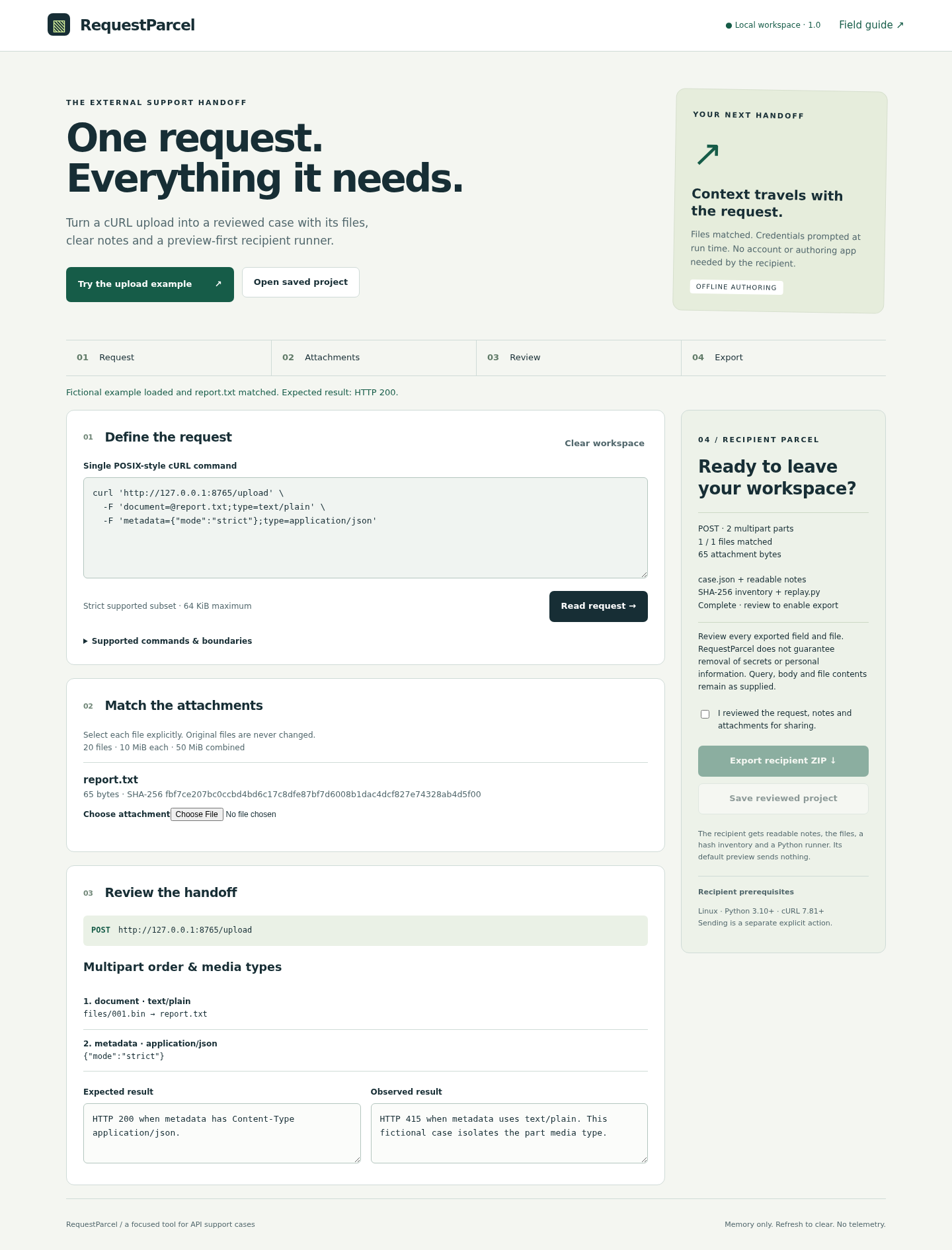
app/index.htmlin Linux Chrome. Keep the folder together. Choose Try the upload example: the fictional report.txt attachment is already matched.Inspect the example
Under Match the attachments, expect one file with 65 bytes and a SHA-256 hash. In Review the handoff, inspect the document field with
text/plainand the metadata field withapplication/json. Read the expected 200 and observed 415 notes. These describe the bundled fictional server.Export after review
Read the request, notes and selected file contents. Tick I reviewed the request, notes and attachments for sharing and choose Export recipient ZIP. Use Save reviewed project if you need to reopen the authoring case. A refresh clears unsaved work.
Validate as the recipient
Extract the recipient ZIP into a fresh empty folder and read its README and case files. Keep the demo server and personal notes outside this folder. Open a terminal in it and run
python3 replay.py. The runner validates every packet member, the schema, paths, sizes and hashes before printing a preview; it sends no request. Re-extract or request a new packet if validation fails.Try the fictional server
In a separate terminal, start the buyer/free example server with
python3 examples/demo_server.pyfrom its extracted package folder. It binds only to 127.0.0.1:8765. From the extracted recipient packet, runpython3 replay.py --send --allow-origin http://127.0.0.1:8765. Expect HTTP 200. Stop the sample server with Ctrl+C when finished.Demonstrate the failure and author your own case
In a new copy of the example command, change only the metadata part media type from application/json to text/plain, read the request again, match the supplied report if needed, review and export a new packet. Its explicit send to the sample server returns 415. For your own case, choose each attachment yourself, inspect every exported field and replace/remove recognized credential headers. Runtime header values are prompted in the recipient terminal; do not place them in the command. To uninstall, delete the extracted app and any saved projects or packets you no longer need.
A worked example
Same file, different multipart media type
Input: The fictional CASE-001 report has 65 bytes. One POST to the loopback /upload endpoint contains document=@report.txt;type=text/plain and metadata={"mode":"strict"};type=application/json. The 17-byte metadata value is not customer data.
- Load the built-in example, inspect the two ordered parts and matched report, confirm review and export.
- Extract the packet into a fresh empty folder and run python3 replay.py; no request is sent. Start the separately included example server from its own folder.
- Explicitly send the packet to http://127.0.0.1:8765 and observe 200.
- Create a second packet changing only the metadata media type to text/plain; explicitly send that packet to observe 415.
Expected result: The supported request semantics, multipart order and attachment bytes are preserved. The fictional server returns HTTP 200 with application/json metadata and HTTP 415 with text/plain metadata. The runner prints status, discards the response body and preserves source attachments. This controlled demonstration does not establish reproduction against another API.
A support case the recipient can inspect
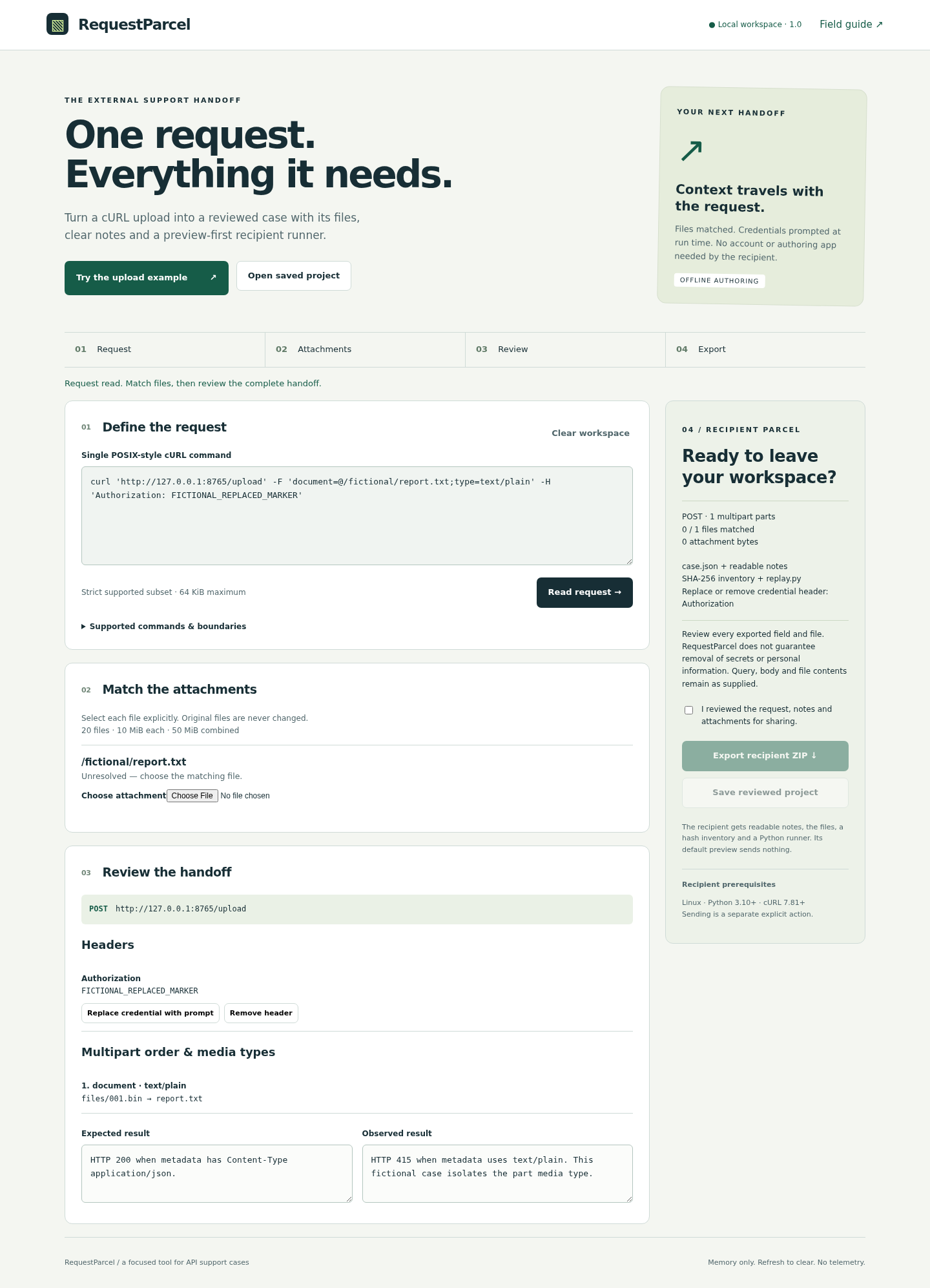
Actual RequestParcel screens in Chrome on Linux, using the original fictional upload example. The reviewed 1.0.1 release retains this interface.
1. Review the complete case
2. Resolve missing inputs
Troubleshooting
Export is disabled
Match every file reference, replace or remove recognized credential headers, and confirm that you reviewed the case and attachments.
The command is unsupported
Read the exact command table in the manual. Separate short flags, use supported POSIX quoting and specify a media type on file multipart parts. If removing an unsupported option would change the case, use a tool that supports it.
The runner reports an inventory mismatch
Re-extract the original packet or obtain a new export. The inventory detects changes; it does not establish who created the packet.
The runner reports an unlisted packet member
Re-extract into a fresh empty folder. Keep personal notes, hidden files and the separate demo server outside it; do not disable inventory validation.
The example connection is refused
Start the separately supplied loopback example server before the explicit send. It is not automatically started by the authoring app or runner.
A credential prompt requires a terminal
Run replay.py in an interactive terminal. Runtime credential entry rejects redirected stdin.
Compatibility & limits
- Strict single-command subset, not a general cURL or shell interpreter. Supports only the documented methods, headers, raw/binary body and multipart options. No unknown-option omission.
- ASCII DNS/IPv4 HTTP(S) URLs only; no URL userinfo or fragments, IPv6 literals, shell expansion, pipes, command chaining or environment assignment. File multipart parts require an explicit media type.
- 20 attachments maximum; 10 MiB each, 50 MiB combined. Command limit 64 KiB, inline body up to 1 MiB, case metadata 2 MiB and saved project 72 MiB.
- Secret and personal-data removal is not guaranteed. Query values, body, filenames, notes and binary contents require manual review. Original pasted command and replaced header values are excluded from exports.
- Recipient sending requires --send and exact --allow-origin. No redirects, retries, inherited proxy settings or .curlrc; request timeout 10 seconds. TLS verification remains enabled. Only status is printed; response bodies are discarded.
- Saved projects use reviewed JSON; arbitrary recipient ZIP import is not supported. Refresh clears unsaved work. Hashes detect file changes, not authenticity.
- Only the specified Linux environment was tested. Sending to a real API can change it; successful validation is not proof of bug reproduction or a safe real-world request.
- Recipient folders must contain exactly the exported packet members. Extra files, hidden entries and unexpected directories are refused before preview and sending.
Need a hand?
Tell us the product, host application and version, what you tried, and the exact error. Contact support with a fictional example; keep private customer files and passwords out of your message.