RequestParcel · Offline support-case authoring 1.0.1 · Linux Chrome
Send the request. Include the files it needs.
Turn one supported cURL request into a reviewed support-case ZIP with selected attachments, readable notes and a preview-first recipient runner.
Use this when a support engineer needs to share one upload request and its dependencies outside an API workspace. The authoring app does not contact the API. A recipient can validate the packet offline; explicitly sending it may change the target service. A complete packet or matching status does not prove reproduction of an arbitrary bug.
$19 USD · one-time purchase
Continue to checkoutStep-by-step guide
No subscription. Final total and tax appear at checkout.
Understand the case before buying
Manual, screenshots and fictional cURL/report/server example. The paid authoring app and recipient packet generation are not included.
- Works locally: Open app/index.html in Linux Chrome; no authoring server or account.
- Explicit attachments: Select files, inspect their hashes and review multipart media types.
- Preview first: Recipient validation sends nothing; API sending requires a separate command.
What it helps you do
For API support engineers sharing an upload case outside their API workspace. Match each file explicitly, inspect supported headers and multipart fields, replace selected whole-header credentials with runtime prompts, and add expected-versus-observed notes. The recipient gets the case, files, hash inventory and Python/cURL runner without needing the authoring app. Save a reviewed JSON project to reopen the case.
What is in your download
- Local browser authoring app, source, licence and build notes.
- Illustrated English HTML manual, actual screenshots and an original fictional upload example with a separate loopback server.
- Recipient ZIP export with case.json, selected file bytes, SHA-256 inventory, readable HTML/Markdown notes and replay.py.
- Reviewed JSON project save/reopen. One-time purchase; recipients do not need the paid authoring app.
A practical example
Same file, different multipart media type
Start with
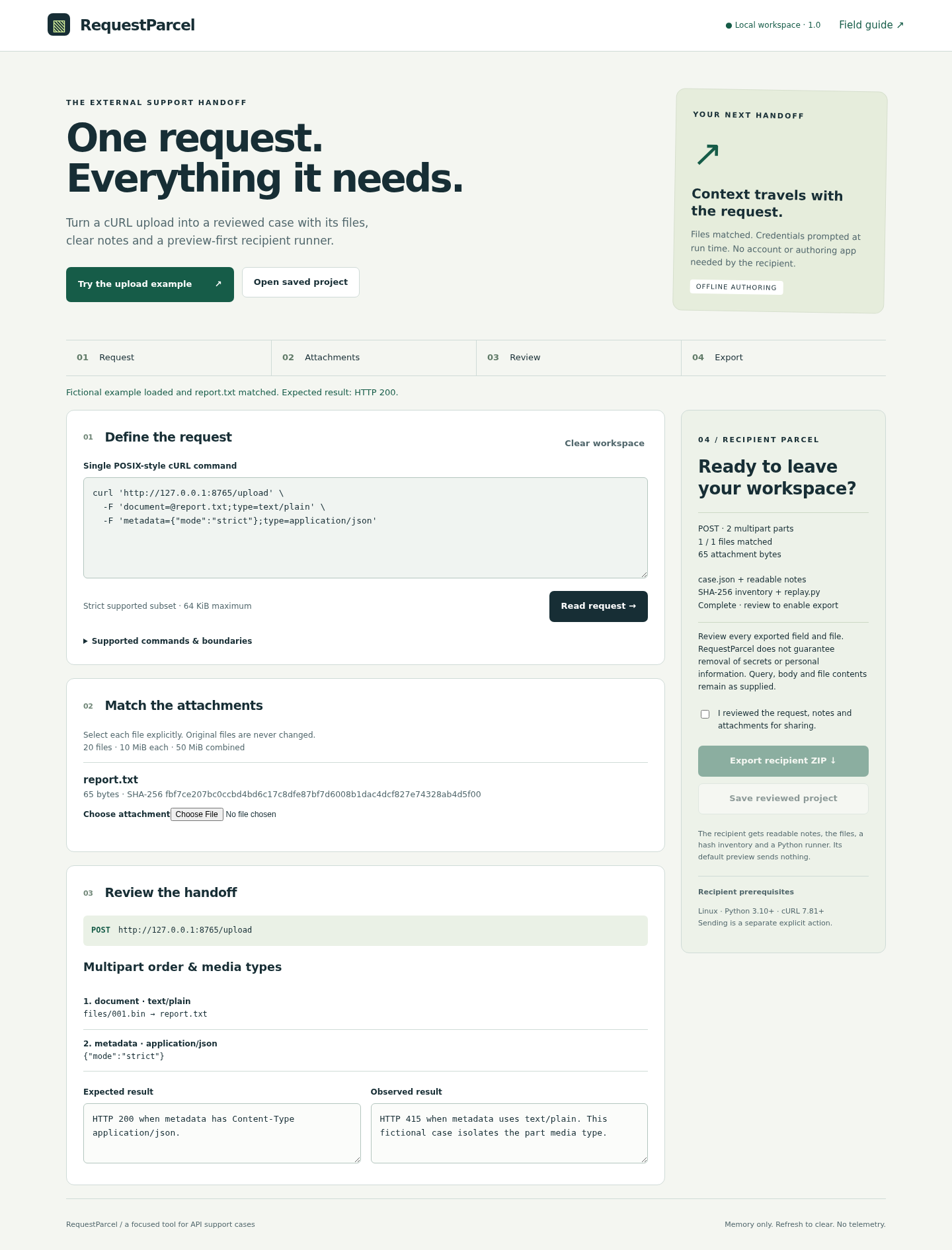
The fictional CASE-001 report has 65 bytes. One POST to the loopback /upload endpoint contains document=@report.txt;type=text/plain and metadata={"mode":"strict"};type=application/json. The 17-byte metadata value is not customer data.
Get this result
The supported request semantics, multipart order and attachment bytes are preserved. The fictional server returns HTTP 200 with application/json metadata and HTTP 415 with text/plain metadata. The runner prints status, discards the response body and preserves source attachments. This controlled demonstration does not establish reproduction against another API.
Free illustrated guide, screenshots and fictional upload example (authoring app not included)
Examples use fictional or synthetic data. Follow this example step by step.
A support case the recipient can inspect
Actual RequestParcel screens in Chrome on Linux, using the original fictional upload example. The reviewed 1.0.1 release retains this interface.
Review the complete case
The built-in example matches report.txt and shows both part media types. Export becomes available after review confirmation. View full size Resolve missing inputs
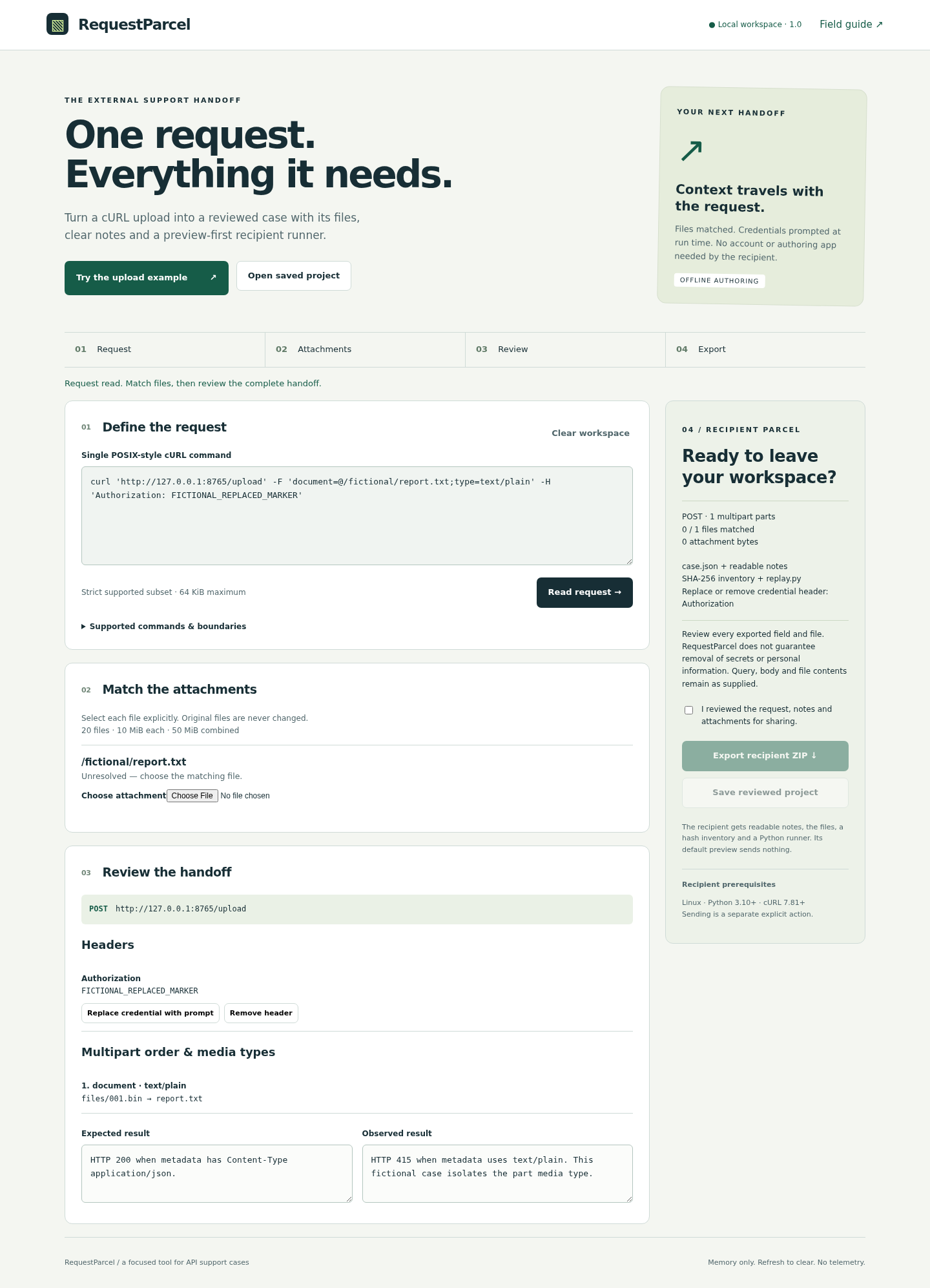
Match required attachments and replace or remove recognized credential headers before export. View full size
How it works
Match the request and files
Load the fictional example or paste one supported command, then bind its file references.
Review the handoff
Inspect fields, notes and file contents; replace or remove recognized credential headers.
Export and preview
Share the recipient ZIP. Its runner validates and previews before any separately requested API send.
Before you buy
- Author: Linux Chrome, with the entire buyer ZIP extracted. Open app/index.html; no runtime install, server or sign-in is required.
- Recipient: Linux, Python 3.10+ and cURL 7.81+. Tested with Ubuntu 22.04.5, Chrome 152, Python 3.10.12 and cURL 7.81.0. Other platforms remain unverified.
- One supported POSIX-style cURL command, explicitly selected attachments, and permission to share those files. A terminal is required for recipient execution and any runtime credential prompt.
Extract the complete RequestParcel-1.0.1.zip and open app/index.html locally in Linux Chrome. Authoring needs no account, server or internet connection. A recipient needs Python 3.10+ and cURL 7.81+: python3 replay.py validates and previews without sending. Sending is a separate explicit command and can modify the target API. Tested on Ubuntu 22.04.5, Chrome 152, Python 3.10.12 and cURL 7.81.0.
Compatibility & limits
One command per case, using a strict POSIX-style cURL subset. Unsupported syntax blocks. Up to 20 files, 10 MiB each and 50 MiB combined; command limit 64 KiB. File multipart parts need an explicit media type. Review query values, bodies, filenames, notes and file contents yourself: secret removal is not guaranteed. Sending uses an exact allowed origin, a 10-second timeout and no redirects or retries; inherited proxies and .curlrc are disabled. Linux is the tested platform. No raw-wire fidelity, cloud upload, arbitrary shell execution or response-body archive. Extract recipient packets into an empty folder; extra files and directories are refused before preview or send.
Get RequestParcel
Perpetual use of the purchased version on your devices for personal or internal commercial work. Keep reasonable backups and modify your own copy; do not redistribute or resell original proprietary code. Third-party licenses and any existing preview permissions retain their rights.
Before payment, save the private recovery code shown by checkout. After Paddle confirms payment, use it to download your ZIP or return for it later. No subscription, future update or email delivery is promised. See the illustrated steps.
$19 USD · once
Buy download