Step-by-step guide
Runhild
Build consistent document packets from CSV or XLSX. Map CSV or XLSX columns into the supplied DOCX templates, validate the rows and download a packet of draft documents for review.
You regularly produce the same handover acts, packing lists or receipt confirmations for several recipients from one list of items, and want every document filled consistently from the same rows.
Before you start
- Desktop Google Chrome or Microsoft Edge. Chrome on Linux is checked for the full flow; Edge on Windows has only been checked to open and start the app.
- A CSV (UTF-8) or XLSX file with eight columns: packet_id, document_date (YYYY-MM-DD), sender_name, recipient_name, item_id, item_name, quantity (whole number above zero) and unit.
- Up to 100 data rows, 20 packets, 3 templates and 60 documents; data file up to 5 MB, template up to 8 MB.
- The purchased runhild-0.1.1-guide-bundle.zip download. It contains program/runhild-preview-20260929.zip; the program itself is unchanged from the earlier release.
Your first result
Download and extract your bundle
Buy the Runhild bundle at /store/runhild/ and extract runhild-0.1.1-guide-bundle.zip. Then extract program/runhild-preview-20260929.zip into a separate folder. The app/, extension/, samples/ and docs/ paths below refer to that extracted program folder. GUIDE.html and examples/ in the outer bundle contain this manual and its practice material. Open app/runhild.html in desktop Chrome or Edge.
Step 1 — Choose your sheet
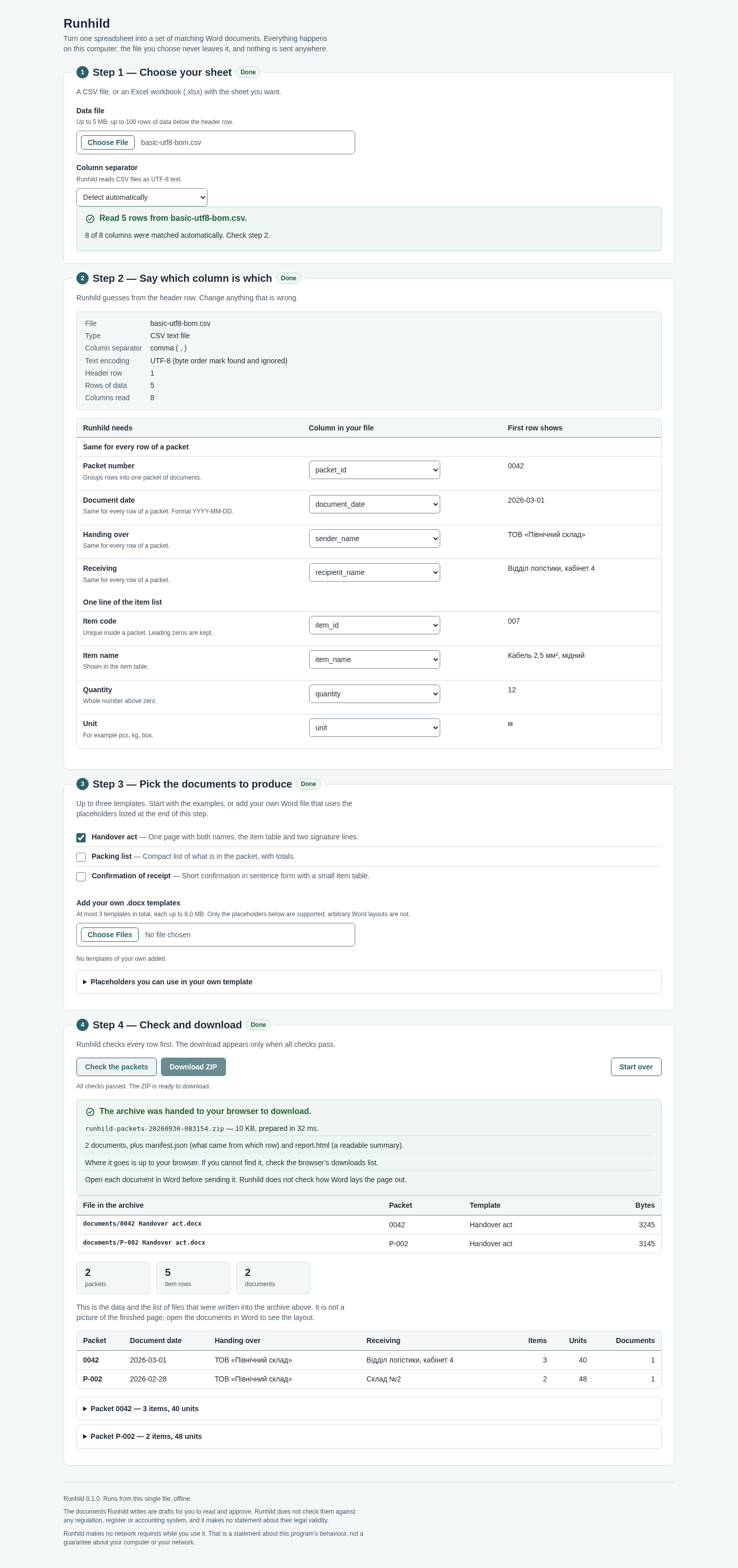
Under Data file choose your CSV or XLSX. For a workbook, pick the worksheet. Runhild shows how many rows it read; if a CSV uses another separator, change Column separator (Detect automatically, Comma, Semicolon or Tab).
Step 2 — Say which column is which
Runhild matches your header row to its fields: Packet number, Document date, Handing over, Receiving, Item code, Item name, Quantity and Unit, and shows the first row's value next to each. Correct any wrong choice in the drop-downs.
Step 3 — Pick the documents to produce
Tick up to three templates. The built-in examples are Handover act (ticked by default), Packing list and Confirmation of receipt. You can also add your own .docx that uses Runhild's placeholders, such as {{sender_name}} and an item-table row marked {{#items}}; the same three examples are in app/templates as Word files to adapt, and docs/TEMPLATE-GUIDE.md lists every placeholder.
Step 4 — Check and download
Click Check the packets. Every row is checked first: each problem is listed with its row, column and value, and nothing is written until all checks pass. Then click Download ZIP. Start over clears the page.
What you get
The ZIP, named runhild-packets-<date>-<time>.zip, is saved to your Downloads folder. It holds documents/<packet> <template>.docx (one per packet per template), manifest.json (which row went into which document) and report.html (a readable summary).
Review before sending
Open every document in the Word version you will use and read it. The documents are drafts for you to approve; Runhild does not check them against any law, register or accounting system.
Saving and your data
Runhild keeps nothing between sessions: reloading or closing the page clears everything, so keep your spreadsheet and the downloaded ZIP. It makes no network requests. To remove it, delete the unzipped folder.
A worked example
Tool library handover packets
Input: examples/runhild/tool-library-handover.csv: four fictional rows for two packets. The Lindgren Tool Library hands garden tools to Maple Street Community Garden (PK-001) and Harbor School Greenhouse (PK-002).
- Open app/runhild.html and choose tool-library-handover.csv as the Data file.
- In Step 2 check that all eight fields are matched (Runhild reports 8 of 8 columns matched automatically).
- In Step 3 tick Packing list and Confirmation of receipt as well as Handover act.
- Click Check the packets, then Download ZIP.
Expected result: Step 4 says All checks passed and 6 documents will be written: 2 packets, 4 item rows (PK-001: 2 items, 14 units; PK-002: 2 items, 4 units). The ZIP contains documents/PK-001 Handover act.docx, PK-001 Packing list.docx, PK-001 Confirmation of receipt.docx, the same three for PK-002, plus manifest.json and report.html. The item code 0042 keeps its leading zeros. If you change the date on one PK-001 row, the check instead reports that packet PK-001 has two different values for Document date and the download stays disabled.
Troubleshooting
Download ZIP stays disabled.
A check failed. Read the listed problem (row, column and value), fix it in your spreadsheet, and choose the file again. Every row of a packet must share the same date, sender and recipient, and item codes must be unique inside a packet.
Letters look wrong after importing a CSV.
Runhild reads CSV files as UTF-8. Save the CSV as UTF-8 from your spreadsheet program, or import the XLSX instead.
Your own template is refused.
The message names the problem, for example an unknown placeholder such as {{invoice_total}}, an {{item.…}} placeholder outside the {{#items}} row, or a placeholder in a header, footer or text box. Only the main document body is filled.
The page lost my work.
Runhild stores nothing. Reloading clears the page by design; choose the file again. The downloaded ZIP is your saved result.
Compatibility & limits
- Fills plain placeholders and one repeating item row only. No PDF output, calculations, signatures, tax or legal checks.
- Chrome on Linux is checked for the full flow; how the documents look in Word on Windows or macOS, screen readers and printing still need your own check.
- The original program keeps its included preview permissions: you may use it, including for real work, but not sell or redistribute it (see PREVIEW-PERMISSION.md and THIRD-PARTY-NOTICES.md).
- Draft documents only; no legal validity, PDF conversion, OCR, signatures, tax or accounting checks. Chrome 152 Linux synthetic DOCX flow checked; Windows Edge startup only and Word rendering unverified.
Need a hand?
Tell us the product, host application and version, what you tried, and the exact error. Contact support with a fictional example; keep private customer files and passwords out of your message.