Step-by-step guide
UrdTrace
See the passages testers visited, the endings they reached and the notes they left along the way.
Use UrdTrace after a small playtest round when you need to connect a tester's comment to the passage and route they actually recorded, then decide what to revise and what to test next.
Before you start
- Desktop Google Chrome on Linux is the tested environment.
- Extract the ZIP and open UrdTrace.html in desktop Chrome on Linux. Load the built-in Ferry example for a complete first round, then open your own published SugarCube 2.37.3 HTML.
- Only published SugarCube 2.37.3 HTML. Harlowe, ink, Yarn, Twee source and Twine archive JSON are not supported inputs.
Your first result
Start with the complete example
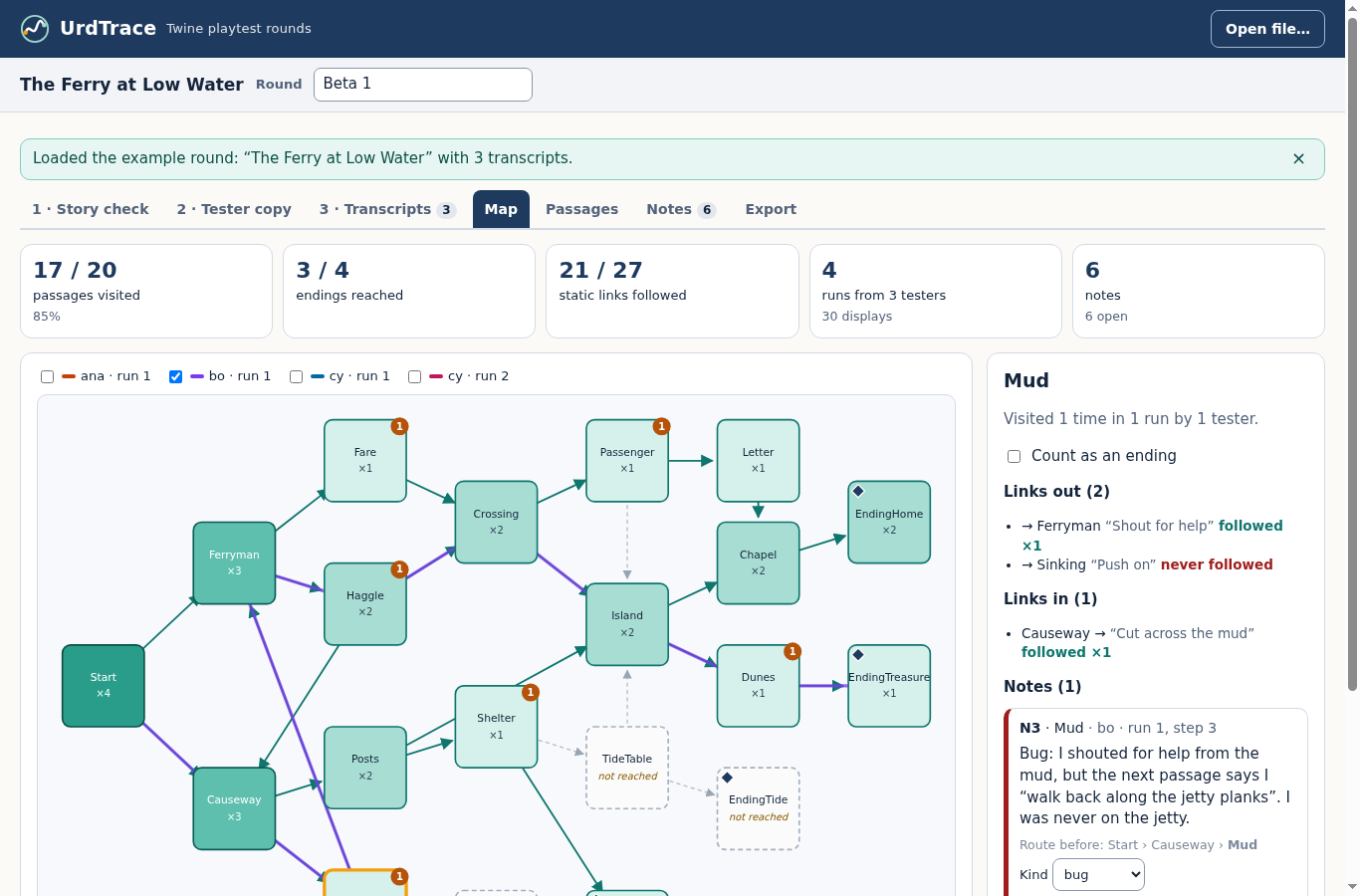
Extract the buyer ZIP, open UrdTrace.html and choose Load example. Open Map and Notes. The original Ferry story has four scripted runs, 30 passage displays and six notes.
Keep the exact published story
In Twine, use Build → Publish to File with SugarCube 2.37.3. Retain that unchanged HTML. Open it in UrdTrace and check the story title, counted passages, starting passage and warnings.
Create a separate tester copy
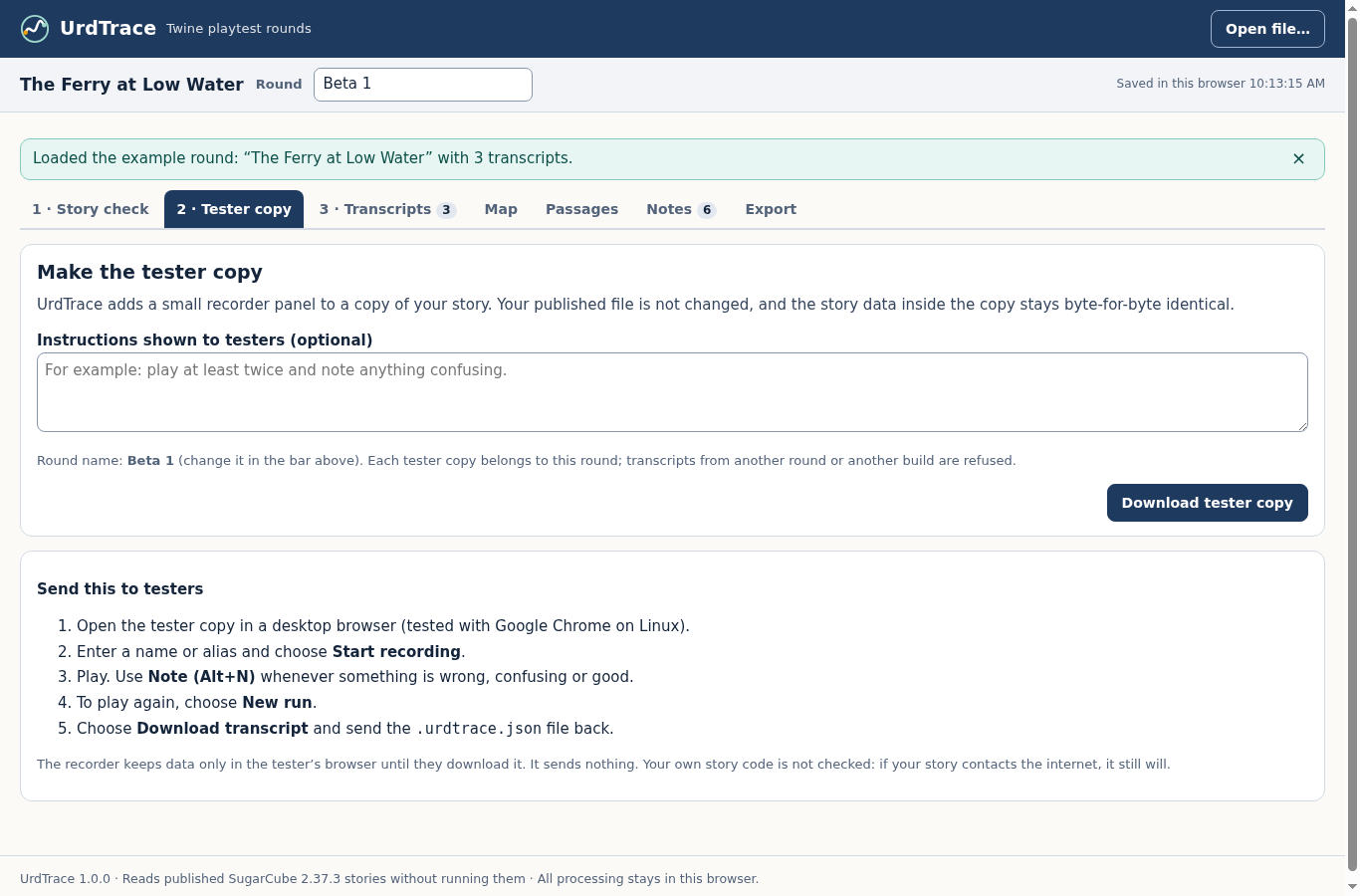
Name the round, open 2 · Tester copy, add instructions and download the tester HTML. Save the editable round. Preserve relative folders for any assets your story needs.
Have testers return their recordings
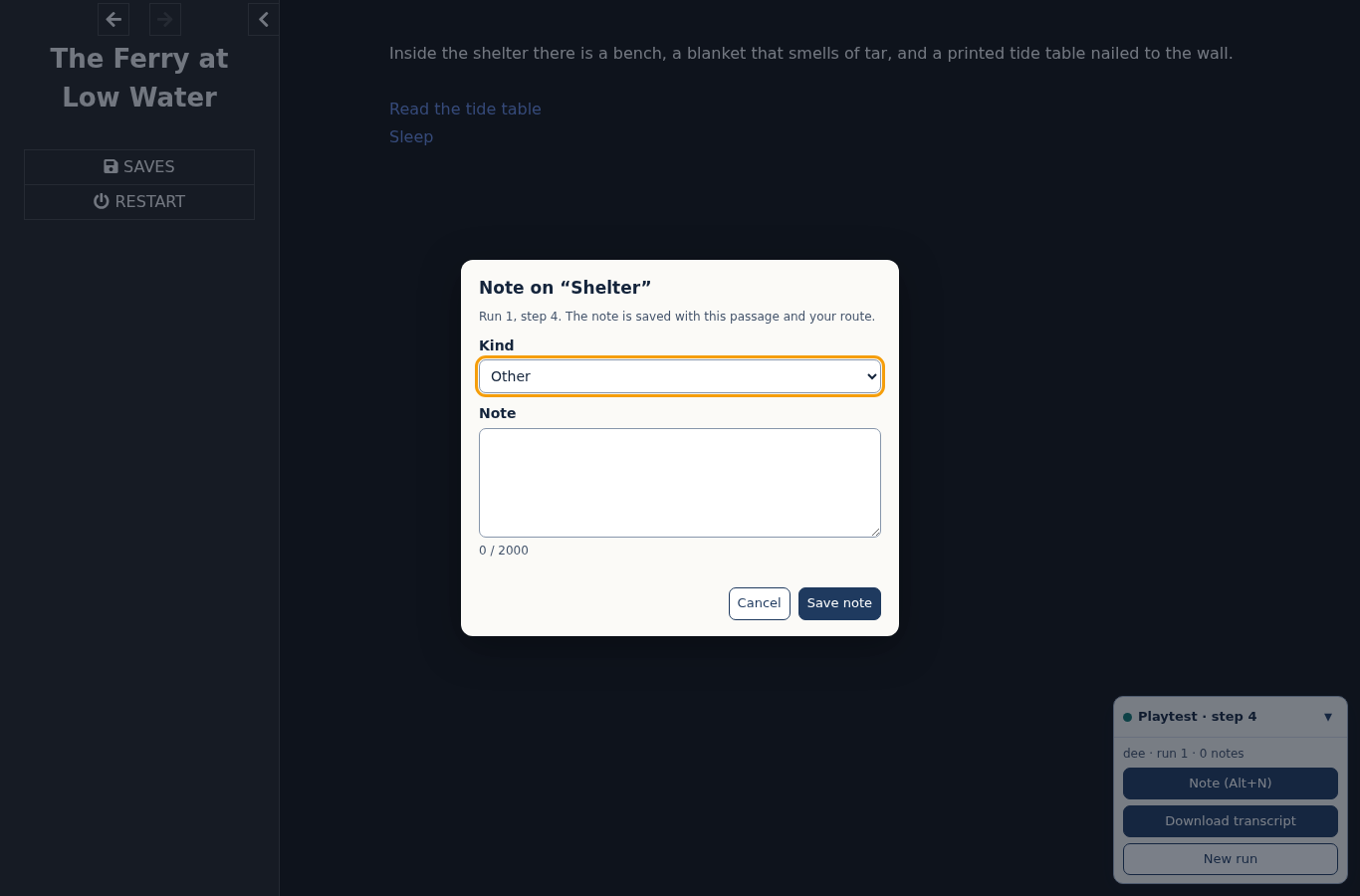
Ask each tester to open the copy in desktop Chrome, enter an alias and choose Start recording. They can add a note while a passage is visible and choose New run to play again. Before closing, they must choose Download transcript and send you the file.
Import files from this round
In 3 · Transcripts, select the returned files together. Confirm aliases, runs and notes. Wrong-build, wrong-round, duplicate-session and over-limit files are refused without changing the open round.
Review what happened
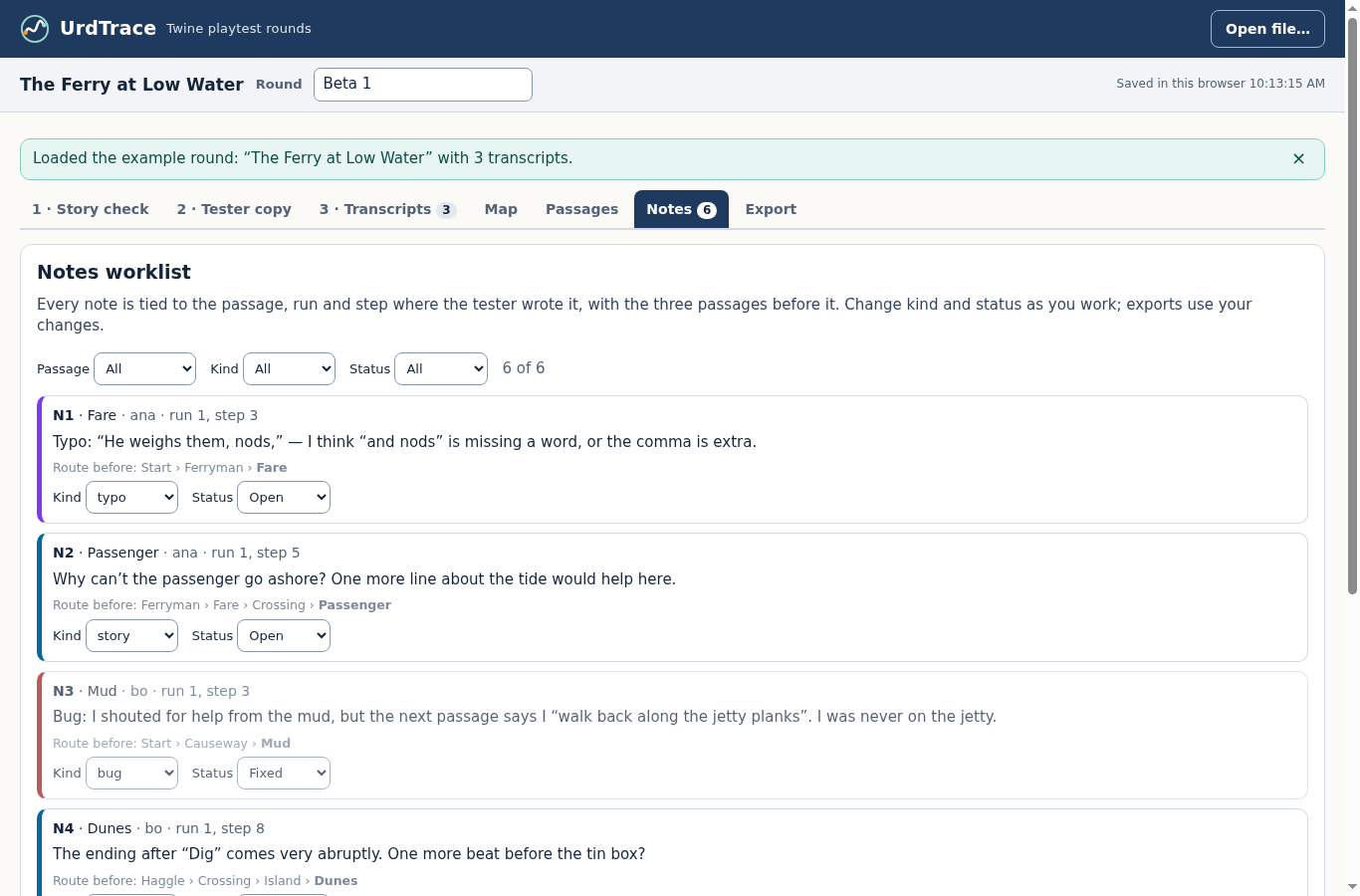
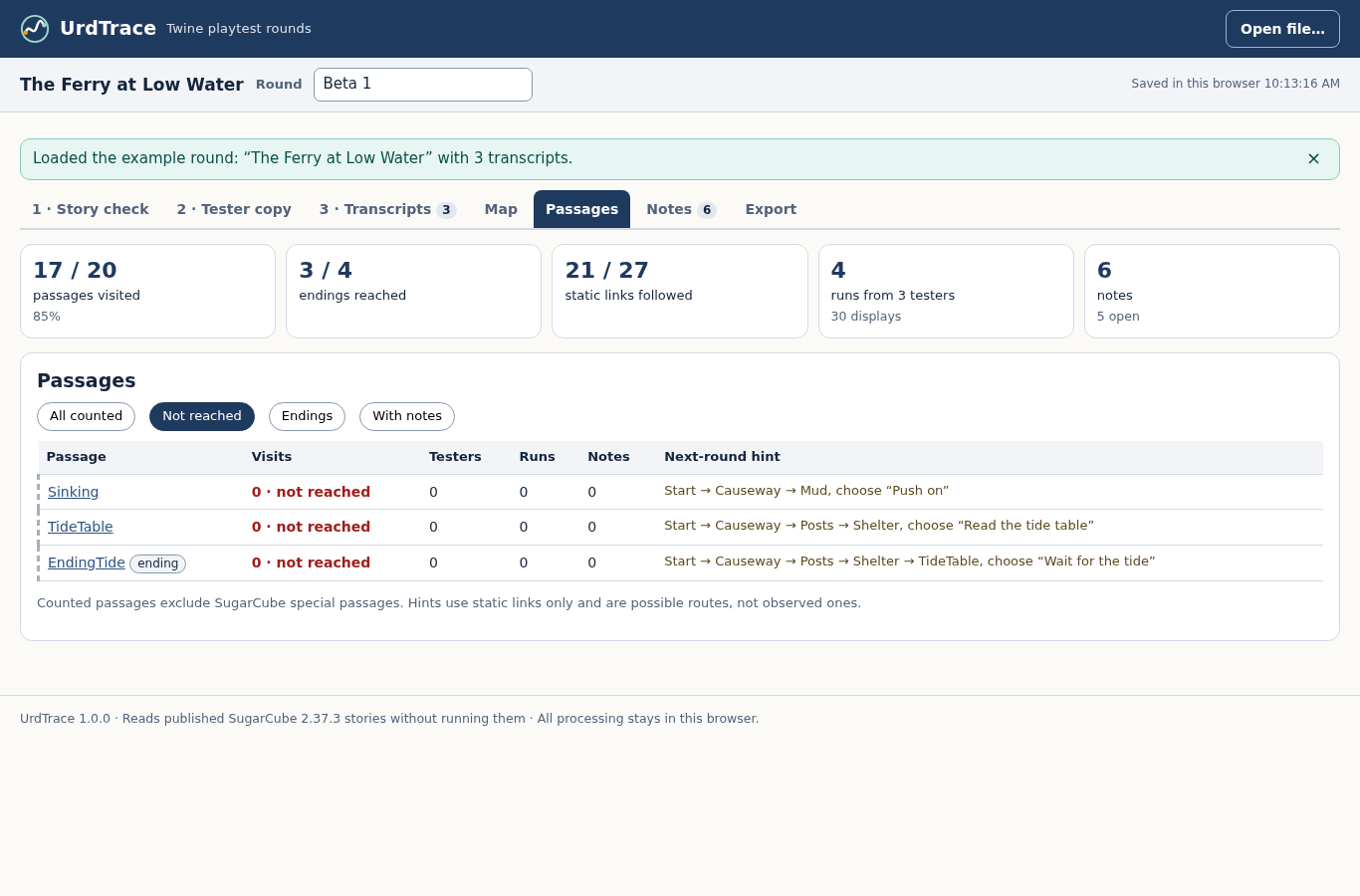
Use Map for recorded routes and passage visits. Use Notes to see the preceding route, change kind or mark an issue fixed. In Passages → Not reached, inspect gaps and check any static route hint against the story's conditions.
Export and keep a backup
In Export, choose Download round ZIP. Open round-report.html or import worklist-spreadsheet-safe.csv. Save the editable round with the original story and transcript downloads; browser autosave is a convenience, not a backup.
A worked example
Find the untested ending in The Ferry at Low Water
Input: The original 21-passage SugarCube story and three fictional tester files. StoryInit is code and is excluded from the 20-passage coverage count.
- C
- h
- o
- o
- s
- e
- L
- o
- a
- d
- e
- x
- a
- m
- p
- l
- e
- ,
- o
- p
- e
- n
- N
- o
- t
- e
- s
- ,
- t
- h
- e
- n
- u
- s
- e
- P
- a
- s
- s
- a
- g
- e
- s
- →
- N
- o
- t
- r
- e
- a
- c
- h
- e
- d
- .
- I
- n
- s
- p
- e
- c
- t
- E
- n
- d
- i
- n
- g
- T
- i
- d
- e
- a
- n
- d
- t
- h
- e
- s
- u
- g
- g
- e
- s
- t
- e
- d
- s
- t
- a
- t
- i
- c
- p
- a
- t
- h
- b
- e
- f
- o
- r
- e
- p
- l
- a
- n
- n
- i
- n
- g
- a
- n
- e
- w
- t
- e
- s
- t
- .
- E
- x
- p
- o
- r
- t
- t
- h
- e
- r
- o
- u
- n
- d
- Z
- I
- P
- a
- n
- d
- r
- e
- o
- p
- e
- n
- t
- h
- e
- r
- e
- p
- o
- r
- t
- .
Expected result: Four scripted runs, 30 passage displays and six notes; 17 of 20 counted passages visited, three of four endings reached and 21 of 27 parsed static links matched by recorded transitions. Sinking, TideTable and EndingTide were not reached.
Follow a complete playtest round
Actual screens from the downloadable app, using an original story and fictional scripted tester files.
1. See the round on the story map
2. Read notes with their route context
3. Make a recorder copy for this round
4. Let testers write at the relevant passage
5. Choose what to test next
Troubleshooting
A transcript says different build or round
Use the saved round and unchanged original published HTML used to make that tester copy. Republishing changes the fingerprint. If the old source is missing, start a fresh round.
A newer download says duplicate session
Save the round, remove that tester's earlier transcript in 3 · Transcripts and import the newer file. Note edits survive when the same note IDs return.
Local browser saving is unavailable
Download the transcript or save the author round before closing or reloading. Storage can depend on the browser profile and file location.
A route hint cannot be followed in the story
Hints use parsed static links. Check conditions and macro or JavaScript links in the actual story; an unvisited passage is not automatically unreachable.
The free pack has no app to open
Open example-results/round-report.html and manual/index.html to inspect the output and workflow. The author app and tester-copy recorder are in the paid ZIP.
Compatibility & limits
- Only published SugarCube 2.37.3 HTML. Harlowe, ink, Yarn, Twee source and Twine archive JSON are not supported inputs.
- Verified in desktop Chrome 152 on Linux. Other browsers, operating systems and mobile platforms are unverified.
- Up to 500 total story passages and 10 MiB story HTML. A round accepts 10 transcripts, at most 2 MiB each and 8 MiB combined.
- Each transcript holds up to 2,000 passage displays and 200 notes, with 2,000 JavaScript string units per note. Saved-round import is limited to 24 MiB.
- Transcripts must match the exact original HTML bytes and round. Keep the original file; start a new round after republishing.
- Coverage comes from recorded passage displays and parsed static links. Route hints do not solve conditions, analyze every dynamic link or prove a path is playable.
- Testers must choose to record, download and return their files. There is no automatic collection, variable capture or cloud collaboration.
- The app and recorder do not upload your data. Your own story may still run network code or require external assets. Keep those assets with the tester copy.
- Printable reports were checked using Chrome's PDF output; physical printers and other PDF engines are unverified.
Need a hand?
Tell us the product, host application and version, what you tried, and the exact error. Contact support with a fictional example; keep private customer files and passwords out of your message.