Step-by-step guide
VelesRelay
Plan relief cover for fixed volunteer posts, including walking and both handovers. Review gaps, repair a late return and issue matching instructions for each post and rover.
You already have a fixed rota for ordinary information, welcome or exhibition posts and need to plan how a small relief team will cover requested absences.
Before you start
- Desktop Google Chrome. Independently checked in Chrome 152.0.7977.82 on Linux x86_64; other platforms are unverified.
- Extract the whole buyer ZIP and open app/index.html in desktop Google Chrome. Choose Load Orchard Fair, then Propose route in Review. No installation, command line, server, account or internet connection is required. Keep the extracted folders together.
- A known base rota, absence windows, qualified relief people, availability and explicit directed walking times. Check these inputs with your team.
- For bulk entry, use all six supplied UTF-8 CSV filenames and exact headers together. A failed import leaves the current plan intact.
Your first result
Load the original route
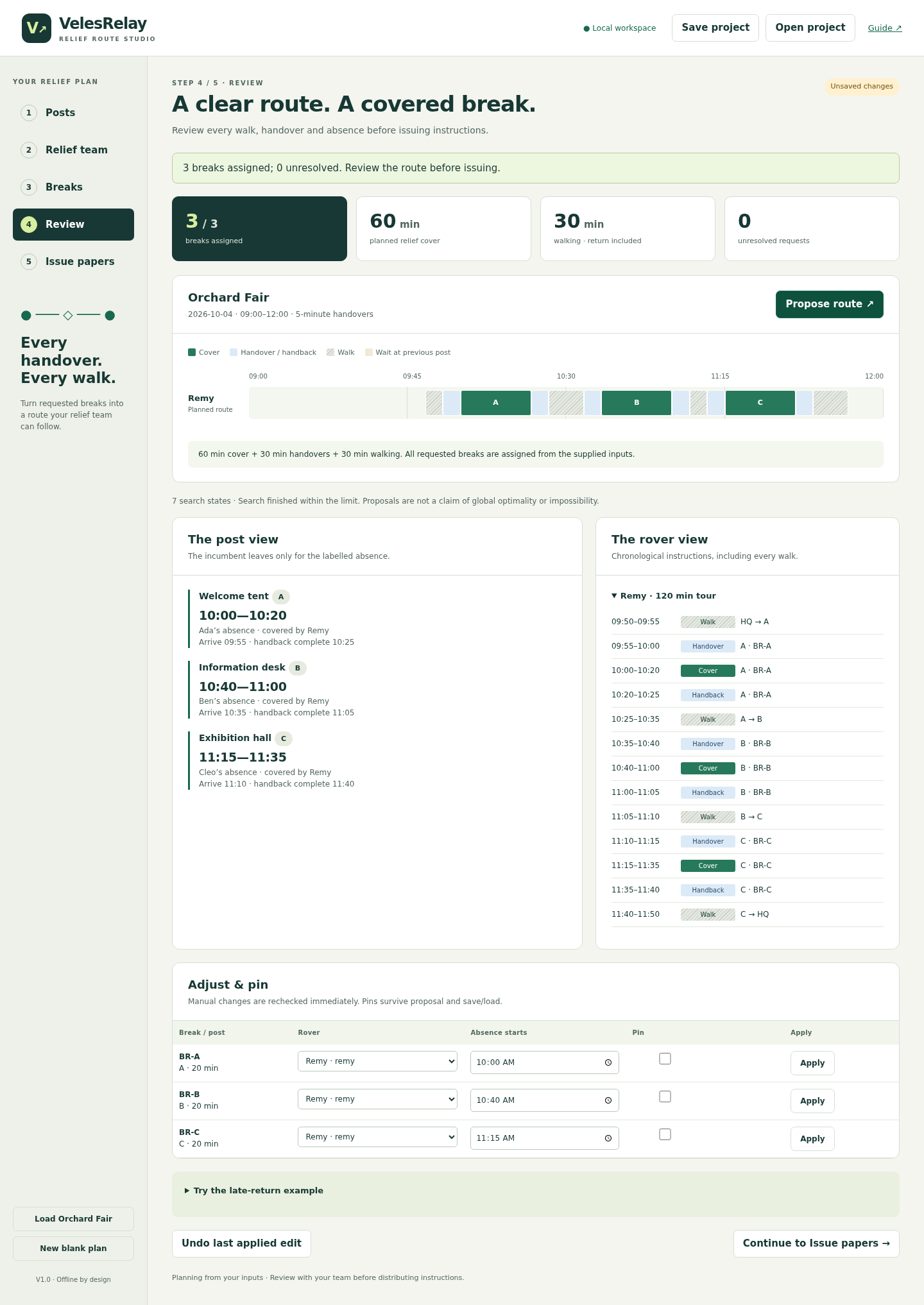
Open app/index.html, choose Load Orchard Fair, then Propose route in Review. Check all three post cards and Remy’s itinerary. Expected totals: 60 minutes cover + 30 handover + 30 walking = 120 minutes.
Keep the first issued version
Open Issue papers, issue revision 1 and choose Save project. Check your Downloads folder for the JSON. This keeps the original instructions available while you edit the draft.
Inspect a late return
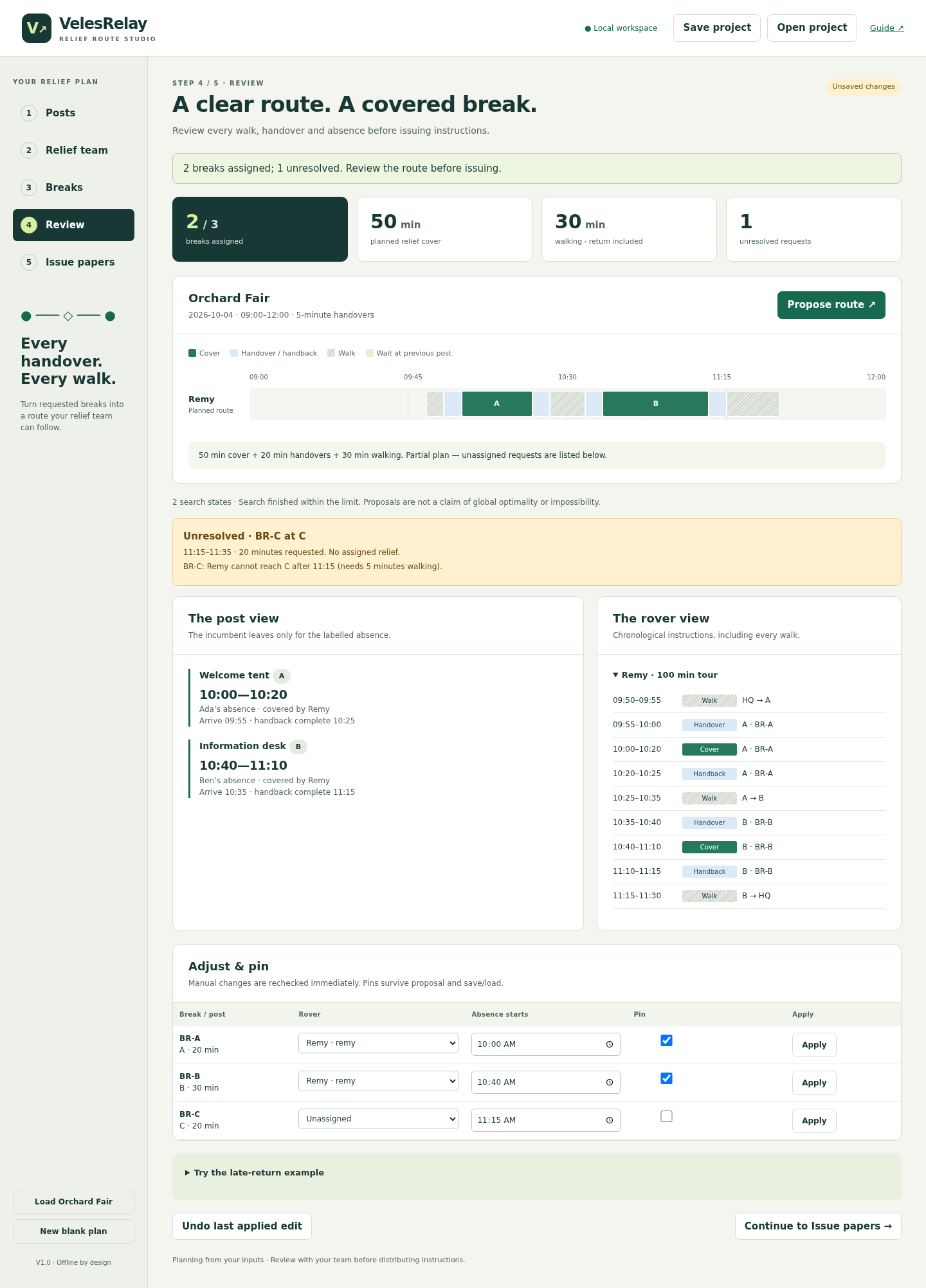
Return to Review, expand Try the late-return example and choose Apply B delay + return route. This extends B to 11:10, pins A/B and explicitly adds B → HQ: 15 minutes. Propose again. C remains unresolved because Remy cannot reach its 11:10 handover.
Bring in the backup
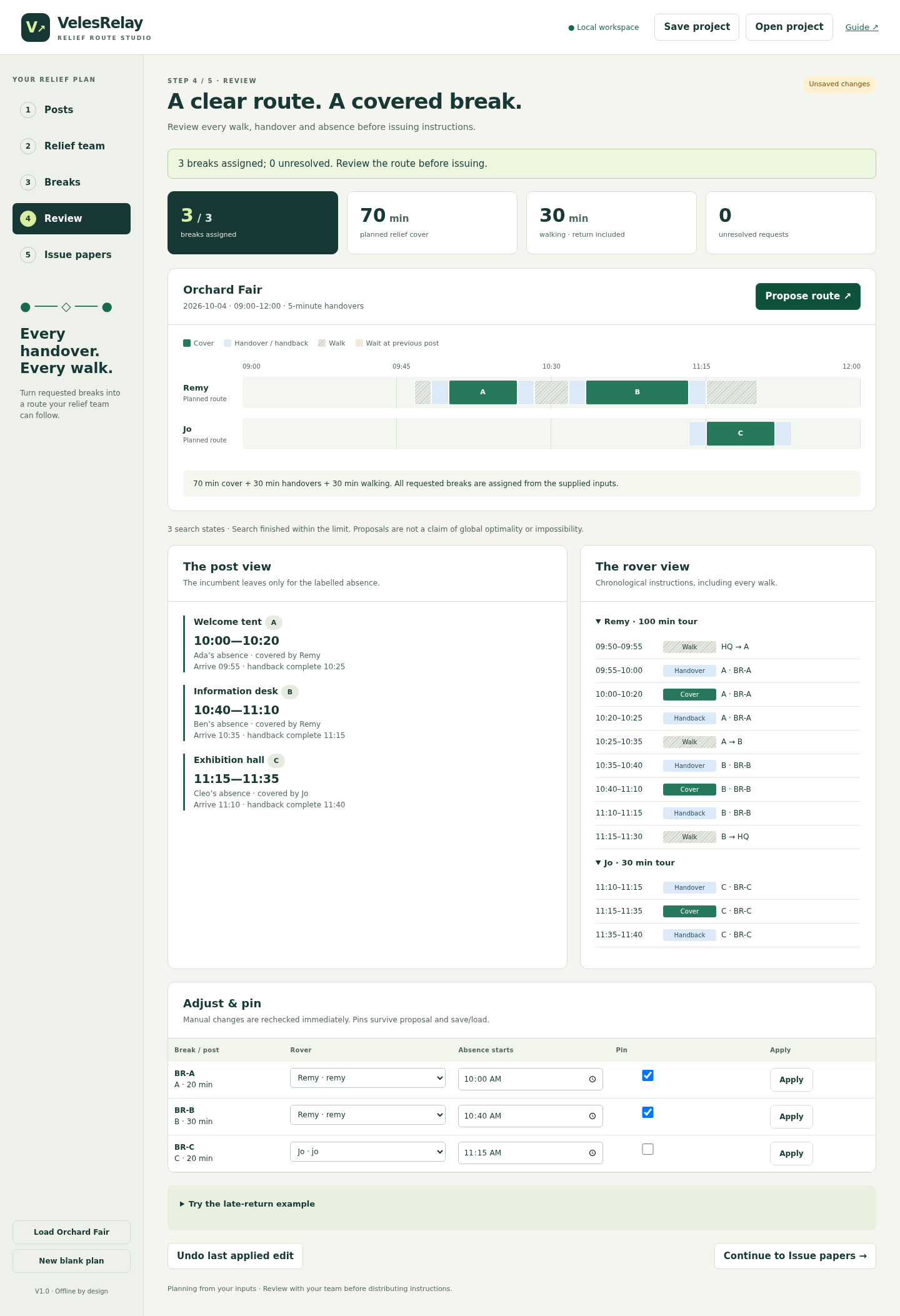
Choose Add backup Jo at C, then propose again. Jo starts at C at 11:10 and covers its unchanged 11:15–11:35 absence. Remy returns from B 11:15–11:30. Review 70 minutes cover, 30 handover and 30 walking across both rovers.
Issue the replacement sheets
Issue revision 2 and save the project. The replacement checklist identifies posts B/C and rovers Remy/Jo. Revision 1 remains in the paper-source menu. Review the selected revision and use Print / save PDF: A4 or Letter, portrait, default margins, 100% scale, with Chrome headers/footers disabled.
Build your own event
Choose New blank plan. Enter event settings and posts, relief people and eligibility, directed travel and unavailable intervals, then requested absences. Use Apply to commit visible fields before changing steps or saving. Propose and inspect the route; use assignment controls to adjust a rover, start time or pin. A pin needs an assignment.
Export and reopen deliberately
Save JSON to preserve inputs, assignments, pins and issued history, then use Open project next time. Assignment CSV describes the current draft, even when an older revision is selected for papers. Use Spreadsheet-safe assignment CSV when opening formula-like names in a spreadsheet; canonical CSV preserves the original text.
A worked example
Orchard Fair — original fictional relief exercise
Input: Three fixed posts, one eligible rover, three 20-minute absences and five-minute handovers. Directed walks are HQ→A 5, A→B 10, B→C 5 and C→HQ 10 minutes.
- Follow Remy from HQ at 09:50 to A at 09:55, then the three cover periods A 10:00–10:20, B 10:40–11:00 and C 11:15–11:35.
- Issue revision 1. Extend B to 11:10, keep A/B pinned and explicitly add B→HQ 15 minutes. Observe C’s unresolved request.
- Add Jo at C from 11:10, propose and issue revision 2. Review the changed sheets before sharing them.
Expected result: Original route: Remy returns HQ at 11:50; 60 cover + 30 handover + 30 walking = 120 minutes. Repaired plan: Jo covers C, Remy returns HQ at 11:30; totals become 70/30/30. Replace B/C and Remy/Jo sheets; the first revision remains unchanged.
Review the original route, the gap and the repair
Actual VelesRelay screens in Chrome on Linux. Orchard Fair and all names are fictional.
1. Follow the whole relief route
2. Keep the uncovered request visible
3. Issue the repaired plan
Troubleshooting
A route is missing or nothing is assigned
Enter every directed leg, including start to first post and last post to return location. A→B does not imply B→A, and a missing leg is not zero.
A pinned route prevents a proposal
Check eligibility, handovers, availability and the final return. Correct or unpin conflicting placements. A capped or unsuccessful search does not prove no arrangement exists.
You cannot change steps or save
Apply the visible edits first. Undo restores the last applied edit and discards unapplied fields; pressing it again toggles the two states.
CSV import is rejected
Select all six supplied filenames together, with exact headers and UTF-8 comma quoting. Check IDs and references. Semicolon-delimited exports and embedded newlines in names are unsupported.
Printed times differ from the current draft
Check the paper-source revision. Older issued versions deliberately retain earlier times. CSV exports always use the working draft.
The app looks blank or loses its styling
Extract the complete ZIP and keep the folders together. Open app/index.html from the extracted folder in Chrome.
Compatibility & limits
- One same-day event up to 16 hours on a five-minute grid; no midnight crossing or time zones.
- 12 fixed posts, 6 distinct rovers, 40 requests, 12 roles, 72 eligibility rows, 100 directed travel rows and 24 unavailable intervals.
- Absences 5–120 minutes, walking 0–120 minutes and handovers of 0, 5, 10 or 15 minutes. CSV files up to 1 MiB each, project JSON up to 5 MiB and 20 issued revisions.
- Each rover has one continuous tour. Walking and waiting must avoid unavailable intervals. A directed route must be entered explicitly, including the return; a missing leg is unavailable.
- Search stops at 100,000 states or five seconds and reports incomplete exploration when capped. It does not prove an optimal plan or global impossibility. Intermediate visits around pinned placements may require manual planning.
- No autosave, signup, messaging, shift allocation, calendar integration or attendance verification. Save the downloaded project before closing.
- Verified in Google Chrome 152 on Linux with networking disabled, including desktop and 390px layouts and A4/Letter PDF output. Other platforms and physical printing are unverified. Desktop is recommended for editing.
- The absence is total time away from the post. The relief rover arrives before it for handover and stays afterward for handback. Confirm operational suitability and timings with your team.
- Issued revisions record a plan based on supplied inputs; they do not establish attendance or approval by other people. This is not a tool for medical, security, traffic or safeguarding coverage or legal break-entitlement calculations.
- Data stays in browser memory with no runtime network requests, telemetry or cloud sync. Downloaded project files contain names and schedules in readable form. The app does not automatically save or overwrite imported files.
- At narrow widths, use chronological itinerary cards and scroll tables for controls. The full timeline is intended for desktop.
- The app and runtime source are supplied under the MIT license; retain its notice when redistributing. The free example pack excludes the application.
Need a hand?
Tell us the product, host application and version, what you tried, and the exact error. Contact support with a fictional example; keep private customer files and passwords out of your message.