Step-by-step guide
ZoneHandoff
Prepare a reviewable DNS handoff from two complete BIND exports, with exact original files and explicit record choices.
Use this when you have complete existing and proposed BIND exports for the same domain and need to agree what should change. It prepares local files for an operator to review. It does not query or change live DNS, establish provider completeness or test email delivery.
Before you start
- Linux with Python 3.10+ and Chrome. Tested on Linux x86-64 with Python 3.10.12 and Chrome 152; other environments are unverified.
- Extract the entire
ZoneHandoff-1.0.0.zip. The parser is bundled: no pip install or internet connection is needed at runtime. - Complete UTF-8 BIND exports for one domain, including SOA and apex NS. Up to 2 MiB and 5,000 records per file; supported types only. Do not treat partial zone fragments as complete exports.
Your first result
Extract and launch
Extract the complete ZIP. Open a terminal in
ZoneHandoff-1.0.0and runpython3 start.py. Use the printedhttp://127.0.0.1:address in Chrome if the browser does not open. Keep that terminal running. The local port can change on each launch.Try the fictional example
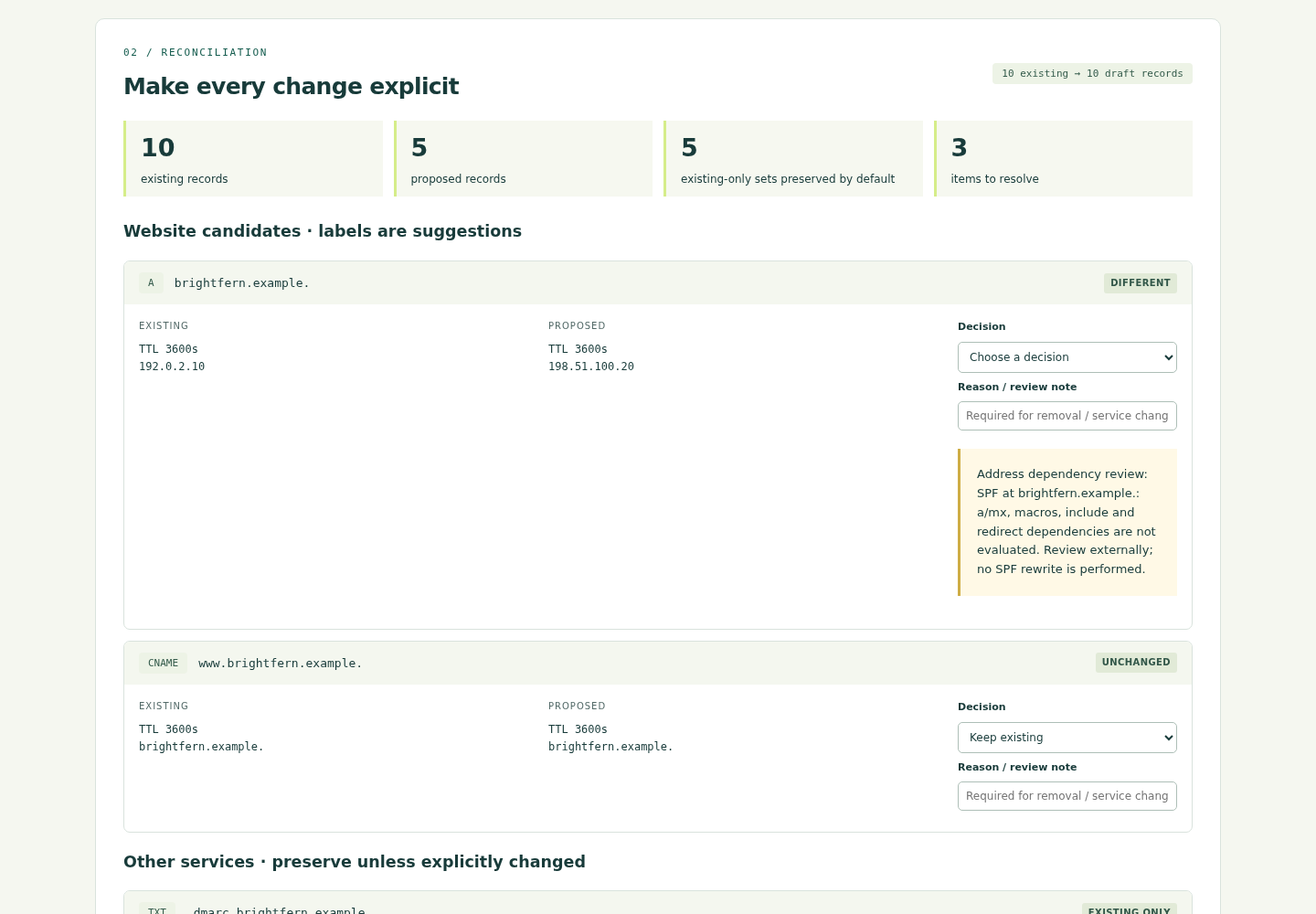
Choose Load fictional example. You should see 10 existing records and 5 proposed records. For
brightfern.example. A, choose Use proposed. Leave existing-only MX, SPF, DMARC, DKIM and CRM on Keep existing. ThewwwCNAME stays unchanged.Resolve and review
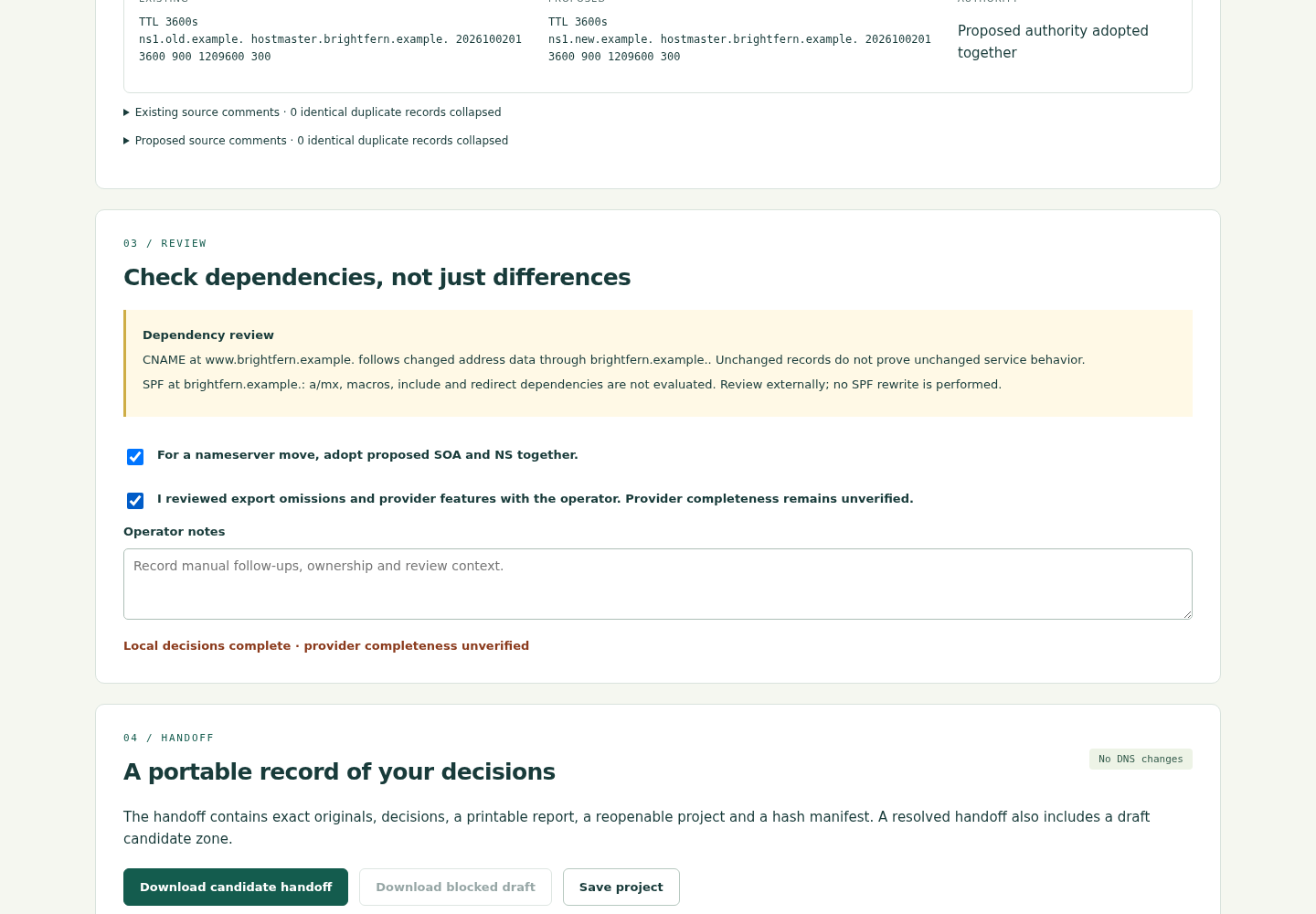
The example uses nameserver-move mode: in Review, confirm adoption of proposed SOA and NS together, read the limitations and record the provider-review action. Review the notice that
wwwfollows the changed apex. For real files, conduct the provider review with the operator; a checked box cannot prove completeness.Export and reopen
Select Download candidate handoff, then Save project. Extract the handoff ZIP separately and open
handoff.htmlto read, print or save as PDF. The ZIP contains original zone files,candidate.zone, decisions, a project and hashes. Later choose Reopen project to restore sources and decisions. Work is not autosaved.Compare a fresh export
Under Fresh BIND export, select
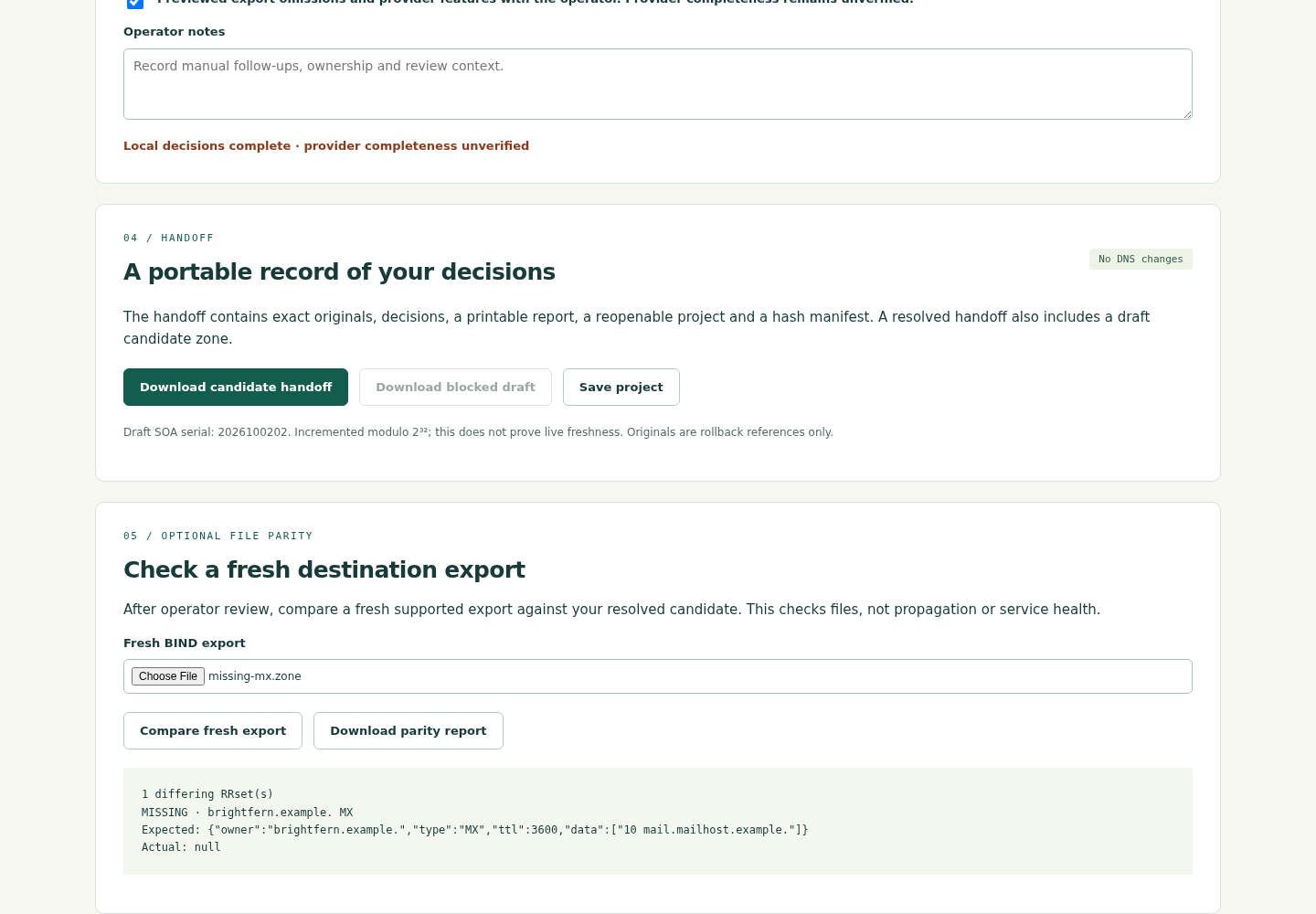
examples/expected-candidate.zoneand click Compare fresh export: expect zero differences. Remove the MX line from a copy and compare again: expect exactly one missing MX RRset. This checks file parity, not running DNS or mail.Use your own files and close
Enter your domain in ASCII/Punycode, choose complete existing and proposed exports and click Compare exports. Keep existing DNS is the default for your own files; choose a nameserver move only when intended. Changed inputs reset decisions. Save before closing, press Ctrl+C in the terminal and close the tab. To uninstall, delete the extracted folder; separately delete saved projects and exports you no longer need.
A worked example
Brightfern Studio: preserve five omitted service sets
Input: The free ZIP includes fictional existing.zone (10 records), proposed.zone (5 records) and expected-candidate.zone. Reserved .example names and documentation addresses are used; the mail strings are not deployable settings.
- Load the fictional example and choose the proposed apex A address,
198.51.100.20. - Preserve the existing-only MX, SPF TXT, DMARC TXT, DKIM TXT and CRM CNAME; leave the existing www CNAME unchanged.
- Adopt the proposed SOA/NS together and complete the example review. Download the candidate handoff and save the project.
- Compare the expected candidate as a fresh export, then compare a copy with its MX line removed.
Expected result: A draft with 10 records in 9 RRsets, apex A 198.51.100.20, nameservers ns1.new.example. and ns2.new.example., and SOA serial 2026100202. Existing mail and CRM data remain. Original inputs are preserved byte for byte. Fresh comparison gives zero differences, or exactly one missing MX RRset after the MX line is removed.
From two exports to a clear handoff
Actual screens from ZoneHandoff 1.0.0 in Chrome on Linux, using the fictional Brightfern Studio files included with the guide.
1. Compare records
2. Review the handoff
3. Find an omitted MX
Troubleshooting
Python is missing or the browser cannot connect
Use Python 3.10+ from your approved Linux software source. Launch from the extracted folder, keep the terminal open and use its current local address. Do not expose this local server to a network.
The source is refused
Read the refusal and obtain a supported complete export from the operator. Unsupported types, duplicate SOA, mixed TTLs, CNAME conflicts and provider markers are refused. Do not delete unsupported records just to pass validation.
Candidate download stays disabled
Resolve changed and new sets, required reasons, CNAME conflicts and review actions. An unresolved draft can be saved, but deliberately contains no candidate zone.
Reloading lost my choices
Use Reopen project with the last saved JSON. Unsaved work is held only in memory and cannot be recovered. Reimport originals if project hashes or decision identities no longer match.
Compatibility & limits
- Accepts A, AAAA, CNAME, MX, TXT, SRV, CAA and apex NS/SOA in complete supported BIND exports. DNSSEC, delegations, wildcards, reverse zones, unknown types and provider metadata are excluded.
- Conservative detection of ALIAS, ANAME, POOL, proxy, geoip and failover markers can refuse comments or quoted values. The app cannot detect provider features omitted from an export.
- Local preparation only. No DNS query or change, provider import certification, propagation check, SPF evaluation or email test. Provider imports and environments other than the tested Linux/Chrome setup remain unverified.
- Up to 2 MiB and 5,000 records per source; project request limit 8 MiB. Comments are retained in exact originals; candidate formatting is canonical. Comment review displays the first 500 comment-containing lines.
- The candidate serial is a draft successor of the chosen snapshot. It does not establish live freshness. Original zone files are references, not immediately deployable rollback zones.
- Projects and exports contain full zone records and notes. Share them only with the intended operators. The app has no automatic save, account, telemetry or cloud service.
Need a hand?
Tell us the product, host application and version, what you tried, and the exact error. Contact support with a fictional example; keep private customer files and passwords out of your message.