ZoneHandoff · Local Python and browser app 1.0.0 · Linux
Move a website. Keep track of the DNS it depends on.
Compare two complete BIND zone exports, choose which records to keep or change, and save a DNS handoff with the originals, decisions and a draft candidate zone.
Use this when you have complete existing and proposed BIND exports for the same domain and need to agree what should change. It prepares local files for an operator to review. It does not query or change live DNS, establish provider completeness or test email delivery.
$29 USD · one-time purchase
Continue to checkoutStep-by-step guide
No subscription. Final total and tax appear at checkout.
See the workflow before buying
Includes the manual, real screenshots, two fictional exports and the expected candidate. The application is in the paid download.
- Runs locally: Linux, Python 3.10+ and Chrome; the parser is bundled.
- Complete exports: BIND files with SOA and apex NS; supported record types only.
- Reviewable output: Original files, explicit choices, draft zone and printable handoff.
What it helps you do
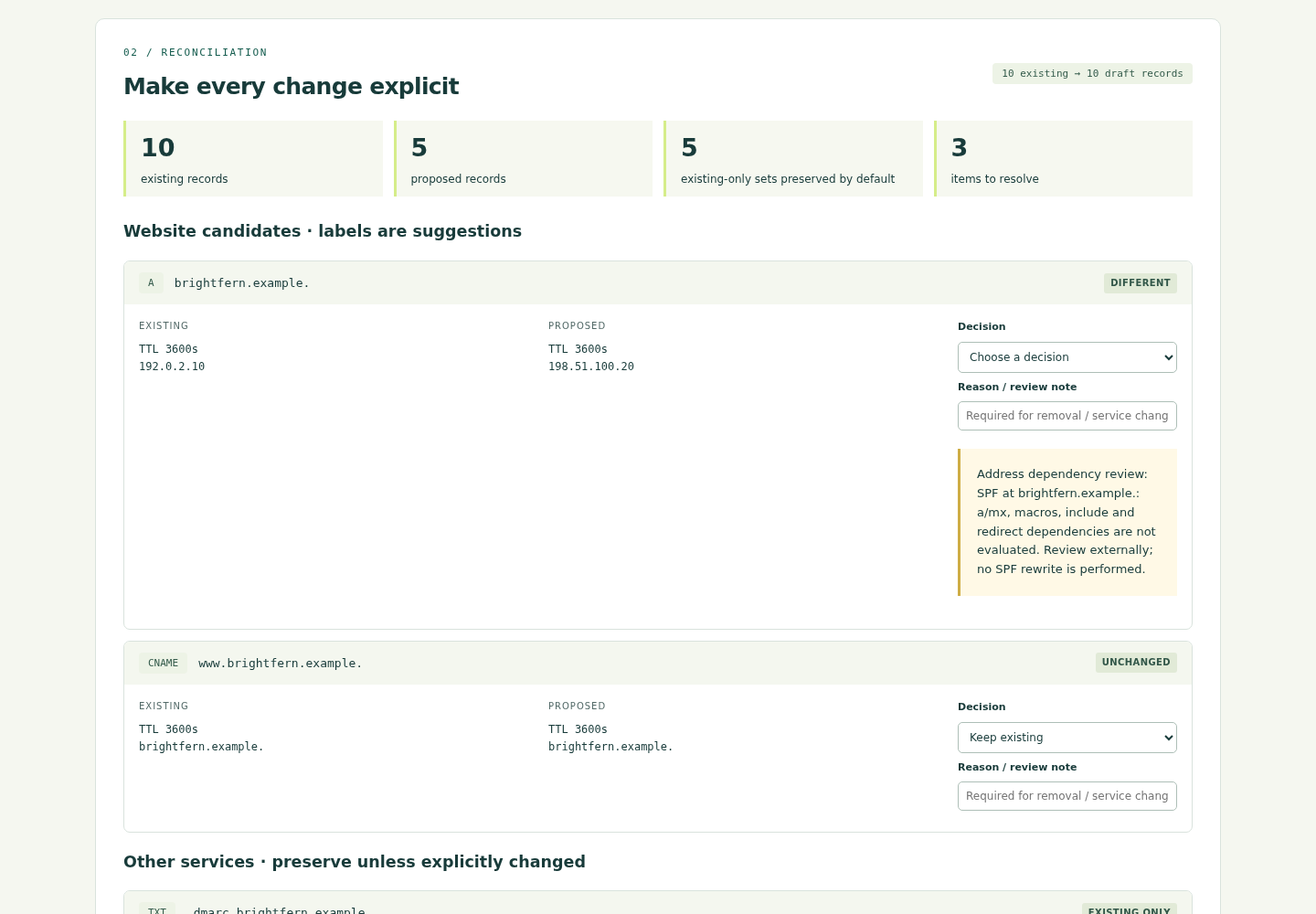
For agency technical leads and DNS operators preparing a change to one domain. Existing-only records stay selected for preservation. Review website changes alongside MX, SPF, DKIM, DMARC and other supported service records; record reasons for service changes and removals. The app reports local address dependencies and unresolved choices. Save a project to reopen, or compare a fresh export with the candidate to find missing, changed and unexpected records.
What is in your download
- ZoneHandoff 1.0.0 local Python/browser app, bundled parser, source, licence and dependency notices.
- Illustrated manual with actual screenshots, fictional Brightfern Studio zone files and an expected candidate.
- Save and reopen projects; export a handoff ZIP with exact originals, a resolved draft candidate, printable HTML report, decisions CSV and file hashes. Unresolved drafts omit the candidate.
- Compare a fresh BIND export and download a separate parity report. One-time download; no account or subscription.
A practical example
Brightfern Studio: preserve five omitted service sets
Start with
The free ZIP includes fictional existing.zone (10 records), proposed.zone (5 records) and expected-candidate.zone. Reserved .example names and documentation addresses are used; the mail strings are not deployable settings.
Get this result
A draft with 10 records in 9 RRsets, apex A 198.51.100.20, nameservers ns1.new.example. and ns2.new.example., and SOA serial 2026100202. Existing mail and CRM data remain. Original inputs are preserved byte for byte. Fresh comparison gives zero differences, or exactly one missing MX RRset after the MX line is removed.
Free illustrated manual, screenshots and fictional BIND examples (app not included)
Examples use fictional or synthetic data. Follow this example step by step.
From two exports to a clear handoff
Actual screens from ZoneHandoff 1.0.0 in Chrome on Linux, using the fictional Brightfern Studio files included with the guide.
Compare records
Review complete record sets. Existing-only service records stay selected for preservation. View full size Review the handoff
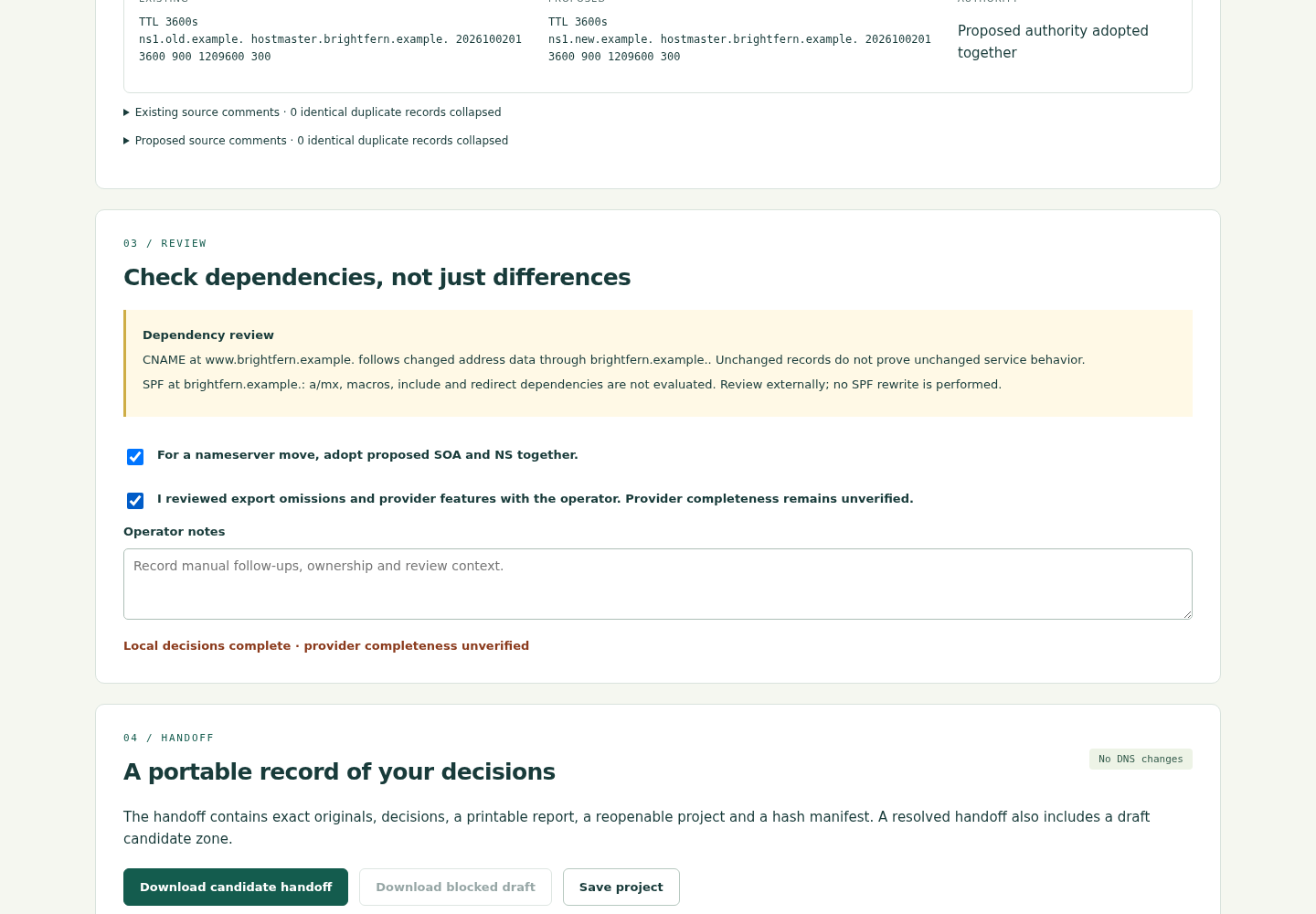
Resolve decisions and read dependencies before downloading. Local completion does not certify live services. View full size Find an omitted MX
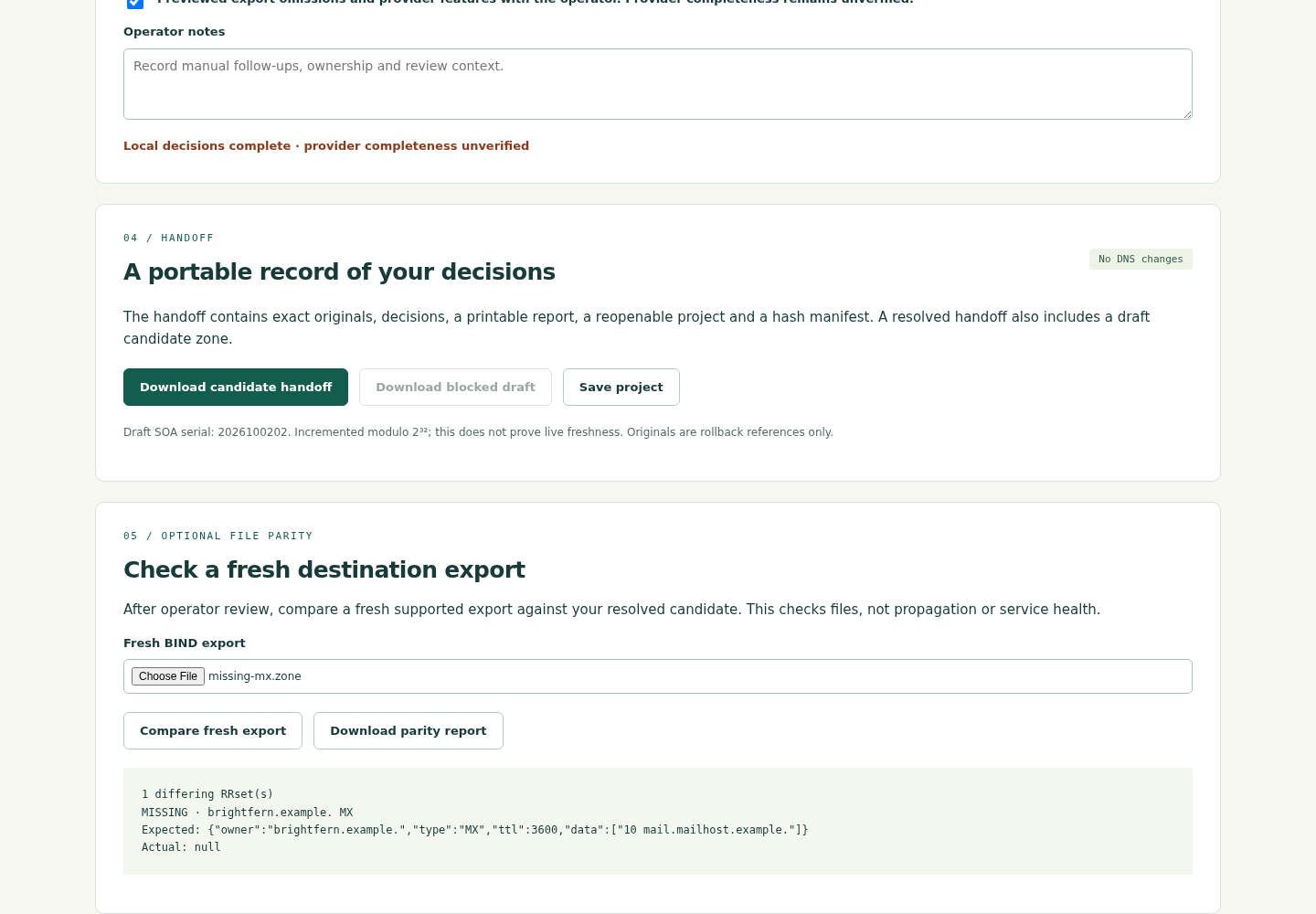
Remove the MX line from a copy of the expected candidate: the fresh comparison reports exactly one missing set. View full size
How it works
Load complete exports
Compare existing and proposed files for the same domain, or start with the fictional example.
Review each choice
Keep services, decide changes and read dependency notices and unresolved items.
Save the handoff
Download originals, a draft candidate and a printable decision report; save the project to reopen.
Before you buy
- Linux with Python 3.10+ and Chrome. Tested on Linux x86-64 with Python 3.10.12 and Chrome 152; other environments are unverified.
- Extract the entire
ZoneHandoff-1.0.0.zip. The parser is bundled: no pip install or internet connection is needed at runtime. - Complete UTF-8 BIND exports for one domain, including SOA and apex NS. Up to 2 MiB and 5,000 records per file; supported types only. Do not treat partial zone fragments as complete exports.
Extract the whole ZoneHandoff-1.0.0.zip on Linux. Open a terminal in the extracted folder and run python3 start.py with Python 3.10 or later. Keep the terminal open and use the local address it prints in Chrome. The parser is bundled; no pip install, internet connection or account is needed to run the app. First choose Load fictional example, follow the guide, and download the handoff. Tested with Python 3.10.12 and Chrome 152 on Linux x86-64.
Compatibility & limits
Complete supported UTF-8 BIND exports of the same domain are required: up to 2 MiB and 5,000 records per source. Supports A, AAAA, CNAME, MX, TXT, SRV, CAA and apex NS/SOA. Refuses DNSSEC, delegations, wildcards, unknown record types and provider-specific markers; conservative marker detection can also refuse quoted values. Local file preparation only: the app does not query or change DNS, verify provider completeness, certify email or test live services. Provider imports, other operating systems and browsers remain unverified. A generated SOA serial is a draft successor, not proof of live freshness. Original files are references, not ready-to-deploy rollback zones.
Get ZoneHandoff
Perpetual use of the purchased version on your devices for personal or internal commercial work. Keep reasonable backups and modify your own copy; do not redistribute or resell original proprietary code. Third-party licenses and any existing preview permissions retain their rights.
Before payment, save the private recovery code shown by checkout. After Paddle confirms payment, use it to download your ZIP or return for it later. No subscription, future update or email delivery is promised. See the illustrated steps.
$29 USD · once
Buy download