KupalaKit · Offline floral workshop planner 1.0.0 · Chrome on Linux
From booked seats to prepared flower kits.
Plan flower kits from workshop seat counts, round the order to whole bunches and prepare session buckets, labels and recipe cards. Keep revisions when bookings or deliveries change.
You teach a flower workshop and need to turn kit recipes and session seats into an order and preparation pack.
$19 USD · one-time purchase
Continue to checkoutStep-by-step guide
No subscription. Final total and tax appear at checkout.
Work through the numbers before buying
Includes three input CSVs, a written guide and expected figures. The app and full illustrated manual are in the paid package.
- Count every set: Include participant seats, rounded-up spare sets and tutor demos in the order.
- Prepare each session: Read seat buckets, spares and demo stems, and the bunches to open.
- Keep the changed plan: Replan cancellations, extra bookings and short deliveries as numbered revisions.
What it helps you do
For floral-workshop tutors preparing up to six sessions. Enter stems per seat, spare and demo sets; freeze a whole-bunch order, prepare session allocations and keep numbered revisions for later changes.
What is in your download
- Single-file offline browser app
- Illustrated English manual with 11 actual screenshots
- Original Willow Lane CSVs, three-revision example project and expected results
- Exports: order and bucket CSVs, bunch-break steps, printable prep sheets/labels/recipe cards, ready ZIP and editable project
A practical example
Willow Lane posy day — original fictional workshop
Start with
K1 Garden posy uses GR 3, SR 5, SN 3, EU 4 and WX 5. K2 Petite posy uses SR 3, EU 2 and WX 3. Morning: 10 K1 seats plus one demo. Afternoon: six K1 and four K2 seats. One spare set per five seats, rounded up by kit/session. Garden rose bunches contain 12; the others contain 10.
Get this result
R1 needs GR/SR/SN/EU/WX 63/120/63/94/120: order 6/12/7/10/12 bunches. R2 needs 57/113/57/88/113. R3 needs 57/113/69/88/95, leaving 15/7/1/12/5. A shortage of 13 waxflower before the substitution blocks approval; a proposed two-bunch top-up is not received stock.
Free hand-worked guide, three CSV inputs and expected results (no app)
Examples use fictional or synthetic data. Follow this example step by step.
From seats and stems to a revised workshop plan
Actual KupalaKit screens in Chrome on Linux. Willow Lane is an original fictional workshop.
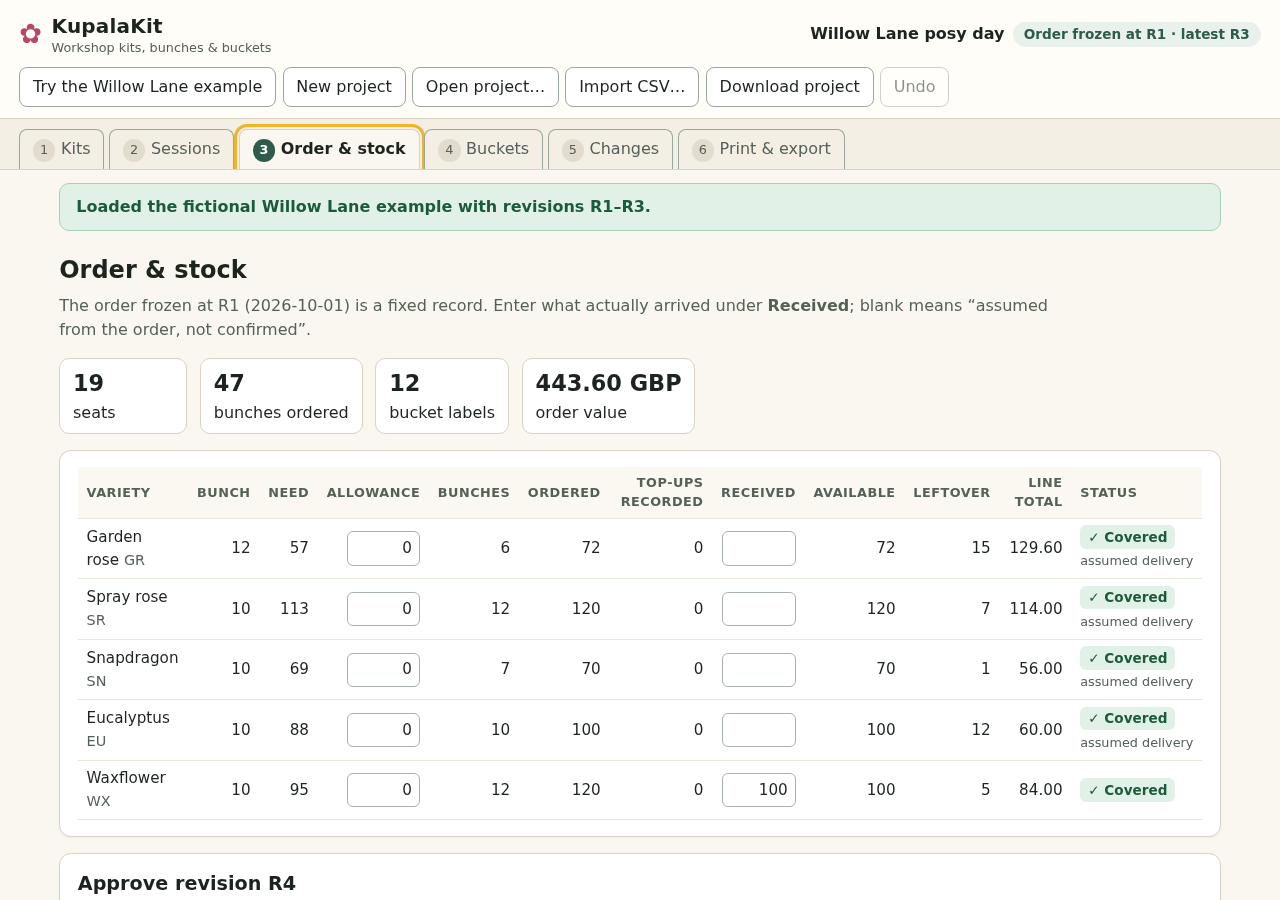
Keep the order and received stems distinct
Willow Lane R3 needs 95 waxflower stems from a delivery of 100. The original order remains 120. Blank Received cells are assumed deliveries, not confirmed stock. View full size Prepare the two sessions
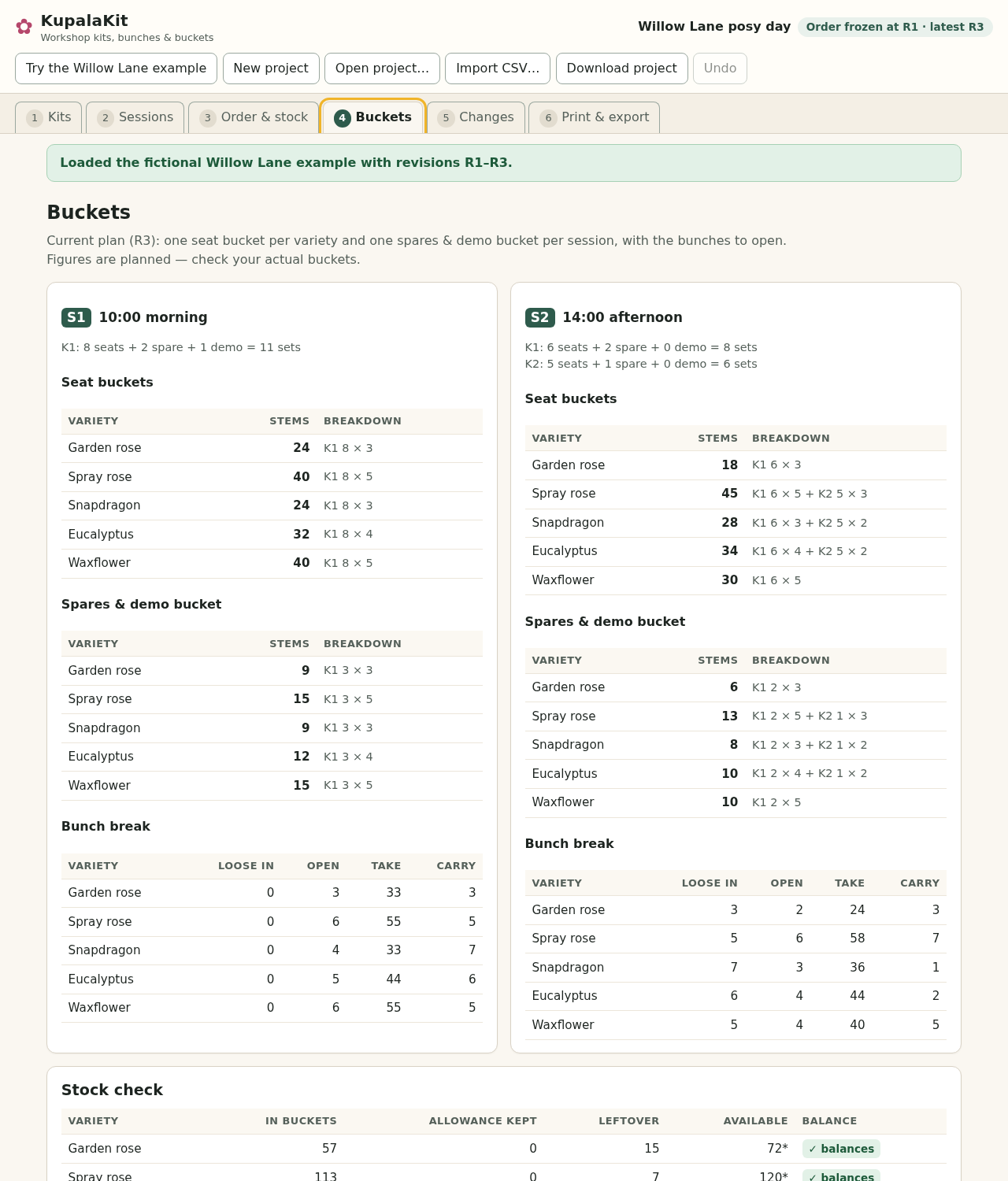
Seat buckets, a combined spares-and-demo bucket and bunch-break steps for each session. All quantities are planned; check the actual stems. View full size Replan after cancellations and a late booking
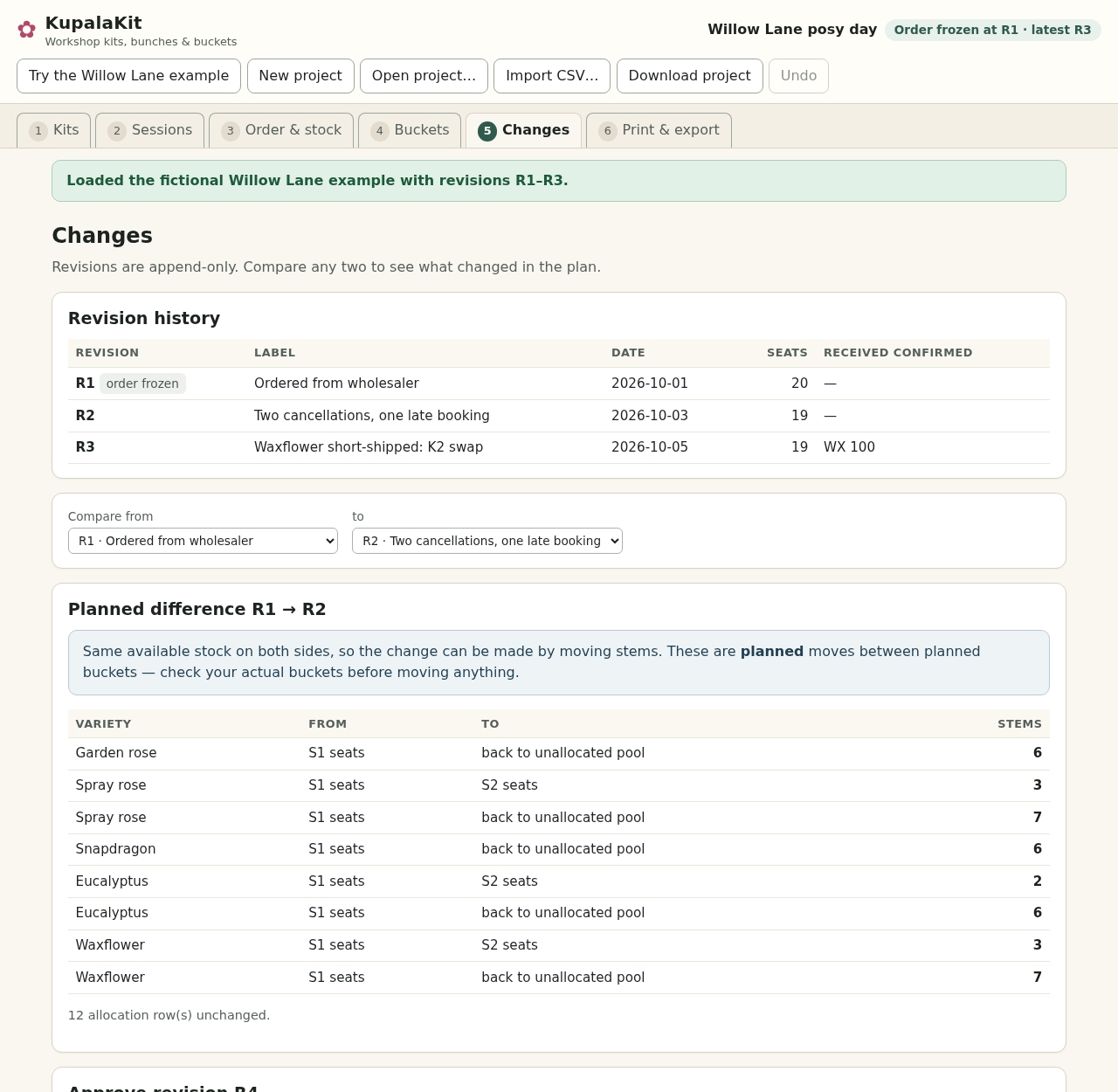
R1 to R2 keeps the same available stock. The plan transfers 3 spray roses, 2 eucalyptus and 3 waxflower stems from morning seat buckets to afternoon seat buckets. View full size Catch a short delivery before approval
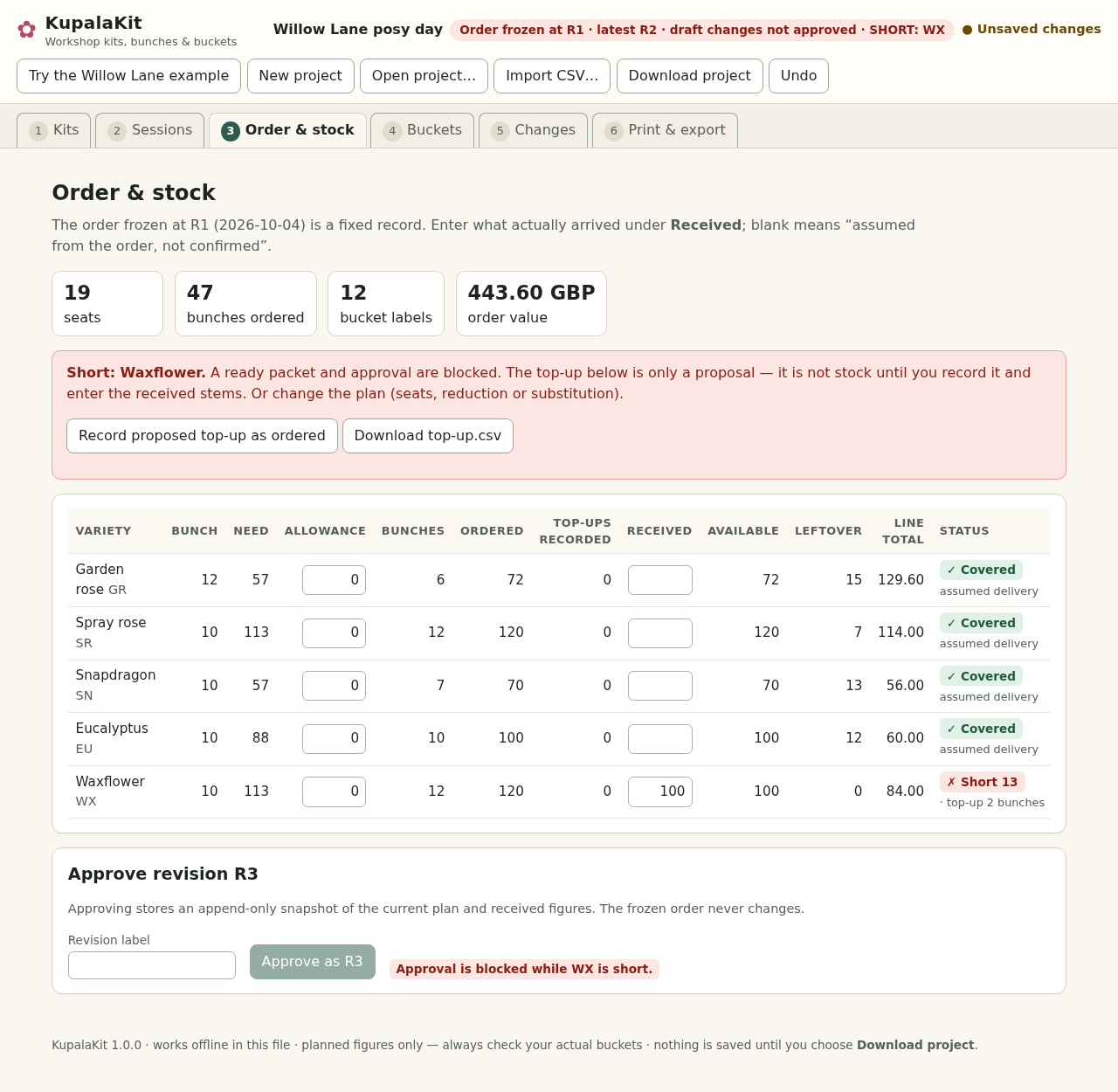
With only 100 waxflower stems received against a need of 113, approval and the ready packet are blocked. Two proposed top-up bunches are not received stock. View full size Use a revised plan when stock changes
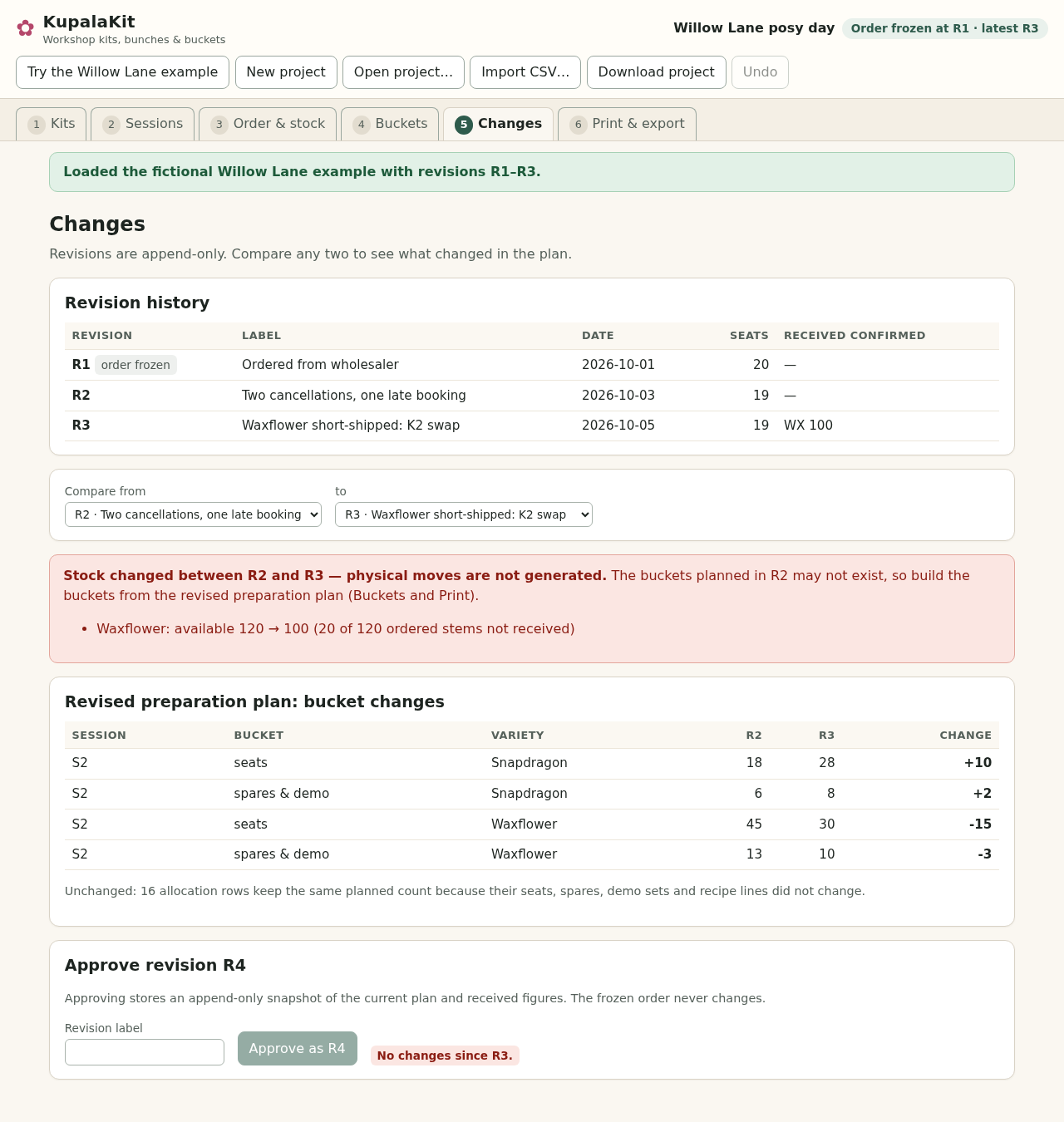
R2 to R3 changes received stock and the Petite posy recipe. KupalaKit shows allocation changes and does not generate a move list. View full size
How it works
Enter the class
Add varieties, recipes, seats and spare/demo sets.
Check the stems
Freeze the order, enter received quantities and resolve shortages.
Prepare and save
Read session buckets, print the pack and download the project.
Before you buy
- Desktop Google Chrome; checked in Chrome 152 on Linux.
- Extract the buyer ZIP into a folder you own and open KupalaKit.html in desktop Google Chrome. The app is one local HTML file; no installation, account, server or internet connection is required.
- Your kit recipes, stems per bunch, session seats, spare/demo policy and actual received quantities.
- A4 or US Letter printing at 100% with Default margins; check a test page on your printer.
Compatibility & limits
Designed for desktop Chrome on Linux with A4 and US Letter layouts. Other browsers and operating systems are unverified. Desktop authoring is recommended; narrow tables scroll sideways. Physical printing is unverified. Up to 60 varieties, three kits with 20 recipe lines each, six sessions and 200 total seats. Each session/kit allows 0–60 seats and 0–10 demo sets. Recipe lines use 1–99 whole stems. Bunch sizes are 1–500; allowances are 0–500 stems per variety. Spare sets round up separately for each session and kit, with none for zero seats. Every seat, spare and demo of a kit receives the same recipe. The R1 order keeps its original quantities, bunch sizes and prices. A blank Received cell assumes original ordered stock; it does not confirm delivery. Recorded top-ups do not add available stock until received stems are entered. Historical revisions show only top-ups recorded before that revision was approved. Received cannot exceed original ordered stems plus recorded top-ups. A shortage blocks approval and the ready packet. Draft printing remains available and is marked DRAFT. Comparisons on unchanged available stock show planned transfers between allocations. When available stock changes, the app gives a revised preparation plan without a move list. Check physical buckets yourself. This is not stock tracking, booking software, a wholesaler connection or advice on flower suitability, care or substitutions. Projects allow up to 30 approved revisions and 30 recorded top-up orders. The .kupalakit.json input limit is 4 MiB (4,194,304 bytes). CSV import is available before freezing R1: UTF-8, comma-separated, exact supplied headers, at most 512 KiB (524,288 bytes) per file. Usable data-record limits are 60 varieties, 60 recipe lines across three kits (20 each), and 18 session/kit records across six sessions and three kits; headers and ignored blank lines are excluded. Quoted commas, quotes and line breaks are supported, subject to each field's validation. Imports apply together or leave the project unchanged. IDs contain 1–16 letters, digits, hyphens or underscores, starting with a letter or digit. Names use 1–60 characters; duplicate names after Unicode normalization, case folding and trimming are refused. Prices are optional, 0–99999.99; use one currency per project: none, USD, EUR or GBP. No tax or currency conversion. Print session prep sheets, order sheets, bucket labels and participant recipe cards on A4 or US Letter. Labels are arranged in a two-column grid with up to ten labels per page. Longer combined spares-and-demo lists are split across additional labels; these label parts do not imply extra physical buckets. Participant cards form one card set per kit, not per attendee. Long recipes split into numbered parts, up to two parts per page, each repeating the whole-kit stem total. Print enough copies for your class. Content length can add pages: check every page in print preview. Keep Chrome margins at Default and scale at 100%. The ready ZIP supplies printable HTML, CSV and project files, not pre-rendered PDFs, and is limited to 10 MiB (10,485,760 bytes), including archive headers. Choose Download project explicitly to save. Download project and the ready packet validate the serialized project with the same rules used when reopening it. Invalid text remains in the draft for correction and is not downloaded. A structurally valid project with a shortage can be saved and reopened; the shortage still blocks approval and the ready packet. Draft printing remains available and is marked DRAFT. There is no autosave, account, cloud sync or browser storage. Undo reverses draft edits since the last approval. Input files are not overwritten. Runtime network access is blocked and no requests were observed in testing. The purchase licenses this version for personal or business use on your own computers. Generated printouts may be shared. Do not redistribute or resell the app or manual. The free example is shareable and includes a hand-worked guide, three CSVs and expected results; it excludes the app, the full illustrated manual and generated printouts.
Get KupalaKit
Perpetual use of the purchased version on your devices for personal or internal commercial work. Keep reasonable backups and modify your own copy; do not redistribute or resell original proprietary code. Third-party licenses and any existing preview permissions retain their rights.
Before payment, save the private recovery code shown by checkout. After Paddle confirms payment, use it to download your ZIP or return for it later. No subscription, future update or email delivery is promised. See the illustrated steps.
$19 USD · once
Buy download