Step-by-step guide
BragiWave
Check a REAPER region render against an audio delivery contract. Define the expected audio filenames, WAV format and duration in a render contract, then check the generated region files against it.
You deliver game or app sounds as one WAV per REAPER region and want a repeatable check that every expected file exists, is fresh, has the agreed format and the exact length, before you send the delivery.
Before you start
- REAPER 7, installed and licensed separately. Checked with REAPER 7.80 on Linux using silent and synthetic test audio; macOS is not checked yet.
- A saved REAPER project whose regions match the contract, and an empty output folder.
- A contract file (JSON). The package includes a ready demo contract: app/examples/contract.demo.json.
- The purchased bragiwave-0.1.1-guide-bundle.zip download. It contains program/bragiwave-preview-20260929.zip; the program itself is unchanged from the earlier release.
Your first result
Download and extract your bundle
Buy the BragiWave bundle at /store/bragiwave/ and extract bragiwave-0.1.1-guide-bundle.zip. Then extract program/bragiwave-preview-20260929.zip into a separate folder. The app/, extension/, samples/ and docs/ paths below refer to that extracted program folder. GUIDE.html and examples/ in the outer bundle contain this manual and its practice material.
Copy it into REAPER
In REAPER choose Options › Show REAPER resource path in explorer/finder. Inside its Scripts folder create a folder named BragiWave and copy everything from the package's app folder into it. Keep the lib folder next to the scripts.
Register the actions
Open Actions › Show action list…, click New action… › Load ReaScript… and load bragiwave_panel.lua (the panel with all buttons). Optionally also load bragiwave_preflight.lua, bragiwave.lua and bragiwave_verify.lua to run the same checks directly.
Prepare the project
Create the regions the contract describes and save the project; BragiWave refuses unsaved changes. Open REAPER's Render dialog once and set the format the contract needs (for the demo: WAV, 24-bit PCM, stereo), then close it keeping the settings. BragiWave cannot choose the format for you; it checks it afterwards.
Add the contract
Copy the contract next to the saved project and name it bragiwave.contract.json; BragiWave looks for that name. If it is elsewhere, the first run asks for it and remembers the path.
Run the checks
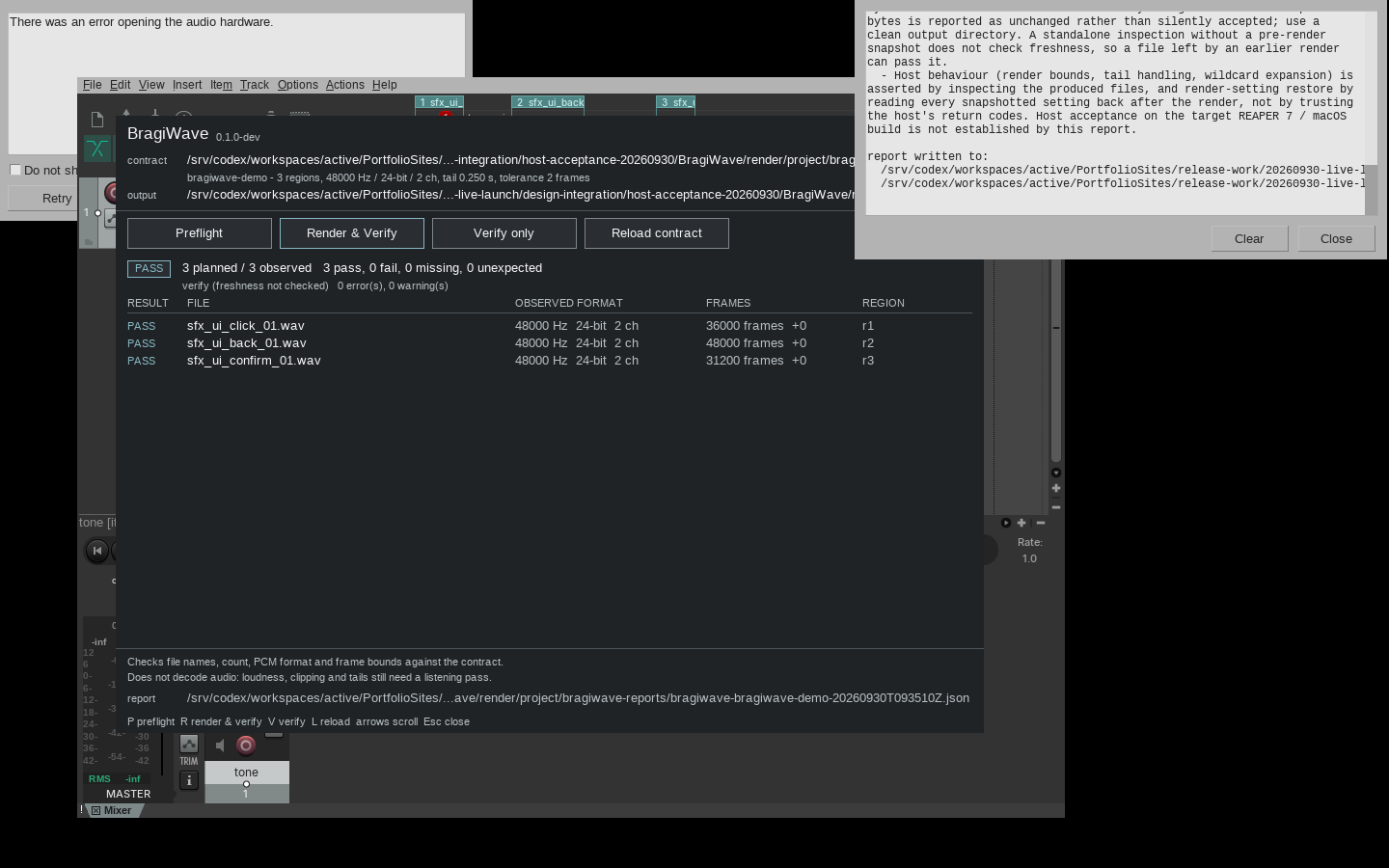
Run the panel action. The BragiWave window shows the contract and output folder, and the buttons Preflight (P), Render & Verify (R), Verify only (V) and Reload contract (L); Esc closes it. Preflight checks project, contract and output folder and changes nothing. Render & Verify first shows a confirmation (Render N region(s) from this project?) listing exactly what it sets; click OK to render.
Read the result
The panel lists each file as PASS, FAIL or MISS with its observed format and frame count. Render & Verify and Verify only also save reports in a bragiwave-reports folder next to the project: bragiwave-<contract>-<time>.json and .txt plus bragiwave-latest.json and .txt. Preflight writes no file. Verify only cannot tell an old file from a fresh one and says freshness not checked.
What it changes, and removal
BragiWave changes only REAPER's render settings for the run and puts your own settings back afterwards, also when a render fails. It remembers one preference, the last contract path. To remove it, delete the BragiWave folder from Scripts and remove its actions from the action list; reports stay in each project's bragiwave-reports folder.
A worked example
Deliver three UI sounds
Input: The package's own synthetic contract app/examples/contract.demo.json (three UI sounds, 48 kHz, 24-bit, stereo, 0.25 s tail) and examples/bragiwave/regions.csv, which lists the three regions to create and the expected result for each.
- Start a new REAPER project in an empty folder and create three regions exactly as in regions.csv: sfx_ui_click_01 from 0.0 to 0.5 s, sfx_ui_back_01 from 1.0 to 1.75 s and sfx_ui_confirm_01 from 2.5 to 2.9 s. The project may be silent.
- Save the project, set the Render dialog to WAV 24-bit PCM stereo, and copy contract.demo.json next to the project as bragiwave.contract.json.
- Run the BragiWave panel and click Preflight.
- Click Render & Verify, then OK in the confirmation.
Expected result: Preflight reports no problem. After Render & Verify the panel shows PASS with 3 planned / 3 observed and 3 pass, 0 fail, 0 missing, 0 unexpected: sfx_ui_click_01.wav 36000 frames, sfx_ui_back_01.wav 48000 frames and sfx_ui_confirm_01.wav 31200 frames, each 48000 Hz, 24-bit, 2 ch, in a render folder next to the project. A bragiwave-reports folder holds the JSON and text reports.
Troubleshooting
A file FAILs with a sample rate or bit depth mismatch.
BragiWave does not change the render format. Open REAPER's Render dialog, choose the format the contract requires (for example WAV 24-bit PCM), keep the settings, empty the output folder and run Render & Verify again.
The output folder is reported as not empty, or an unexpected file is listed.
The contract requires an empty output folder so that old files cannot pass as new. Move the old files away, then render again.
BragiWave refuses to render because the project has unsaved changes.
Save the project first. The contract describes the saved project, so the render must match it.
After switching project tabs a command runs nothing.
The panel reloads the contract and output folder for the newly active project first. Check the header, then choose the command again.
Compatibility & limits
- Checks structure and length only. It does not listen to or decode audio: no loudness, LUFS, clipping, silence or quality judgement, and no mastering or conversion.
- Checked in REAPER 7.80 on Linux with synthetic audio; macOS, real projects and audio devices are not checked yet. Work on a copy of the project.
- No automatic updates: to update, replace the contents of the BragiWave folder with the newer package.
- The original program keeps its included preview permissions: you may use it, including for real work, but not sell or redistribute it (see PREVIEW-PERMISSION.md). REAPER has its own licence.
- Checks filenames, WAV geometry and frame counts, not loudness, clipping, silence, phase or listening quality. REAPER licence separate. Linux REAPER 7.80 GUI verified; macOS and real audio unverified.
Need a hand?
Tell us the product, host application and version, what you tried, and the exact error. Contact support with a fictional example; keep private customer files and passwords out of your message.