Tool + guide bundle
BragiWave
Check a REAPER region render against an audio delivery contract.
You deliver game or app sounds as one WAV per REAPER region and want a repeatable check that every expected file exists, is fresh, has the agreed format and the exact length, before you send the delivery.
$19 USD · one-time purchase
Continue to checkoutStep-by-step guide
No subscription. Final total and tax appear at checkout.
What it helps you do
Define the expected audio filenames, WAV format and duration in a render contract, then check the generated region files against it.
What is in your download
- The original tool ZIP, preserved inside the download bundle.
- Installation and first-result instructions.
- A worked example and the included license notices.
A practical example
Deliver three UI sounds
Start with
The package's own synthetic contract app/examples/contract.demo.json (three UI sounds, 48 kHz, 24-bit, stereo, 0.25 s tail) and examples/bragiwave/regions.csv, which lists the three regions to create and the expected result for each.
Get this result
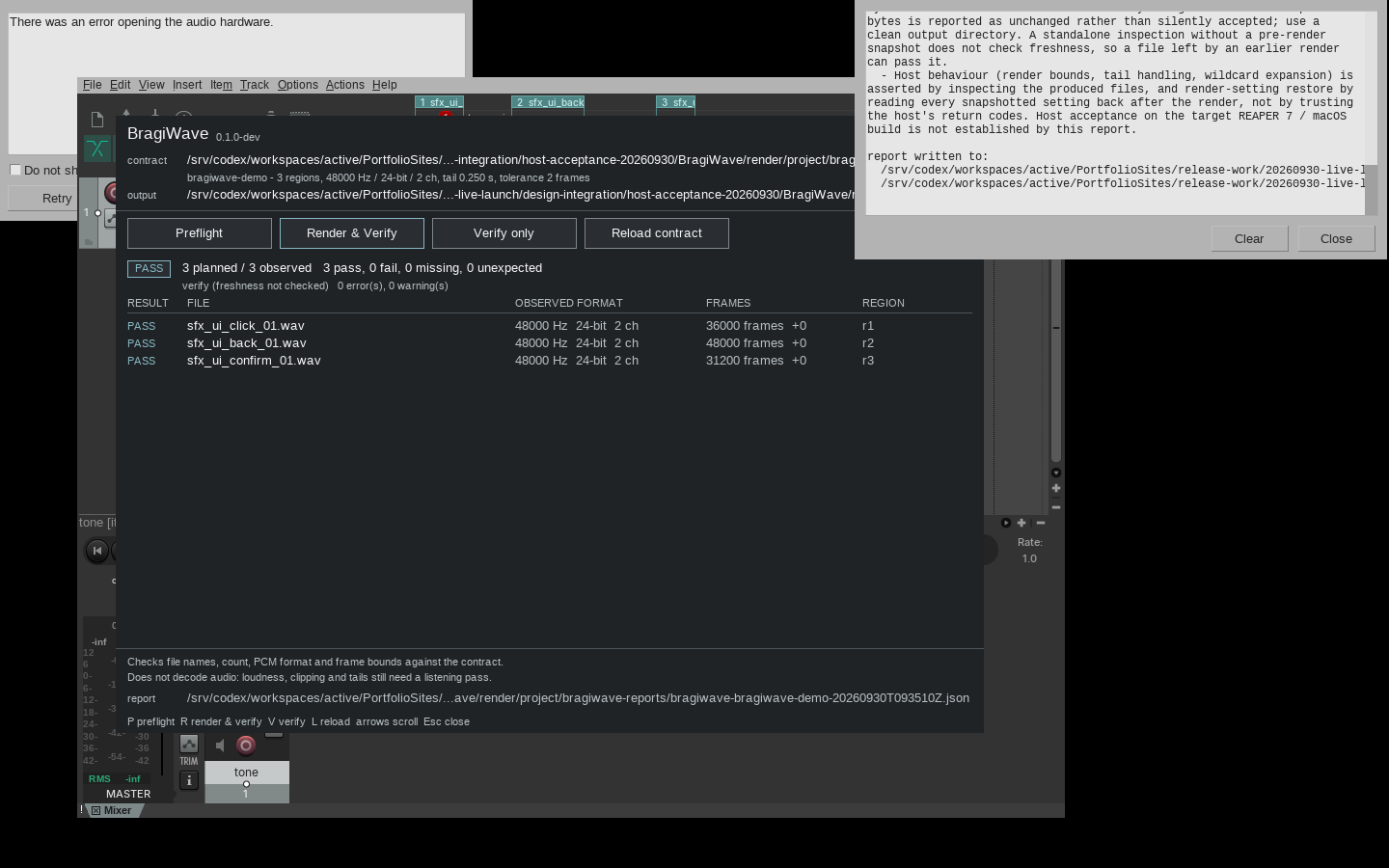
Preflight reports no problem. After Render & Verify the panel shows PASS with 3 planned / 3 observed and 3 pass, 0 fail, 0 missing, 0 unexpected: sfx_ui_click_01.wav 36000 frames, sfx_ui_back_01.wav 48000 frames and sfx_ui_confirm_01.wav 31200 frames, each 48000 Hz, 24-bit, 2 ch, in a render folder next to the project. A bragiwave-reports folder holds the JSON and text reports.
Download guide & practice files (ZIP)
Examples use fictional or synthetic data. Follow this example step by step.
How it works
Download and extract your bundle
Buy the BragiWave bundle at /store/bragiwave/ and extract bragiwave-0.1.1-guide-bundle.zip. Then extract program/bragiwave-preview-20260929.zip into a separate folder. The app/, extension/, samples/ and docs/ paths below refer to that extracted program folder. GUIDE.html and examples/ in the outer bundle contain this manual and its practice material.
Copy it into REAPER
In REAPER choose Options › Show REAPER resource path in explorer/finder. Inside its Scripts folder create a folder named BragiWave and copy everything from the package's app folder into it. Keep the lib folder next to the scripts.
Register the actions
Open Actions › Show action list…, click New action… › Load ReaScript… and load bragiwave_panel.lua (the panel with all buttons). Optionally also load bragiwave_preflight.lua, bragiwave.lua and bragiwave_verify.lua to run the same checks directly.
Before you buy
- REAPER 7, installed and licensed separately. Checked with REAPER 7.80 on Linux using silent and synthetic test audio; macOS is not checked yet.
- A saved REAPER project whose regions match the contract, and an empty output folder.
- A contract file (JSON). The package includes a ready demo contract: app/examples/contract.demo.json.
- The purchased bragiwave-0.1.1-guide-bundle.zip download. It contains program/bragiwave-preview-20260929.zip; the program itself is unchanged from the earlier release.
Extract the inner preview ZIP. In REAPER 7 use Actions > Show action list > New action > Load ReaScript for the four app/*.lua actions; keep app/lib beside them. Save a copy of a project and edit its render contract before use.
Compatibility & limits
Checks filenames, WAV geometry and frame counts, not loudness, clipping, silence, phase or listening quality. REAPER licence separate. Linux REAPER 7.80 GUI verified; macOS and real audio unverified.
Get BragiWave
Perpetual use of the purchased version on your devices for personal or internal commercial work. Keep reasonable backups and modify your own copy; do not redistribute or resell original proprietary code. Third-party licenses and any existing preview permissions retain their rights.
Before payment, save the private recovery code shown by checkout. After Paddle confirms payment, use it to download your ZIP or return for it later. No subscription, future update or email delivery is promised. See the illustrated steps.
$19 USD · once
Buy download