Task walkthrough · StribogDeck
Find which prototype cards to reprint after a playtest
A card-text edit, a quantity increase and an internal designer note need different actions. Compare the version you printed with the next version, then separate the new copies to print from the old copies to remove.
A Perunlight workflow for StribogDeck, our paid offline card-list comparison tool. Written with AI assistance and checked against the free fictional Ember Orchard pack, an independent CSV ledger and the accepted app review in Chrome 152 on Linux. This is an invented prototype, not a customer case study. Published .
Start with the version you actually printed
Ember Orchard v0.7 contains 24 distinct card rows and 38 printed copies. Its v0.8 export contains 25 rows and 39 copies. A one-copy difference in the total does not mean that printing one card will update the deck: several old cards have changed or disappeared.
- Extract the free ZIP and open manual/index.html.
- Open examples/ember-orchard-v0.7.csv and ember-orchard-v0.8.csv in a text editor. Their fields are id, name, type, cost, qty, text and notes.
- Inspect example-output/print-and-pull.html and patch-notes.html. These saved results can be read without the app.
- Find EO-02, EO-04 and EO-05 in both inputs. They show three different cases: an extra copy, a printed-field change and an internal-note change.
Previous printed deck: 24 card rows · 38 copies
New deck:              25 card rows · 39 copies

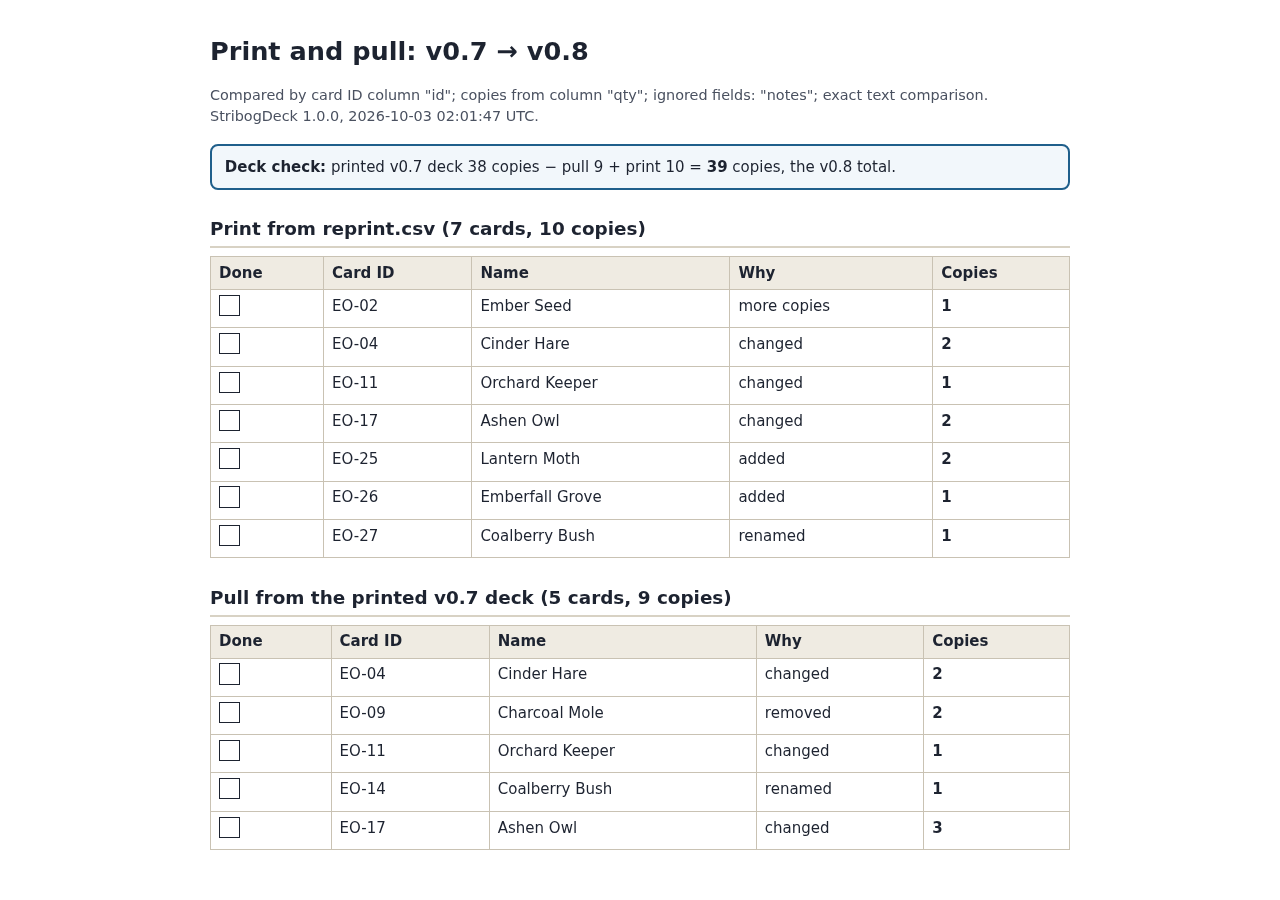
Reprint: 7 card rows · 10 copies
Pull:    5 card rows ·  9 copies

38 previous − 9 pulled + 10 printed = 39 new copies
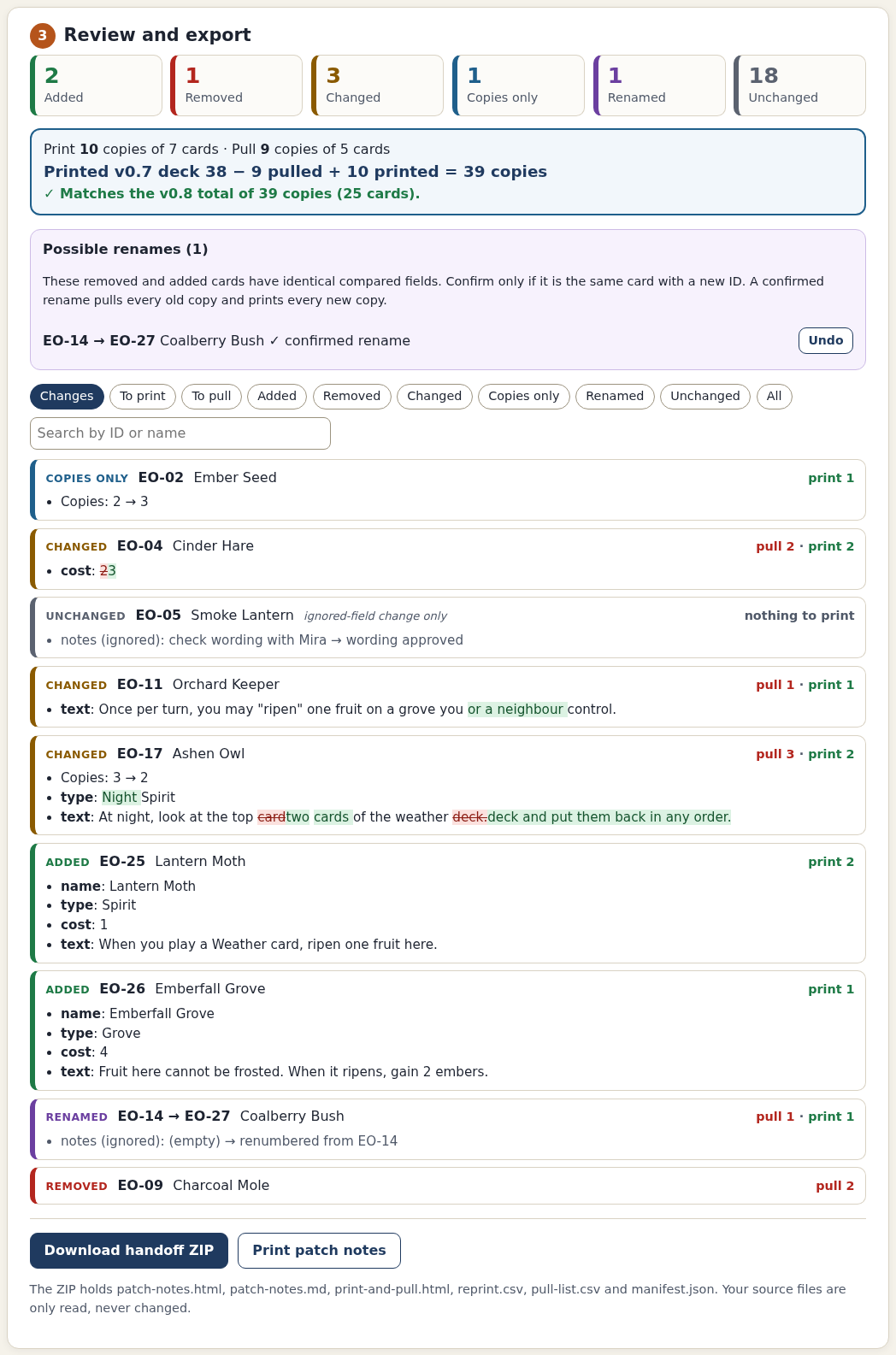
With the paid app, extract the full ZIP and open StribogDeck.html in Chrome on Linux. Choose Load the Ember Orchard example. Confirm id and qty, explicitly tick Ignore beside notes, keep Exact spacing and press Compare versions. Confirm EO-14 → EO-27 only because this fictional card was deliberately renumbered.
Distinguish a changed card from an extra copy
- EO-02 changes from two copies to three, while its printed content stays the same. Keep the two old copies and print one additional copy.
- EO-04 changes its printed cost and still needs two copies. Pull both old copies and print two replacements.
- EO-05 changes only its internal notes. Because notes was explicitly ignored, it needs no reprint.
- EO-17 changes printed fields and decreases from three copies to two. Pull all three old copies and print two new ones; the changed text makes a simple one-copy removal insufficient.
The chosen fields define what counts as a printed change. A hint beside a designer-note column does not ignore it automatically. Tick Ignore only when that field is irrelevant to your printed card. Exact spacing is the default; Ignore spacing trims values and collapses runs of whitespace.
A suggested rename is also a decision. EO-14 and EO-27 have matching compared fields, but StribogDeck pairs them only after confirmation. A confirmed rename pulls all old copies and prints all new copies. Ambiguous candidates stay added and removed.
Check the print and pull counts against the source
- In reprint.csv, find seven rows: EO-02 ×1, EO-04 ×2, EO-11 ×1, EO-17 ×2, EO-25 ×2, EO-26 ×1 and EO-27 ×1. Sum print_copies to get ten.
- In pull-list.csv, find five rows: EO-04 ×2, EO-09 ×2, EO-11 ×1, EO-14 ×1 and EO-17 ×3. Sum pull_copies to get nine.
- Check EO-02 in reprint.csv: its original qty is still 3, but print_copies is 1. Use print_copies for the reprint job.
- Match the retained source fields in each reprint row to v0.8 and each pull row to v0.7. Original text and quantity fields remain present.
- Read the settings and input/output hashes in manifest.json, then check that 38 − 9 + 10 equals the new total of 39.
Expected: 2 added, 1 removed, 3 changed, 1 copies-only, 1 confirmed renamed and 18 unchanged cards. Print ten copies and remove nine; the deck ends with 39 copies.
An independent Python CSV check reconciled this example and compared output source fields against the two originals. The app adds three fields to each output CSV: stribog_version, stribog_reason and either print_copies or pull_copies. It preserves exact cell text, so formula-like values remain formula-like; a spreadsheet may interpret them when opening the file.
Give playtesters the version changes
The handoff ZIP contains six files: patch-notes.html, patch-notes.md, print-and-pull.html, reprint.csv, pull-list.csv and manifest.json. The notes describe added, removed, edited, copies-only and renamed cards. HTML notes show the changed words, while the Markdown version is plain text you can reuse in your own workflow.
Keep both original exports and the handoff for that version transition. To reproduce the comparison later, load the same two CSVs and apply the settings recorded in the manifest. Do not assume a new designer note, spacing rule or quantity setting has no effect; compare again after changing settings.
Use it with your own card sheet
- Export the version you printed and the replacement version as UTF-8 CSV or TSV, with one card per row and stable unique IDs.
- Load both exports. Confirm the ID column, the quantity column or one-copy setting, the ignored fields and the spacing rule.
- Resolve duplicate/missing IDs, invalid quantities and malformed rows using the named spreadsheet rows.
- Inspect all changes and warnings, confirm only valid renames, and check the reconciliation before downloading.
- Prepare your card-generator input from reprint.csv using print_copies, then use the pull list against the old printed deck. Test your own generator import before relying on it.
StribogDeck 1.0.0 was verified in Chrome 152 on Linux. It accepts files up to 5 MB, 5,000 card rows, 100 columns and 10,000 characters per cell, with whole-number quantities from 0 to 999. It does not draw cards, arrange print sheets or produce PDFs. Named generator imports and physical/PDF printing were not tested.
Read the complete setup guide for delimiter choices, output details and refusal cases. The free sample demonstrates the calculation; it does not establish compatibility with every card-design or spreadsheet application.
Perunlight product
Prepare the next playtest handoff with StribogDeck
$12 USD, one-time purchase. Compare two CSV/TSV card lists, review version changes and download patch notes with exact print/pull copy counts. Includes the offline app, illustrated guide and fictional card lists.
Get StribogDeck · $12Read the setup guide
Verified in Chrome on Linux. Card rendering, named generator import and physical printing are outside the checked workflow.