Step-by-step guide
StribogDeck
Compare two exported card lists, explain the changes to playtesters and count the copies to print and remove.
Use this after editing a spreadsheet-based tabletop prototype when you have the CSV version you last printed and its replacement. Keep your card generator for drawing and printing the cards; StribogDeck supplies the change list and copy counts.
Before you start
- Desktop Chrome on Linux; Chrome 152 was verified. Other browsers, operating systems and touch devices are untested.
- Extract the buyer ZIP and open StribogDeck.html. No account, network connection or additional application is required for comparison.
- Two UTF-8 CSV/TSV exports with headers and a stable, unique card ID in each row. Use a quantity column or explicitly choose one copy per row.
Your first result
Try the Ember Orchard example
Extract
StribogDeck-1.0.0.zip, openStribogDeck.htmlin Chrome and press Load the Ember Orchard example. The previous slot shows 24 cards and the new slot 25. This is a fictional deck with 38 copies in v0.7 and 39 in v0.8.Choose which changes matter
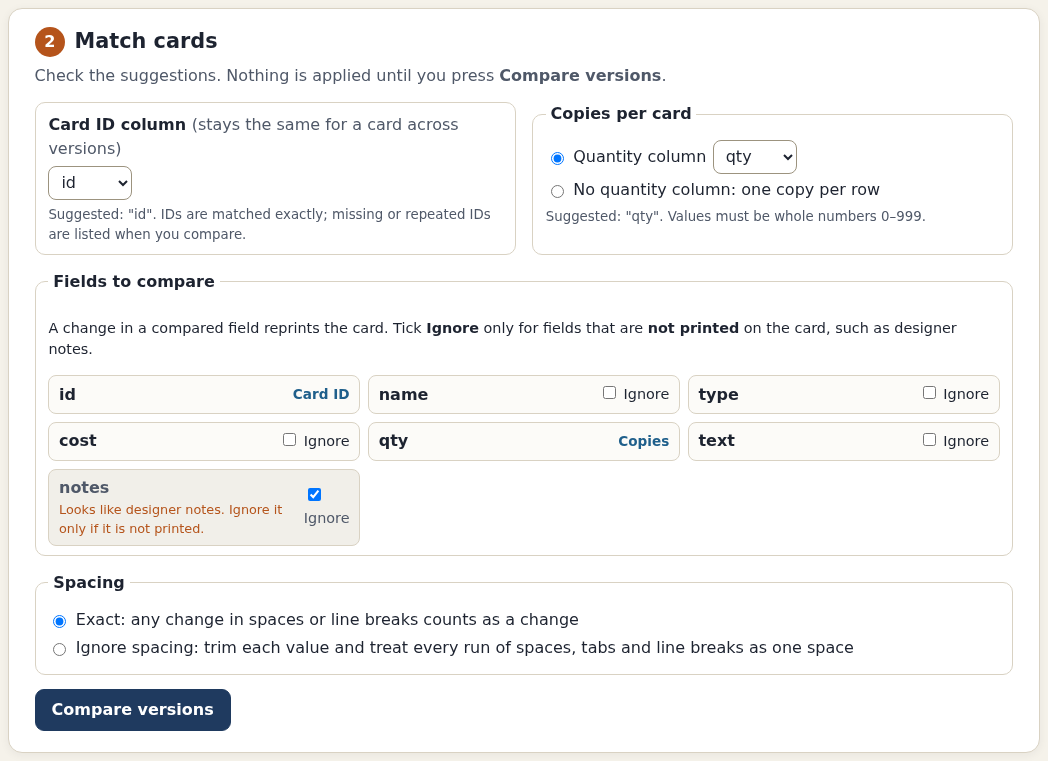
Check Card ID column
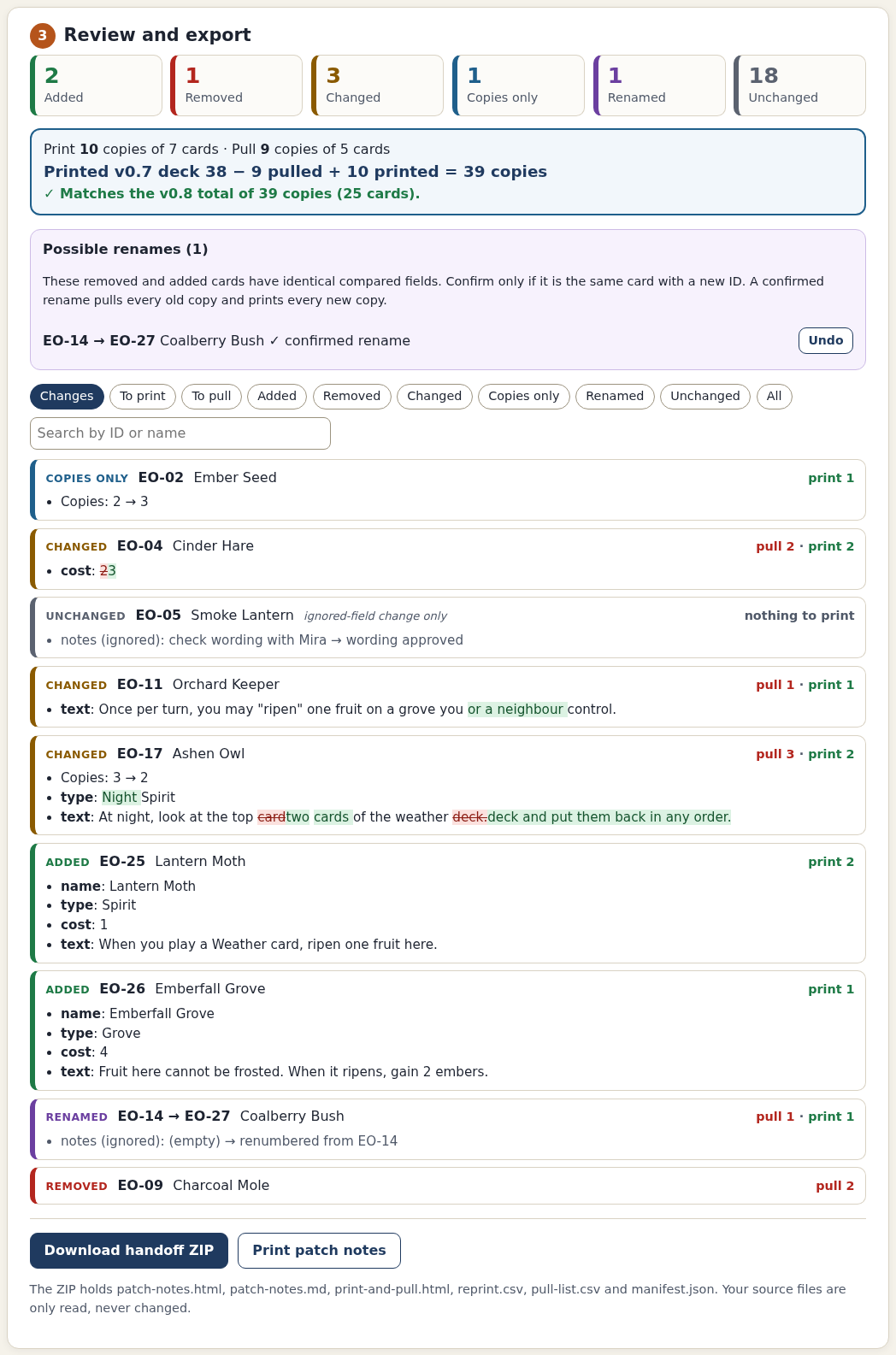
idand Quantity columnqty. Tick Ignore besidenotes; it is suggested but is still compared until you tick it. Keep Spacing on Exact, then press Compare versions. Under Possible renames, confirmEO-14 → EO-27only because the example's Coalberry Bush was deliberately renumbered.Check the expected result
Expect 2 added · 1 removed · 3 changed · 1 copies only · 1 renamed · 18 unchanged. The deck check reads 38 − 9 pulled + 10 printed = 39 copies.
EO-05needs no reprint because only its ignored notes changed.EO-02needs one additional copy even though its total quantity is three.Inspect the six-file handoff
Press Download handoff ZIP, extract it and open
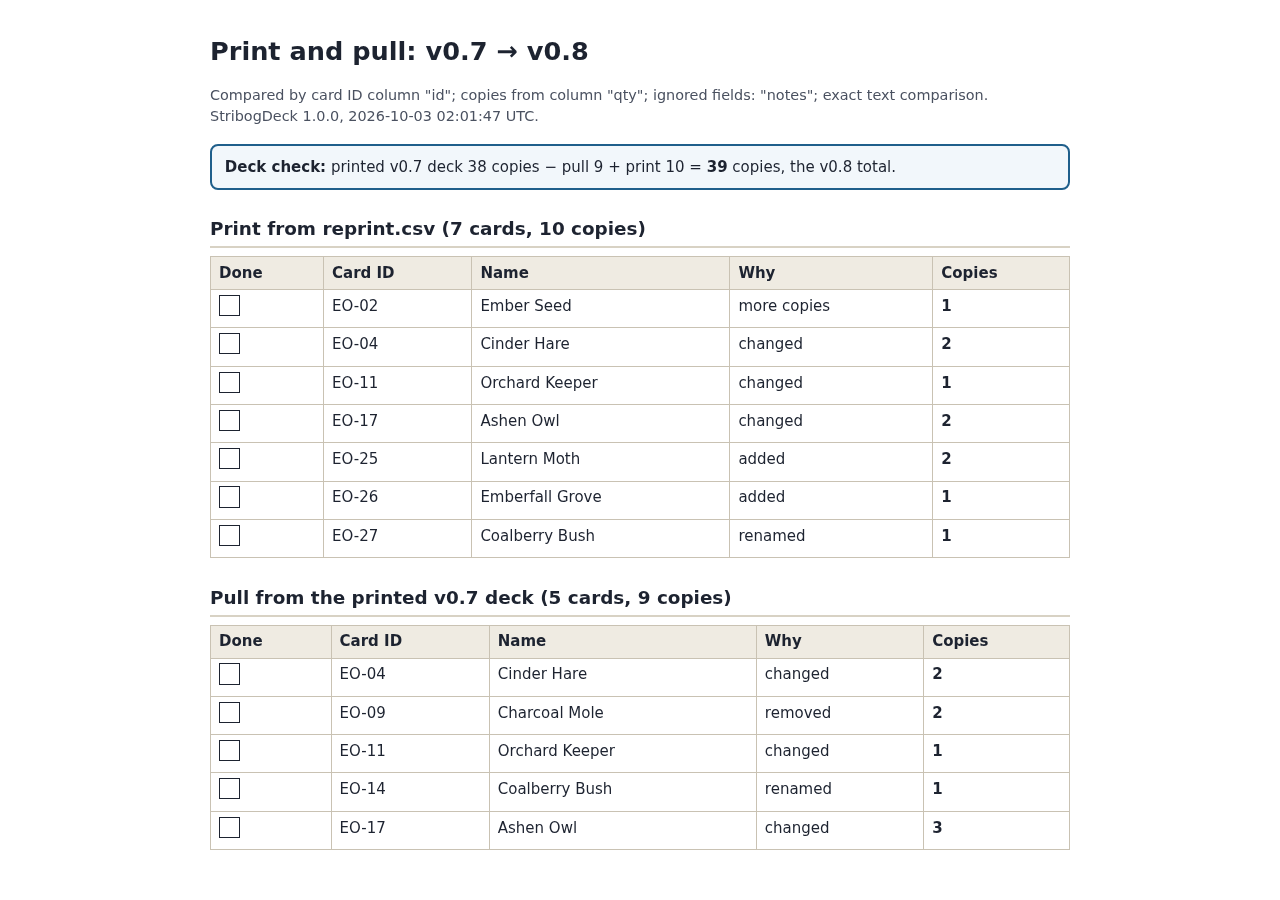
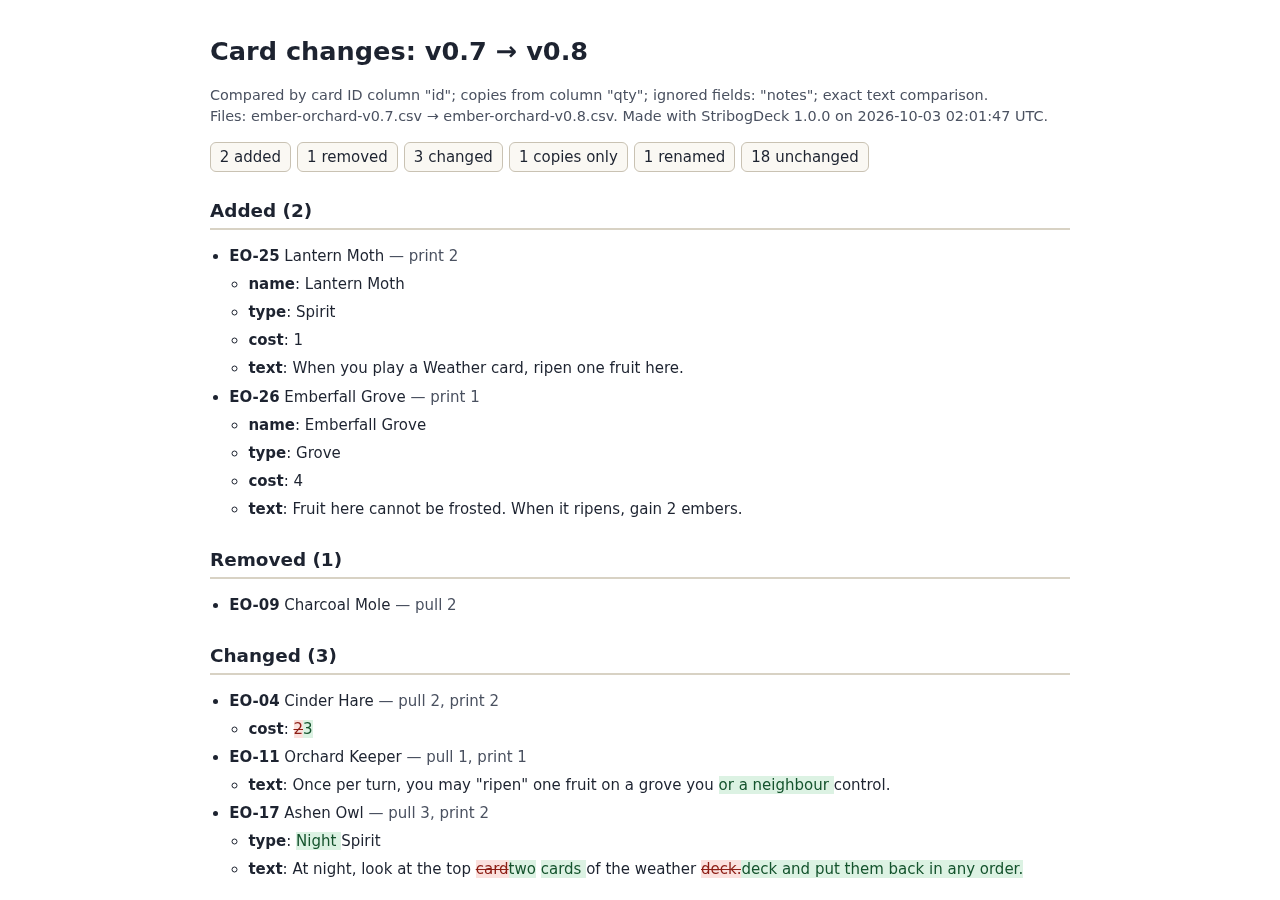
print-and-pull.htmlandpatch-notes.html.reprint.csvhas seven rows and ten copies;pull-list.csvhas five rows and nine copies. Compare them with the free pack'sexample-output/. The ZIP also includes Markdown notes andmanifest.jsonwith input/output hashes, settings, warnings and confirmed renames. Timestamps can differ.Compare your own exports
Export the version you last printed and the edited version as CSV UTF-8. Load each in its slot. Confirm the stable ID and the quantity column, or choose No quantity column: one copy per row. Ignore only fields that are not printed. Ignore spacing trims values and collapses runs of spaces, tabs and line breaks; use it only when those differences do not matter. Press Compare versions again after changing settings.
Review and use the output
Resolve any duplicate/missing ID, malformed row or invalid quantity before comparison. Confirm a rename only when it is the same card; ambiguous matches stay added and removed. Check all warnings and the reconciliation. Use
print_copieswhen preparing a reprint, not the original quantity column. Import into your particular card generator remains unverified. To repeat a comparison, reload both CSVs and use the settings recorded in the manifest. Keep your original exports and downloaded handoffs. Delete the extracted folder to uninstall.
A worked example
Ember Orchard: ten prints and nine removals
Input: Two fictional CSVs: 24 card rows and 38 copies in v0.7; 25 rows and 39 copies in v0.8. Columns: id, name, type, cost, qty, text and notes.
- Load the example, ignore notes and compare with exact spacing.
- Confirm EO-14 → EO-27 as the same card with a new ID.
- Download and inspect the patch notes, CSVs and print-and-pull checklist.
Expected result: Reprint EO-02 ×1, EO-04 ×2, EO-11 ×1, EO-17 ×2, EO-25 ×2, EO-26 ×1 and EO-27 ×1. Pull EO-04 ×2, EO-09 ×2, EO-11 ×1, EO-14 ×1 and EO-17 ×3. The result reconciles: 38 − 9 + 10 = 39. An ignored designer-note edit on EO-05 does not trigger a reprint.
From spreadsheet changes to a playtest handoff
Actual StribogDeck 1.0.0 screens in Chrome on Linux using the fictional Ember Orchard deck.
1. Confirm how cards are matched
2. Use the print-and-pull checklist
3. Share the version changes
Troubleshooting
An ID occurs twice or is missing
Use the named spreadsheet rows to correct the source. Give each card a unique, nonblank ID and export again.
A quantity is blank, fractional or out of range
Use whole numbers from 0 to 999, or explicitly choose one copy per row.
Rows have the wrong number of cells
Choose comma, semicolon or tab in the slot's Delimiter menu. Otherwise fix quoting in the exported source.
A file is rejected as UTF-16 or invalid text
Export it as CSV UTF-8. XLSX and ODS workbooks are not accepted directly.
Every card appears changed
Check the ID column, fields present in only one version, and spacing. Ignore a field only if its changes should not affect printing.
The reprint quantity looks too high
Read print_copies, not the original qty field. An unchanged card increasing from two to three copies needs only one print.
Compatibility & limits
- Chrome 152 on Linux was verified offline, including a 360 px layout. macOS, Windows, Firefox, Safari and touch operation remain untested.
- UTF-8 CSV/TSV with optional BOM, comma/semicolon/tab delimiters and LF/CRLF endings. Limits: 5 MB per input, 5,000 rows, 100 columns, 10,000 characters per cell and quantities 0–999.
- Exact ID matching. Rename suggestions require a unique one-to-one match and explicit confirmation. No fuzzy identity inference.
- Changed or renamed cards pull all previous copies and print all new copies. Quantity-only increases/decreases use the difference. Zero-copy rows are reported but omitted from print/pull CSVs.
- No XLSX/ODS editing, online sheet connection, images, card drawing, imposition or PDF generation. Import into nanDECK, Dextrous, Component Studio, Tabletop Simulator or other generators was not verified.
- Output CSVs preserve original headers, cell text, row order, delimiter, BOM and line ending, adding three metadata columns. Formula-like cell text is preserved and warned about; a spreadsheet may interpret it as a formula.
- The print action was tested through loading the notes and calling the browser print function. Physical printing and PDF output were not tested. Keyboard operation and visible focus were checked; no full accessibility conformance is claimed.
Need a hand?
Tell us the product, host application and version, what you tried, and the exact error. Contact support with a fictional example; keep private customer files and passwords out of your message.