Task walkthrough · ZoneHandoff
Compare DNS exports before changing nameservers
The new website works in a preview. The proposed DNS export has five records. The old one has ten. Before you move the nameservers, find out what those missing records do and decide what should survive.
A Perunlight workflow for ZoneHandoff, our paid local DNS preparation tool. Written with AI assistance and checked against the independently accepted ZoneHandoff 1.0.0 example on Linux with Python 3.10.12 and Chrome 152. All domains and addresses below are fictional. Published .
Get both exports and check what they leave out
Ask for a complete export from the current DNS provider and the proposed configuration from the new provider. Keep the original files unchanged. Record the domain, where each file came from and when it was exported.
A DNS scan is not a complete inventory. Cloudflare explains that its quick scan looks for common record names and can miss custom hostnames or DKIM selectors. Check the provider dashboard and the services that depend on the zone before changing nameservers. See Cloudflare’s quick-scan limits.
- List website, email, CRM, verification and other services with someone who knows the domain. A record absent from a new website setup may still be needed.
- Distinguish a provider’s BIND record export from its other settings. Cloudflare, for example, can encode proxy and CNAME-flattening behavior in export comments; those settings affect how an import behaves. See Cloudflare’s import and export documentation.
- ZoneHandoff refuses provider-specific markers, DNSSEC, delegation, wildcard and unsupported records. If it refuses an export, resolve the unsupported configuration with the responsible operator. Do not strip meaningful settings merely to make a parser accept the file.
This walkthrough covers the supported plain BIND records of one zone. It does not establish that an export contains every setting required by your provider.
Read the ten-record example before touching a real zone
Unzip the free download and open examples/README.md. The fictional Brightfern Studio files have an easy-to-check difference: existing.zone has ten records and proposed.zone has five.
- Both files contain the apex A record, www CNAME, two apex NS records and one SOA record. The proposed file changes the website address and nameservers.
- Only the existing file contains the MX record, SPF TXT, DMARC TXT, DKIM TXT and CRM CNAME.
- The intended result changes the website and authority while keeping those five existing-only services. The result has ten records grouped into nine record sets.
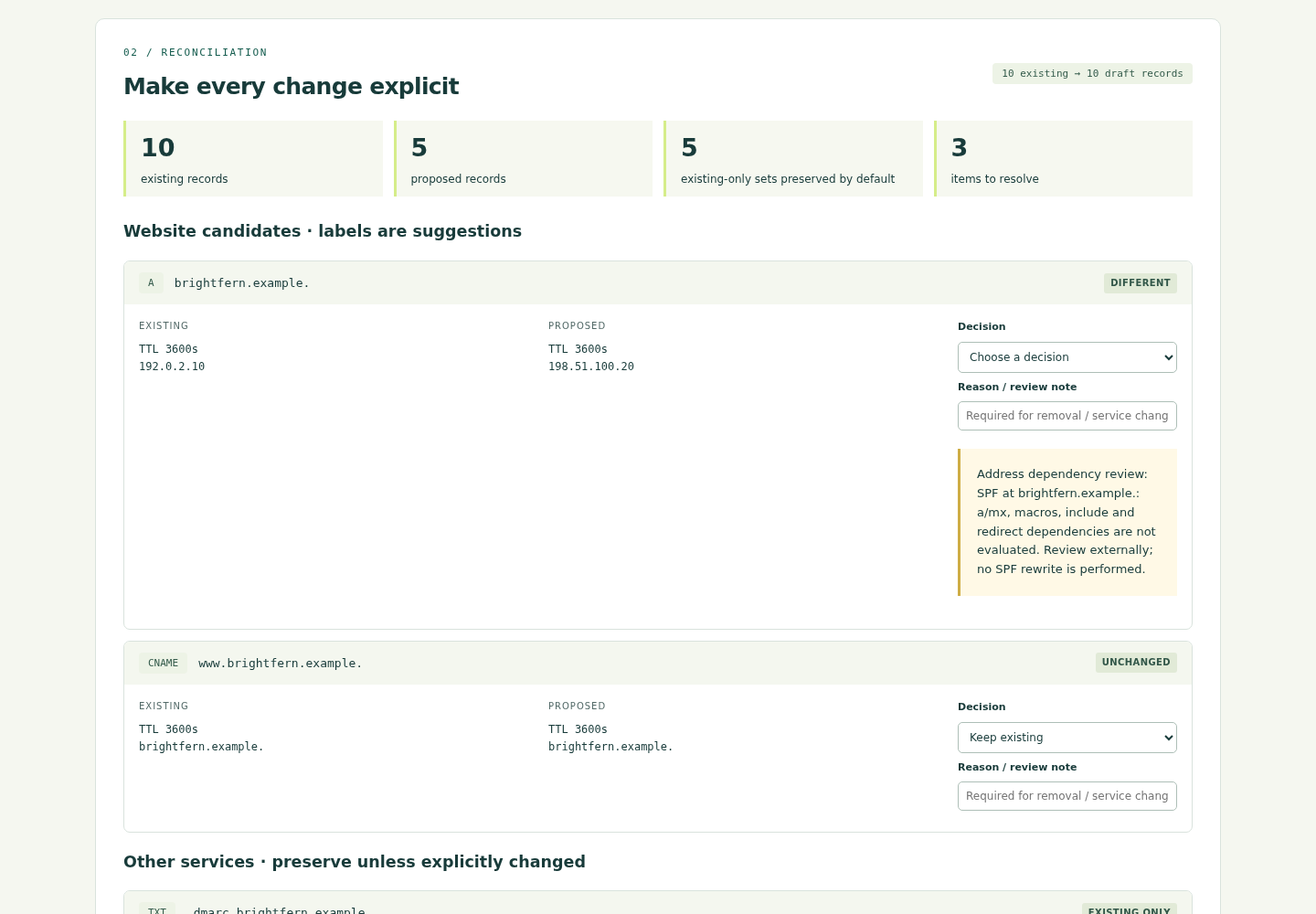
For a free text-only exercise, compare the two input files in an editor. Write down what to keep and why, then compare your list with expected-candidate.zone. The app adds grouped decisions, dependency notices and an exportable handoff for the same job.
Make the missing records an explicit decision
- In the paid app, start the local server with
python3 start.py, then open the local address it prints in Chrome. Load the two fictional zone files and read the source review. - Choose the nameserver-move mode for this example and confirm the operator’s authority decision. The NS and SOA choices are linked. A real move needs separate provider and registrar planning.
- Use the proposed apex A record and the proposed authority. Preserve all five existing-only service sets and the unchanged www CNAME. Read the notice that www follows the changed apex.
- Review every difference. If you remove a record, record a reason. A name that looks unfamiliar is a reason to investigate, not evidence that the record is unused.
Expected fictional result: apex A 198.51.100.20; NS ns1.new.example. and ns2.new.example.; draft SOA serial 2026100202. MX, SPF, DMARC, DKIM and CRM remain, along with www. TTL 3600 remains intact.
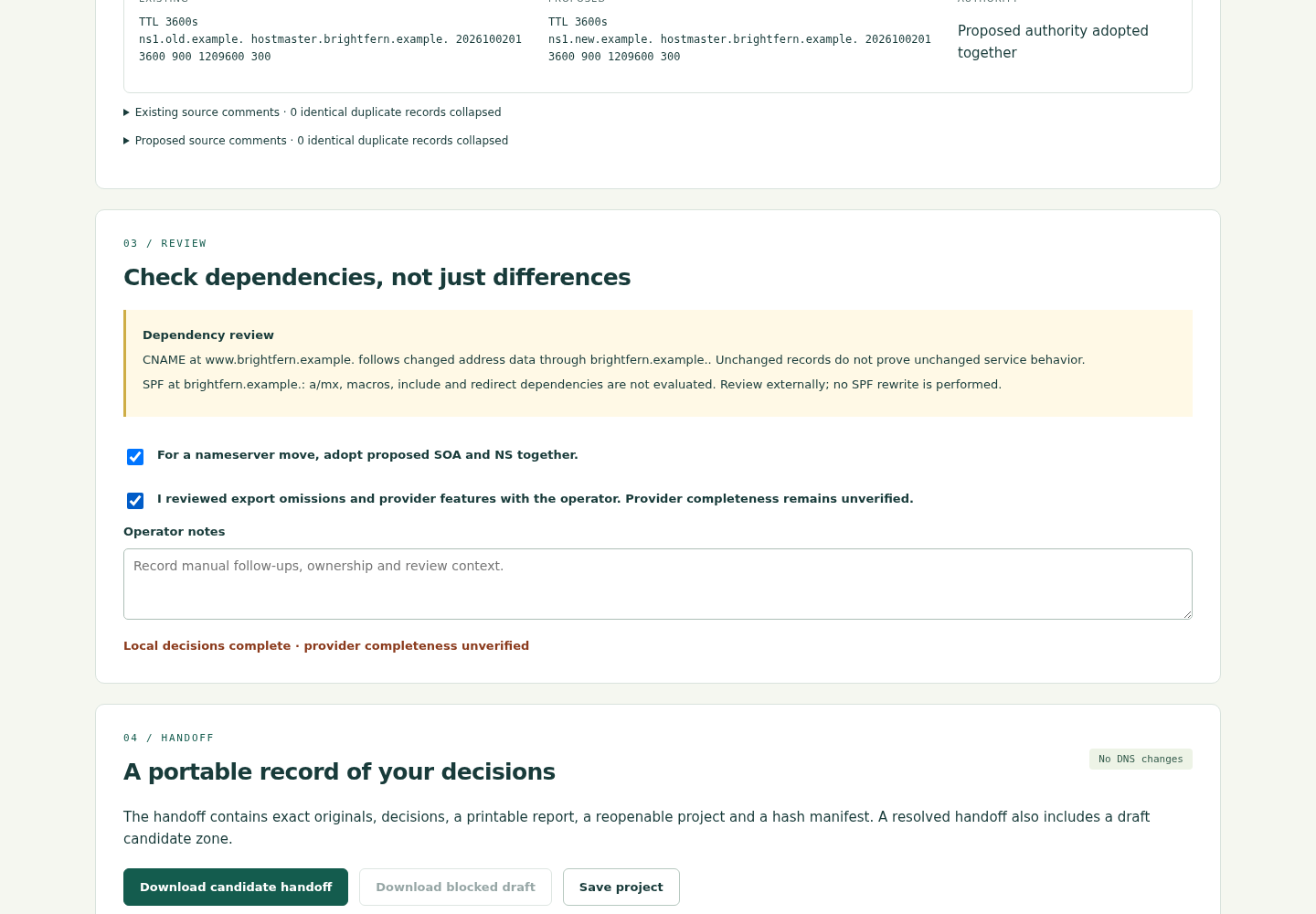
Reserved .example names, test addresses and the fake DKIM value make this example safe to share. They do not make it usable as a real domain configuration.
Save a reviewable handoff
Export the handoff after resolving the decisions. It includes the exact source files, hashes, a project file, HTML and CSV reports, and the candidate zone when the review is resolved. A blocked draft does not contain an import-ready candidate.
- Check the domain and source hashes against the files you meant to review.
- Read the candidate and the record decisions, including removals and linked authority choices.
- Save the project and reopen it to confirm that the decisions travel with the files. The app does not autosave.
- Have the responsible DNS operator validate the intended records and provider-specific behavior before any real change.
A syntax checker is one useful check. ISC describes named-checkzone as checking the syntax and integrity of a zone file. Passing that check does not confirm live DNS, provider compatibility or working email. The accepted Brightfern candidate was independently checked with BIND; a different real export still needs its own review.
Keep the originals as reference evidence. They are not automatically deployable rollback files: authority, serial numbers and provider behavior may need a separate recovery plan.
Compare a fresh export with the agreed candidate
After the responsible operator imports or recreates the agreed records, obtain a fresh complete export. ZoneHandoff can compare that file with the selected candidate and group missing, extra and changed sets. The app itself does not perform the import.
- For the fictional exercise, make a copy of
examples/expected-candidate.zone. - Remove only its single MX line from the copy. Keep the packaged expected file unchanged.
- Load the modified copy as the fresh export and run the parity comparison.
Expected result: exactly one missing MX record set. Comparing the unmodified expected candidate should show parity with the selected plan.
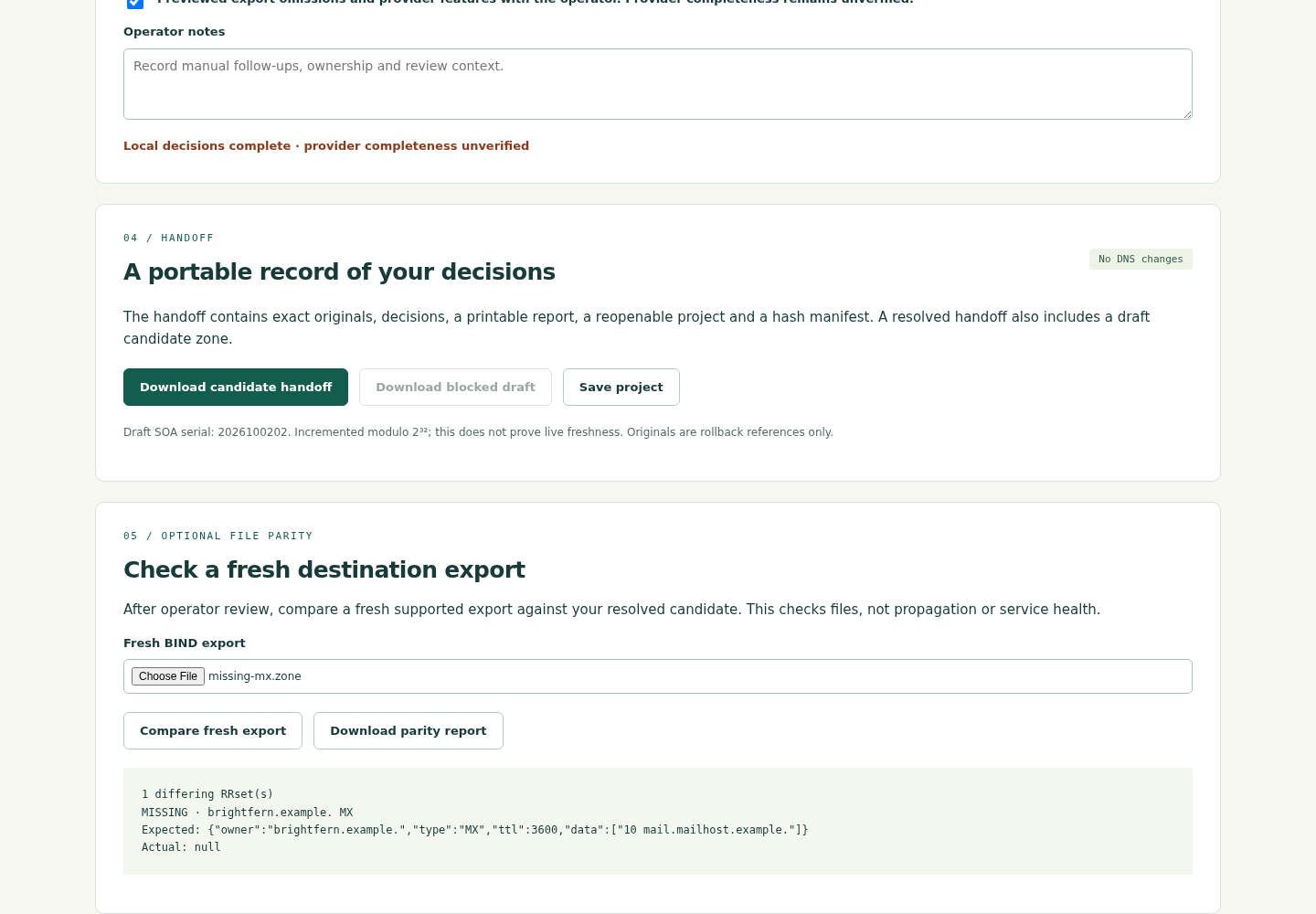
Repeat the comparison after correcting an import mistake. Then perform the provider, registrar, live DNS and service checks required by the actual migration. An offline file match cannot replace them.
Decide whether this workflow fits your files
ZoneHandoff 1.0.0 supports A, AAAA, CNAME, MX, TXT, SRV, CAA and apex NS/SOA in complete UTF-8 BIND exports. Each source is limited to 2 MiB and 5,000 records. It preserves original bytes and compares parsed record sets locally.
The verified environment is Linux with Python 3.10.12 and Chrome 152. Other systems, provider imports, live DNS results and physical service continuity were not verified. There are no live DNS queries, DNS changes, email tests or DNSSEC certification.
If your job needs wildcard records, delegated zones, glue management, DNSSEC or provider-specific metadata, this version does not cover that job. See the full setup guide and limitations before buying.
Perunlight product
Prepare the handoff with ZoneHandoff
$29 USD, one-time purchase. Run the local tool, compare supported exports, document record decisions and export the handoff. The purchase includes the app, illustrated manual and fictional examples.
Get ZoneHandoff · $29Read the complete setup guide
The free archive contains the worked example and manual, not the paid app. No DNS credentials are required by the app.