Step-by-step guide
DazhLight
Steady exposure and colour flicker across a stop-motion shot. Mark static parts of the set, preserve deliberate lighting changes, then export corrected PNG frames and a review report.
You have a numbered PNG/JPEG shot with global exposure or colour-balance flicker and can identify areas of the set that stay still.
Before you start
- Desktop Google Chrome; Chrome 152 on Linux was tested. Extract the complete buyer ZIP and open DazhLight.html.
- Keep original frames unchanged. Use opaque RGB files with matching dimensions and the documented size/colour profile.
- Choose a static, moderately lit part of the set. Export settings to keep work before closing.
Your first result
Open the worked example
Extract the buyer ZIP and open DazhLight.html. In 1 Frames, choose every PNG in example/lamp-cue-shot. Wait until all 48 frames are ready.
Load its reference areas
Return to 1 Frames, choose Load settings…, and select example/lamp-cue-shot.dazhlight.json. It defines references A/B, check box C, colour mode, a cue at frame 25 and ignored B samples at frames 30–32. Measurement starts automatically.
Compare the correction
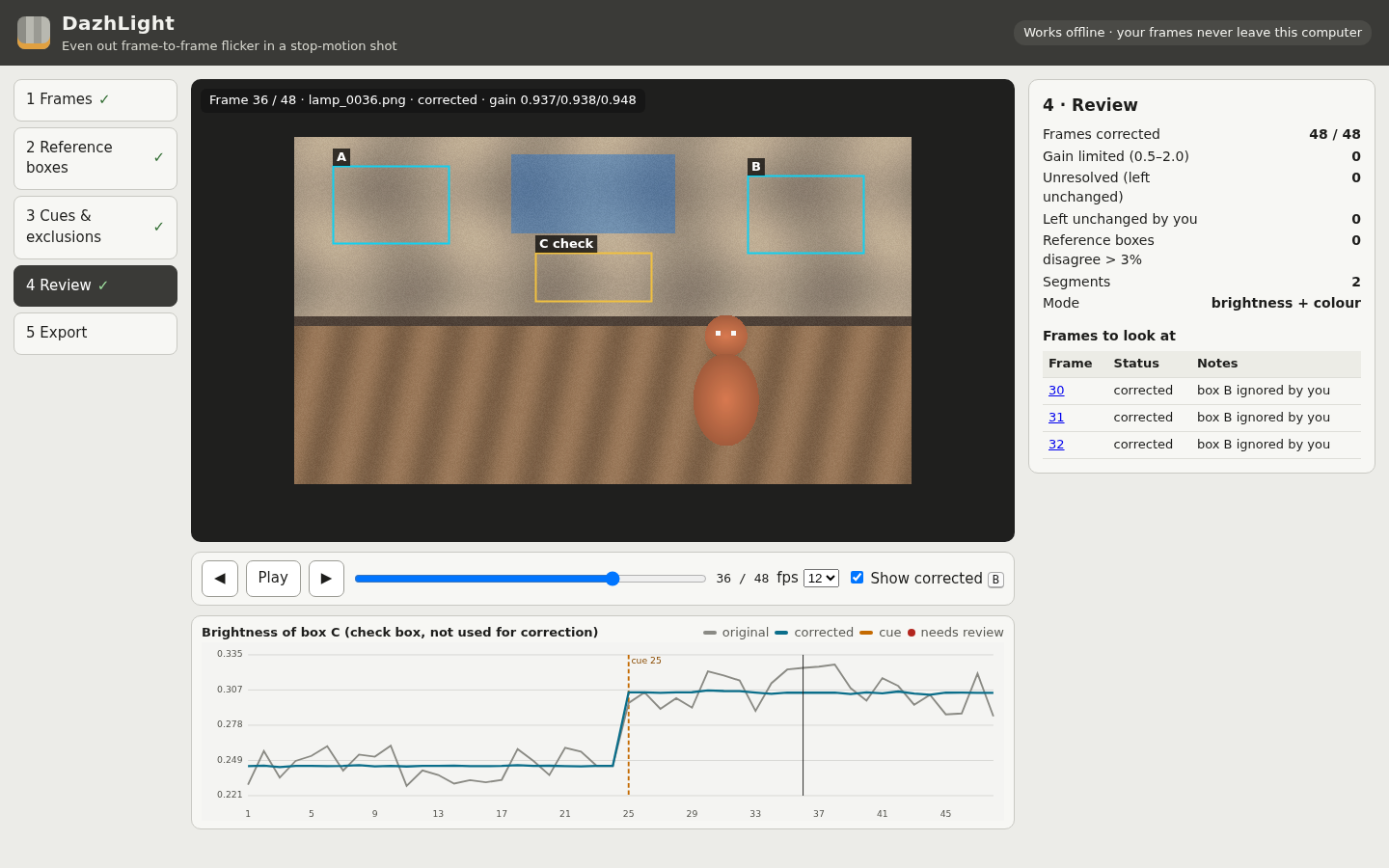
Open 4 Review. Use Play, the frame arrows and Show corrected (B). The check-region graph should be steadier within each segment and still step upward at frame 25. The sample should show 48 corrected frames and two segments.
Export a durable result
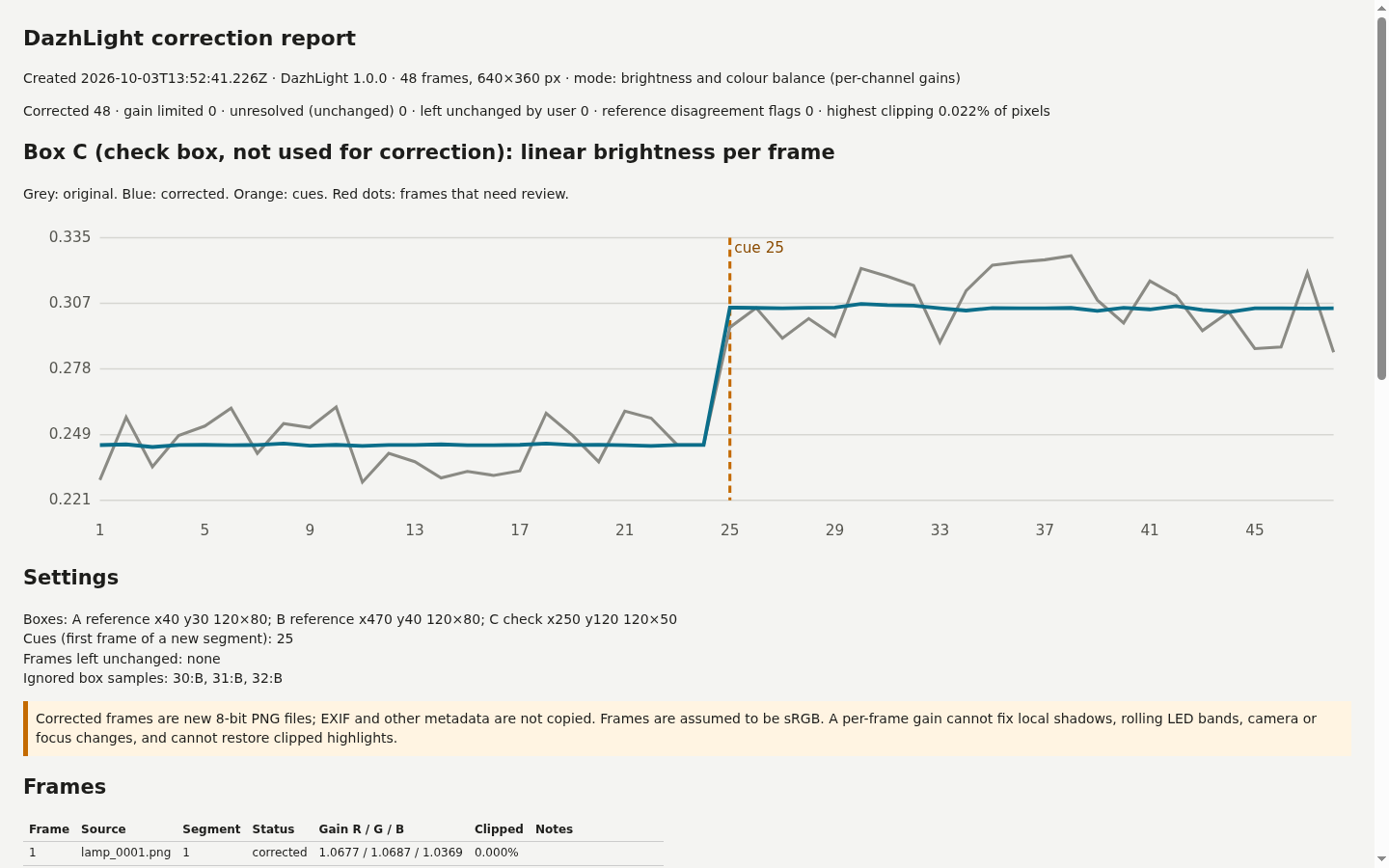
Open 5 Export and choose Export ZIP. Extract the downloaded archive. Inspect frames/ and report.html; gains.csv records the applied gains and clipping, manifest.json records input/output hashes, and settings.json preserves your choices.
Start your own shot
Keep the previous export first. Choose all frames of one new shot. Read refusals and any listed missing numbers. Numbering gaps require acknowledgement and are never filled automatically.
Place reference boxes
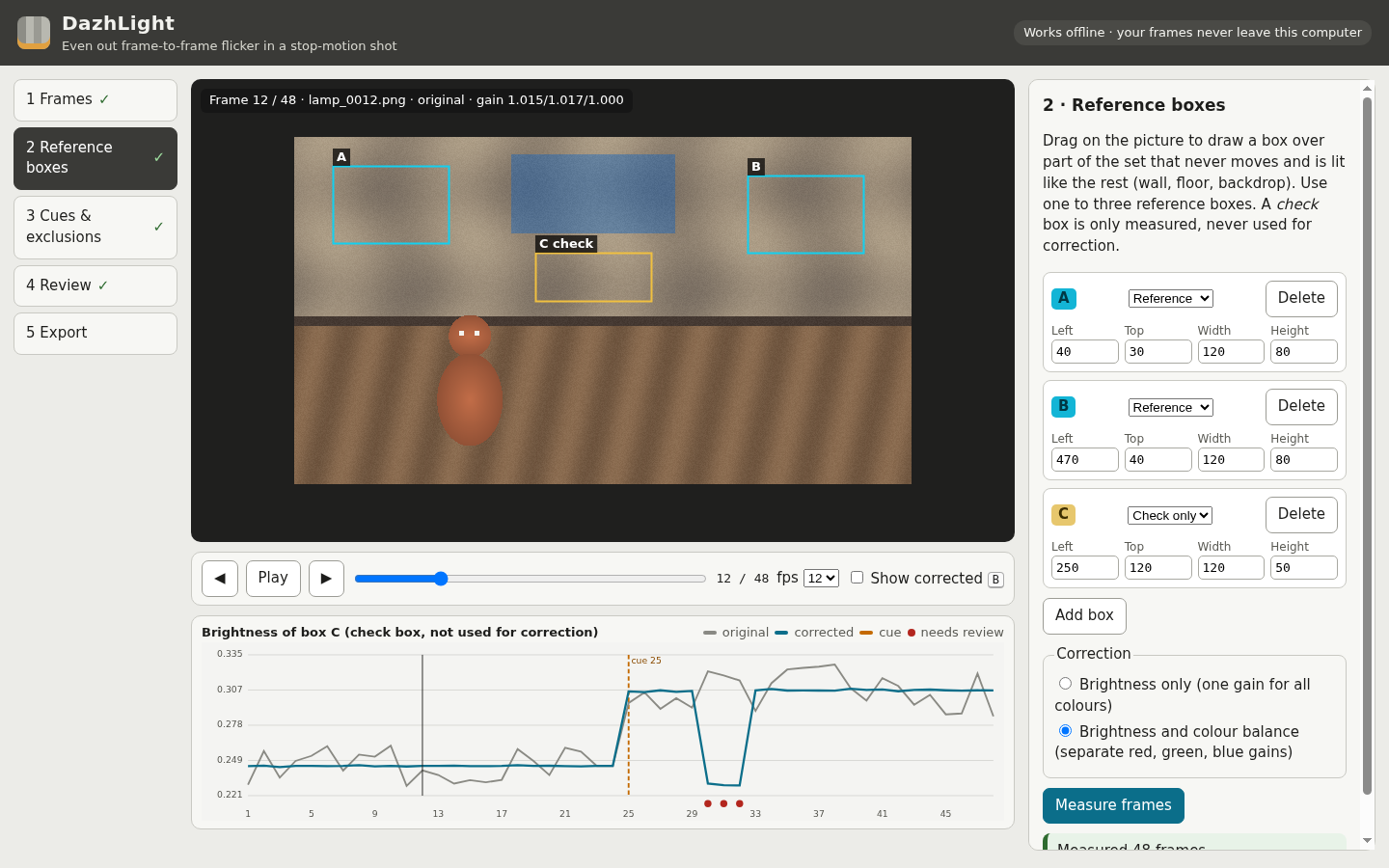
In 2 Reference boxes, drag a box on a static, moderately lit area or choose Add box and type its coordinates. Add up to three references; an optional check box measures an independent area. Choose brightness only or brightness and colour balance, then Measure frames.
Preserve lighting cues and handle obstructions
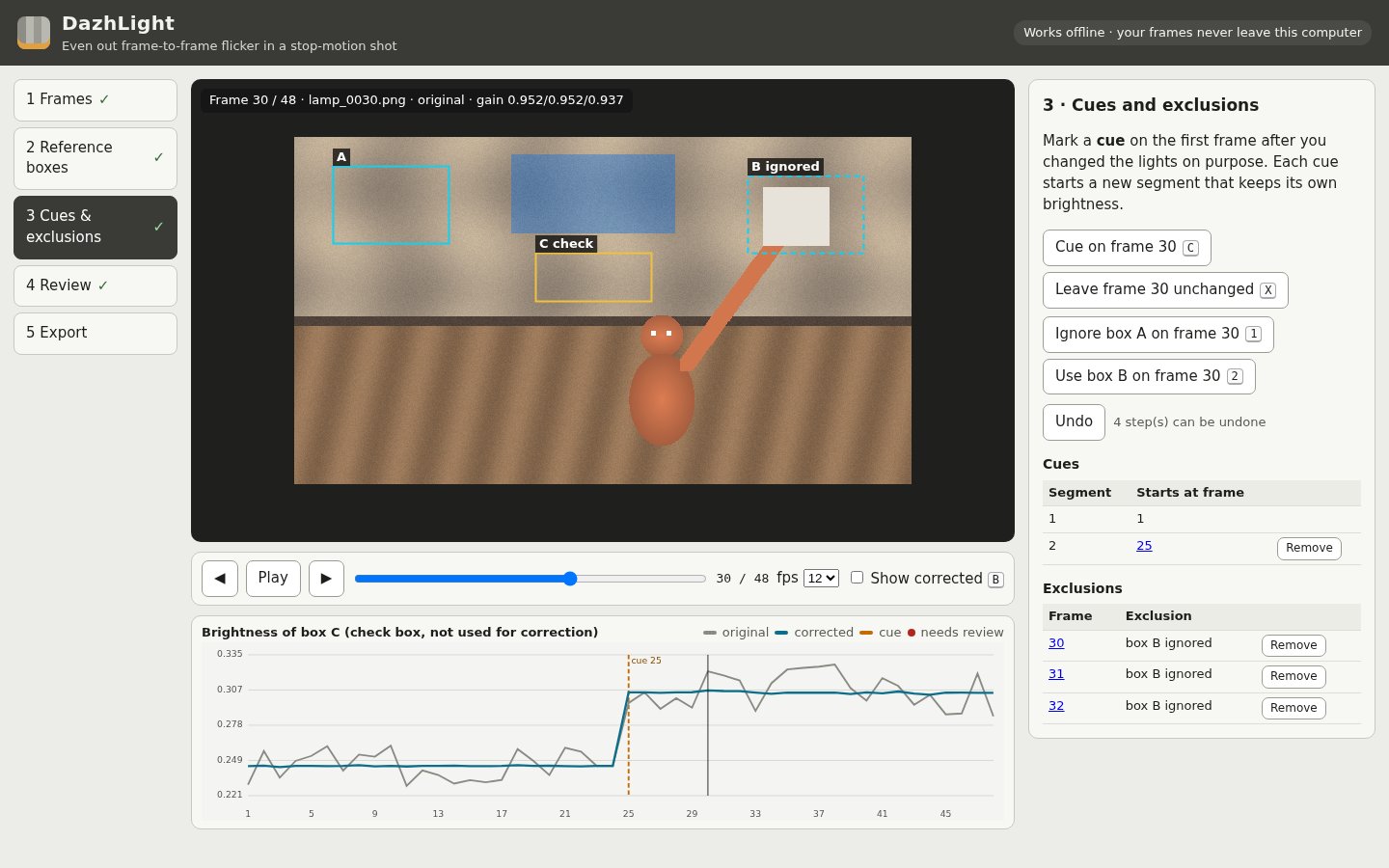
In 3 Cues & exclusions, go to the first frame after each deliberate light change and mark a cue. If a subject covers a reference box, ignore that box on those frames. Use Leave this frame unchanged when an original copy is preferable. Undo reverses the last edit.
Review warnings and save
Inspect disagreements, gain limits, unresolved frames and highlights. Acknowledge the review gate where required. Adjust boxes and remeasure when necessary, then export. The CSV/report provides exact pixel clipping; the interactive preview is an estimate.
Reopen your settings
Open the original frames again, then load the saved settings.json in 1 Frames. The files must match exactly; a settings file alone does not include the source images.
A worked example
A lamp change in a fictional 48-frame shot
Input: Original 640 × 360 synthetic PNG frames with exposure/colour wobble, a moving subject, a deliberate lamp change at frame 25 and a card covering reference B on frames 30–32.
- Open all 48 frames and load the supplied matching settings.
- Review check box C, which is not used to calculate the correction.
- Export and inspect the corrected frames, graph, gain rows and manifest.
Expected result: 48 corrected frames, two lighting segments, no gain-limited or unresolved frames with the supplied settings. The graph becomes steadier within each segment while the deliberate brightness step remains. These results describe the synthetic example, not a guarantee for camera footage.
From a flickering shot to a reviewed frame sequence
Actual Chrome screens using original synthetic example data.
1. Keep the deliberate light change
2. Measure the static set
3. Handle an obstruction explicitly
4. Inspect the exported result
Troubleshooting
Embedded colour profile or orientation refused
Keep originals. Convert working copies to correctly oriented, opaque 8-bit sRGB RGB files without an embedded ICC profile, then reopen them. Simply deleting a profile does not convert colour values.
References disagree
Step through the flagged frames. Ignore a covered reference only where needed, or move it to a more stable area and remeasure. The application cannot identify the obstruction for you.
A box is too dark or clipped
Choose a moderately lit static area with usable colour channels. Review unresolved or gain-limited frames before acknowledging export.
Export step is unavailable
Complete measurement after any region edit. Review and acknowledge gain-limited or unresolved frames when prompted.
Input exceeds a limit
Prepare smaller working copies or split at a cut or intentional cue. Different segments use their own targets, so review continuity after splitting.
Saved settings do not load
Select the exact original files used to create them. Changed names, content, dimensions or file sizes invalidate the saved match.
Compatibility & limits
- One shot of 2–300 numbered frames with identical dimensions, each side 32–1920 pixels. Up to 8 MiB per frame, 256 MiB total input and 120 million decoded pixels.
- Opaque 8-bit RGB PNG or three-component JPEG only. Embedded ICC profiles, EXIF rotation, PNG cICP/HDR declarations, transparent pixels, animated, indexed, greyscale, 16-bit and CMYK images are refused. Untagged input is treated as sRGB. RAW, TIFF, HEIC and video are unsupported.
- Use one to three static reference boxes, at least 16 × 16 pixels each, with up to four boxes including check regions. Gains are limited to 0.5–2.0. Dark, clipped or excluded samples may leave a frame unresolved; review and acknowledge flagged results.
- A global gain cannot correct local shadows, rolling LED bands, camera movement, focus changes or lighting changes confined to the subject. Clipped highlights cannot be recovered. A disagreement warning does not automatically identify an obstruction.
- Corrected frames are new 8-bit PNGs without source metadata. Frames deliberately left unchanged are byte-identical copies. JPEG decoding is performed by Chrome; the product does not claim JPEG pixel identity after correction.
- Only desktop Chrome 152 on Linux was tested. The 390-pixel layout was inspected in a desktop browser. Other browsers, operating systems, phones, real-camera shots, Dragonframe and video-editor import remain unverified.
- There is no autosave. Keep the source frames and exported settings yourself; settings require the exact original names, dimensions, sizes and SHA-256 hashes. Review clipping is an estimate; exported CSV/report values measure actual corrected pixels.
- Large exports are assembled in memory. Independent testing included a 57-frame, 1920 × 1080 synthetic noisy shot producing a 338.4 MiB ZIP, and a separate valid 300-frame mixed shot that reached the 512 MiB safety stop without a partial download. These are test cases, not a usable-capacity promise; performance on slower or low-memory computers is unverified.
Need a hand?
Tell us the product, host application and version, what you tried, and the exact error. Contact support with a fictional example; keep private customer files and passwords out of your message.