DazhLight · Offline frame correction 1.0.0
Steadier frames. Your lighting cues kept.
Steady exposure and colour flicker across a stop-motion shot. Mark static parts of the set, preserve deliberate lighting changes, then export corrected PNG frames and a review report.
You have a numbered PNG/JPEG shot with global exposure or colour-balance flicker and can identify areas of the set that stay still.
$19 USD · one-time purchase
Continue to checkoutStep-by-step guide
No subscription. Final total and tax appear at checkout.
Understand the workflow before buying
Includes the guide, screenshots and original example frames/settings. The interactive correction application is in the paid download.
- Choose what stays still: Draw reference boxes on the set so the moving subject does not drive the correction.
- Keep intentional changes: Mark the first frame after a deliberate lighting change to start a new correction segment.
- Review before using the frames: Compare the flip-book and graph, inspect flagged frames, then export PNGs, settings, gains and a hash manifest.
What it helps you do
For small stop-motion shots with stationary reference areas. You choose the areas to measure and mark intentional lighting changes; the application computes a brightness or per-channel gain for each frame.
What is in your download
- Single-file offline application
- Illustrated HTML manual and actual product screenshots
- Original 48-frame synthetic shot, matching settings, expected values and generator
- README, licence, changelog and file checksums
A practical example
A lamp change in a fictional 48-frame shot
Start with
Original 640 × 360 synthetic PNG frames with exposure/colour wobble, a moving subject, a deliberate lamp change at frame 25 and a card covering reference B on frames 30–32.
Get this result
48 corrected frames, two lighting segments, no gain-limited or unresolved frames with the supplied settings. The graph becomes steadier within each segment while the deliberate brightness step remains. These results describe the synthetic example, not a guarantee for camera footage.
Free illustrated guide and synthetic shot; application not included
Examples use fictional or synthetic data. Follow this example step by step.
From a flickering shot to a reviewed frame sequence
Actual Chrome screens using original synthetic example data.
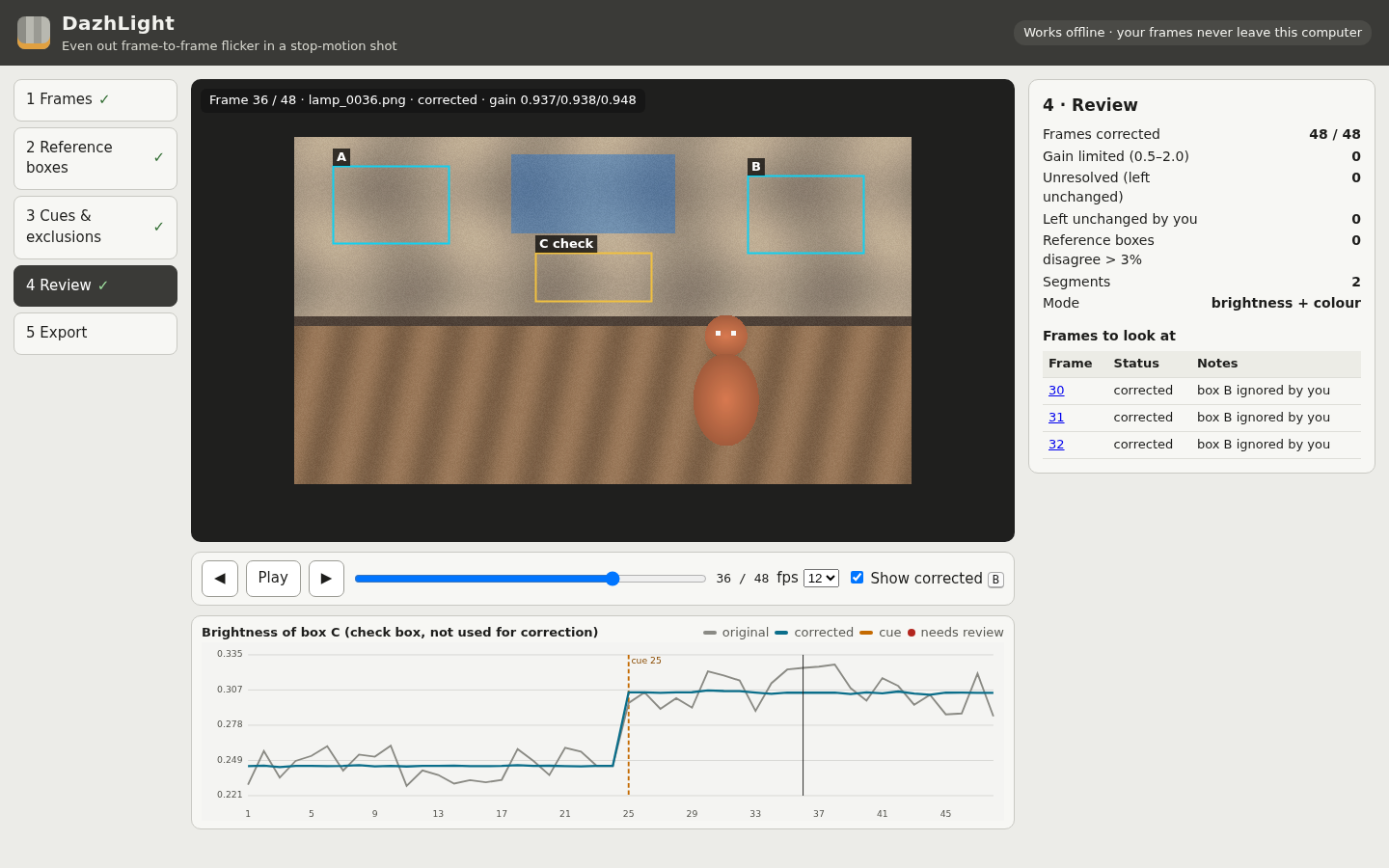
Keep the deliberate light change
The original synthetic shot keeps its lighting step at frame 25 while the check region becomes steadier within each segment. View full size Measure the static set
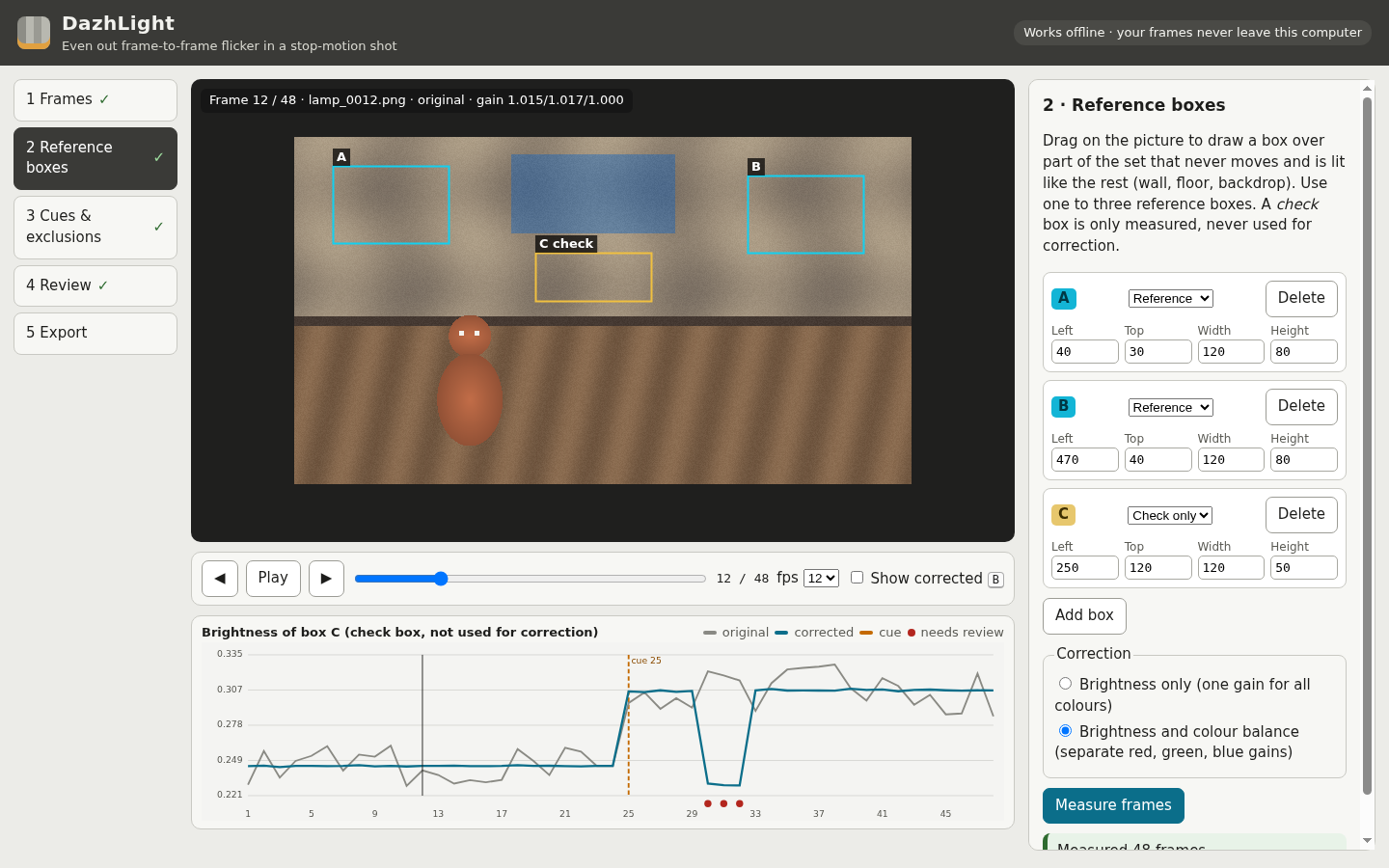
Reference boxes A and B guide the correction. Check box C is measured separately and does not drive it. View full size Handle an obstruction explicitly
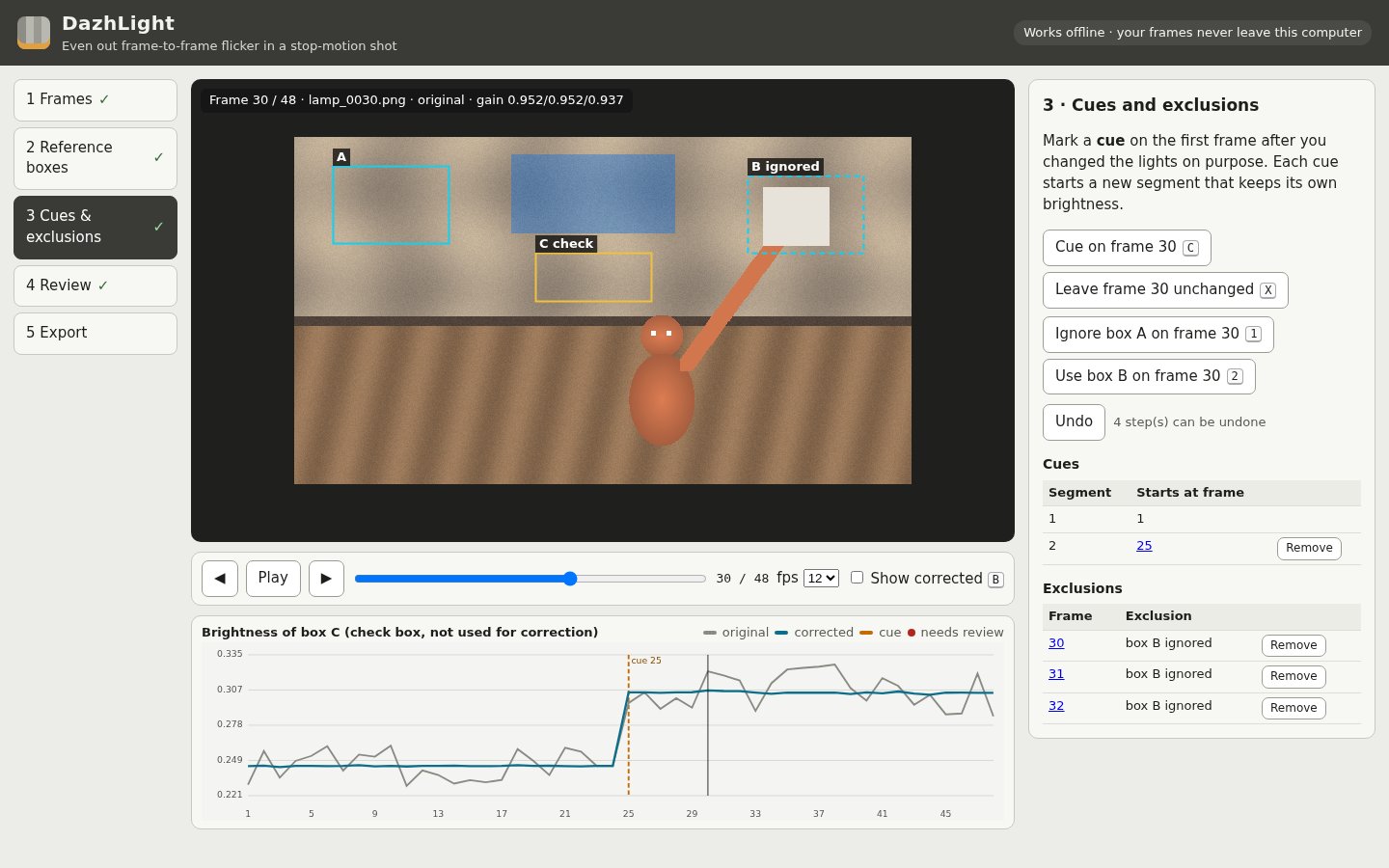
The example ignores box B on frames 30–32, where a moving card covers it. View full size Inspect the exported result
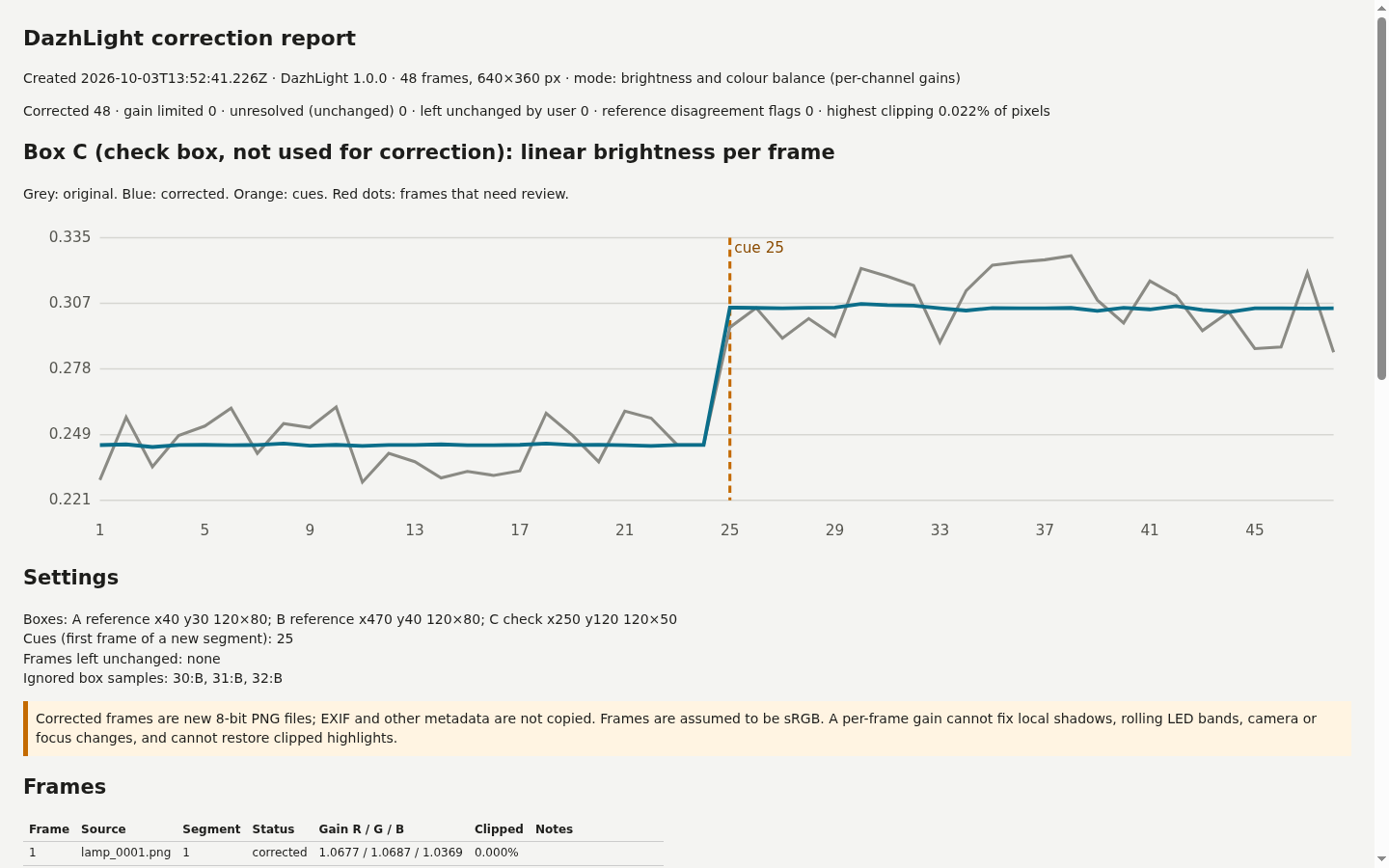
The local HTML report records the brightness graph, gains and frames that need attention. View full size
How it works
Open the shot
Choose numbered frames and confirm any numbering gaps.
Mark the set
Add static reference boxes, intentional lighting cues and explicit exclusions.
Review and export
Inspect before/after frames and warnings, then save corrected frames with a report.
Before you buy
- Desktop Google Chrome; Chrome 152 on Linux was tested. Extract the complete buyer ZIP and open DazhLight.html.
- Keep original frames unchanged. Use opaque RGB files with matching dimensions and the documented size/colour profile.
- Choose a static, moderately lit part of the set. Export settings to keep work before closing.
Extract DazhLight-1.0.0.zip and open DazhLight.html in desktop Google Chrome. Start with the included 48-frame fictional shot and settings, then follow the illustrated manual. Processing runs locally.
Compatibility & limits
One shot of 2–300 numbered frames with identical dimensions, each side 32–1920 pixels. Up to 8 MiB per frame, 256 MiB total input and 120 million decoded pixels. Opaque 8-bit RGB PNG or three-component JPEG only. Embedded ICC profiles, EXIF rotation, PNG cICP/HDR declarations, transparent pixels, animated, indexed, greyscale, 16-bit and CMYK images are refused. Untagged input is treated as sRGB. RAW, TIFF, HEIC and video are unsupported. Use one to three static reference boxes, at least 16 × 16 pixels each, with up to four boxes including check regions. Gains are limited to 0.5–2.0. Dark, clipped or excluded samples may leave a frame unresolved; review and acknowledge flagged results. A global gain cannot correct local shadows, rolling LED bands, camera movement, focus changes or lighting changes confined to the subject. Clipped highlights cannot be recovered. A disagreement warning does not automatically identify an obstruction. Corrected frames are new 8-bit PNGs without source metadata. Frames deliberately left unchanged are byte-identical copies. JPEG decoding is performed by Chrome; the product does not claim JPEG pixel identity after correction. Only desktop Chrome 152 on Linux was tested. The 390-pixel layout was inspected in a desktop browser. Other browsers, operating systems, phones, real-camera shots, Dragonframe and video-editor import remain unverified. There is no autosave. Keep the source frames and exported settings yourself; settings require the exact original names, dimensions, sizes and SHA-256 hashes. Review clipping is an estimate; exported CSV/report values measure actual corrected pixels. Large exports are assembled in memory. Independent testing included a 57-frame, 1920 × 1080 synthetic noisy shot producing a 338.4 MiB ZIP, and a separate valid 300-frame mixed shot that reached the 512 MiB safety stop without a partial download. These are test cases, not a usable-capacity promise; performance on slower or low-memory computers is unverified.
Get DazhLight
Perpetual use of the purchased version on your devices for personal or internal commercial work. Keep reasonable backups and modify your own copy; do not redistribute or resell original proprietary code. Third-party licenses and any existing preview permissions retain their rights.
Before payment, save the private recovery code shown by checkout. After Paddle confirms payment, use it to download your ZIP or return for it later. No subscription, future update or email delivery is promised. See the illustrated steps.
$19 USD · once
Buy download