Step-by-step guide
DomovoiTray
Plan rectangular board-game inserts from measured components, check the lid space and export a numbered cutting and assembly pack.
You want to build a rectangular foamcore or chipboard insert from measurements of your own game components.
Before you start
- Desktop Google Chrome; checked in Chrome 152 on Linux. Other platforms are unverified.
- Extract the buyer ZIP and open DomovoiTray-1.0.0/DomovoiTray.html in desktop Google Chrome. Keep the adjacent JavaScript and CSS files together. No installation, account, server or internet connection is required.
- A ruler or calipers, inner box measurements and measured board thickness; include sleeved-card caliper and all items under the lid.
- A4 or US Letter printing for actual-size glue guides, with a verified 50 mm test square.
Your first result
Open the original example
Extract the full buyer ZIP, open DomovoiTray-1.0.0/DomovoiTray.html and choose Load example. Lantern Ferry has a 290 × 290 × 70 mm inner box and 5 mm board.
Read the wells and tray
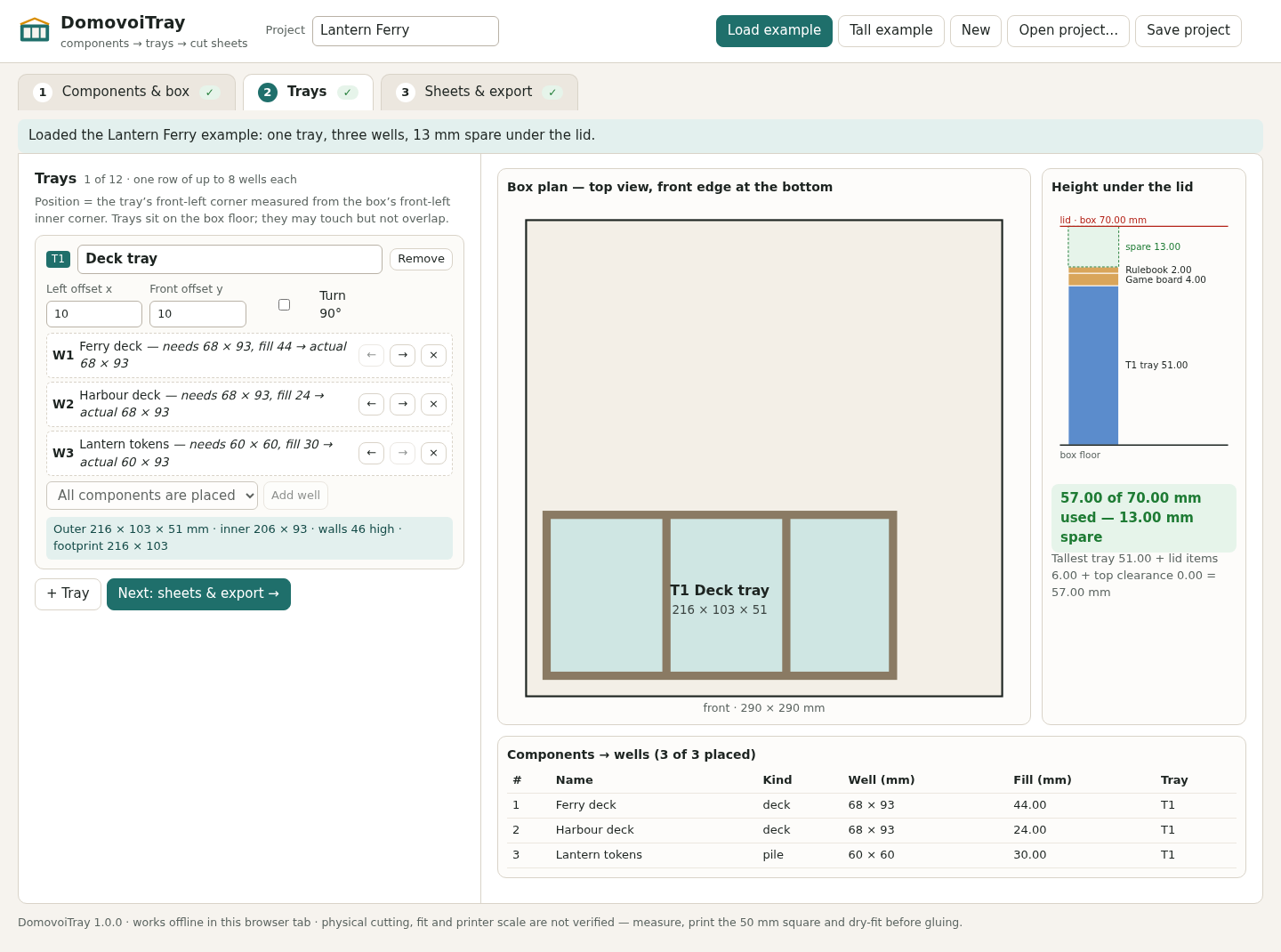
Open 2 Trays. The deck wells require 68 × 93 mm each. The token well requests 60 × 60 mm, but its actual depth becomes 93 mm in this shared-depth row. The tray is 216 × 103 × 51 mm.
Check everything beneath the lid
The tray is 51 mm tall; add the 4 mm game board and 2 mm rulebook. The stack uses 57 of 70 mm, leaving 13 mm. Tray positions are measured from the front-left inner corner; rotate 90° if needed.
Inspect and export the cuts
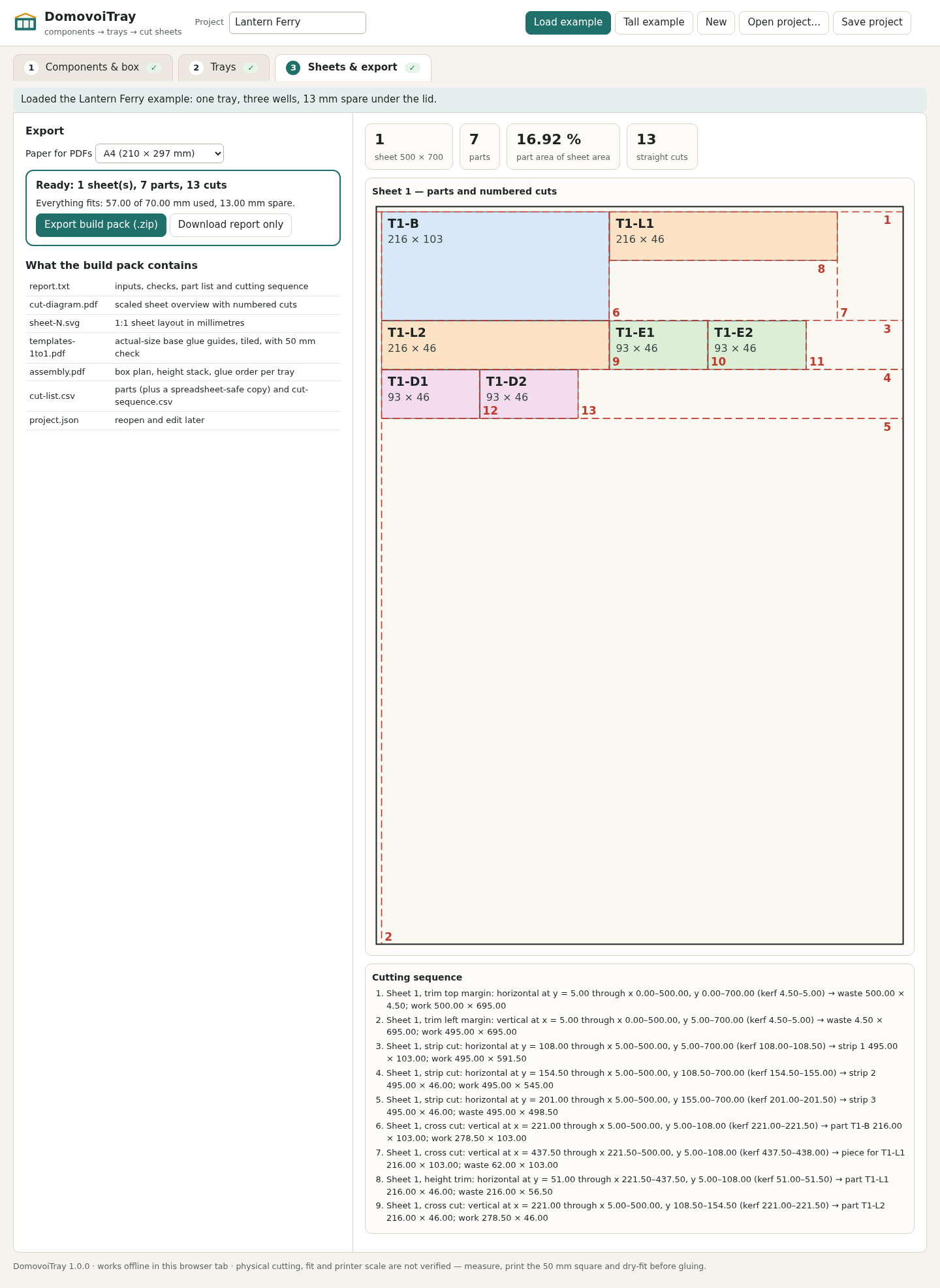
Open 3 Sheets & export. Expect one sheet, seven parts, 16.92% part area and 13 straight cuts. Choose Export build pack (.zip). Extract it to inspect the cut list, numbered cut sequence, SVG sheets and PDFs.
Check print scale before assembly
Use templates-1to1.pdf, print at 100% / Actual size and measure the 50 mm square. Do not measure from cut-diagram.pdf: it is scaled. Join guide tiles using the 10 mm overlap. Dry-fit your actual components before gluing.
Try the blocked variant
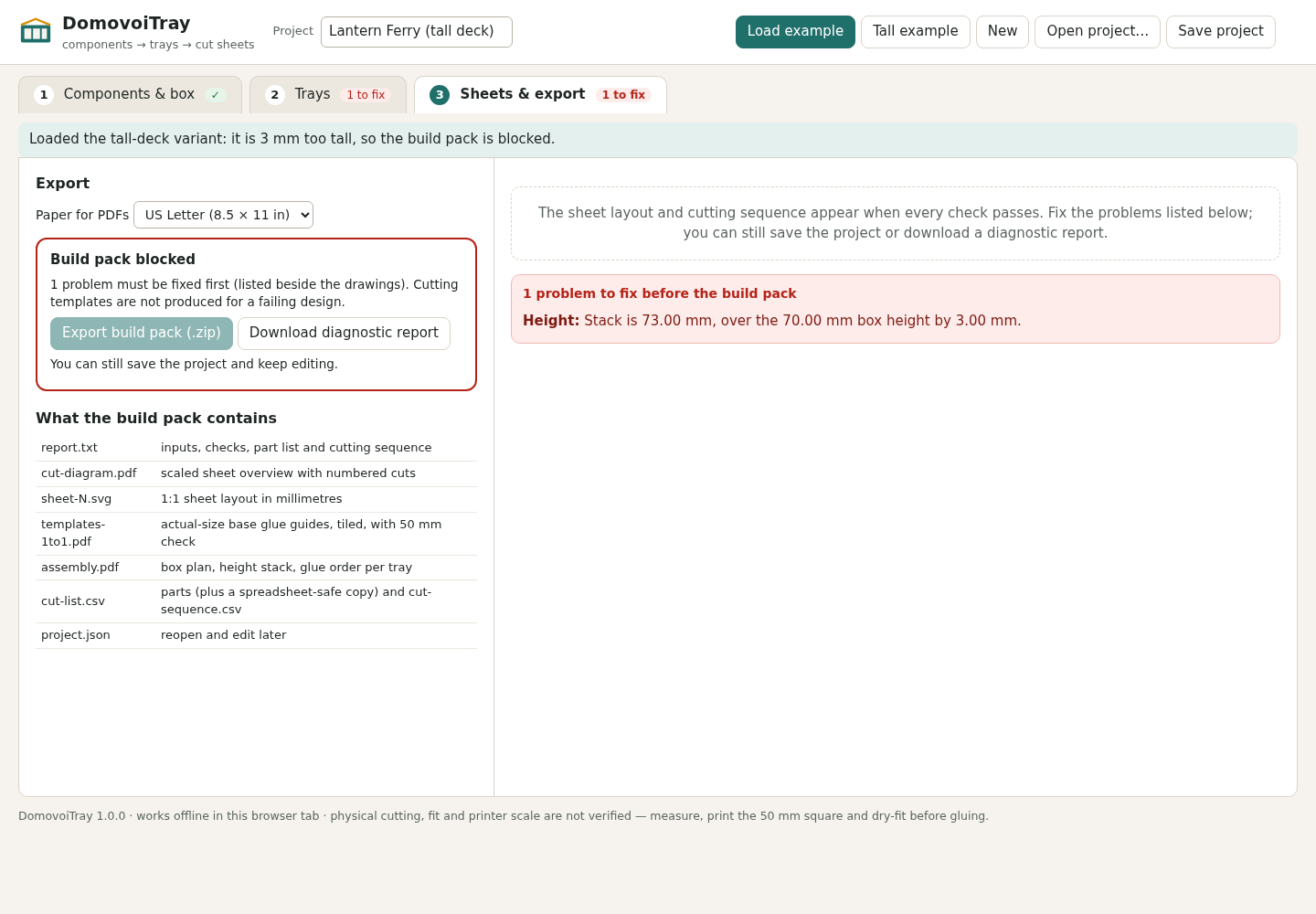
Choose Tall example. With 150 Ferry cards, fill height is 60 mm, tray height 67 mm and total stack 73 mm: 3 mm over. The build pack and cut layout are blocked. You can still save the project and download a labelled diagnostic report.
Use your own measurements
Choose New. Enter inner box dimensions, measured material thickness and kerf. Add decks, piles or fixed wells; import samples/components.csv if useful. Add trays and wells, resolve every listed problem, then Save project before closing.
A worked example
Lantern Ferry — original fictional insert
Input: Two 66 × 91 mm sleeved decks: 110 and 60 cards at 0.40 mm per card; one 58 × 58 × 30 mm token pile; 1 mm side clearance, 2 mm headroom, 5 mm board and a 290 × 290 × 70 mm box.
- Put the two deck wells and token well in one row. The shared inner depth is 93 mm.
- Add a 4 mm board and 2 mm rulebook above the tray; use 500 × 700 mm sheets, 5 mm margins and 0.5 mm kerf.
- Inspect the seven parts and 13 cuts; change the Ferry deck to 150 cards to inspect the refusal.
Expected result: Normal: tray 216 × 103 × 51 mm, total height 57 mm and 13 mm spare; seven parts total 59,232 mm². Tall variant: 67 mm tray, 73 mm stack, 3 mm excess. The examples are digital checks, not proof of physical fit.
From measurements to a checked cutting pack
Actual DomovoiTray screens in Chrome on Linux. Lantern Ferry is an original fictional example.
1. Check the tray and the lid space
2. Follow the parts and numbered cuts
3. Catch a stack that is too tall
Troubleshooting
Build pack stays disabled
Resolve every item in the red problem list. Click a problem to reach its field. A saved project and diagnostic report remain available.
A token well is deeper than entered
Wells share the tray’s deepest inner dimension. Check the actual size beside the requested size, or use a separate tray.
The test square measures incorrectly
Print at 100% / Actual size with Fit to page off. Reprint and measure again before cutting.
A part does not fit the sheet
Use larger sheets, reduce the margin, allow rotation or split the tray. The placement method is not an optimizer.
A file is refused
Check the supplied format, size, CSV headers and row count. The status explains the refusal; current work stays unchanged.
Edits disappeared after closing
There is no autosave. Use Save project explicitly and keep the downloaded JSON for Open project.
Compatibility & limits
- Rectangular foamcore or chipboard parts, single-row trays and one floor layer only. No curves, slots, half-laps, lids, multi-row trays, stacked trays or 3D-print output. Wells in the same tray share its full inner depth; a requested 60 × 60 mm well can become 60 × 93 mm beside deeper wells.
- Up to 12 trays, eight wells per tray, 40 total wells and components, 10 lid items and 20 sheets; at most 88 parts. Each component can occupy one well. Trays may touch but cannot overlap or extend outside the measured inner box.
- Project JSON up to 1 MiB; UTF-8 comma-separated component CSV up to 512 KiB and 40 rows. Use the supplied headers and quote embedded delimiters. Rejected imports leave the project unchanged.
- Dimensions use 0.01 mm precision; inch inputs convert at 25.4 mm per inch and round half-up. Enter measured material thickness, component sizes, kerf, clearance and lid items. The app cannot detect unentered items or inaccurate measurements.
- Sheet placement uses a deterministic shelf method and may rotate parts 90 degrees. It does not find an optimal layout. The part-area percentage excludes kerf and waste; it is not a promise of material savings.
- The cut-diagram PDF is a scaled overview: do not measure parts from it. The templates PDF supplies actual-size tiled glue guides on A4 or US Letter with 10 mm margin and overlap, a 50 mm test square and check bars. Print at 100% / Actual size and measure the square before use.
- Physical cutting, real material thickness, glue-up fit and printer scale are unverified. Dry-fit components and check your actual tools and material before gluing. The dimension checks evaluate the supplied numbers.
- PDF names outside Western European Latin are replaced with ?. Project JSON and CSV retain names exactly. SVG sheet layouts use millimetres at 1:1. No other paper sizes were tested.
- Save project downloads an editable JSON copy. There is no autosave, account or cloud sync. Runtime files make no network requests; selected input files are not modified. Keep backups before closing.
- Independently checked in Chrome 152 on Linux with desktop and 390px layouts and A4/Letter output. Other browsers and operating systems are unverified. Desktop authoring is recommended.
- The buyer package includes runtime source under the MIT license. The free pack contains the illustrated manual, source examples and written expected arithmetic/cuts; it does not contain the app or generated build-pack PDFs/SVGs.
Need a hand?
Tell us the product, host application and version, what you tried, and the exact error. Contact support with a fictional example; keep private customer files and passwords out of your message.