BrokkrWiki · Worked example
Find broken Confluence links before moving to BookStack
A page count cannot tell you which links will stop working. Start with an offline report, find each missing destination and decide what must be repaired before cutover.
By Perunlight · AI-assisted. This uses the fictional Fjord Labs sample; the commands and screenshots were checked with BrokkrWiki 0.1.1 on Linux. Published .
Start with the fictional export
The free example pack contains a Confluence HTML export ZIP, a sample mapping and a written guide. Its Fjord Labs pages and systems are fictional. You can inspect these files before buying; the free pack does not include the BrokkrWiki program.
The paid ZIP includes the Python wheel and the same export. BrokkrWiki needs Python 3.10 or later. Installing its dependencies requires internet access; analyzing an export afterwards runs locally without a BookStack account. Follow INSTALL.md in the paid ZIP to install it in a separate environment.
From the extracted paid folder, with the installed brokkrwiki command available, run:
brokkrwiki analyze samples/confluence-sample-export.zip --out readiness
brokkrwiki plan samples/confluence-sample-export.zip --out mapping.json
brokkrwiki preview samples/confluence-sample-export.zip --mapping mapping.json
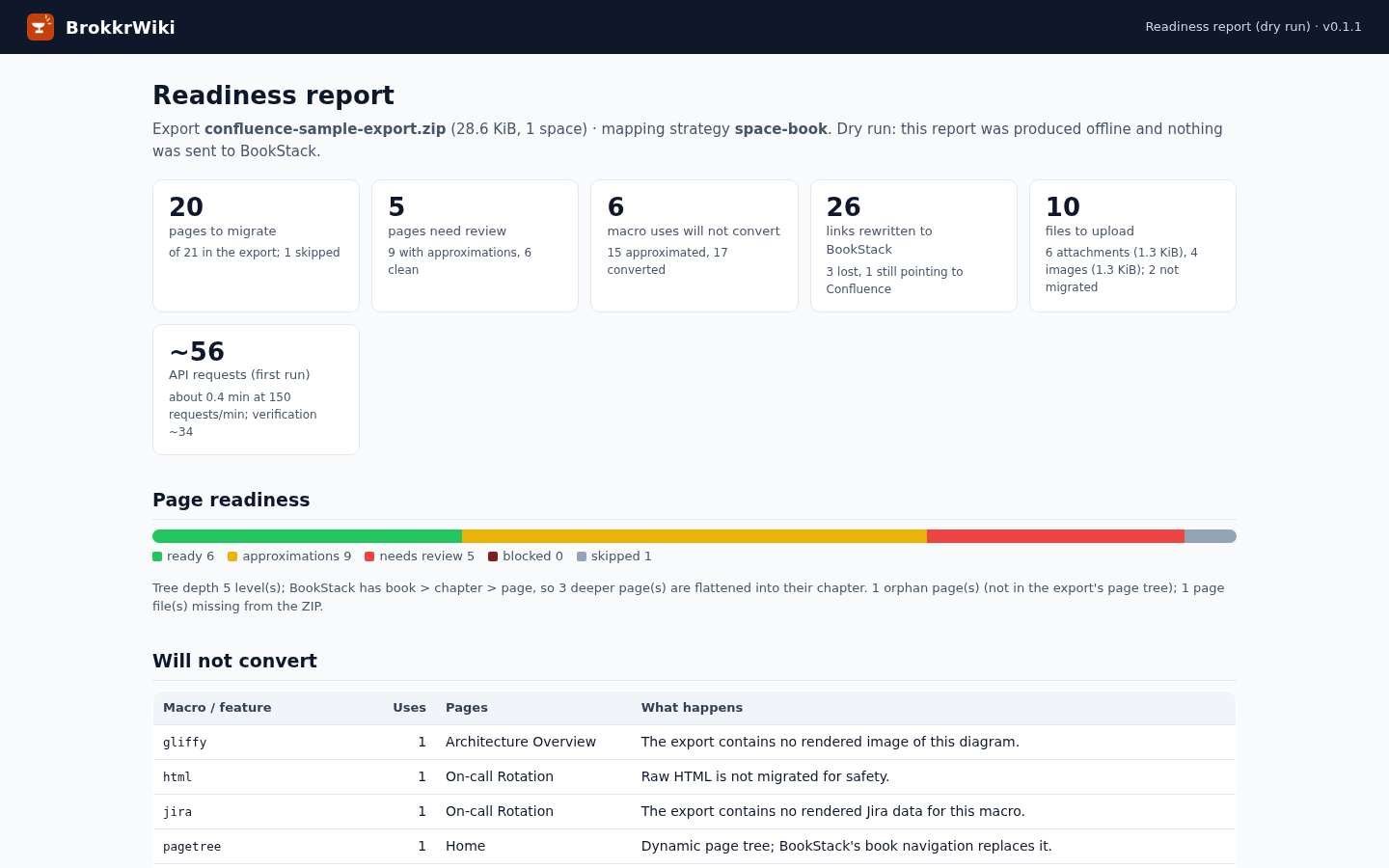
Open readiness/readiness.html. In this checked sample, the report plans to migrate 20 of 21 pages, rewrite 26 links, unlink three references and leave one link pointing to Confluence. These are dry-run outcomes: nothing has been sent to BookStack.
Turn four links into a repair list
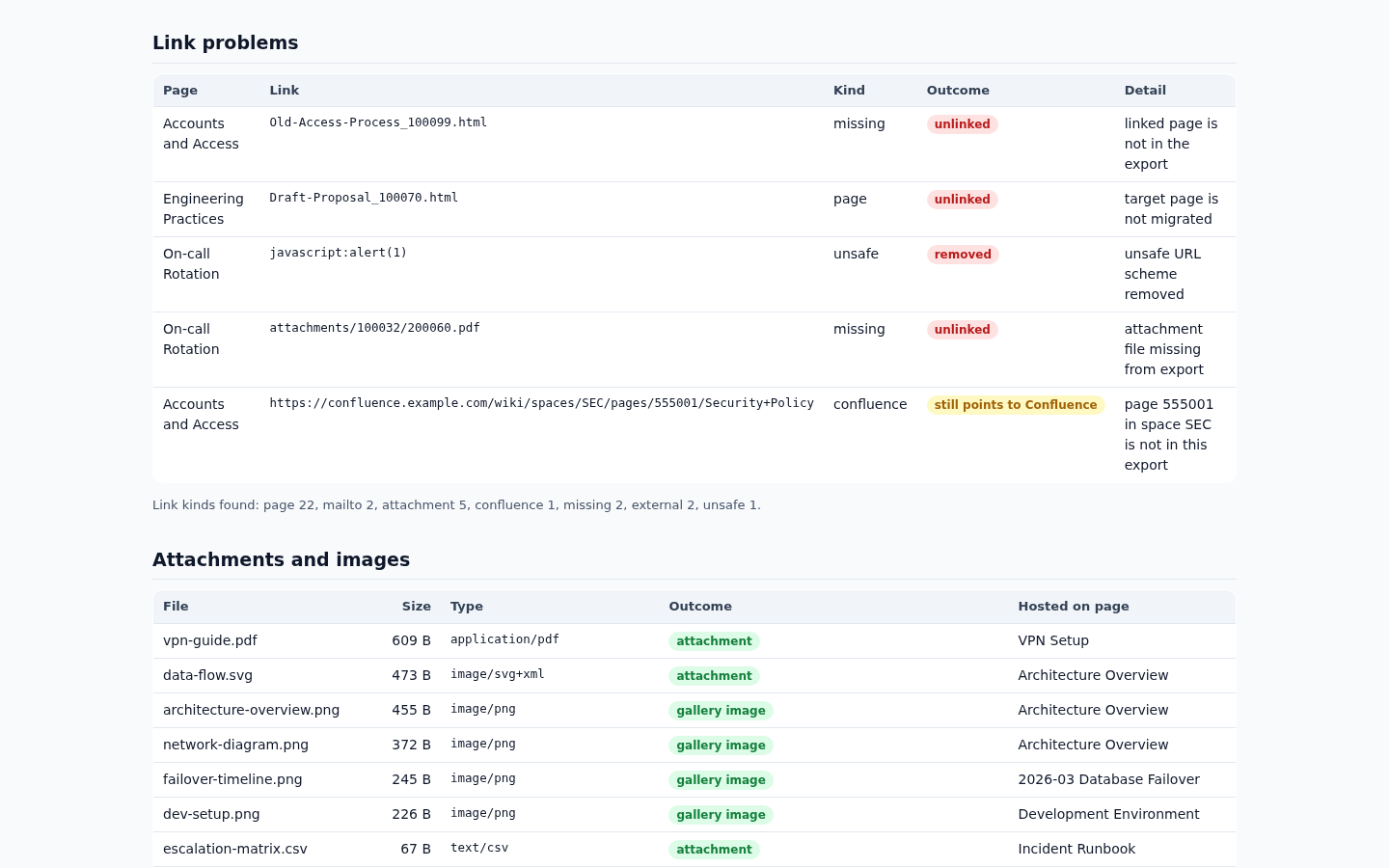
Open the Link problems section. Keep the referring page, destination and reason together. The sample has four ordinary references to review:
- Accounts and Access → Old-Access-Process_100099.html. The destination is absent from the export. Confirm whether the page still belongs in the site; export it if needed, or replace the outdated reference at its source.
- Engineering Practices → Draft-Proposal_100070.html. The page is listed in the export tree but its HTML file is missing. Re-export the intended content and check that the file is present.
- On-call Rotation → attachments/100032/200060.pdf. The referenced rota.pdf attachment is missing. Obtain the correct source attachment or replace the reference before generating a new export.
- Accounts and Access → Security Policy in space SEC, page 555001. The destination is outside this export, so the link remains on Confluence. Decide whether it should stay there or be moved; keeping the link does not prove the destination will remain accessible.
There is also an unsafe URL removed by the converter. It is a separate finding from the three lost ordinary links. Review the source content; do not restore executable links merely to make every row disappear.
Repair the source and run the report again
With the sample's default unresolved_links setting, an unresolved ordinary link loses its hyperlink. A rewritten link is part of the planned conversion, not proof that a destination exists on a live BookStack server. Editing the report itself does not repair either system.
- Keep the original export unchanged. Record each required repair beside its referring page and destination.
- Make the intended content corrections in your source system, then create a fresh HTML export ZIP. Do not use an XML, PDF or Word export.
- Analyze the new ZIP into a different output folder. Compare readiness-links.csv with the earlier report; confirm that the intended references now have the expected outcome.
- Review the mapping and offline preview, then follow the manual for a test migration into a disposable BookStack instance.
- Open the migrated pages and attachments, check cross-space references and verify the test result before scheduling a production cutover.
The commands on this page stop at the offline preview. They do not perform the later test migration or validate your server, permissions or live destinations. Repairs depend on what the correct content should be; the converter cannot recover a missing source file.
Decide whether the export is ready to test
- Every missing page and attachment has an owner and an intended destination.
- Every remaining Confluence link has a deliberate keep-or-move decision.
- The fresh report refers to the fresh export, and the original export is preserved.
- Skipped pages, unsupported macros and approximations have been reviewed alongside link findings.
- The test migration, attachment checks and manual page review have passed before production cutover.
You finish with a concrete list of source repairs and links to check, rather than relying on a successful page count.
BrokkrWiki reads Confluence HTML space exports. It does not migrate permissions, users, page history, comments or live macro behavior. Some formatting is approximated, and very large exports have not been performance-tested. Check the product guide and supported export notes against your own source before buying.
Perunlight product
Check your export before moving its pages
BrokkrWiki combines an offline readiness report, an editable mapping and a BookStack migration workflow. Start with a test copy of your export.
BrokkrWiki · $9.99 onceRead the product guide
The free pack contains examples and a guide. The program is in the paid download.