Task walkthrough · KvasirQA
Find inconsistent translations in XLIFF and TMX files before handoff
Two translators, a reused translation memory and a late change can leave one English sentence with two German translations. Here is how to find those pairs across files, decide which ones matter and fix them before you deliver.
A Perunlight product workflow for KvasirQA, our paid offline checker. Written with AI assistance and checked against the accepted KvasirQA 1.0.0 test run (desktop Chrome 152 on Linux, fictional files). Published .
What counts as an inconsistency
A consistency check compares segments that share a language pair and looks for two patterns:
- Same source, different translations. One source text has two or more target versions. In interface strings, safety text and product terms this is usually a slip; in running text it can be deliberate.
- Same translation, different sources. One target text is used for two different source texts, for example a singular and a plural label that now read the same.
Neither pattern is automatically an error. Treat each one as a question for the reviewer: should these really read differently, or the same?
They are hard to spot in a translation editor because the variants usually sit in different files, different jobs, or in the project and the translation memory that goes back to the client.
Check everything that ships together
- Export the bilingual files you are about to hand off as XLIFF 1.2, 2.0, 2.1 or TMX 1.4: the same files the client or the next reviewer will receive.
- Add the translation memory export for the same language pair, if the project has one. A fresh translation that disagrees with the approved memory only shows up when both are checked together.
- Add the glossary if there is one. A term with two translations is often also a glossary miss, and the glossary can settle which variant is right.
- Look at the language codes. Consistency is compared within one exact pair, so
en-US → de-DEanden → deare checked separately. Export with the same codes, or expect to miss pairs.
Triage each finding
For every group of variants, work through the same four questions:
- Is one variant required? Check the glossary, the approved translation memory and the client’s style guide. If one variant is required, use it everywhere.
- Does context justify the difference? A button label and a sentence in a manual may need different wording, and a length limit may force a shorter form. Write down the reason so the next reviewer does not reopen it.
- Is it a slip? Fix it in your translation tool, not in the exported file, so the project, the memory and the next export agree.
- Did the fix hold? Export again and run the same check. The count for that check should drop; whatever is left should be variation you chose to keep.
Note the variants you keep in your delivery note, for example: “Start boiling: button label and help text intentionally use different verbs.” It saves a round of questions.
Worked example: the fictional Brightfern files
KvasirQA comes with practice files for an invented kettle brand, Brightfern: a segmented XLIFF 1.2 manual (en-US → de-DE), an XLIFF 2.1 app file (en → fr-FR), a TMX 1.4 memory (en-US → de-DE) and a three-term glossary. Every mistake in them is planted. In the accepted test run, KvasirQA 1.0.0 checked 29 segments in 3 files, reported 7 errors and 6 warnings, and disclosed one unit skipped because it is marked translate="no".
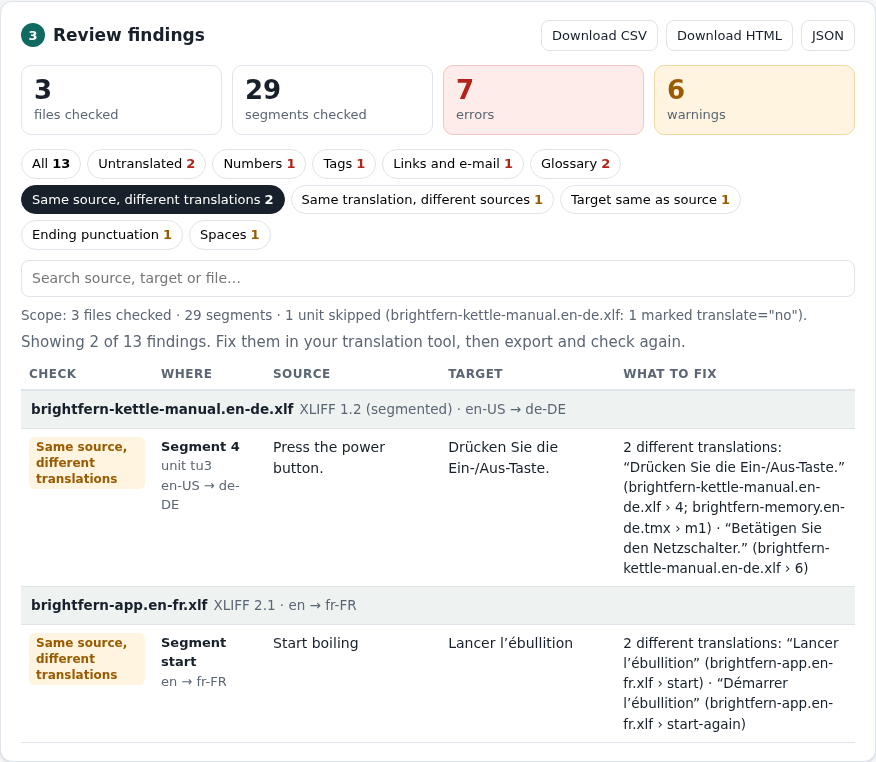
The three consistency findings and a decision for each
- “Press the power button.” is “Drücken Sie die Ein-/Aus-Taste.” in segment 4 of the German manual and in memory unit m1, but “Betätigen Sie den Netzschalter.” in segment 6. Decision: the glossary requires “Ein-/Aus-Taste”, and the Glossary check flags segment 6 as an error too, so segment 6 is the slip.
- “Start boiling” is “Lancer l’ébullition” in unit
startand “Démarrer l’ébullition” in unitstart-againof the French app file. Decision: nothing in the glossary settles it. Pick one wording unless the two buttons are meant to read differently, and note the choice. - “Filtre” translates both “Filter” and “Filters” (Same translation, different sources). Decision: check the interface. If “Filters” labels a group of several filters, the plural “Filtres” is probably intended.
The other ten findings come from other checks: a changed number (1.7 litres became 1,5 Liter), a missing placeholder tag, a changed support link, two untranslated segments, two glossary misses, an unchanged brand name (“Brightfern”, a warning that is right to keep), a missing full stop and a double space.
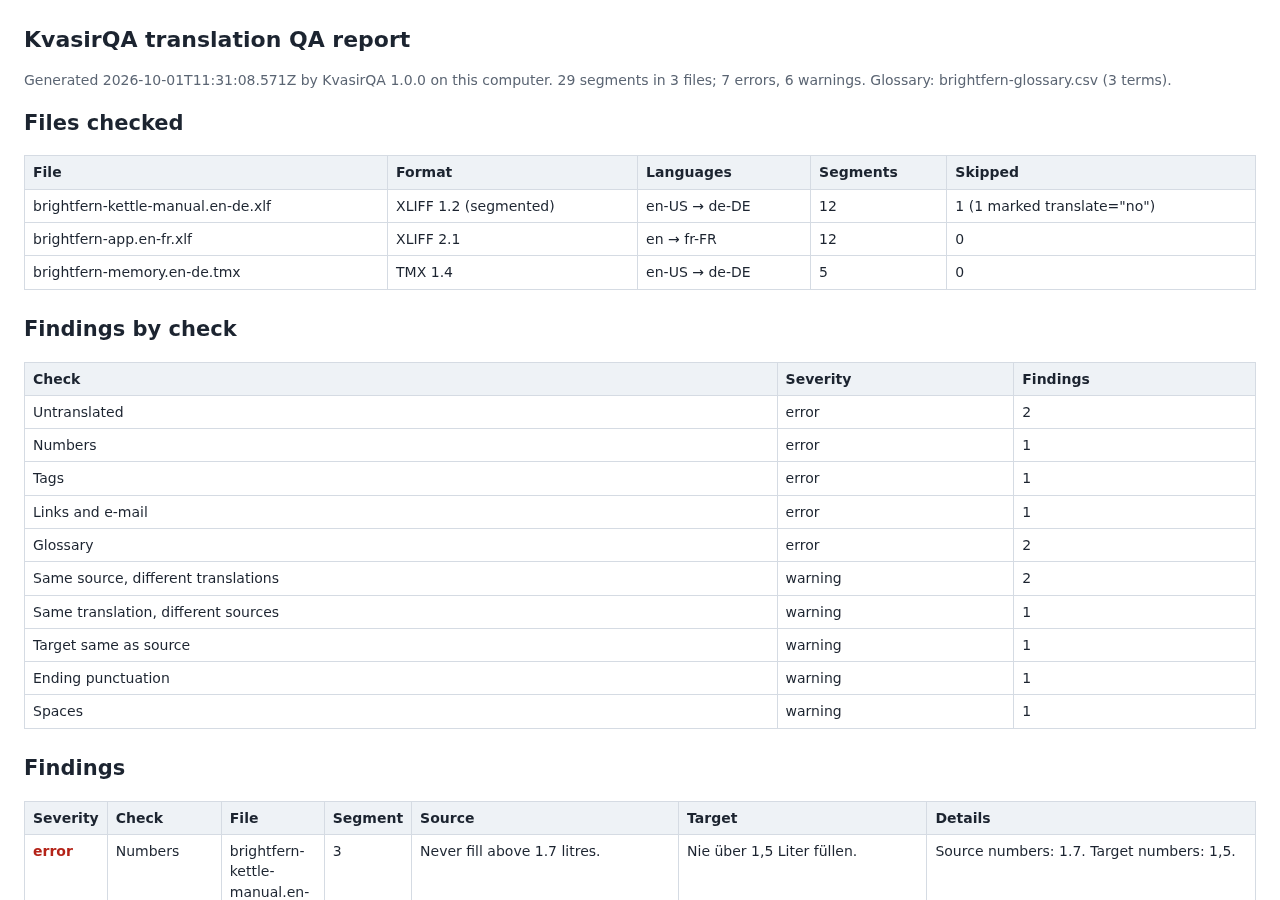
Result of the practice run: 13 findings (7 errors and 6 warnings) in 29 segments of 3 files, with the skipped translate="no" unit disclosed. Three findings are consistency warnings that need a decision. The practice files themselves are not changed.
The practice files are in the free guide ZIP linked below, so you can open them in your own translation tool. The ZIP does not contain the app.
A free first pass with Python
For a quick look at the first pattern in a few files of one language pair, Python’s standard library is enough. This script can surface candidate groups: source texts that have more than one translation across the XLIFF 1.2, XLIFF 2.x and TMX files you give it.
import sys, collections, xml.etree.ElementTree as ET

def local(el): return el.tag.rsplit('}', 1)[-1]
def text(el): return ' '.join(''.join(el.itertext()).split())
def child(el, name): return next((c for c in el if local(c) == name), None)

found = collections.defaultdict(set)
for path in sys.argv[1:]:
    for unit in ET.parse(path).getroot().iter():
        kind, uid = local(unit), unit.get('id') or unit.get('tuid')
        if kind == 'tu':  # TMX: first variant is the source, second the target
            pairs = [[s for v in unit for s in v if local(s) == 'seg']]
        elif kind == 'trans-unit' and unit.get('translate') != 'no':  # XLIFF 1.2
            pairs = [[child(unit, 'source'), child(unit, 'target')]]
        elif kind == 'unit' and unit.get('translate') != 'no':  # XLIFF 2.x
            pairs = [[child(s, 'source'), child(s, 'target')] for s in unit if local(s) == 'segment']
        else:
            continue
        for pair in pairs:
            if len(pair) == 2 and None not in pair and text(pair[1]):
                found[text(pair[0])].add((text(pair[1]), f'{path} {uid}'))

for source, rows in found.items():
    if len({target for target, _ in rows}) > 1:
        print(source)
        for target, where in sorted(rows):
            print('   ', target, '<-', where)
Save it as same_source.py and run it on one language pair at a time. For the German Brightfern files, python3 same_source.py brightfern-kettle-manual.en-de.xlf brightfern-memory.en-de.tmx prints the “Press the power button.” group with both German variants and where each occurs. A separate run, python3 same_source.py brightfern-app.en-fr.xlf, prints the French “Start boiling” group.
It is a rough check. It compares whole XLIFF 1.2 units rather than segments, includes the text of inline codes, assumes the first TMX variant is the source, is case-sensitive, ignores translate="no" set on a group or file, does not separate language pairs and does not look for one translation used for different sources.
Common mistakes
- Checking files one at a time. Most inconsistencies sit between files, or between a file and the memory. Check everything that ships together in one run.
- Mixing language codes. A file exported as
deand a memory exported asde-DEare compared as different pairs, so their disagreements stay hidden. - Fixing the exported file instead of the project. The next export or memory update brings the old variant back.
- Treating every warning as an error. Some variants are deliberate. Decide, note the reason and move on.
- Reading a clean report as approval. A consistency check says nothing about whether either variant is a good translation.
Limits and next steps
- KvasirQA flags candidate issues for a human reviewer. It does not certify translation quality, judge meaning, grammar or style, or write changes back to your files or translation tool.
- It was tested only in desktop Chrome 152 on Linux, with synthetic files written to the XLIFF 1.2, 2.0, 2.1 and TMX 1.4 specifications. Real Trados, memoQ and Phrase exports, Windows and macOS have not been verified; vendor-specific files may not work.
- Other formats (PO, TS, TTX, bilingual DOCX/RTF and project packages) are not supported. TMX units without a defined source language and units with
<sub>text inside an inline code are skipped, counted and the result is marked partial. - Okapi CheckMate is a capable free alternative for offline bilingual QA; KvasirQA offers a smaller browser workflow.
Next: if you have KvasirQA, run the practice files first, then check one real delivery together with its memory and glossary, and keep the HTML report with your handoff notes. The KvasirQA setup guide covers opening the app, reading the scope line and saving reports.
Perunlight product
Run these checks with KvasirQA
KvasirQA is a paid offline browser app: $19 USD, one-time purchase, no account or subscription. It runs the consistency, glossary, number, tag, link, punctuation and spacing checks shown above and saves CSV, HTML or JSON reports. Tested in desktop Chrome 152 on Linux only.
Get KvasirQA · $19Read the setup guide
The free ZIP lets you read the manual and open the practice files; the checks themselves need the paid app.