Step-by-step guide
KvasirQA
Check bilingual XLIFF 1.2, 2.0, 2.1 and TMX 1.4 files offline in desktop Chrome and save a CSV, HTML or JSON QA report.
Offline browser app for desktop Google Chrome, tested in Chrome 152 on Linux only. Test fixtures are synthetic: files written to the XLIFF 1.2, 2.0, 2.1 and TMX 1.4 specifications. Real Trados, memoQ and Phrase exports have not been independently verified, and vendor-specific files or packages may not work. KvasirQA flags candidate issues for a reviewer; it does not certify translation quality, edit your files or replace your CAT tool.
Before you start
- Desktop Google Chrome; tested with Chrome 152 on Linux (x86-64). Windows, macOS, phones and other browsers have not been tested.
- The whole
KvasirQA-1.0.0.zipextracted, withKvasirQA.htmlkept next to itsappfolder. No account, licence key, internet connection or installation. - Bilingual files up to 50 MB each: XLIFF 1.2 (including segmented files), XLIFF 2.0 or XLIFF 2.1 (
.xlf,.xliff), or TMX 1.4 (.tmx, the TMX 1.4b format). The version and namespace are checked; other versions are refused with a message. - Optional glossary: a UTF-8 CSV or TSV with
source,target,languagecolumns.
Your first result
Extract and open
Extract the whole
KvasirQA-1.0.0.zipinto a folder you can find again. OpenKvasirQA.htmlin desktop Chrome: drag it into a Chrome window, or right-click it and choose Open with › Google Chrome. You should see Check translations before you deliver them and a green-edged Start here box.Run the practice check
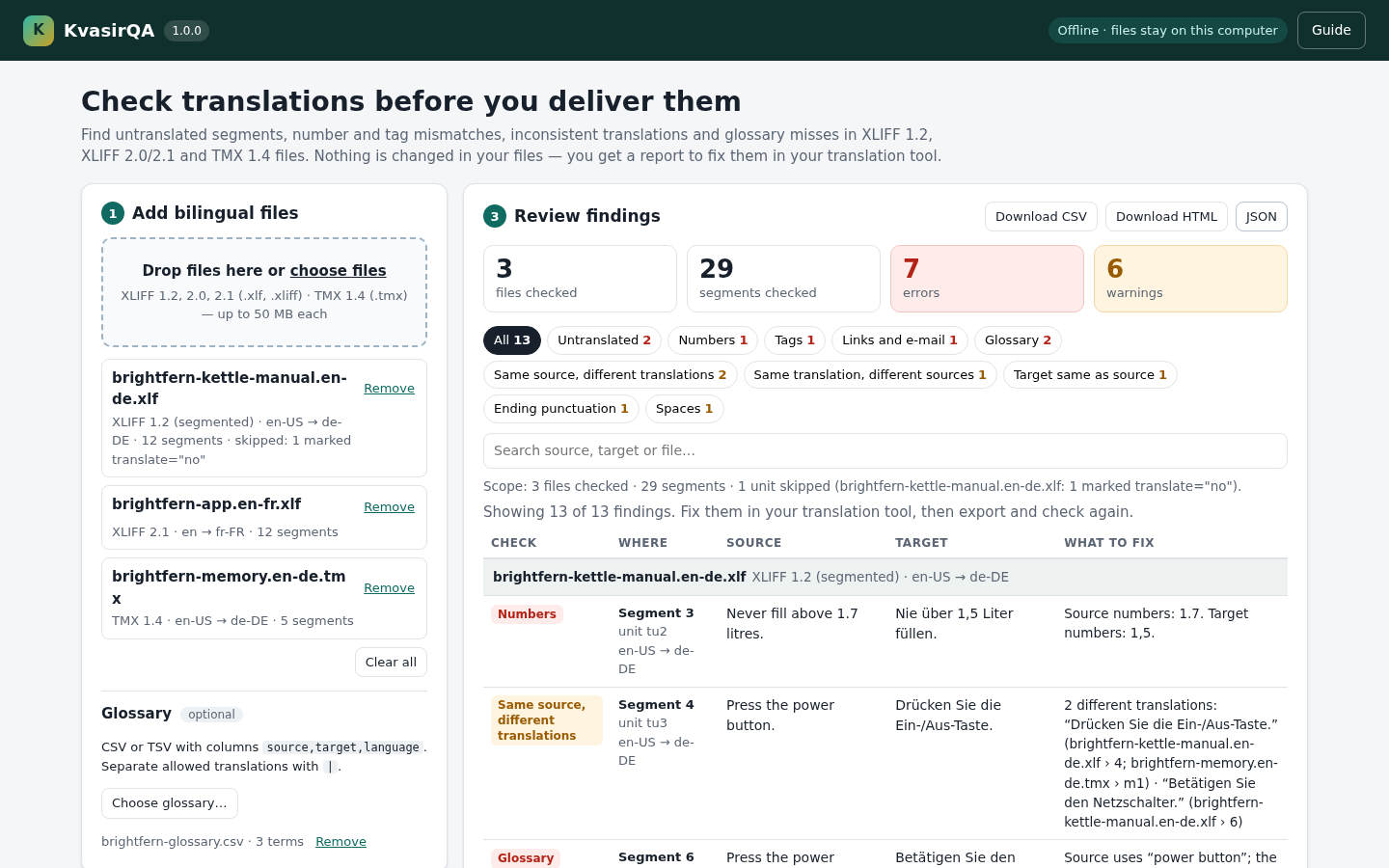
Click Load practice files. Expect 3 files, 29 segments checked, 7 errors and 6 warnings. The mistakes in the fictional Brightfern files are planted on purpose.
Review the findings
Read the Scope: line under the tiles first: it states the files and segments checked and any units skipped. Click a check chip such as Numbers to filter, or search by words or file name. Each row gives Where (file and segment) and What to fix. Errors are likely mistakes; warnings need your judgement and can be intentional.
Save and reopen the report
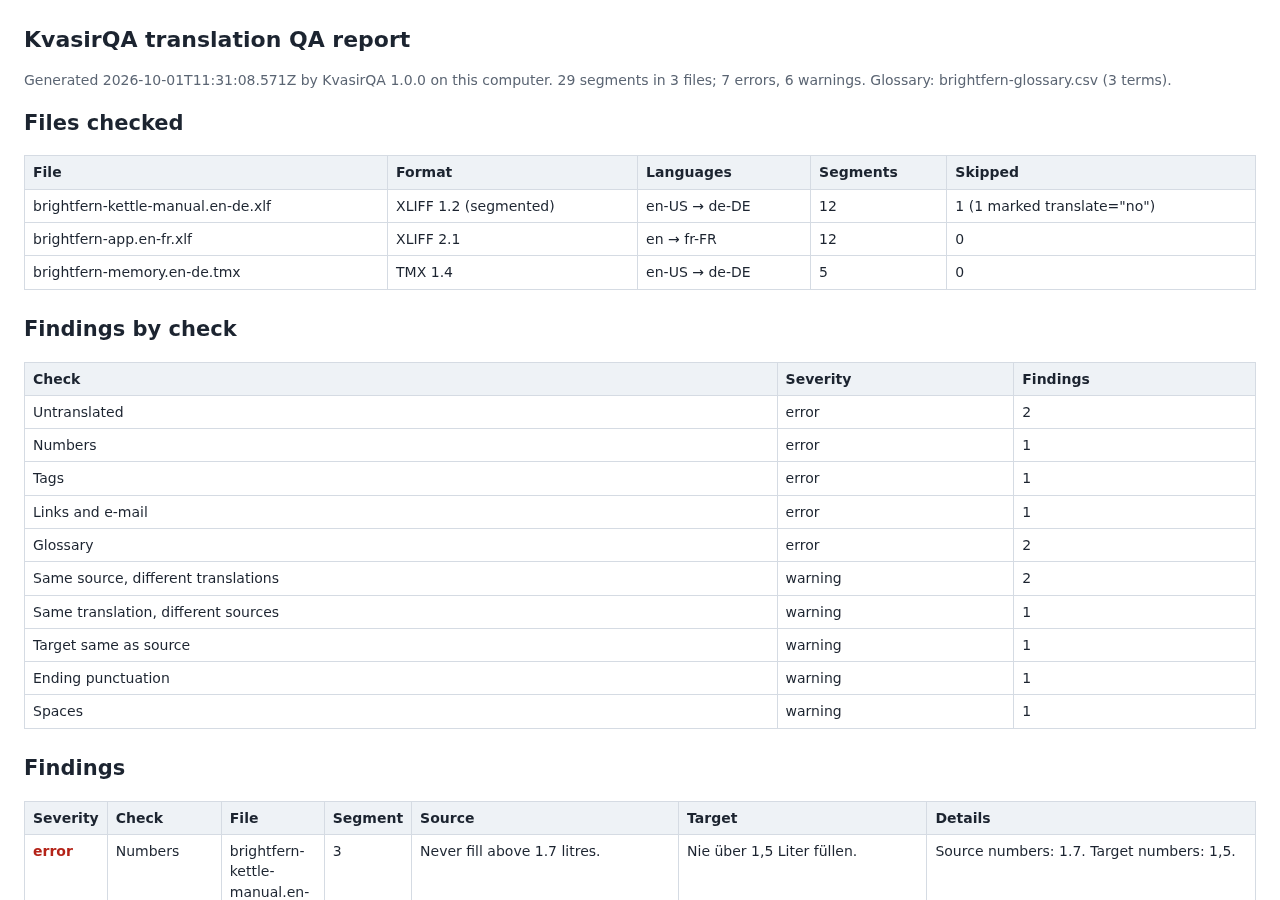
Click Download CSV, Download HTML or JSON. Chrome saves
kvasirqa-report-<date>-<time>files in your usual downloads folder. Reopen the HTML report in your browser to reread, print or save it as PDF, and open the CSV in a spreadsheet. A report reflects the checks that were switched on when you clicked.Check your own files
Click Clear all, then drop your exported XLIFF or TMX files on Drop files here or choose files. Add a glossary with Choose glossary… if you have one. Fix the findings in your translation tool, export again and add the new files: a file with the same name replaces the earlier one. KvasirQA never changes your files.
Privacy and uninstall
Files are read by Chrome on your computer; the app page blocks network requests and nothing is uploaded. KvasirQA keeps no project: to check again later, add the files again. It stores one browser setting, whether the guide is hidden. To uninstall, delete the extracted folder; saved reports stay in your downloads folder.
A worked example
Check the fictional Brightfern kettle files
Input: The practice files in examples/ of the paid download and the free guide ZIP: brightfern-kettle-manual.en-de.xlf (segmented XLIFF 1.2, en-US → de-DE), brightfern-app.en-fr.xlf (XLIFF 2.1, en → fr-FR), brightfern-memory.en-de.tmx (TMX 1.4, en-US → de-DE) and brightfern-glossary.csv (3 terms). All text is fictional and every mistake is planted.
- Open
KvasirQA.htmlin desktop Chrome and click Load practice files, or add the four files fromexamples/yourself. - Check the summary: 3 files checked, 29 segments checked, 7 errors and 6 warnings. The Scope: line reports 1 unit skipped because it is marked
translate="no". - Click Numbers: segment 3 of the German manual turns “Never fill above 1.7 litres.” into “Nie über 1,5 Liter füllen.”; source number 1.7, target number 1,5.
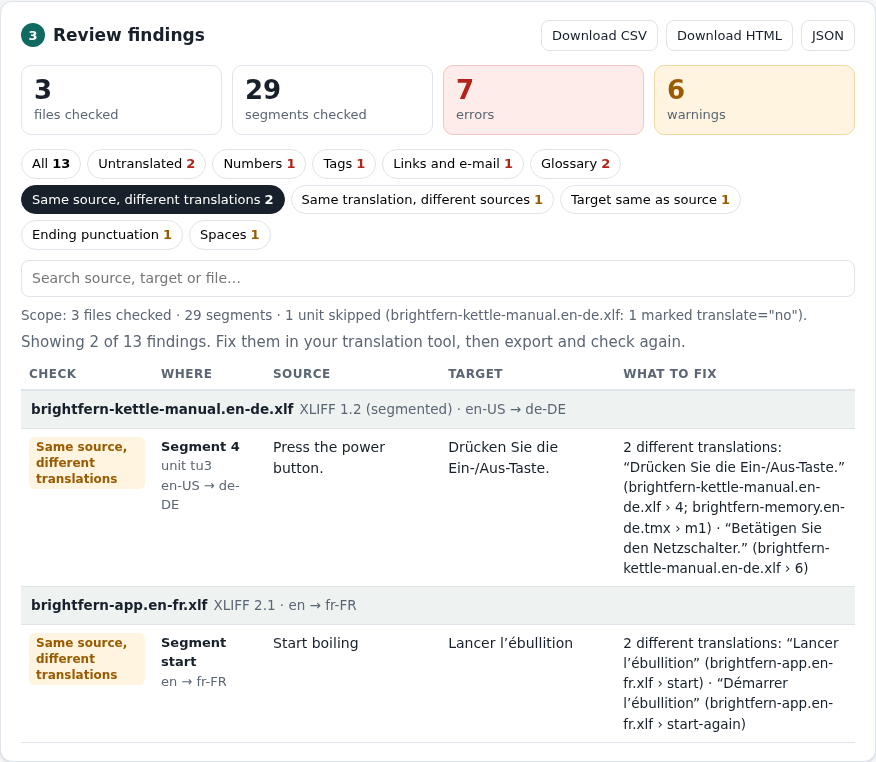
- Click Same source, different translations: “Press the power button.” is “Drücken Sie die Ein-/Aus-Taste.” in segment 4 and TMX unit m1, but “Betätigen Sie den Netzschalter.” in segment 6. The Glossary check also flags segment 6, because the glossary requires “Ein-/Aus-Taste”.
- Click All, then Download HTML. Open the saved
kvasirqa-report-<date>-<time>.htmlfrom your downloads folder: it lists the files checked, the counts per check and all 13 findings.
Expected result: 13 findings (7 errors and 6 warnings) in 29 segments of 3 files, with the skipped translate="no" unit disclosed, and a standalone HTML report you can reopen, print or save as PDF. The CSV and JSON reports contain the same findings. The practice files are not changed.
The practice run in three screens
Actual KvasirQA 1.0.0 screens captured from the accepted download in Chrome 152 on Linux with the fictional Brightfern practice files. The same images are in the illustrated manual.
1. Open and start
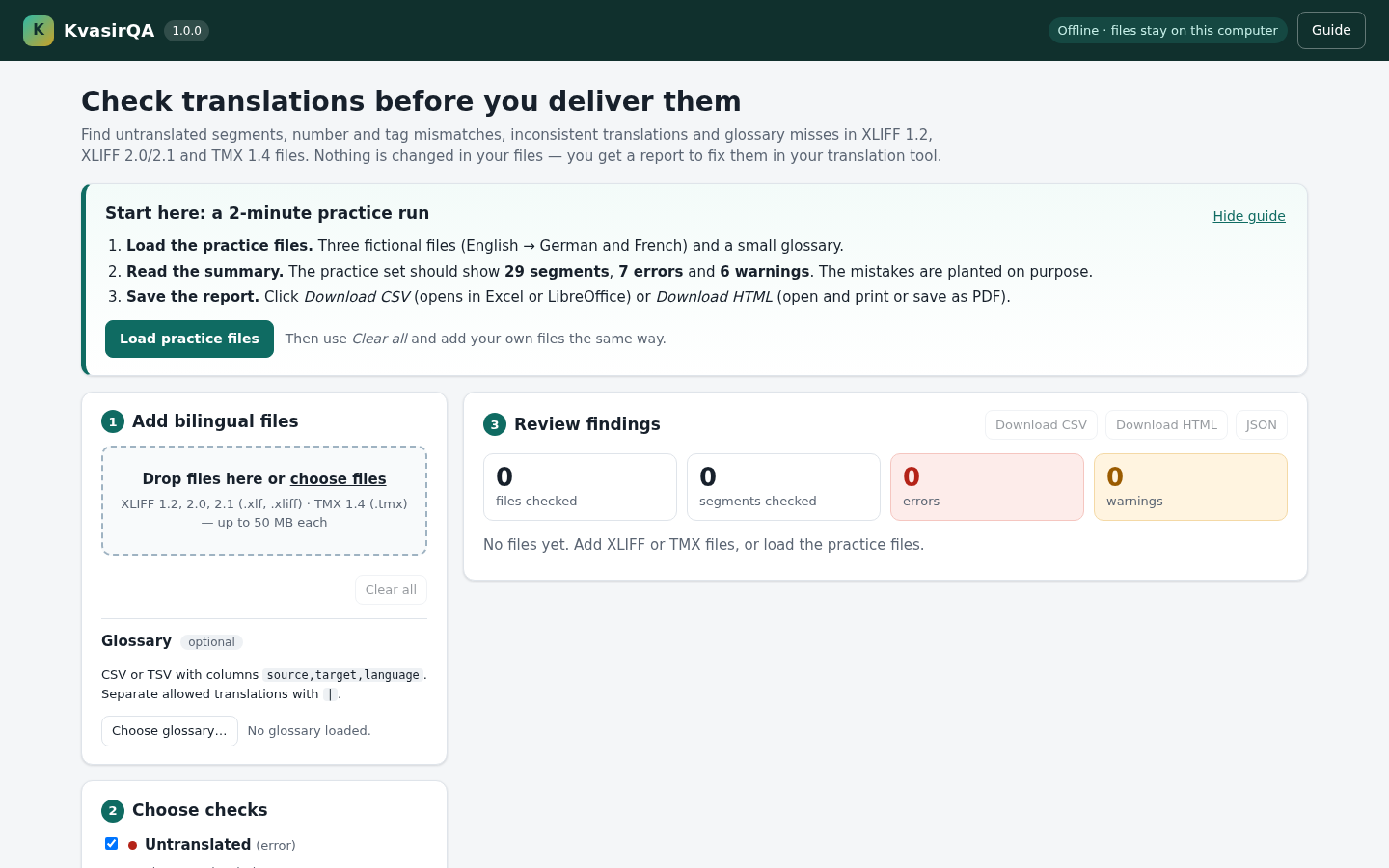
KvasirQA.html in desktop Chrome. The Start here box walks you through the practice run: click Load practice files.2. Review a cross-file finding
3. Save and reopen the report
Troubleshooting
Buttons do nothing or the page has no colours
KvasirQA.html was opened from inside the ZIP or away from its app folder. Extract the whole ZIP again and open KvasirQA.html from the extracted folder. It worked when the green Start here box appears.
A file card turns red and says Not checked
Read the message, for example “not well-formed XML (line …, column …)”, “Not a bilingual file”, “No checkable segments were found”, “Unsupported XLIFF version” or “not valid UTF-8”. The other files are still checked. Re-export that file from your translation tool as UTF-8 XLIFF 1.2, 2.0, 2.1 or TMX 1.4 and add it again: a file with the same name replaces the earlier one. Use Remove on a card to drop a file from the run.
An amber Partial result line appears
Some files were not checked, or some units could not be checked: TMX units without a defined source language and units with <sub> text inside an inline code. Counts and every report cover only what was checked and list what was left out. Fix or re-export the listed files and add them again; review skipped units in your translation tool. When every file and unit was checked, the line starts with Scope: instead.
The glossary shows a red message
Use a CSV or TSV (comma, semicolon or tab; UTF-8) with one term per row in source,target,language order. Separate allowed translations with |. It worked when “… · N terms” appears next to Choose glossary….
A file is refused as larger than 50 MB
Split the project or check fewer files at a time. Exports with an embedded original document can be very large.
No findings are shown, or no report arrives
If “No findings match this filter” appears, click All or clear the search box. If a download seems missing, check Chrome’s download bar or chrome://downloads.
Compatibility & limits
- Flags candidate issues for a human reviewer. It does not certify translation quality; judge meaning, grammar, style or spelling; write changes back to your files or CAT tool; or read CAT statuses, comments or locks. A clean report does not prove a translation is right.
- The test fixtures are synthetic files written to the XLIFF 1.2, 2.0, 2.1 and TMX 1.4 specifications. Real Trados, memoQ, Phrase and other CAT-tool exports have not been independently verified; vendor-specific files, dialects and packages may not work.
- Tested only in desktop Chrome 152 on Linux (x86-64). Windows, macOS, phones, tablets and other browsers have not been tested.
- Accepts exactly XLIFF 1.2, 2.0, 2.1 and TMX 1.4; other versions are refused with a message. PO, TS, TTX, bilingual DOCX/RTF and compressed project packages are not supported.
- TMX units without a defined source language and units with
<sub>text inside an inline code are skipped, counted and the result is marked partial. Units markedtranslate="no"are skipped and counted. The Tags check compares inline codes, not highlight markers such as TMXhior XLIFFmrk; the text inside them is checked. - Consistency compares exact language pairs (
deandde-DEdiffer). Numbers compare digits, so3.5and3,50are reported. - Up to 50 MB per file; performance near that limit is untested. The on-screen table shows the first 500 findings; the CSV, HTML and JSON reports contain all of them.
- Okapi CheckMate is a capable free alternative for offline bilingual QA, and Xbench offers broader CAT-format and terminology features. KvasirQA offers a smaller browser workflow.
Need a hand?
Tell us the product, host application and version, what you tried, and the exact error. Contact support with a fictional example; keep private customer files and passwords out of your message.