KvasirQA · Offline browser app 1.0.0 · desktop Chrome
Check XLIFF and TMX translations before delivery
Check bilingual XLIFF 1.2, XLIFF 2.0, XLIFF 2.1 and TMX 1.4 files in desktop Chrome for untranslated segments, changed numbers, inline codes and links, glossary misses and inconsistent translations, then save a CSV, HTML or JSON report.
Offline browser app for desktop Google Chrome, tested in Chrome 152 on Linux only. Test fixtures are synthetic: files written to the XLIFF 1.2, 2.0, 2.1 and TMX 1.4 specifications. Real Trados, memoQ and Phrase exports have not been independently verified, and vendor-specific files or packages may not work. KvasirQA flags candidate issues for a reviewer; it does not certify translation quality, edit your files or replace your CAT tool.
$19 USD · one-time purchase
Continue to checkoutStep-by-step guide
No subscription. Final total and tax appear at checkout.
What it helps you do
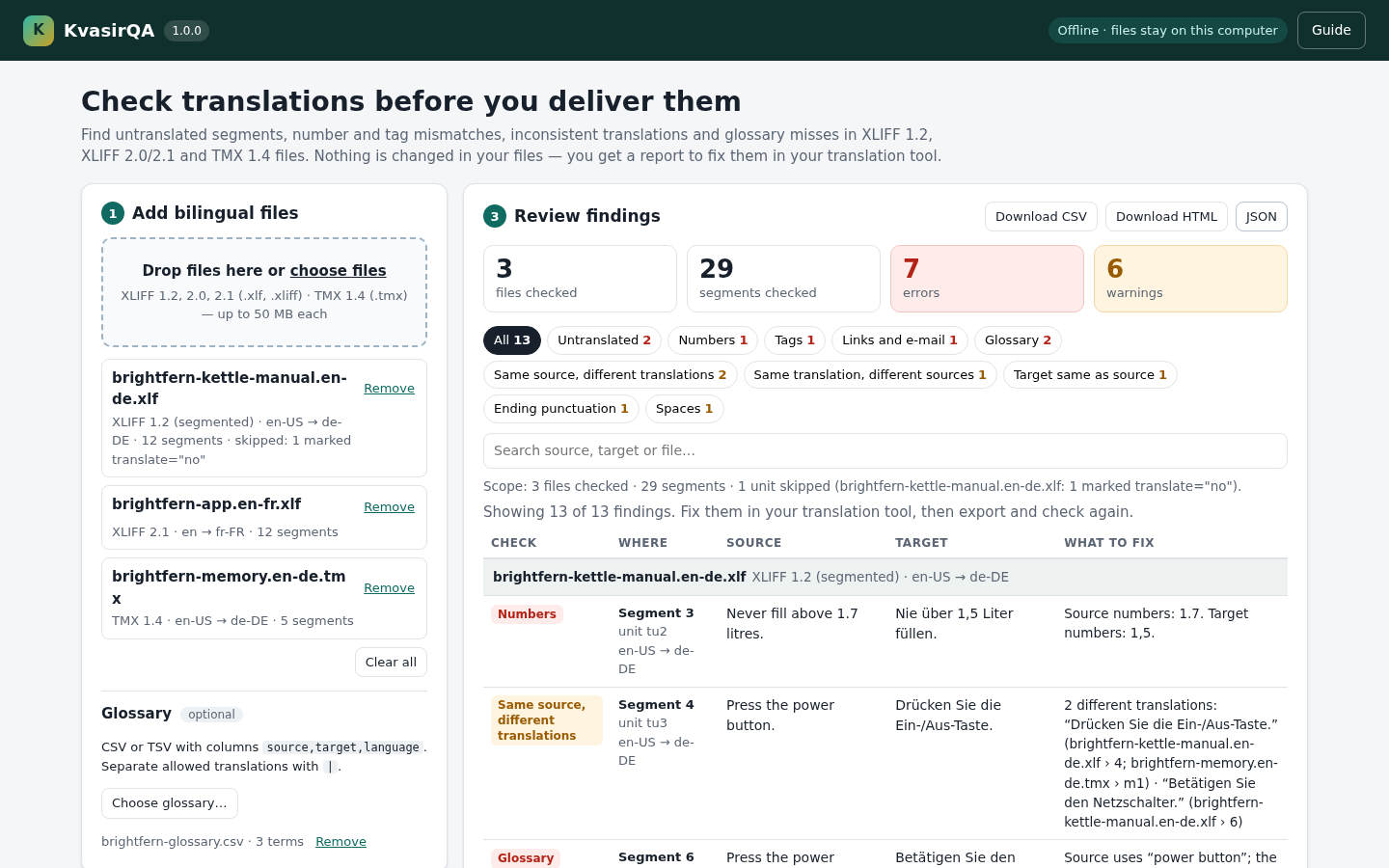
Add the bilingual files you are about to deliver, plus an optional TMX export and glossary CSV. Review errors (untranslated, numbers, inline codes, links and e-mail, glossary) and warnings (the same source translated differently across loaded files with the same language pair, one translation for different sources, target same as source, ending punctuation, spaces). Each finding names the file and segment. The app and every report state what was checked; files that cannot be read and units that cannot be checked are listed and the result is marked partial.
What is in your download
- KvasirQA 1.0.0 offline browser app (HTML and plain JavaScript, no dependencies), README, licence and changelog.
- Illustrated manual with real screenshots, fictional Brightfern practice files (XLIFF 1.2, XLIFF 2.1, TMX 1.4) and a sample glossary.
- CSV, standalone HTML and JSON reports that list every finding and everything that was not checked. No account or subscription.
Bundled fictional practice files
Input → review → output
Rows from the actual KvasirQA 1.0.0 practice run in Chrome 152 on Linux. The Brightfern files are fictional and synthetic; every mistake is planted.
You add → KvasirQA reports → You save
brightfern-kettle-manual.en-de.xlf: “Never fill above 1.7 litres.” → “Nie über 1,5 Liter füllen.” → Numbers (error): source 1.7, target 1,5 → a report row naming the file and segment 3- the same file plus
brightfern-memory.en-de.tmx, both en-US → de-DE → Same source, different translations (warning): segment 4 and TMX m1 differ from segment 6 → every variant with its location brightfern-glossary.csvwithpower button,Ein-/Aus-Taste,de→ Glossary (error) on segment 6 → the expected term in each report- 3 practice files and a 3-term glossary → 29 segments, 7 errors, 6 warnings; 1 translate="no" unit skipped and disclosed →
kvasirqa-report-<date>-<time>.csv,.htmlor.json
Free before you buy: the illustrated manual with real screenshots and these fictional practice files (the guide ZIP below; the app is not included). Paid download: the offline app (KvasirQA.html and its app folder), the same manual and practice files, README, licence and changelog. Test fixtures are synthetic; real CAT-tool exports have not been independently verified.
A practical example
Check the fictional Brightfern kettle files
Start with
The practice files in examples/ of the paid download and the free guide ZIP: brightfern-kettle-manual.en-de.xlf (segmented XLIFF 1.2, en-US → de-DE), brightfern-app.en-fr.xlf (XLIFF 2.1, en → fr-FR), brightfern-memory.en-de.tmx (TMX 1.4, en-US → de-DE) and brightfern-glossary.csv (3 terms). All text is fictional and every mistake is planted.
Get this result
13 findings (7 errors and 6 warnings) in 29 segments of 3 files, with the skipped translate="no" unit disclosed, and a standalone HTML report you can reopen, print or save as PDF. The CSV and JSON reports contain the same findings. The practice files are not changed.
Free guide ZIP: illustrated manual and fictional practice files (app not included)
Examples use fictional or synthetic data. Follow this example step by step.
The practice run in three screens
Actual KvasirQA 1.0.0 screens captured from the accepted download in Chrome 152 on Linux with the fictional Brightfern practice files. The same images are in the illustrated manual.
Open and start
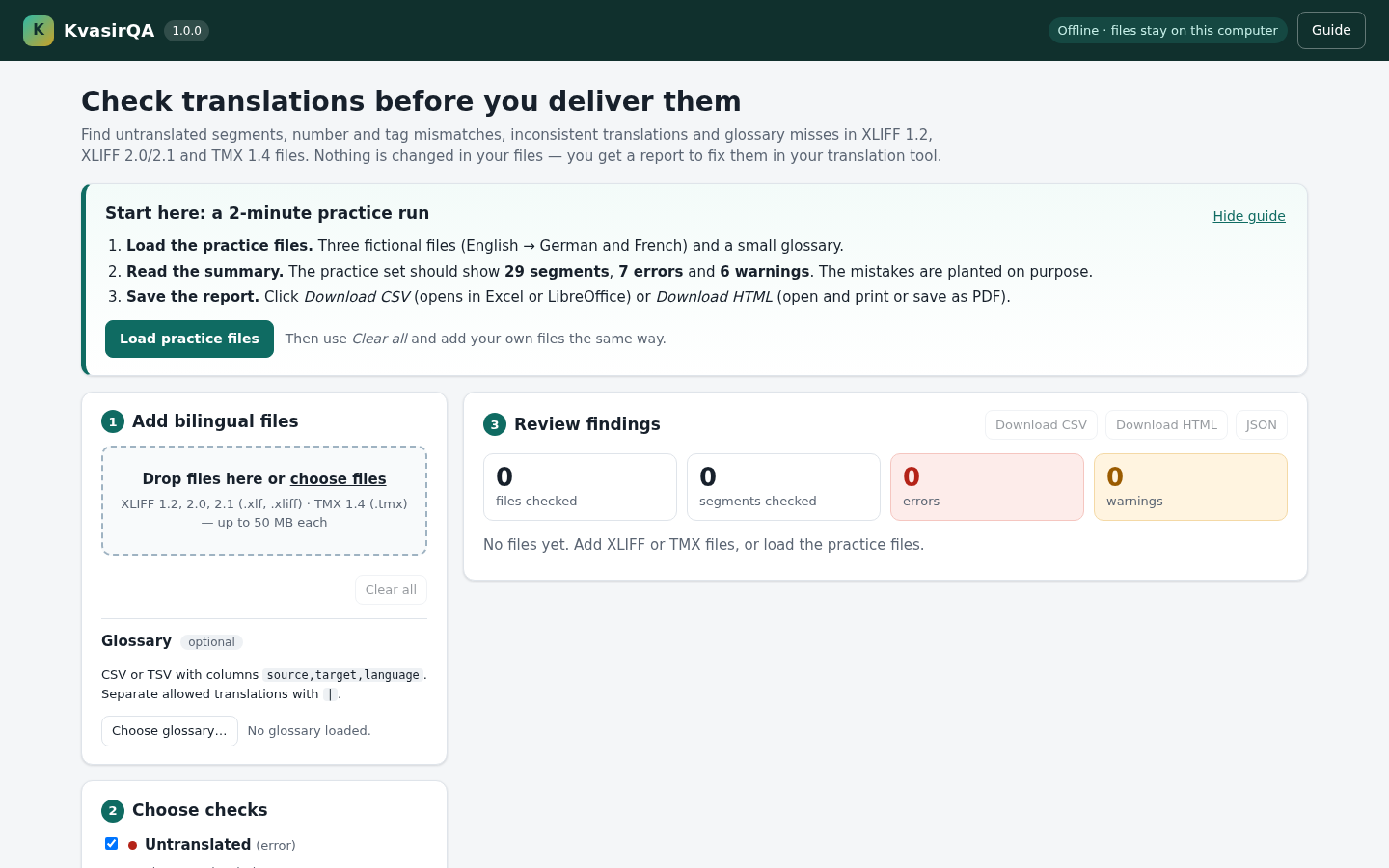
Open KvasirQA.htmlin desktop Chrome. The Start here box walks you through the practice run: click Load practice files. View full sizeReview a cross-file finding
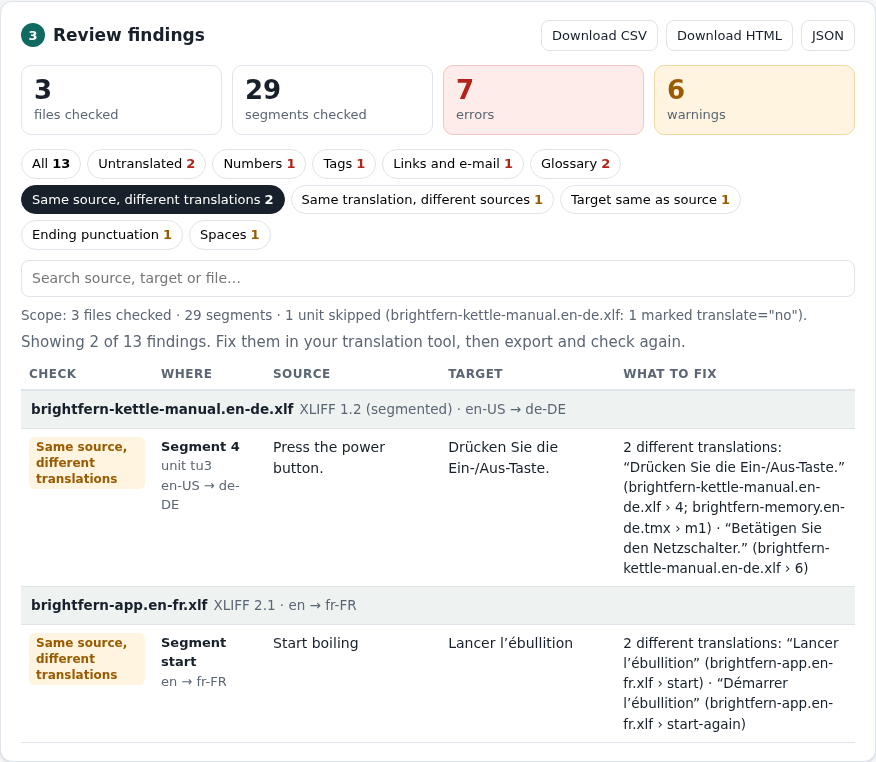
Same source, different translations: the German XLIFF disagrees with the translation memory for the same en-US → de-DE pair, and every variant is listed with its location. View full size Save and reopen the report
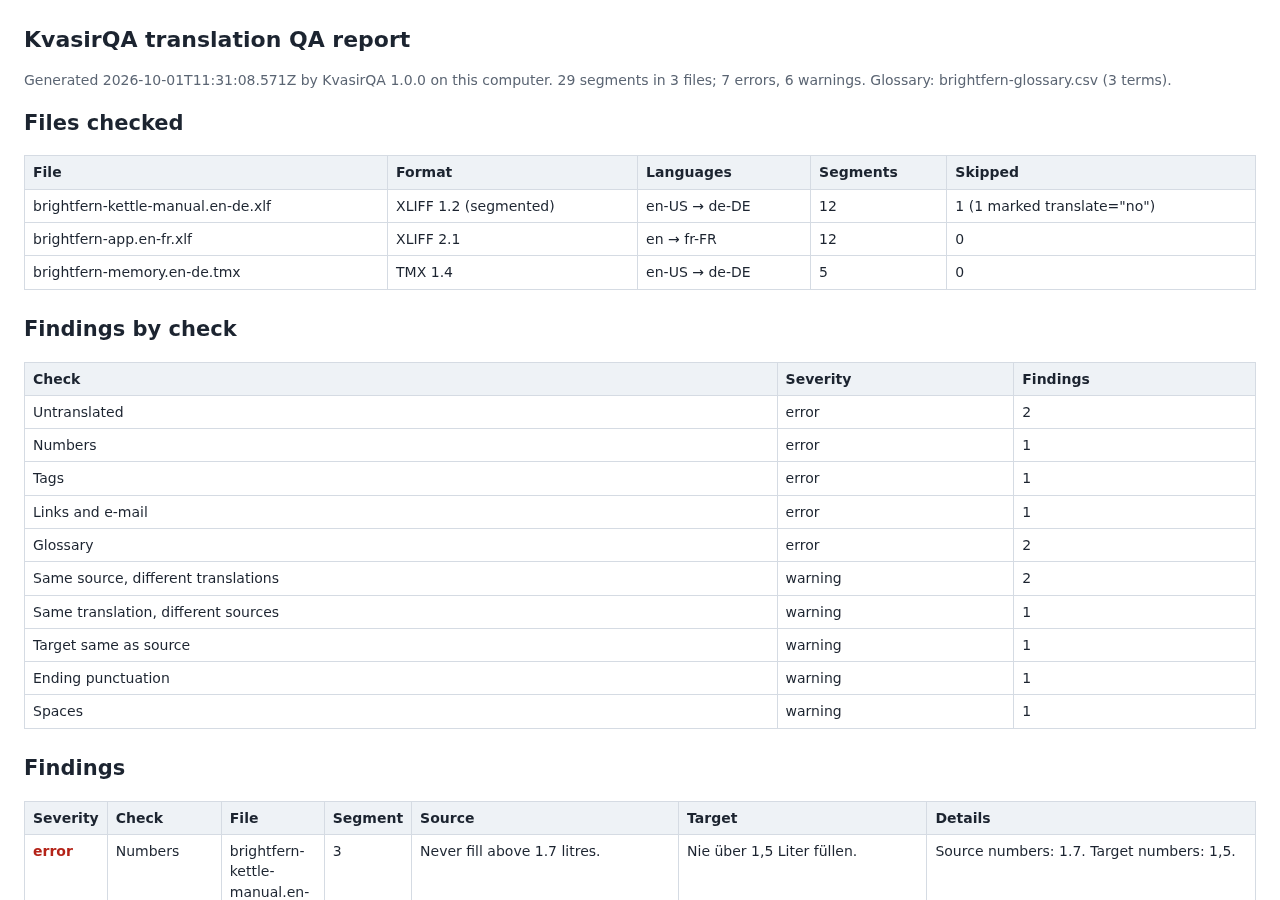
The saved HTML report: files checked, counts per check and every finding, ready to reopen, print or save as PDF. View full size
How it works
Add your files
Drop exported XLIFF 1.2, 2.0, 2.1 or TMX 1.4 files and, optionally, a glossary CSV.
Review the findings
Filter errors and warnings by check; each row names the file, segment and what to fix.
Save a report
Download CSV, HTML or JSON, fix in your translation tool and check again.
Before you buy
- Desktop Google Chrome; tested with Chrome 152 on Linux (x86-64). Windows, macOS, phones and other browsers have not been tested.
- The whole
KvasirQA-1.0.0.zipextracted, withKvasirQA.htmlkept next to itsappfolder. No account, licence key, internet connection or installation. - Bilingual files up to 50 MB each: XLIFF 1.2 (including segmented files), XLIFF 2.0 or XLIFF 2.1 (
.xlf,.xliff), or TMX 1.4 (.tmx, the TMX 1.4b format). The version and namespace are checked; other versions are refused with a message. - Optional glossary: a UTF-8 CSV or TSV with
source,target,languagecolumns.
Extract the whole KvasirQA-1.0.0.zip, keep KvasirQA.html next to its app folder, and open KvasirQA.html in desktop Google Chrome. Click Load practice files to see the fictional example (29 segments, 7 errors, 6 warnings), then Clear all and add your own exported files. No server, account or internet connection is needed. Tested in Chrome 152 on Linux. Files are read only inside your browser; they are never changed or uploaded. To uninstall, delete the extracted folder; reports you saved stay in your downloads folder.
Compatibility & limits
Tested in desktop Chrome 152 on Linux with synthetic files written to the XLIFF 1.2, 2.0, 2.1 and TMX 1.4 specifications; Windows, macOS, phones, other browsers and real Trados, memoQ or Phrase exports were not tested, and vendor-specific files or packages may not work. Other XLIFF/TMX versions are refused; PO, TS, TTX and bilingual DOCX/RTF are not supported. TMX units without a defined source language and units with <sub> text inside an inline code are skipped, counted and the result is marked partial; units marked translate="no" are skipped and counted. The Tags check compares inline codes, not highlight markers such as TMX hi. Up to 50 MB per file. KvasirQA flags possible issues for review: it does not certify quality, check spelling, grammar or style, or write changes back to CAT files. Okapi CheckMate is a capable free alternative; KvasirQA offers a smaller browser workflow.
Get KvasirQA
Perpetual use of the purchased version on your devices for personal or internal commercial work. Keep reasonable backups and modify your own copy; do not redistribute or resell original proprietary code. Third-party licenses and any existing preview permissions retain their rights.
Before payment, save the private recovery code shown by checkout. After Paddle confirms payment, use it to download your ZIP or return for it later. No subscription, future update or email delivery is promised. See the illustrated steps.
$19 USD · once
Buy download