How to fit a lattice cage in Blender
YmirCage sizes a lattice to selected meshes and adds their Lattice modifiers. Edit the cage to deform the objects without applying their modifiers.
Updated 29 September 2026
Choose the meshes
Use Blender 4.5 LTS in Object Mode. Select one mesh, or a small group of independent meshes. Save a copy of your scene before trying the early preview.
YmirCage fits the selection’s bounding box. It creates a lattice object and adds a Lattice modifier to each source mesh; it does not apply the modifiers or rewrite the mesh geometry.
Install and open YmirCage
Download the free YmirCage 0.1.0 ZIP. In Blender, open Edit → Preferences → Get Extensions, open the menu and choose Install from Disk…. Select the ZIP.
In the 3D Viewport press N and open the YmirCage tab. Its operators also appear under Object → YmirCage.
Fit and shape the cage
- With the source meshes selected, choose orientation, padding and resolution.
- Press Fit Cage. A lattice named YmirCage_<object> appears, and each mesh receives a Lattice modifier.
- Select that cage and enter Edit Mode.
- Move its control points and inspect how the source meshes deform.
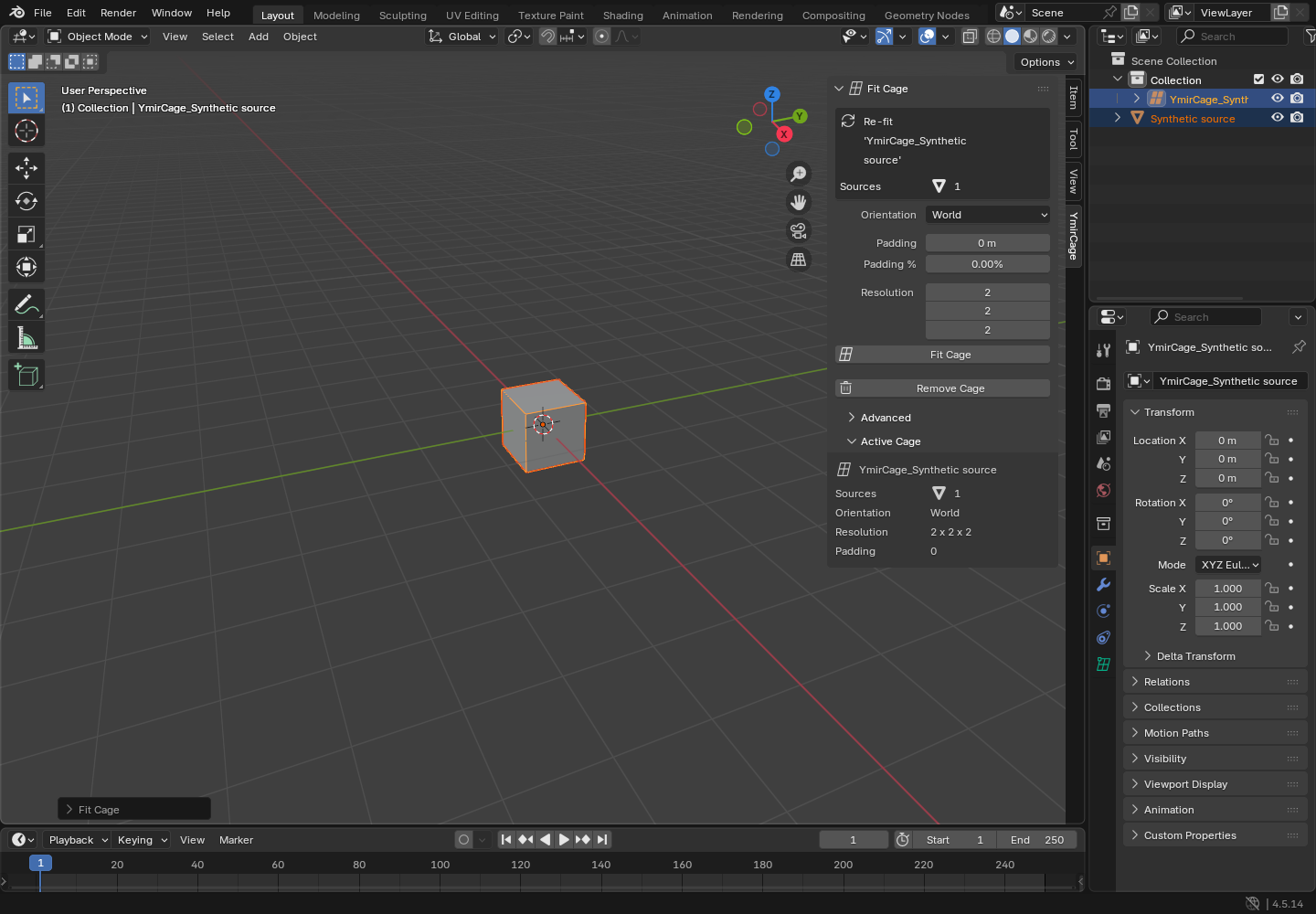
Refit without losing track of edits
Select the existing cage or its source meshes and use Fit Cage again to update that cage. Selecting the cage by itself uses its recorded source meshes. Selecting meshes replaces the source set, so read the sidebar’s list of meshes that will become unbound before you confirm.
At the same resolution, moved control points are kept. Changing resolution rebuilds the grid; an edited cage is protected until you explicitly choose Reset Edited Points in the Advanced panel. A lattice with shape keys cannot have its resolution changed by the tool.
A refit uses the current sidebar settings. Read Changes from the last fit before proceeding.
Remove the cage cleanly
Return to Object Mode, select the cage, then use Remove Cage. This removes the cage and the modifiers the tool created without applying them.
Deleting only the lattice with Blender’s X key can leave modifiers pointing to no object. Use the add-on’s removal command for cleanup. If a cage was already deleted, inspect Modifier Properties and remove the empty modifiers yourself.
Version, license and help
This guide covers the free GPL-2.0-or-later YmirCage 0.1.0 early preview. It targets Blender 4.5 LTS, with validation on Linux and Blender 4.5.14 only. Windows, macOS, other patches and artist review remain open.
Get support, or read how to straighten a quad-strip UV layout.