Step-by-step guide
Freyara
Freyara is a bead-chart editor for a triangular peyote kaleidocycle: you colour 24 triangular faces bead by bead and export a PDF pattern booklet.
You want to plan the colours of a beaded kaleidocycle (a ring of six tetrahedra) before buying beads, and you are happy to test an experimental pattern with a small sample first.
Before you start
- Desktop Google Chrome or another Chromium-based browser. The tool was checked in desktop Chrome; other browsers are not verified.
- Free to use: no purchase, account, installation or upload. Files are opened and processed inside your browser tab.
- No files are needed to start: the page includes a Sample and a Control pattern.
Your first result
Open Freyara
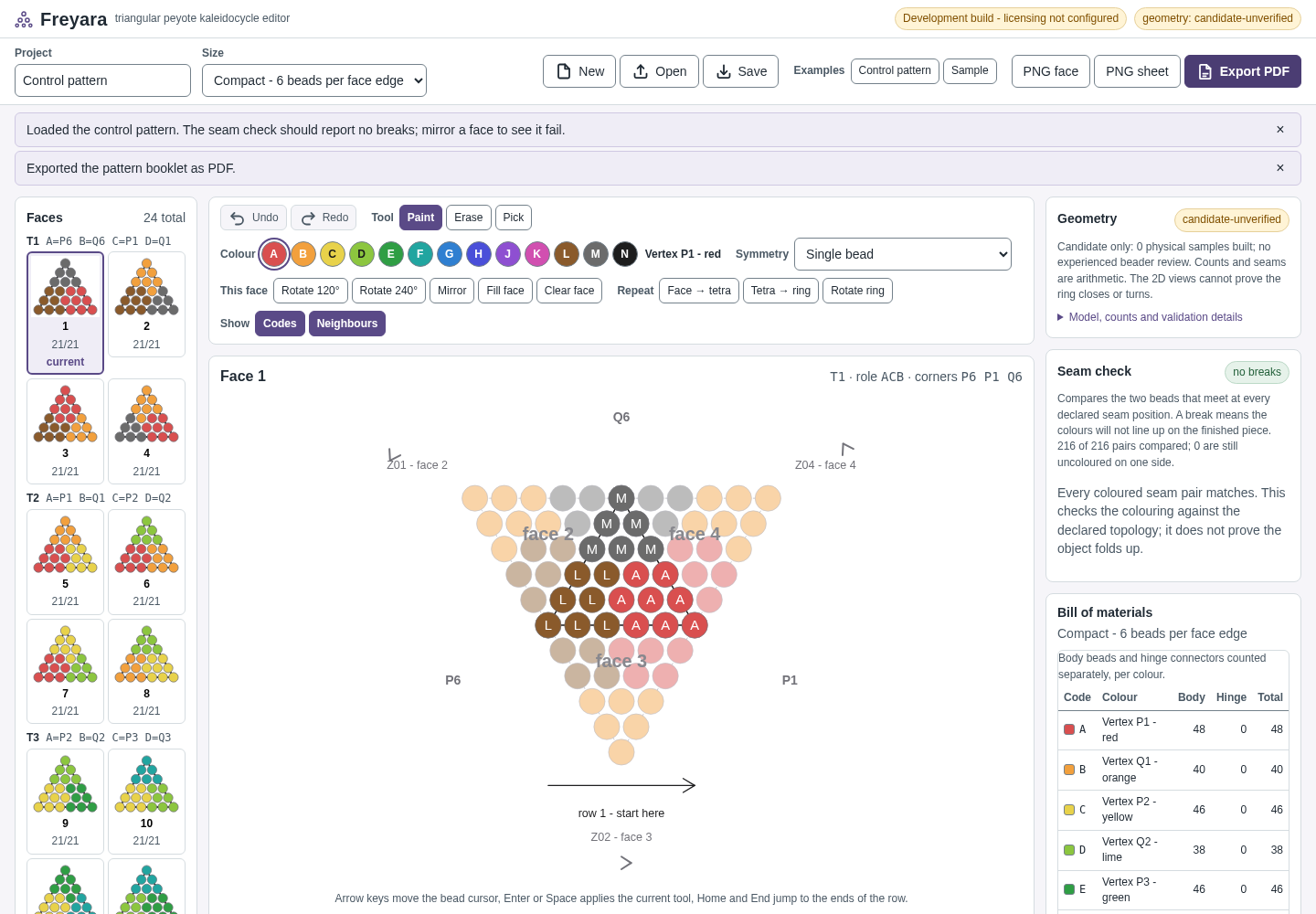
Go to https://perunlight.com/apps/freyara/. The top toolbar holds the project name, Size, New, Open, Save, the examples (Control pattern, Sample) and the exports (PNG face, PNG sheet, Export PDF).
Start a pattern
Click Sample for a small started design, Control pattern for the reference design, or New for an empty pattern. Under Size choose Compact - 6 beads per face edge or Large - 10 beads per face edge. Type a name in the Project box; exported files are named after it.
Colour the beads
The Faces list shows all 24 faces in six groups (T1–T6) with the number of beads placed, for example 0/21. Click a face, choose Paint, pick a colour letter (A–H) and click or drag across the beads. Erase removes colour and Pick copies a bead's colour. Symmetry can paint 2, 3 or 6 matching beads at once.
Use the face tools
Rotate 120°, Rotate 240°, Mirror, Fill face and Clear face change the current face. Under Repeat, Face → tetra, Tetra → ring and Rotate ring copy a design to other faces. Show Codes and Neighbours displays seam labels and joined faces. Add colour and the palette let you name your own colours.
Check the counts
Open Model, counts and validation details for bead counts per colour, seam “breaks” (places where colours will not line up across a seam) and the connector beads for hinges H1–H6.
Export and save
Click Export PDF to download the pattern booklet with a bill of materials, colour legend, charts and assembly notes. PNG face saves the current face and PNG sheet saves all faces as PNG images. Click Save to download a .freyara.json project file; use Open to load it again.
A worked example
Turn the bundled sample into a pattern booklet
Input: No file needed: Freyara's built-in Sample. To try re-opening a saved project, use examples/freyara/fictional-meadow-ring.freyara.json.
- Open https://perunlight.com/apps/freyara/ and click Sample.
- Type Fictional meadow ring in the Project box.
- Click Export PDF.
- Click Save.
- Optional: in a new tab, open Freyara, click Open and choose fictional-meadow-ring.freyara.json.
Expected result: The status reads “Loaded the bundled sample project.” and face 1 shows 4 of 21 beads placed. Export PDF downloads fictional-meadow-ring.pdf, a 13-page booklet in our test. Save downloads fictional-meadow-ring.freyara.json with the message “Project file saved to your downloads.” Opening that file brings back the same pattern and name (“Opened fictional-meadow-ring.freyara.json.”).
Troubleshooting
Every PDF page says “FREYARA DEVELOPMENT BUILD - NOT A LICENSED COPY” and “CANDIDATE GEOMETRY”.
That banner is part of this free preview. It marks the geometry as not yet validated. No key or purchase removes it, and it does not change the chart content.
A message says autosave is paused because another tab changed it.
Only one tab holds the shared autosave. Click Save to write a project file from the tab you are working in before closing it.
The seam check reports a break.
Two beads that meet at a seam have different colours. Click the seam under Joined faces to jump there and repaint, or keep it if the contrast is intentional.
My pattern is gone on another computer or browser.
Autosave only keeps recovery copies in this browser. Carry your work as a .freyara.json file made with Save.
Compatibility & limits
- Experimental geometry: no physical ring has been assembled from this release. Stitch a small sample before buying beads.
- Colours are your own names and colour values, not a bead maker's catalogue.
- Browser autosave is a recovery aid, not a backup; keep the .freyara.json file.
- On a shared computer, remove saved work by clearing this site's data in your browser settings.
Need a hand?
Tell us the product, host application and version, what you tried, and the exact error. Contact support with a fictional example; keep private customer files and passwords out of your message.