Step-by-step guide
FrithRounds
Turn ranked workshop choices into a reviewed round-by-round plan. Keep participant itineraries, facilitator rosters and cancellation changes together in one approved revision.
You have ranked participant choices and a small workshop timetable, and need a reviewed allocation plus coordinated print packets.
Before you start
- Desktop Google Chrome on Linux was tested (Chrome 152.0.7977.82). Extract and keep all buyer files together; opening index.html locally works without network access.
- For your own event, prepare exact stable participant IDs, ranked topic choices, sessions and whole-number capacities. Every active person must attend every round.
- No autosave is provided. Download the project and keep earlier approved packets before closing or replacing inputs.
Your first result
Open the example
Extract the complete buyer ZIP. Open START-HERE.html, follow Open FrithRounds, and choose Try the six-person skills day.
Generate the first plan
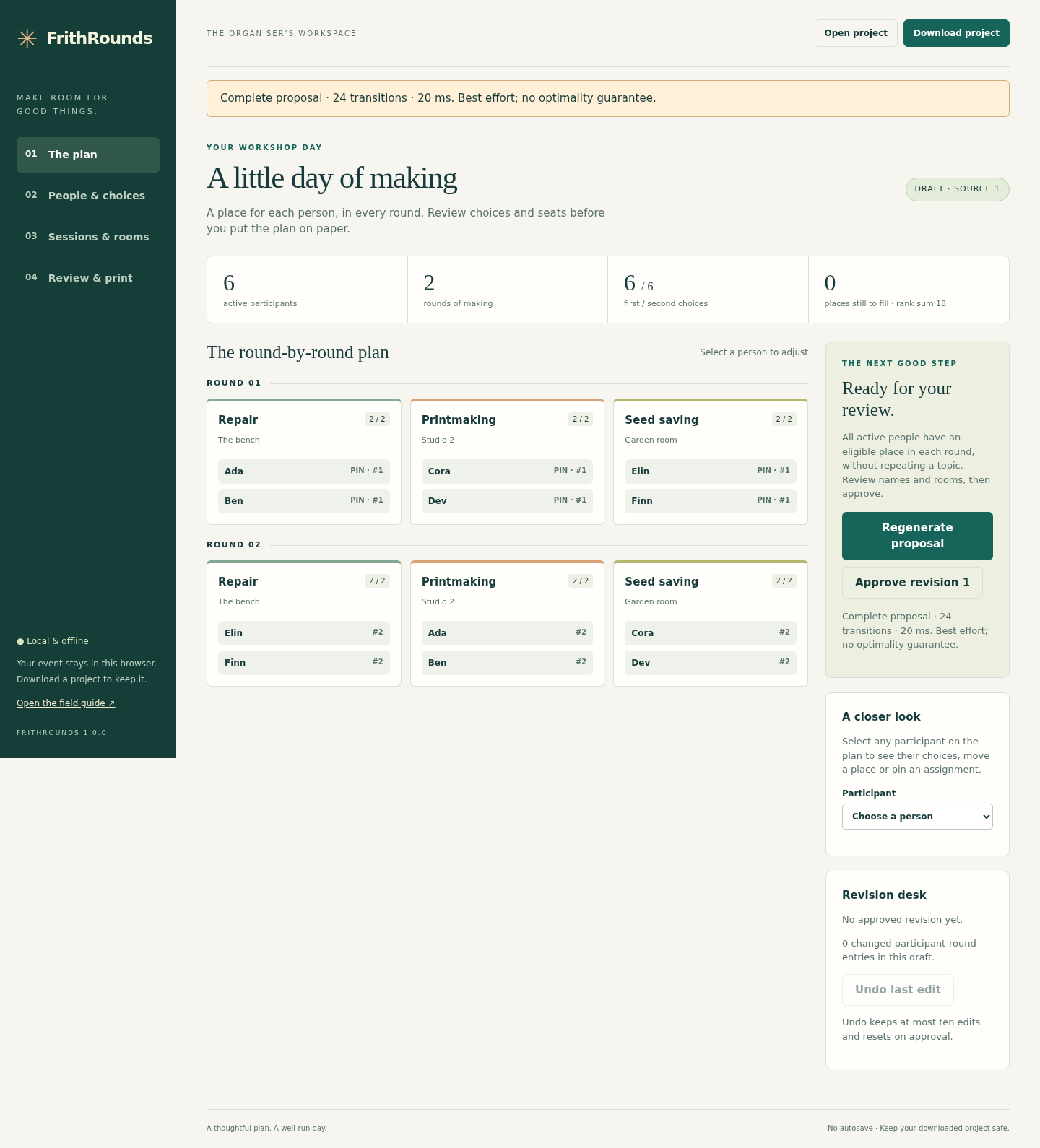
Choose Generate proposal. Expect six participants, two rounds, twelve places, zero missing places and a rank sum of 18. Check each name and room before choosing Approve revision 1.
Keep a durable copy
Choose Download project. In Review & print, choose Download approved ZIP. The project stores the current draft and last approved snapshot, including when it is bundled in an approved ZIP. Approved print HTML and CSV stay tied to the approved revision; keep older downloads separately.
Print the same revision
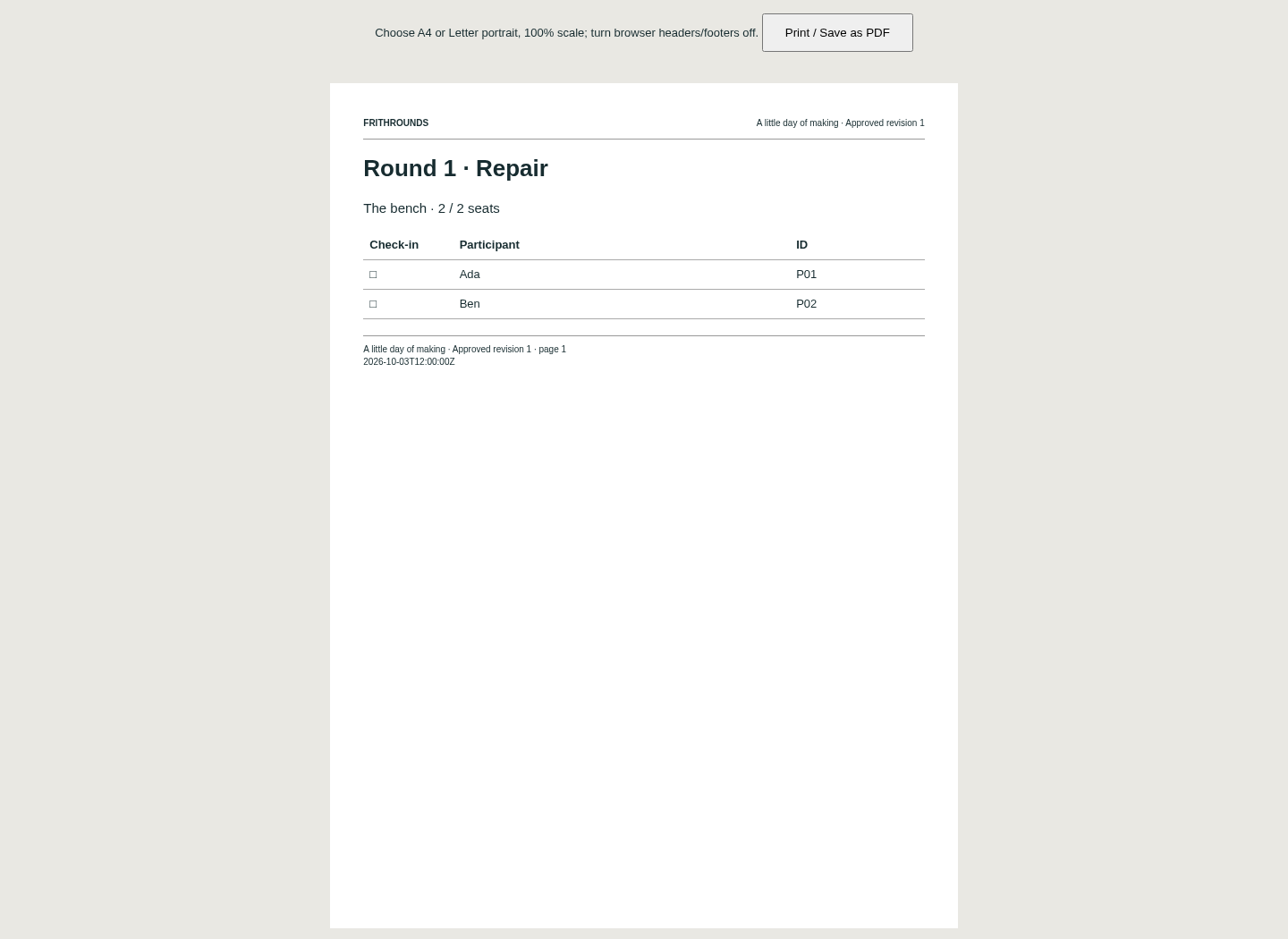
Extract the exported ZIP and open packet.html. Print from Chrome to A4 or Letter, portrait, 100% scale, with browser headers and footers disabled. Preview every page. The original sample has six rosters, six participant itineraries and one checklist.
Try a cancellation
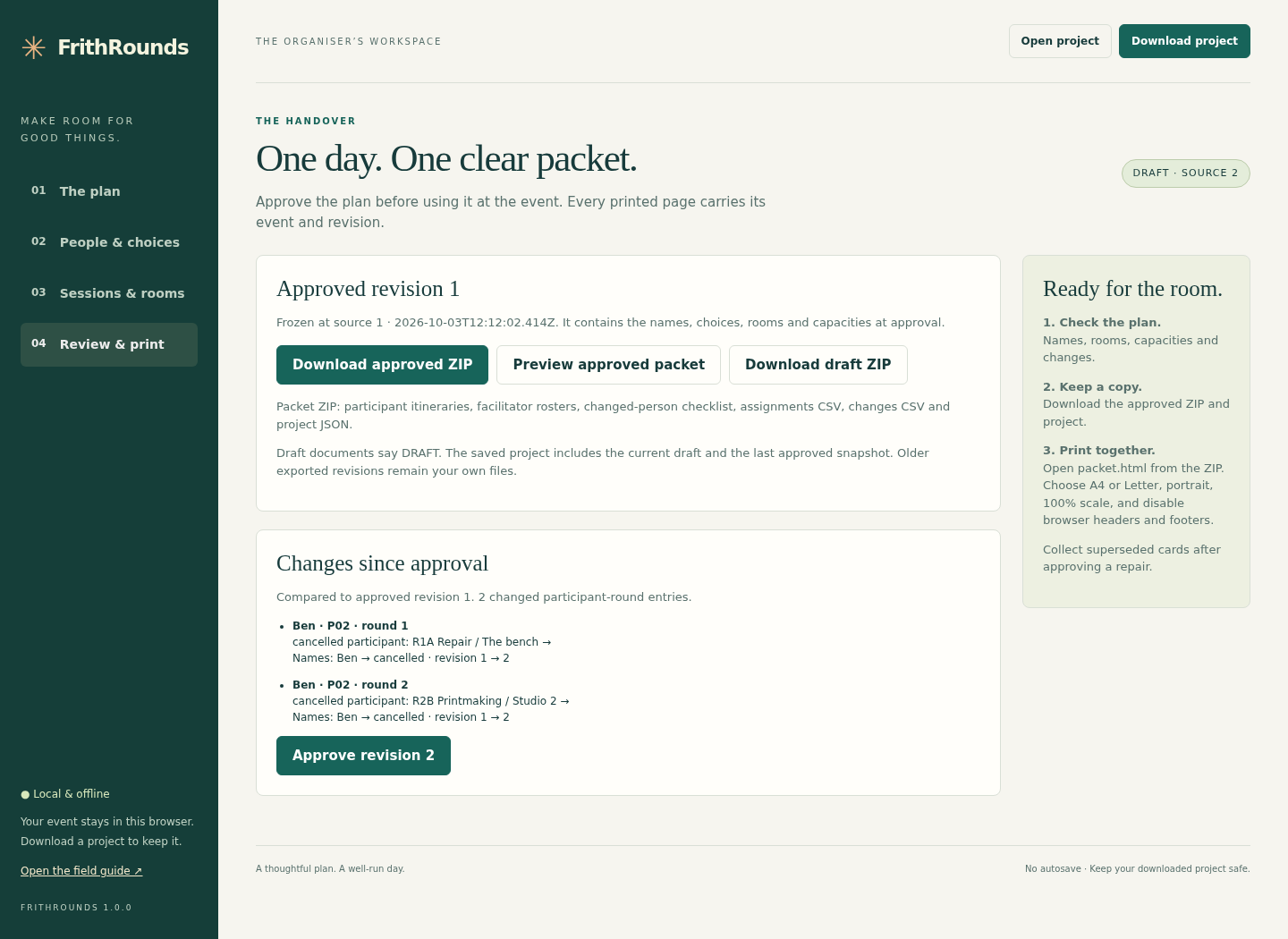
In People & choices, deactivate Ben (P02). Generate a new proposal: expect ten places and rank sum 15, with no surviving participant moved. Inspect the two cancelled entries, approve revision 2 and replace superseded papers.
Bring your own event
Save your existing project first. Open the app in a fresh tab and choose Start an empty event. In Sessions & rooms, set the event and round count, read or edit the session CSV, then choose Apply session sheet.
Map the roster explicitly
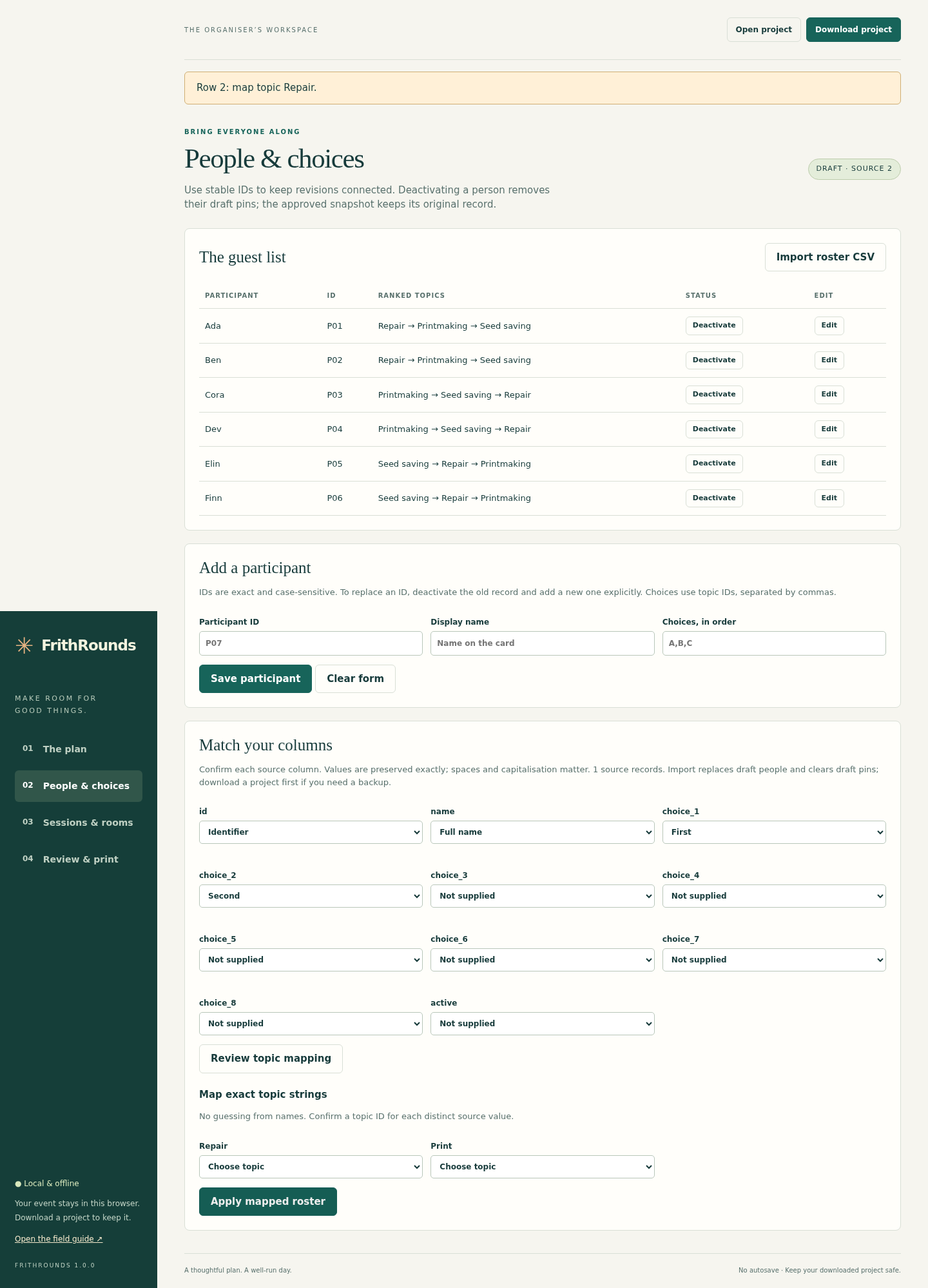
In People & choices, import UTF-8 CSV. Match the ID, name, ranked-choice and optional active columns, then choose Review topic mapping and Apply mapped roster. Import replaces draft people and clears draft pins while preserving the last approved snapshot.
Review deliberate changes
Select a person to move or pin a place. Remove conflicting pins explicitly before source edits. Changes create a draft; an incomplete plan cannot be approved. Room/name changes can require new papers even when session assignments stay the same.
Reopen the saved project
Open the application again, choose Open project, and select the downloaded JSON. Saved inputs and assignments are rechecked. Without a downloaded copy, closed unsaved work cannot be recovered.
A worked example
A little day of making — original fictional example
Input: Six people; Repair, Printmaking and Seed saving; two rounds with two seats per session. Explicit round-1 pins keep the demonstration consistent.
- Generate and approve revision 1, then download its project and packet.
- Deactivate P02 and regenerate against the approved plan.
- Inspect the cancellation checklist before approving and printing revision 2.
Expected result: Round 1: Repair Ada/Ben; Printmaking Cora/Dev; Seed saving Elin/Finn. Round 2: Repair Elin/Finn; Printmaking Ada/Ben; Seed saving Cora/Dev. Twelve assignments, rank sum 18. After P02 cancels: ten assignments, rank sum 15, no surviving moves and five participant itineraries.
From ranked choices to papers for the day
Actual FrithRounds screens in Chrome on Linux with first-party fictional data.
1. Find their places
2. Review a cancellation
3. Map the choices
4. Keep papers together
Troubleshooting
Search limit reached or missing places
This does not prove infeasibility. Review capacities, choices and pins, then make deliberate changes or finish with manual moves. Review the complete result before approval.
Too few seats in a round
Add capacity or a session, or deactivate a cancelled participant. In the six-person example, lowering R2B to one seat leaves only five seats and blocks complete approval.
Source change conflicts with a pin
Remove the named pin explicitly in Sessions & rooms, then apply the source edit. Surviving pins are not silently dropped.
CSV import rejected
Use the documented UTF-8 comma-separated profile, exact unique IDs and explicit column/topic mapping. Quote commas and multiline values. Correct blank or malformed records instead of silently dropping them.
Approved packet shows an old room or name
The approved snapshot is intentionally preserved. Generate and review the corrected draft, approve a new revision, and distribute its packet.
Work disappeared after closing
Reopen your last downloaded project. The application has no autosave.
Compatibility & limits
- Up to 80 participant records, including inactive records, 1–3 rounds, 8 topics and 24 sessions. All active participants attend every round. One session per topic per round; integer capacities 1–80.
- UTF-8 comma-separated roster/session files and version-1 project JSON only. Each input/project is limited to 5 MiB; the exported ZIP is limited to 10 MiB. No XLSX or hosted form integration.
- IDs use 1–32 ASCII letters, digits, underscores or hyphens and match exactly. Names/labels allow 1–120 Unicode characters. Choices must be unique, contiguous and explicitly mapped; unranked topics are ineligible.
- The proposal search is bounded to 200000 transitions with a 10-second worker guard. It can miss feasible arrangements and does not guarantee global optimality, fairness or completion for every event. Review each result and use manual moves where needed.
- No autosave. Keep downloaded projects and earlier revisions yourself. The app retains only the last approved snapshot and current draft; approval is a workflow label, not a digital signature.
- Chrome on Linux and its A4/Letter PDF output were tested. Other browsers, operating systems, physical printers and mobile devices are unverified. Narrow-screen checks use desktop Chrome at 390 pixels.
- Each participant itinerary uses a page; rosters and change lists paginate separately. Printed whitespace is collapsed for readability. Spreadsheet-facing CSV uses a disclosed apostrophe prefix for formula-like text; exact strings remain in JSON.
- No registration collection, notifications, attendee accounts, payments, waitlists, variable attendance, instructor scheduling or timetable generation.
Need a hand?
Tell us the product, host application and version, what you tried, and the exact error. Contact support with a fictional example; keep private customer files and passwords out of your message.