FrithRounds · Offline workshop allocation 1.0.0
One workshop day. One plan everyone can follow.
Turn ranked workshop choices into a reviewed round-by-round plan. Keep participant itineraries, facilitator rosters and cancellation changes together in one approved revision.
You have ranked participant choices and a small workshop timetable, and need a reviewed allocation plus coordinated print packets.
$19 USD · one-time purchase
Continue to checkoutStep-by-step guide
No subscription. Final total and tax appear at checkout.
Try the worked example on paper
The free pack includes source CSVs, a saved project and the expected packet. The interactive application is in the paid download.
- Review every place: Generate a bounded proposal, check choices and capacities, then move or pin places before approval.
- Keep approved papers stable: Names, rooms and assignments stay attached to their approved revision while you edit the next draft.
- Repair a changed day: See cancellations, reassignments and printed-label changes before exporting updated rosters and itineraries.
What it helps you do
For community organisers who already collect ranked choices and set their own session timetable. Review places, capacities and pins, approve a revision, then prepare the papers for the day.
What is in your download
- Offline application and readable local source
- Illustrated English HTML field guide and actual screenshots
- Original fictional roster/session CSVs, saved project and expected printable packet
- License, provenance notes, README and changelog
A practical example
A little day of making — original fictional example
Start with
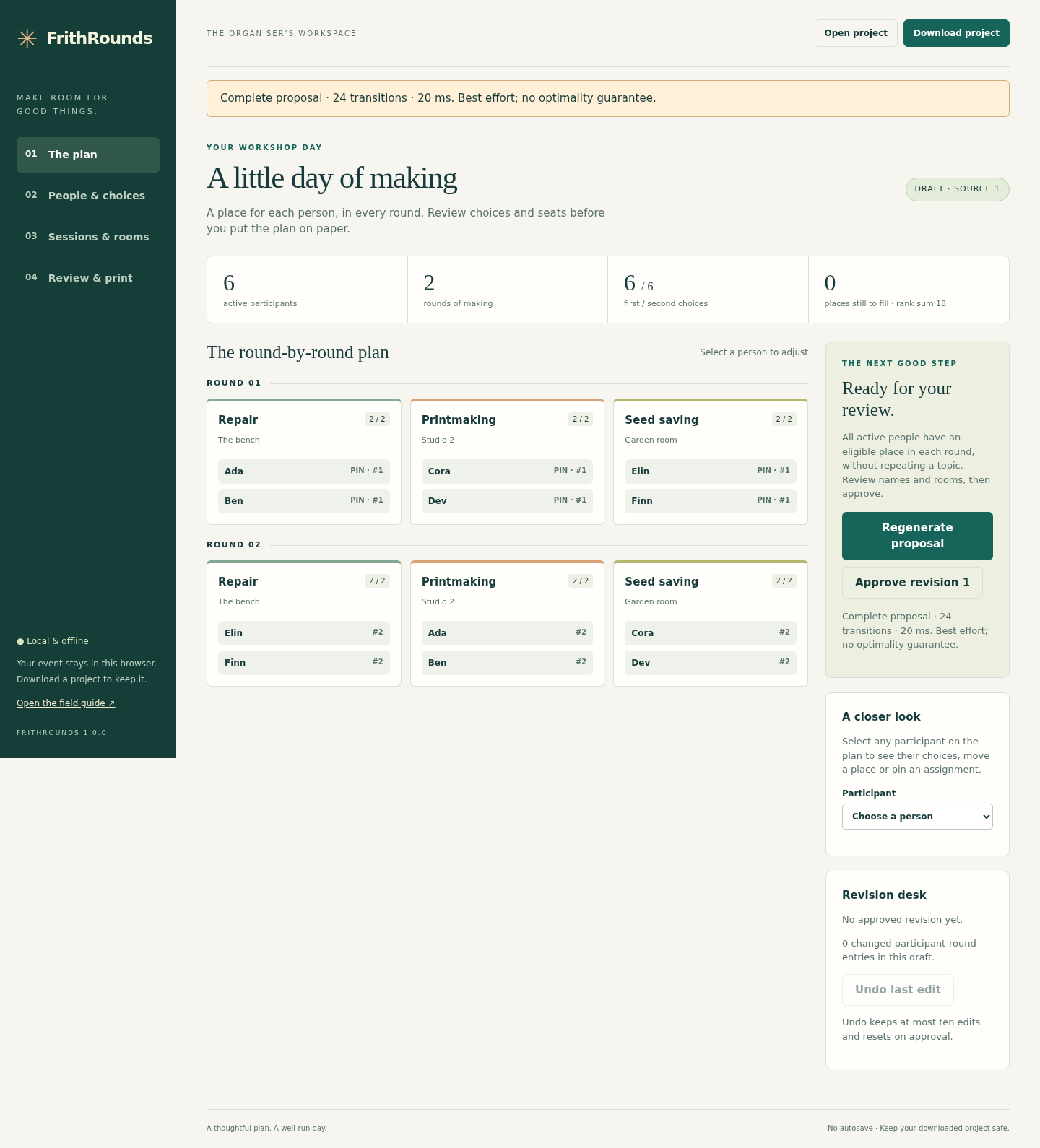
Six people; Repair, Printmaking and Seed saving; two rounds with two seats per session. Explicit round-1 pins keep the demonstration consistent.
Get this result
Round 1: Repair Ada/Ben; Printmaking Cora/Dev; Seed saving Elin/Finn. Round 2: Repair Elin/Finn; Printmaking Ada/Ben; Seed saving Cora/Dev. Twelve assignments, rank sum 18. After P02 cancels: ten assignments, rank sum 15, no surviving moves and five participant itineraries.
Examples use fictional or synthetic data. Follow this example step by step.
From ranked choices to papers for the day
Actual FrithRounds screens in Chrome on Linux with first-party fictional data.
Find their places
The original six-person skills day has twelve places across two rounds, with no repeated topic. View full size Review a cancellation
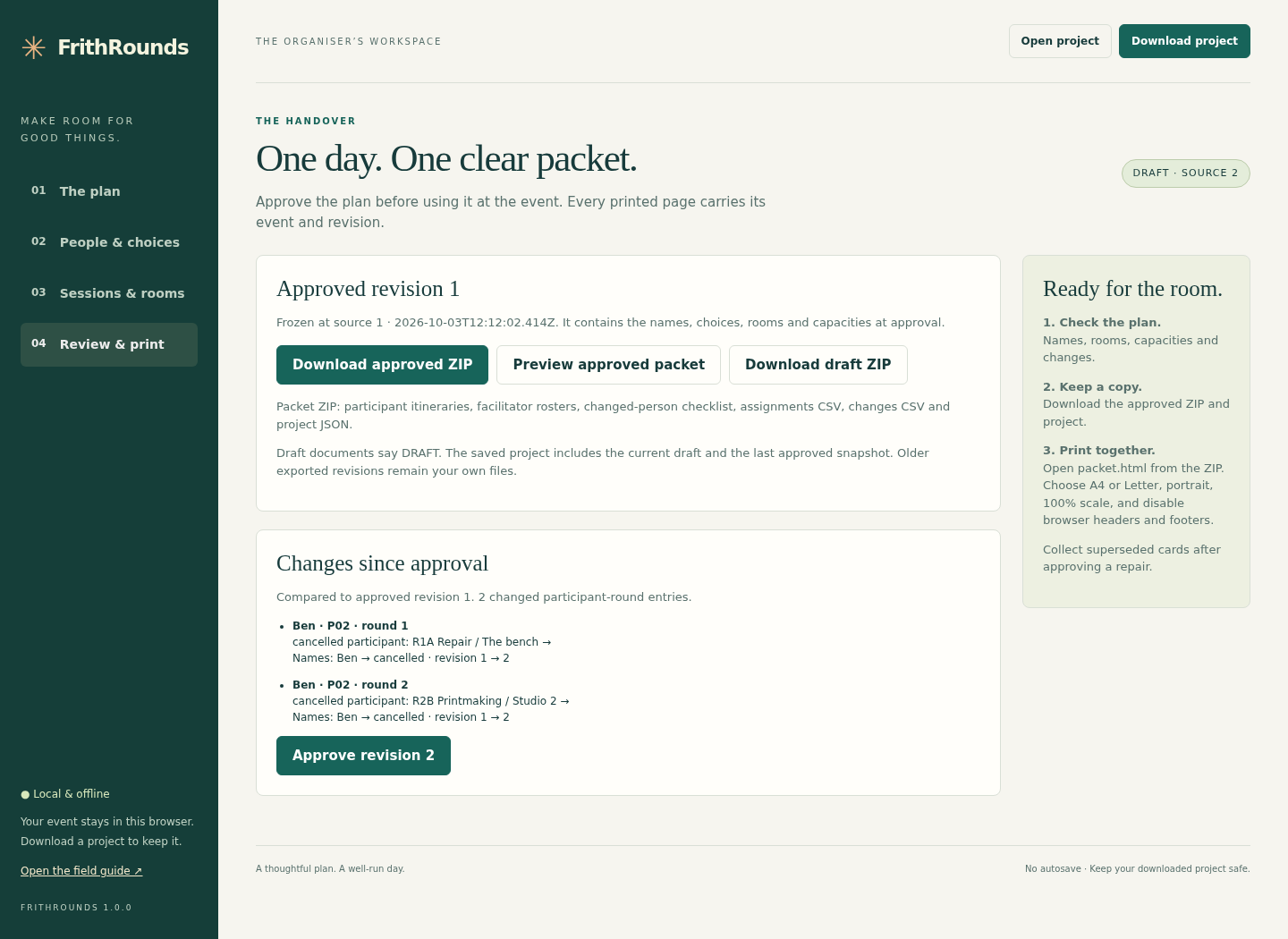
Ben’s cancellation is checked against the last approved revision before new papers are distributed. View full size Map the choices
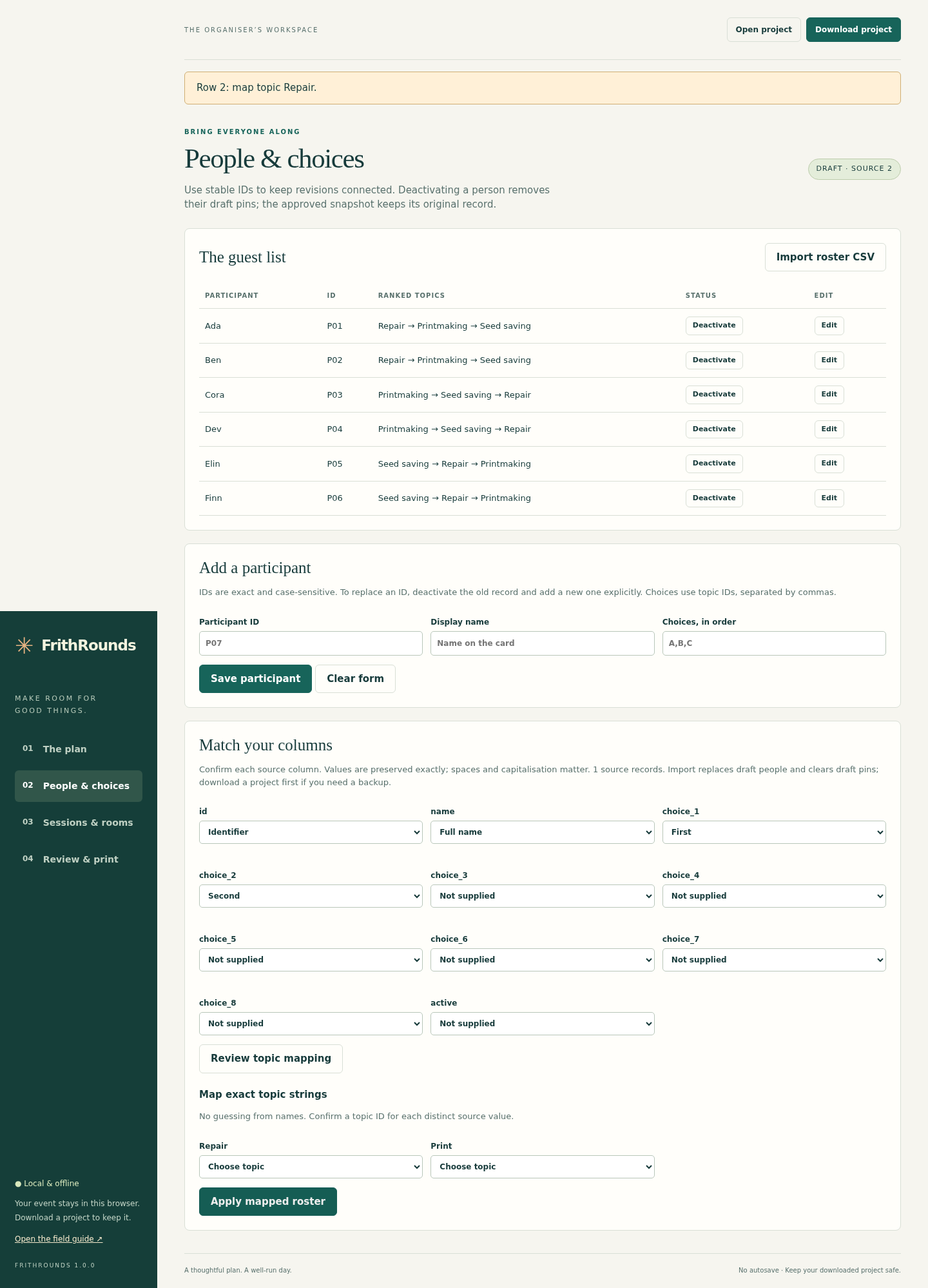
The organiser explicitly maps source columns and topic values before applying a roster. View full size Keep papers together
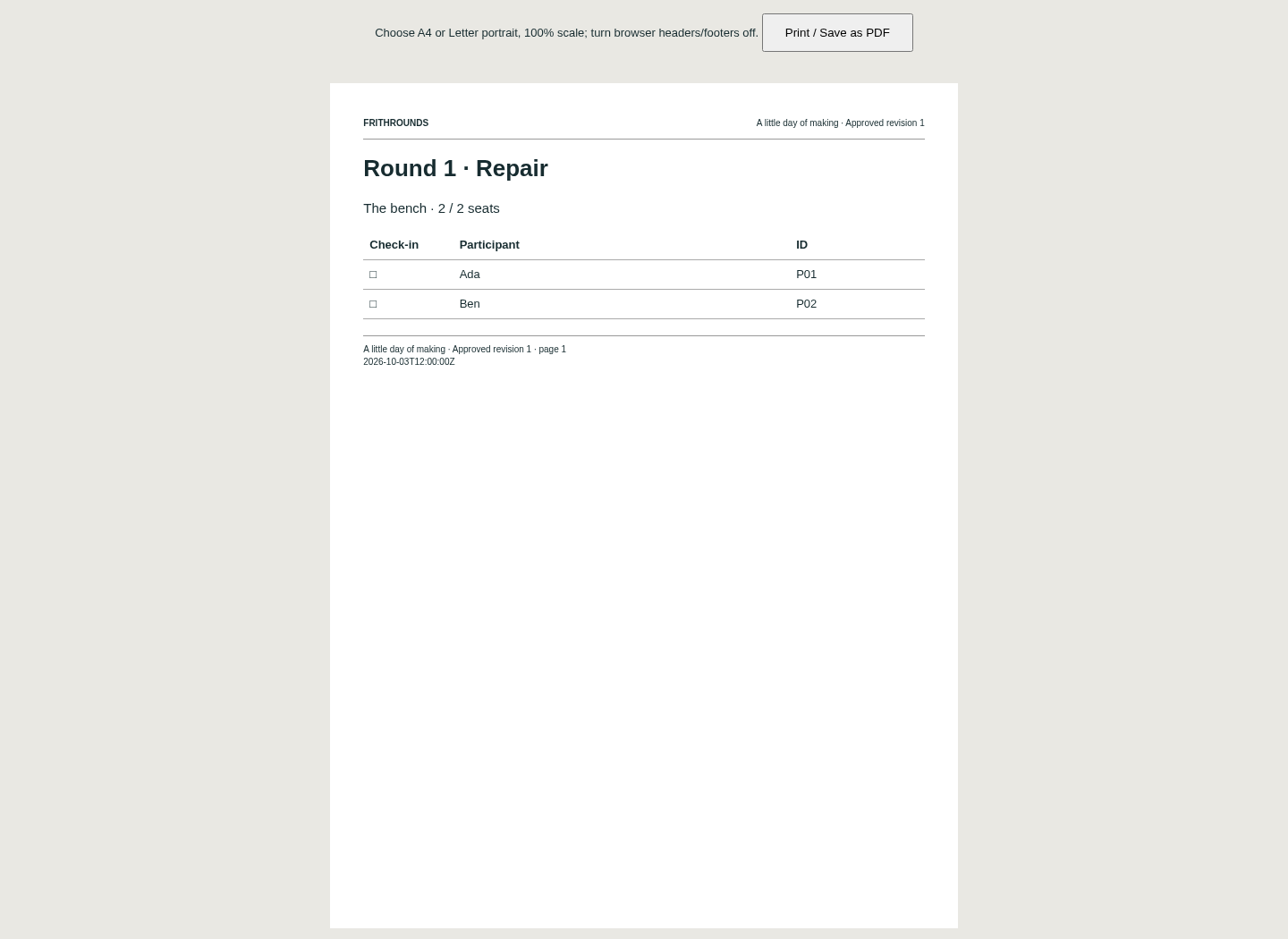
The actual facilitator roster carries the event and approved revision into the print packet. View full size
How it works
Bring the choices
Set sessions, import a roster and explicitly map its columns and topic values.
Review and approve
Check the proposal, move or pin places, then approve a complete valid revision.
Keep the day coordinated
Save the project and packet. Review changes before replacing papers after a cancellation.
Before you buy
- Desktop Google Chrome on Linux was tested (Chrome 152.0.7977.82). Extract and keep all buyer files together; opening index.html locally works without network access.
- For your own event, prepare exact stable participant IDs, ranked topic choices, sessions and whole-number capacities. Every active person must attend every round.
- No autosave is provided. Download the project and keep earlier approved packets before closing or replacing inputs.
Extract the entire FrithRounds-1.0.0.zip. Open START-HERE.html, then index.html in desktop Google Chrome. No installer, account, server or dependency download is required. Try the six-person skills day first.
Compatibility & limits
Up to 80 participant records, including inactive records, 1–3 rounds, 8 topics and 24 sessions. All active participants attend every round. One session per topic per round; integer capacities 1–80. UTF-8 comma-separated roster/session files and version-1 project JSON only. Each input/project is limited to 5 MiB; the exported ZIP is limited to 10 MiB. No XLSX or hosted form integration. IDs use 1–32 ASCII letters, digits, underscores or hyphens and match exactly. Names/labels allow 1–120 Unicode characters. Choices must be unique, contiguous and explicitly mapped; unranked topics are ineligible. The proposal search is bounded to 200000 transitions with a 10-second worker guard. It can miss feasible arrangements and does not guarantee global optimality, fairness or completion for every event. Review each result and use manual moves where needed. No autosave. Keep downloaded projects and earlier revisions yourself. The app retains only the last approved snapshot and current draft; approval is a workflow label, not a digital signature. Chrome on Linux and its A4/Letter PDF output were tested. Other browsers, operating systems, physical printers and mobile devices are unverified. Narrow-screen checks use desktop Chrome at 390 pixels. Each participant itinerary uses a page; rosters and change lists paginate separately. Printed whitespace is collapsed for readability. Spreadsheet-facing CSV uses a disclosed apostrophe prefix for formula-like text; exact strings remain in JSON. No registration collection, notifications, attendee accounts, payments, waitlists, variable attendance, instructor scheduling or timetable generation.
Get FrithRounds
Perpetual use of the purchased version on your devices for personal or internal commercial work. Keep reasonable backups and modify your own copy; do not redistribute or resell original proprietary code. Third-party licenses and any existing preview permissions retain their rights.
Before payment, save the private recovery code shown by checkout. After Paddle confirms payment, use it to download your ZIP or return for it later. No subscription, future update or email delivery is promised. See the illustrated steps.
$19 USD · once
Buy download