Step-by-step guide
LadaCross
Convert an image into a cross-stitch chart with your own palette. Reduce your image to a stitch grid and your own colour palette, inspect symbols, and export a chart and colour-count legend as PDF.
You have an image you are allowed to use (your own drawing, photo or pixel art) and want a stitch chart of a chosen size with a limited number of colours.
Before you start
- Desktop Google Chrome or another Chromium-based browser. The tool was checked in desktop Chrome; other browsers are not verified.
- A PNG or JPEG image of up to 12 megapixels that you have permission to use.
- Install Node.js 20.12 or newer. In this extracted folder run: node start.mjs
Open http://127.0.0.1:8787/ in desktop Google Chrome. Keep the terminal open; Ctrl+C stops it.
Your first result
Open the downloaded local edition
Buy and extract the LadaCross ZIP, then open its LadaCross folder. Install Node.js 20.12 or newer. In this extracted folder run: node start.mjs
Open http://127.0.0.1:8787/ in desktop Google Chrome. Keep the terminal open; Ctrl+C stops it. The same workflow can be explored in the online browser preview.Open LadaCross
In your open local copy, follow the controls described below.
Add an image
In 1 Image, click Choose a PNG or JPEG (up to 12 MP), or click Try the sample image to practise with a flower motif drawn in the page. Drag on the preview to crop, or choose Whole image or Centre square.
Set the size
In 2 Chart size, type Stitches across and Stitches down (up to 200 each). With Keep the crop's proportions ticked, the other number follows. The panel shows the stitch total and the finished size on 14-count fabric.
Choose the colours and make the chart
In 3 Colours, choose how many colours to use (8 to 32). The palette is Your own colours (no thread brand): colours measured from your image, with no thread codes. Click Make chart.
Refine the chart
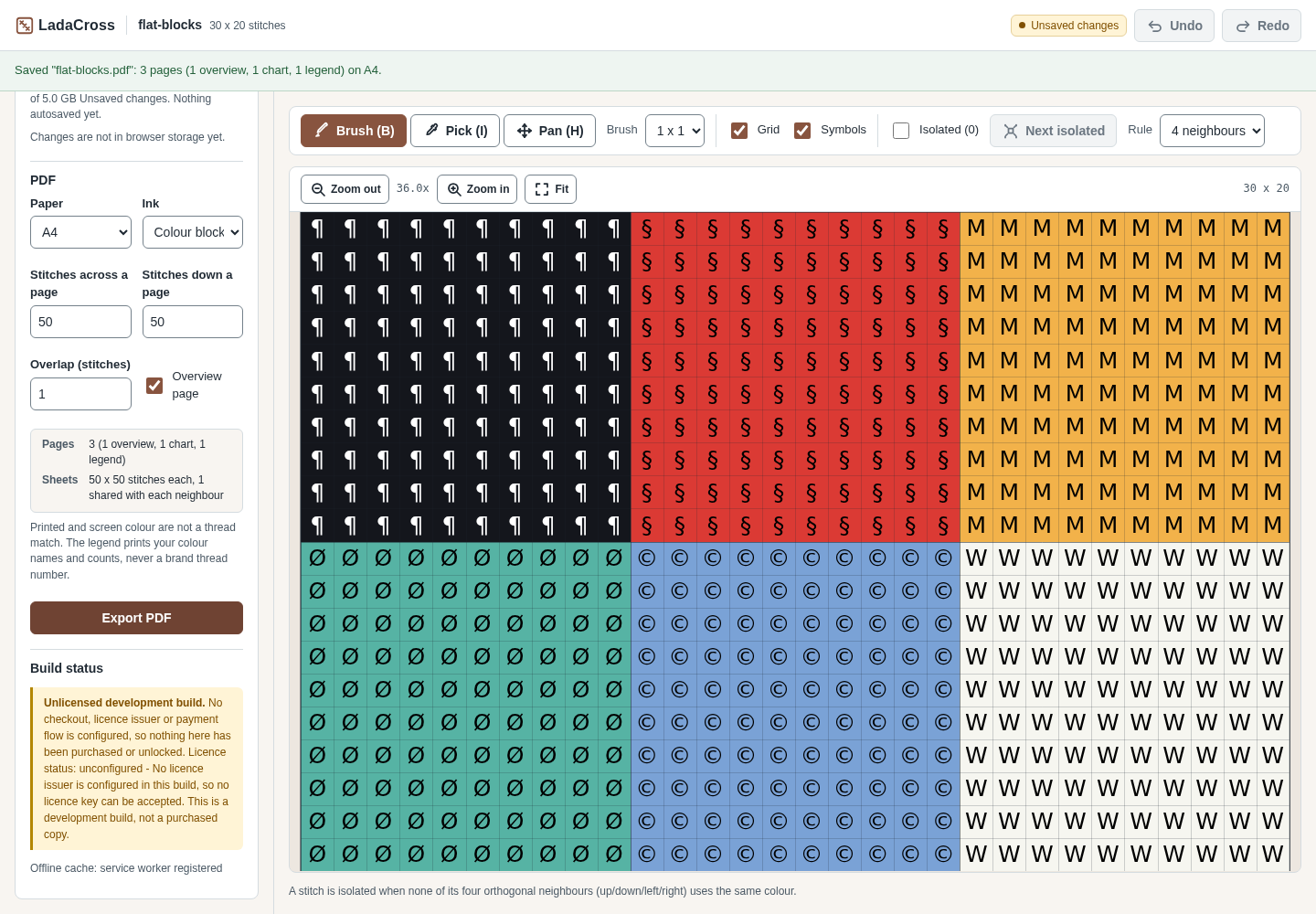
The Palette list shows each colour's symbol, value and stitch count. Merge look-alike colours, choose other symbols, or edit stitches with the chart tools such as Brush (B) and Pick (I). Undo and Redo are at the top.
Export and keep your work
Under Project and export, choose the PDF settings (Paper A4 or Letter, Ink as colour blocks with symbols or black and white symbols, stitches per page, overlap and overview page) and click Export PDF. Click Export .ladacross.json to keep a project file. Save to this browser keeps a copy in this browser; saved projects are listed under Continue a project when you come back.
A worked example
Chart a small heart motif
Input: examples/ladacross/fictional-heart-motif.png: a fictional 128 × 104 px pixel image with four flat colours.
- Open your local LadaCross page, click Choose a PNG or JPEG (up to 12 MP) and select fictional-heart-motif.png.
- In Stitches across, type 32. With Keep the crop's proportions ticked, Stitches down becomes 26.
- Leave Colours at 16 and click Make chart.
- Under Project and export, click Export PDF, then Export .ladacross.json.
Expected result: LadaCross reports “Chart ready: 32 x 26 stitches, 4 colour(s) from 4 distinct source colours.” and the legend adds up to 832 stitches. The download fictional-heart-motif.pdf has 3 A4 pages: an overview, the chart and the legend. The project file fictional-heart-motif.ladacross.json opens again with Open project file, even after the browser's storage has been cleared.
Troubleshooting
The chart has many near-identical colours.
Lower the colour count before Make chart, or use Merge on similar colours in the palette.
Stitches down changes when I type Stitches across.
Keep the crop's proportions is ticked. Untick it to set both numbers yourself.
My chart is missing when I come back.
LadaCross autosaves the open chart in this browser (the status shows “Autosaved” and a time), but the browser can clear that storage. Export a .ladacross.json file and load it with Open project file.
There are no thread brand numbers.
This is intentional: no licensed thread table is included, so the chart uses your own colours. Match threads by eye against a real shade card.
The page says “Unlicensed development build”.
No activation key is needed for the included local features. The purchase supplies the downloadable edition, guide and examples; it does not unlock a separate Pro feature set.
Compatibility & limits
- No licensed thread palette or brand colour matching.
- Images up to 12 megapixels; charts up to 200 × 200 stitches.
- Check the colours and print scale with a small stitched sample before a big project.
- Browser storage is not a backup; keep the exported project file.
- The paid download packages the same core workflow as the browser preview, with a local copy, guide and examples. It does not unlock a separate Pro feature set.
Need a hand?
Tell us the product, host application and version, what you tried, and the exact error. Contact support with a fictional example; keep private customer files and passwords out of your message.