Step-by-step guide
MeginLoad
Combine personal task recipes into one loading and obtain list, with visible quantities and contributing jobs.
Use this for desktop preparation before sequential service visits by one operator. You supply the requirements and inspect the counts. Reusable tools must return between jobs; consumables add across all tasks.
Before you start
- Desktop Google Chrome on Linux; Chrome 152 on Linux x86_64 was verified. Other environments and mobile field use are unverified.
- Extract the whole ZIP. Keep MeginLoad.html beside app, manual, screenshots and examples; open it outside the ZIP preview.
- Your own item IDs, units, counting rules, task requirements and inspected vehicle/storage counts. The fictional examples are arithmetic demonstrations.
Your first result
Try the fictional Maple example
Open
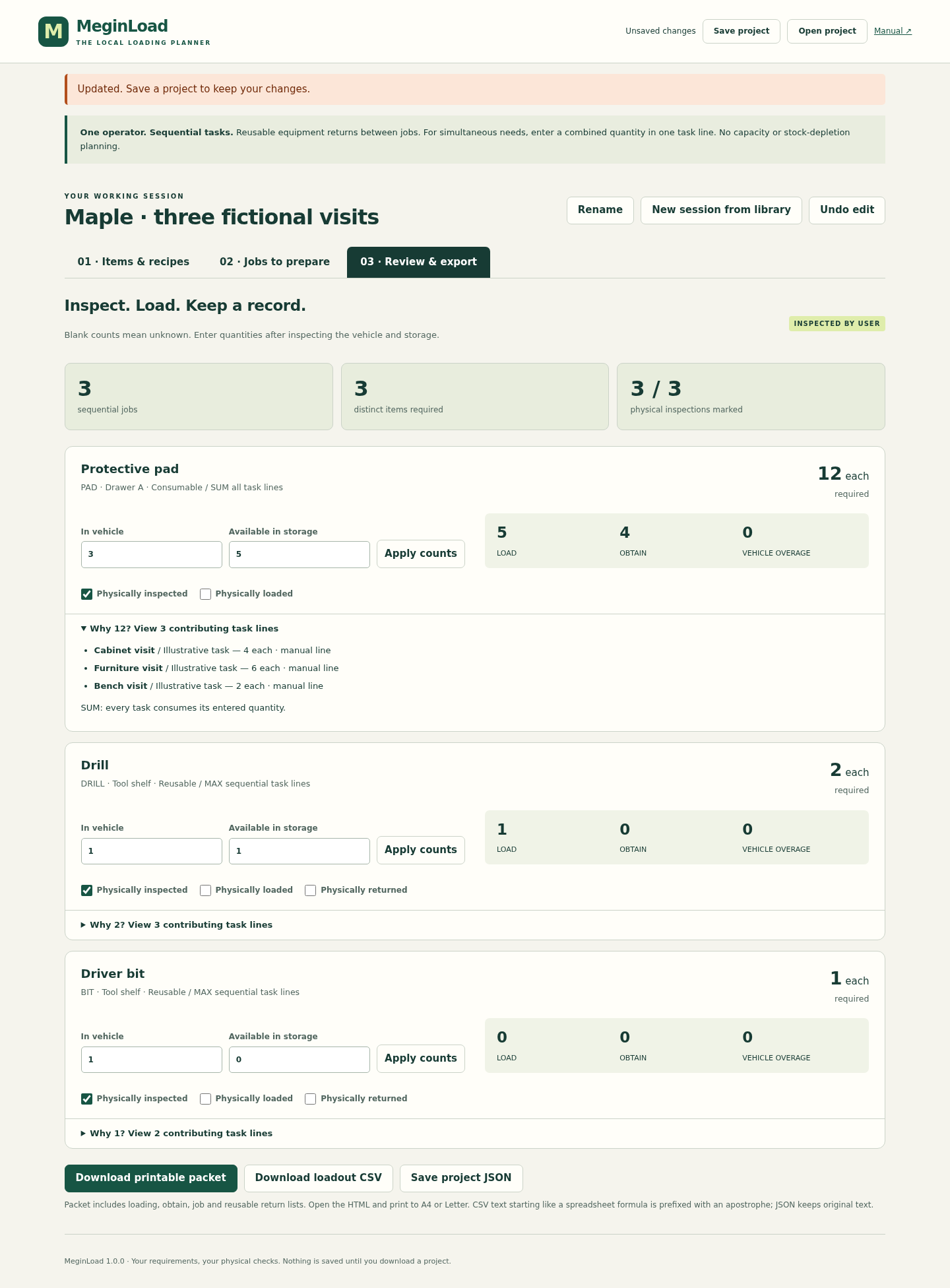
MeginLoad.htmland choose Try fictional example. Go to Review & export. Expect DRILL 2, BIT 1 and PAD 12 required. Expand the pad contributions to see 4 + 6 + 2. The prefilled counts and checkmarks are practice data.Compare the loading result
With the example counts, DRILL needs 1 loaded and 0 obtained; BIT needs 0 and 0; PAD needs 5 loaded and 4 obtained. Remove Bench visit under Jobs to prepare: DRILL becomes 1 and PAD becomes 10. Affected physical marks clear.
Create your own item and recipe library
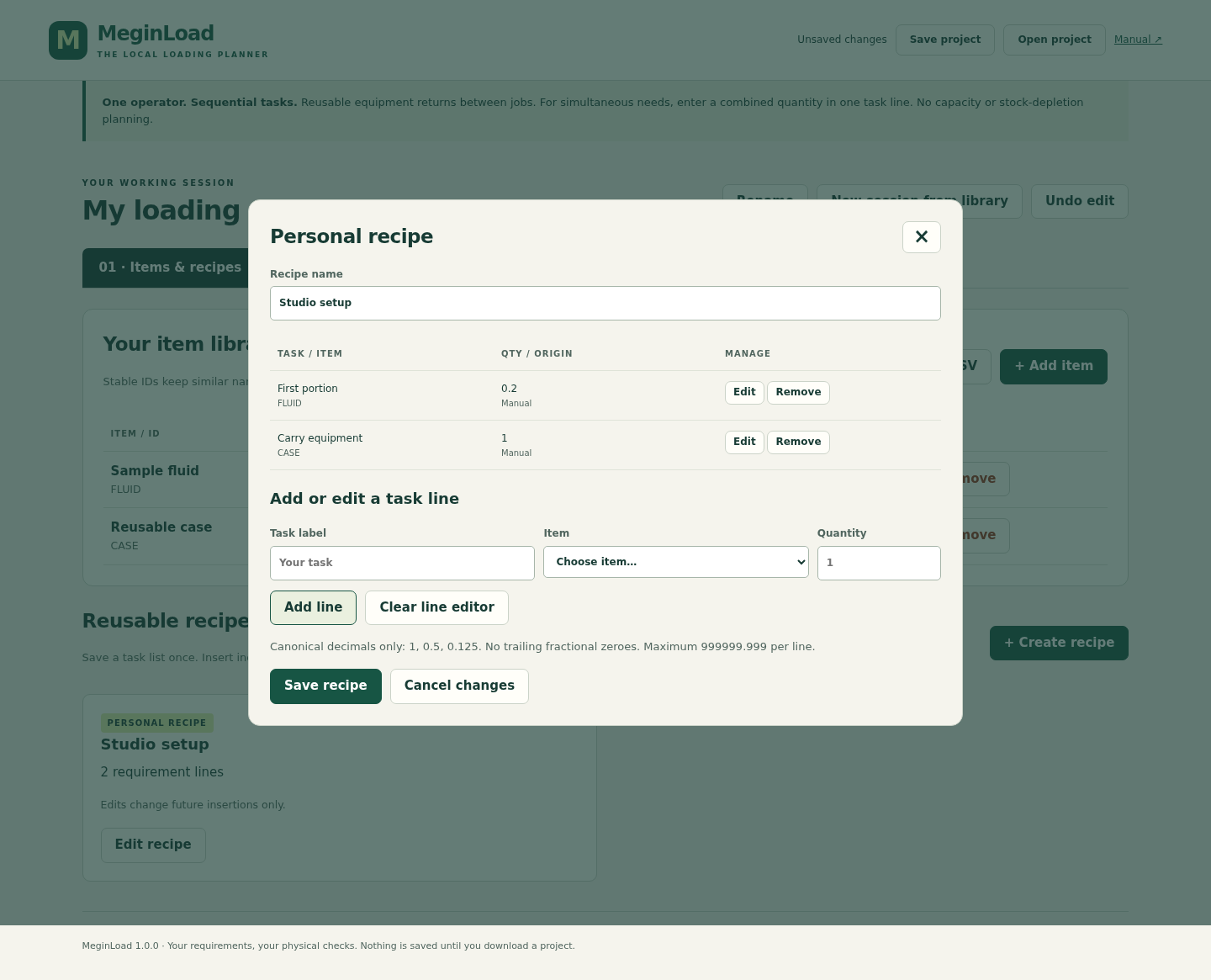
Choose Start blank, acknowledge sequential use and name the session. Under Items & recipes, add stable IDs, names, units, bins and either Reusable/MAX or Consumable/SUM. Create a recipe, use Add line, then Save recipe. Identical names with different IDs stay separate.
Copy recipes into jobs
Choose Jobs to prepare → Add job. Enter its label and notes, select a recipe and choose Insert copy, or add task lines manually. Save the job. Future recipe changes do not alter existing copies. Enter simultaneous needs together on one combined line.
Inspect the actual counts
In Review & export, enter both In vehicle and Available in storage, then choose Apply counts. Blank means unknown. Use decimal notation such as
1,0.5or0.125. Mark Physically inspected only after your inspection; loading and return marks are separate. Recheck after any relevant task, quantity or item change.Save a project and printable packet
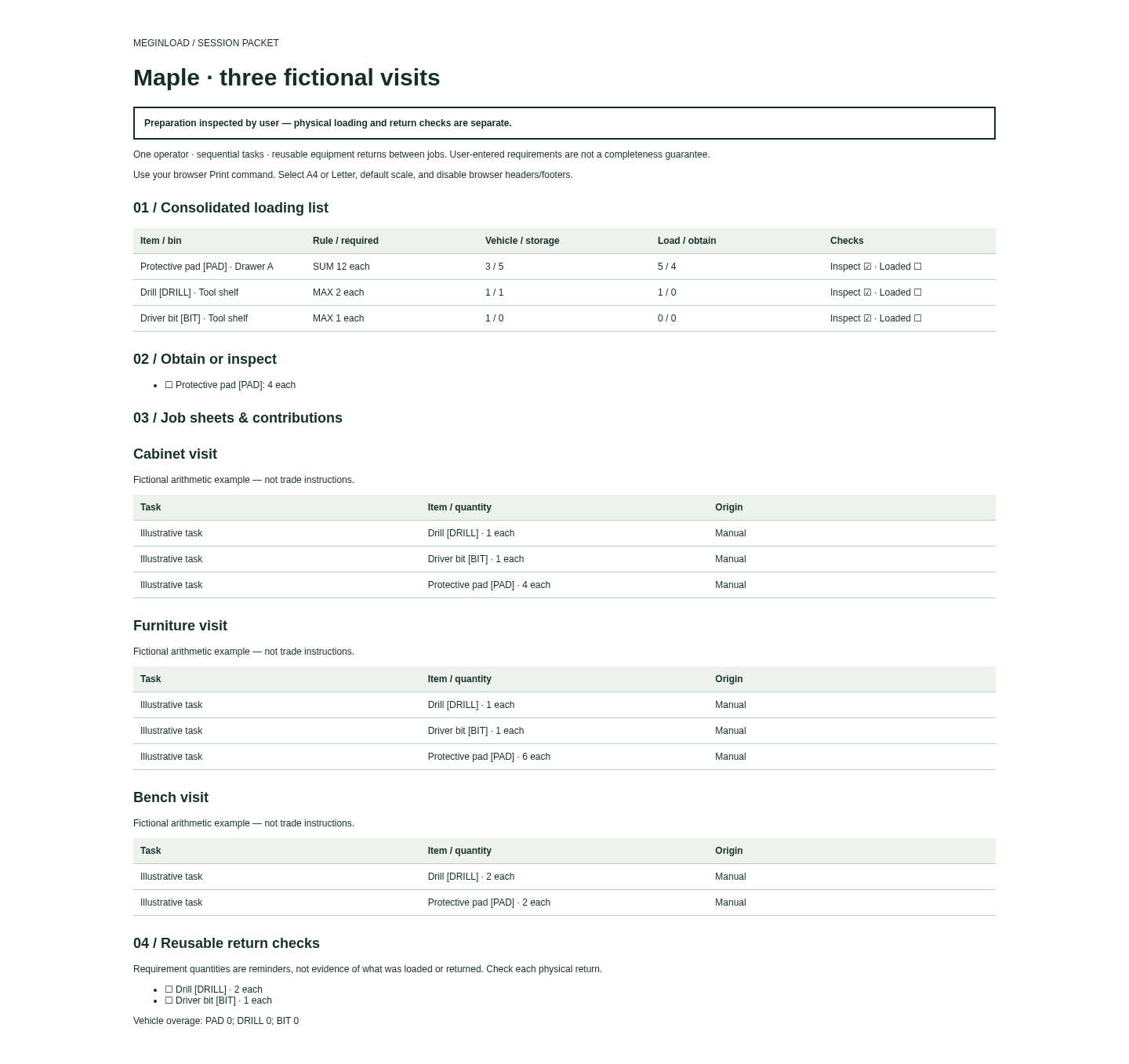
Choose Save project and verify the downloaded JSON. Download the printable HTML packet, open it in Chrome and print to A4 or Letter at default scale with browser headers/footers disabled. The app also exports a presentation CSV. For a new trip choose New session from library, which clears jobs, counts and marks. To uninstall, close the tab and delete the extracted app; keep any project files you need.
A worked example
Maple: three fictional visits
Input: Jobs A/B/C need DRILL 1/1/2, BIT 1/1/0 and PAD 4/6/2. Vehicle counts are DRILL 1, BIT 1, PAD 3; storage counts are 1, 0 and 5.
- Use Try fictional example and open Review & export.
- Expand each contribution list: reusable equipment uses MAX, consumables use SUM.
- Compare the loading and obtain quantities, save JSON and open the downloaded packet.
Expected result: DRILL required 2, load 1, obtain 0. BIT required 1, load 0, obtain 0. PAD required 12, load 5, obtain 4. Removing Bench visit changes DRILL to 1 and PAD to 10. These are fictional arithmetic results, not field or trade guidance.
From task requirements to a loading record
Actual MeginLoad 1.0.0 screens in Chrome on Linux. The examples and physical marks shown are fictional demonstration state.
1. Trace the quantities
2. Save reusable task lists
3. Keep a loading packet
Troubleshooting
Unknown loading amounts
Enter both vehicle and storage counts and choose Apply counts; blank is unknown.
Quantity rejected
Use 1, 0.5 or 0.125; not 1.0, .5, signed or exponent notation.
CSV import rejected
Use exact item_id,name,kind,unit,bin headers, UTF-8 and unique IDs. Review explicit replacement mode for existing IDs.
Checks cleared
Changed items, quantities or contributing jobs/tasks require reinspection, even if totals match.
Work not saved
Use Save project and keep the downloaded JSON. The app has no autosave.
Compatibility & limits
- For one operator doing sequential tasks. Reusable equipment must return between jobs. Enter simultaneous requirements as one combined task line; separate lines use MAX.
- You enter and review every requirement. This is not a trade checklist, a completeness guarantee or evidence that an item was physically loaded or returned.
- No battery or runtime capacity, shared crews, equipment left on site, unit conversion, stock depletion, ordering, costing or device sync.
- Only desktop Google Chrome 152 on Linux was tested. Other environments, mobile field use and physical printing are unverified.
- No autosave. Download and keep the project JSON. A reopened project can retain matching historical marks; start a new session and inspect again for a new trip. Undo clears physical marks.
- Up to 500 items, 100 recipes, 20 jobs, 2,000 job lines and 5,000 recipe lines. Input and saved project limit: 2 MiB including check bindings; presentation exports: 16 MiB. Maximum counts and maximum text may not fit together.
- Quantities must use canonical decimal text with up to three decimal places and a maximum input of 999999.999. Use 1, 0.5 or 0.125; signs, exponents, leading zeros and trailing fractional zeros are refused.
- Recipes can be edited but cannot be deleted in version 1.0. Existing job copies retain their original quantities when a recipe changes.
- Presentation CSV guards formula-like text with an apostrophe; JSON retains original text. CSV is not a project backup. Unknown counts remain unknown.
- Large packets can be impractical: the maximum long-label example produced 236 A4 or 257 Letter PDF pages. Chrome-generated PDFs were checked; physical printing was not.
Need a hand?
Tell us the product, host application and version, what you tried, and the exact error. Contact support with a fictional example; keep private customer files and passwords out of your message.