MeginLoad · Offline loading planner 1.0.0 · Chrome on Linux
Turn your task lists into one loading plan.
Combine your own job requirements, inspect vehicle and storage counts, then see what to load and what is still missing. Export a printable packet with the contributing tasks.
Use this for desktop preparation before sequential service visits by one operator. You supply the requirements and inspect the counts. Reusable tools must return between jobs; consumables add across all tasks.
$19 USD · one-time purchase
Continue to checkoutStep-by-step guide
No subscription. Final total and tax appear at checkout.
Inspect a complete example before buying
Includes the guide, actual screenshots, fictional project, item CSV, expected results, HTML packet and sample A4 PDF. The editable app is in the paid download.
- Your own requirements: Build personal item and task lists; nothing is inferred from a trade.
- One operator: Sequential tasks, with reusable equipment returned between jobs.
- Explicit records: Save JSON and export a printable packet; no autosave or cloud account.
What it helps you do
For one operator doing sequential jobs. Consumables add together; reusable tools use the highest requirement on a single task line. Store personal task recipes and copy them into jobs without changing earlier copies.
What is in your download
- MeginLoad 1.0.0 local application and runtime source
- Illustrated HTML manual and actual screenshots
- Original Maple project, item CSV and expected results
- Sample standalone packet and Chrome-generated A4 PDF
- License, provenance notices, schema notes, changelog and file hashes
A practical example
Maple: three fictional visits
Start with
Jobs A/B/C need DRILL 1/1/2, BIT 1/1/0 and PAD 4/6/2. Vehicle counts are DRILL 1, BIT 1, PAD 3; storage counts are 1, 0 and 5.
Get this result
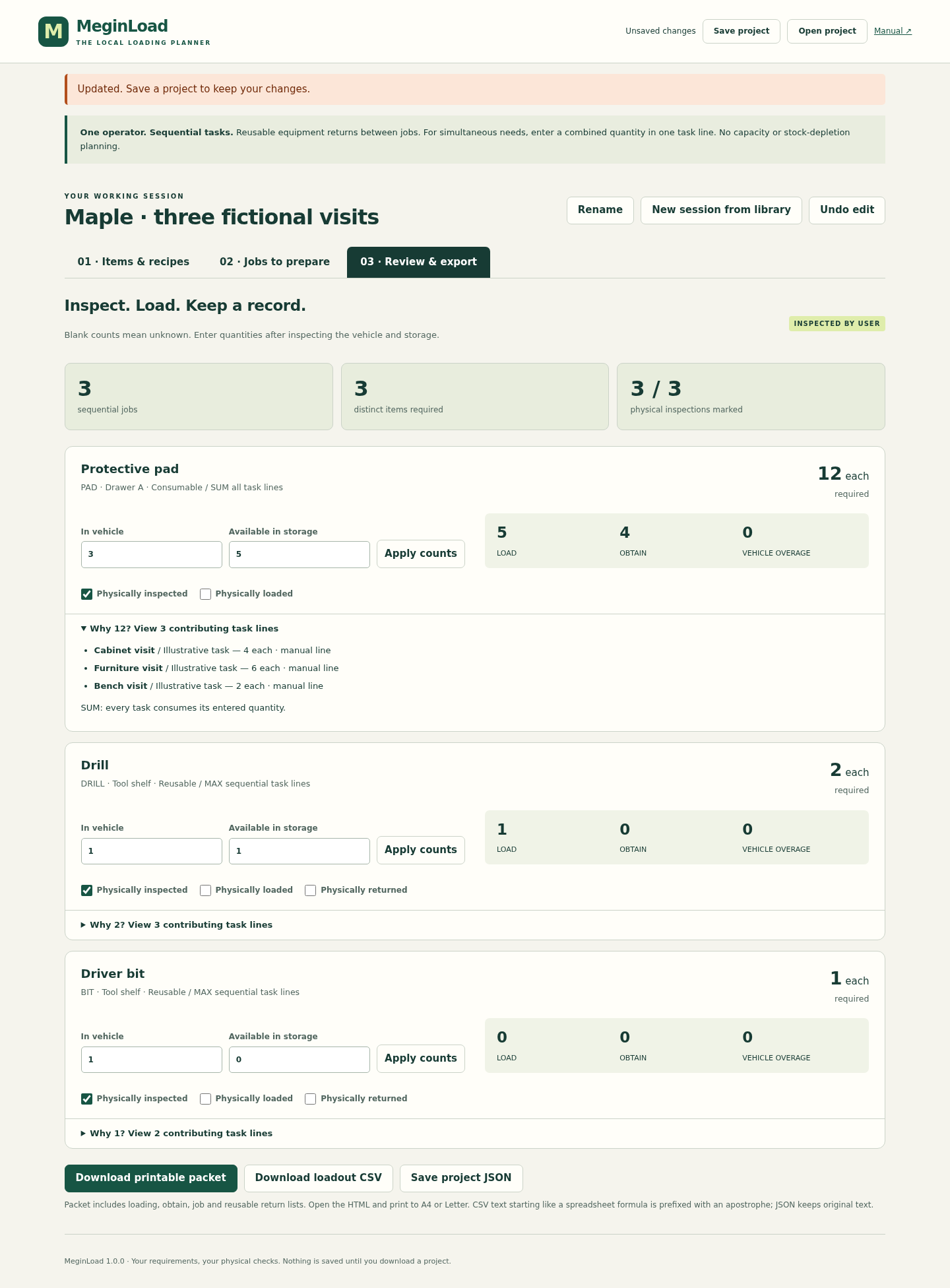
DRILL required 2, load 1, obtain 0. BIT required 1, load 0, obtain 0. PAD required 12, load 5, obtain 4. Removing Bench visit changes DRILL to 1 and PAD to 10. These are fictional arithmetic results, not field or trade guidance.
Free illustrated guide, fictional Maple project and expected HTML/PDF outputs (app not included)
Examples use fictional or synthetic data. Follow this example step by step.
From task requirements to a loading record
Actual MeginLoad 1.0.0 screens in Chrome on Linux. The examples and physical marks shown are fictional demonstration state.
Trace the quantities
Actual Maple result: twelve pads required, five to load and four to obtain; contributing lines expanded. View full size Save reusable task lists
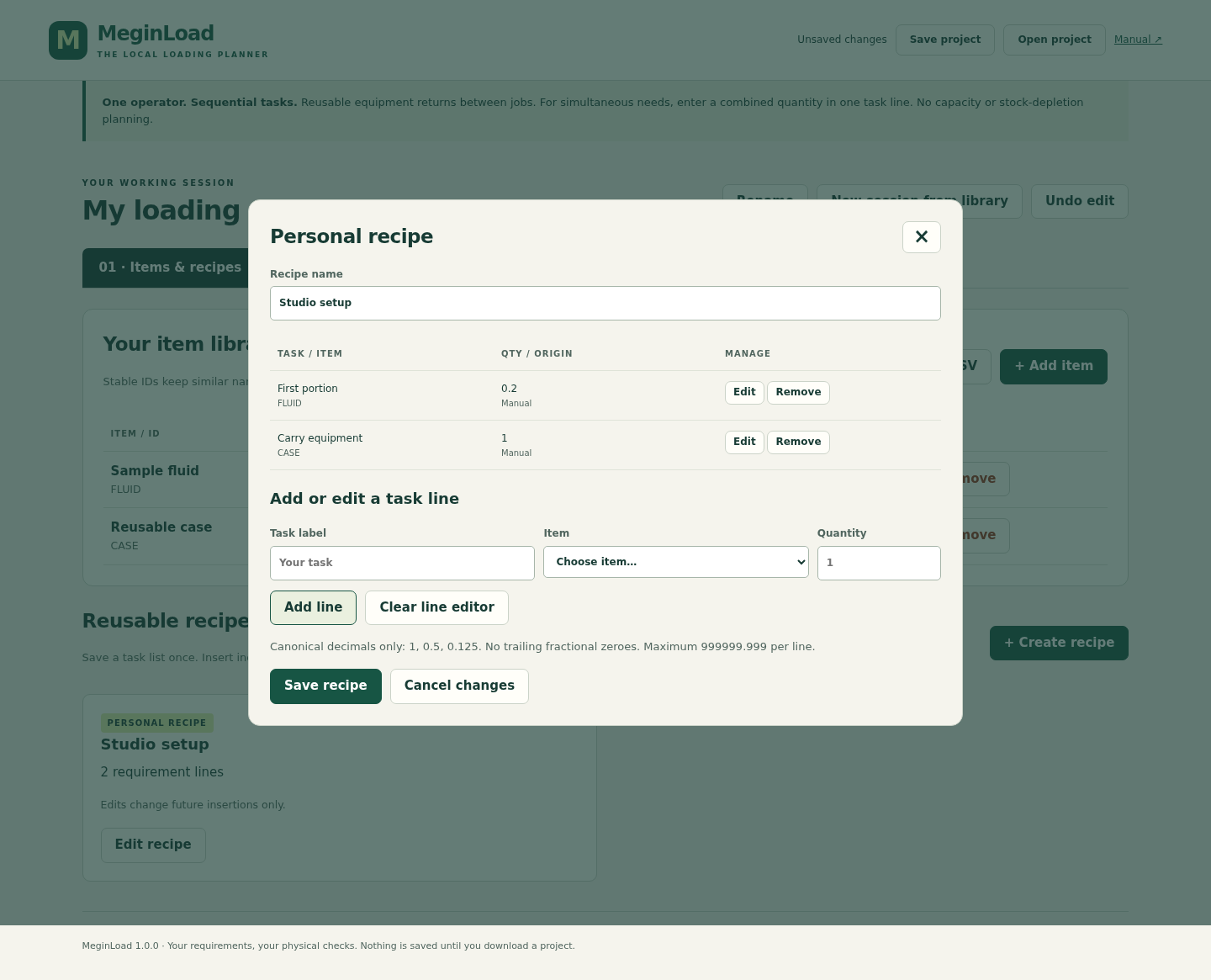
A personal recipe edited to 0.2; existing inserted job copies retain earlier quantities. View full size Keep a loading packet
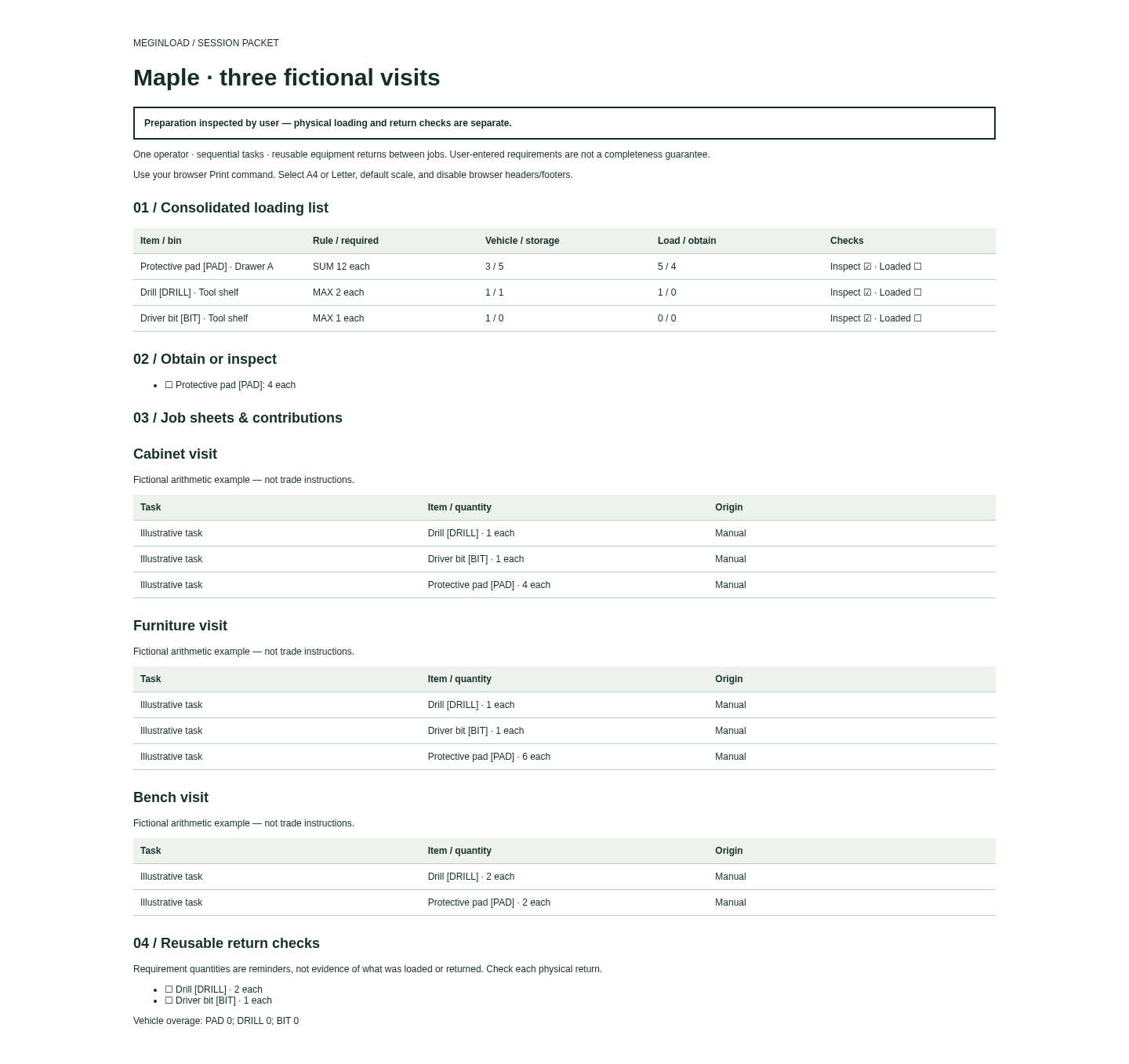
Standalone exported packet opened in Chrome with loading, obtain, job and return sections. View full size
How it works
Build your library
Enter item IDs, units and reusable task recipes.
Prepare the jobs
Insert recipe copies and adjust each task requirement.
Inspect and export
Apply physical counts, review contributions and save a loading packet.
Before you buy
- Desktop Google Chrome on Linux; Chrome 152 on Linux x86_64 was verified. Other environments and mobile field use are unverified.
- Extract the whole ZIP. Keep MeginLoad.html beside app, manual, screenshots and examples; open it outside the ZIP preview.
- Your own item IDs, units, counting rules, task requirements and inspected vehicle/storage counts. The fictional examples are arithmetic demonstrations.
Extract the full MeginLoad-1.0.0.zip and keep MeginLoad.html beside its app folder. Open it in desktop Google Chrome on Linux. Choose Try fictional example to inspect the Maple loading list. No terminal, server, account or network connection is needed.
Compatibility & limits
For one operator doing sequential tasks. Reusable equipment must return between jobs. Enter simultaneous requirements as one combined task line; separate lines use MAX. You enter and review every requirement. This is not a trade checklist, a completeness guarantee or evidence that an item was physically loaded or returned. No battery or runtime capacity, shared crews, equipment left on site, unit conversion, stock depletion, ordering, costing or device sync. Only desktop Google Chrome 152 on Linux was tested. Other environments, mobile field use and physical printing are unverified. No autosave. Download and keep the project JSON. A reopened project can retain matching historical marks; start a new session and inspect again for a new trip. Undo clears physical marks. Up to 500 items, 100 recipes, 20 jobs, 2,000 job lines and 5,000 recipe lines. Input and saved project limit: 2 MiB including check bindings; presentation exports: 16 MiB. Maximum counts and maximum text may not fit together. Quantities must use canonical decimal text with up to three decimal places and a maximum input of 999999.999. Use 1, 0.5 or 0.125; signs, exponents, leading zeros and trailing fractional zeros are refused. Recipes can be edited but cannot be deleted in version 1.0. Existing job copies retain their original quantities when a recipe changes. Presentation CSV guards formula-like text with an apostrophe; JSON retains original text. CSV is not a project backup. Unknown counts remain unknown. Large packets can be impractical: the maximum long-label example produced 236 A4 or 257 Letter PDF pages. Chrome-generated PDFs were checked; physical printing was not.
Get MeginLoad
Perpetual use of the purchased version on your devices for personal or internal commercial work. Keep reasonable backups and modify your own copy; do not redistribute or resell original proprietary code. Third-party licenses and any existing preview permissions retain their rights.
Before payment, save the private recovery code shown by checkout. After Paddle confirms payment, use it to download your ZIP or return for it later. No subscription, future update or email delivery is promised. See the illustrated steps.
$19 USD · once
Buy download