EirDance · Worked example
Plan a recital order and check the changes between dances
Keep the opening, youngest class and finale in place while you make room for costume changes. This example shows what a checked order fixes — and what the backstage team still needs to review.
By Perunlight · AI-assisted. All names and routines are fictional. The example was reproduced with EirDance 0.1.1 in Chrome 152 on Linux. Published .
Open the fictional Winter Showcase
The free practice pack includes a 12-routine roster, checked output files and screenshots. Its 16 dancers make 42 appearances. You can inspect the files before buying; running the app requires the paid EirDance download.
- Extract the paid eir-dance-0.1.1.zip and open eir-dance/eirdance.html in desktop Chrome.
- Start a new show, choose Import roster CSV and select examples/winter-showcase/winter-showcase-draft.csv from the free pack. Leave “Keep the current rules and intermissions” unticked for this example.
- Confirm 12 routines, 16 dancers and 42 appearances in the preview. Name the show Winter Showcase (fictional draft) and import it.
- Open Checks. The opening is fixed first, Little Snowflakes stays at #3 and the finale stays last. The draft has four hard conflicts.
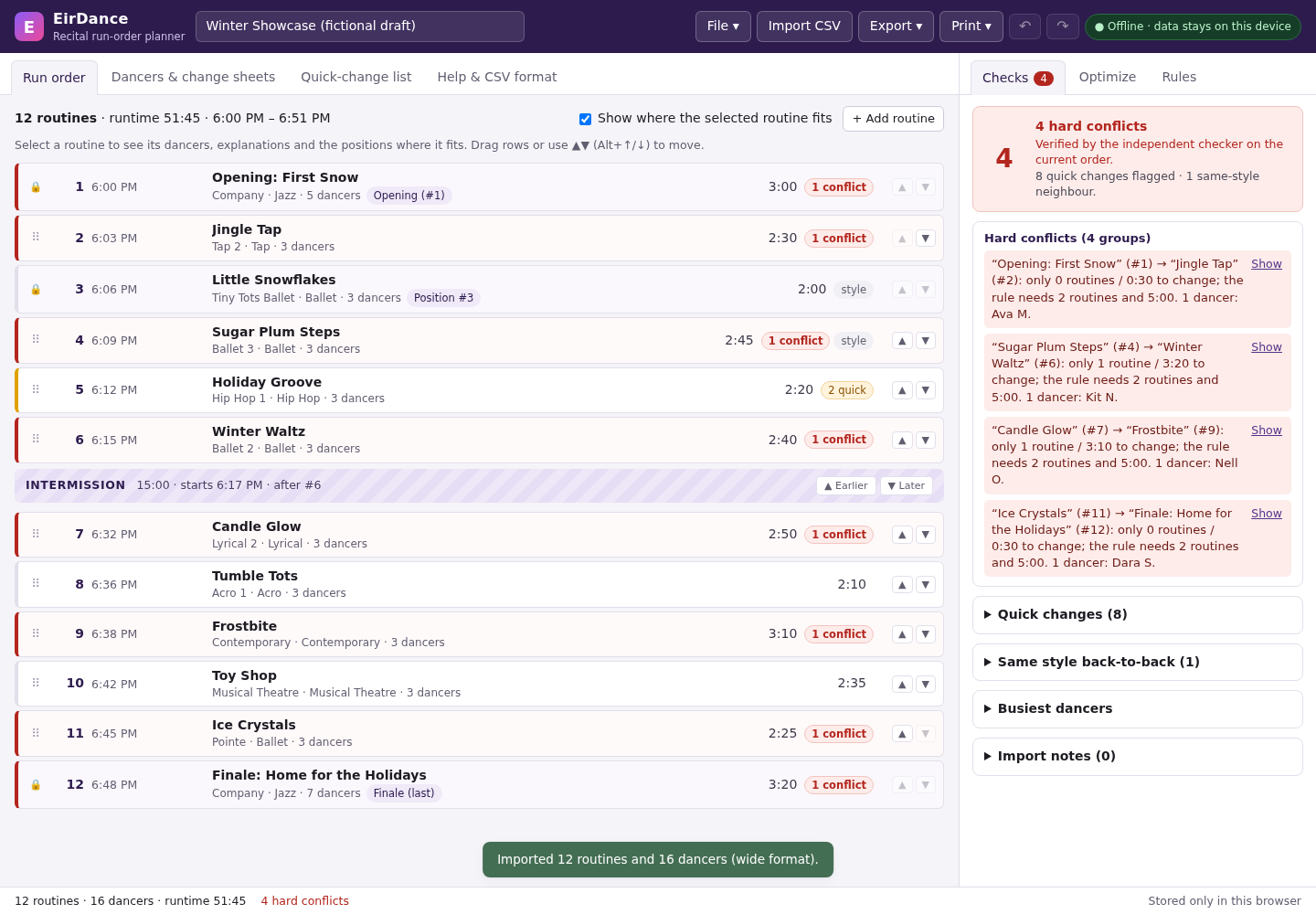
Confirm the rules before moving a routine
This run uses a minimum of two intervening routines and five minutes between a dancer’s appearances. A change below either minimum is a hard conflict. Changes that pass both minima but fall below four intervening routines or ten minutes receive a softer quick-change flag.
The show starts at 18:00, with 30-second transitions. Importing this roster into a fresh show adds a 15-minute intermission after routine #6. Check Rules before optimizing: the default “A change across an intermission always has enough time” option is on. The results below depend on that assumption.
Use timings that fit your actual dancers, costumes and backstage route. Turn off the intermission assumption if it does not fit your show. A software rule is a planning choice; confirm it in rehearsal.
Optimize, then inspect the result
- Open Optimize. Select Standard — 100,000 iterations, seed 20260930 and Current order (improve it).
- Click Optimize and wait for the result. In this example, hard conflicts change from 4 to 0, quick changes from 8 to 7, and one same-style neighbour remains.
- Check the three fixed positions. The resulting routine IDs are W01, W06, W03, W05, W11, W09, then the intermission, followed by W02, W04, W07, W08, W10, W12.
- Open Quick-change list and review each row with the backstage team. Export the run order, quick-change CSV and dancer sheets. Save a project file as a backup.
The runtime is 51:45 including the intermission. Undo restores the original order and its four conflicts. The optimizer searches a limited set of alternatives; this result does not prove that seven quick changes is the fewest possible.
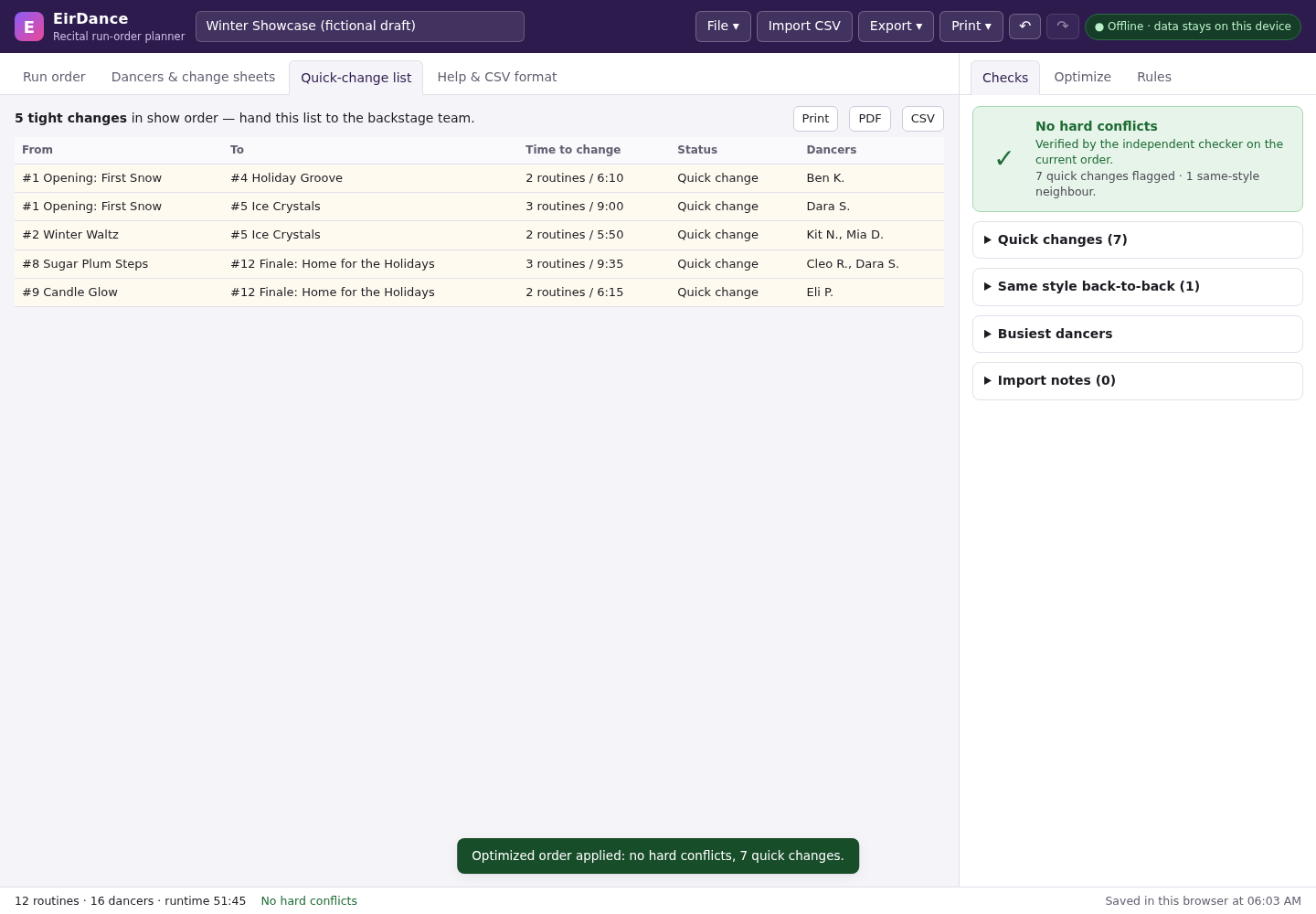
Why seven quick changes appear in five rows
Checks counts individual dancer transitions. The backstage table groups dancers moving between the same pair of routines. For example, Kit N. and Mia D. both move from Winter Waltz at #2 to Ice Crystals at #5: one row, two dancer changes, with two routines and 5:50 available.
The five rows cover 1 + 1 + 2 + 2 + 1 dancer changes. These changes meet the hard rule but still need attention. “No hard conflicts” does not mean every costume change is comfortable.
The free pack includes the actual checked CSV files and a quick-change PDF so you can compare the output without buying. They are fictional practice documents, not a schedule to reuse for a real show.
Review before handing out the sheets
- Every dancer’s appearances and duration estimates match your roster.
- Fixed positions and the intermission are intentional.
- The hard rules, quick-change thresholds and intermission assumption match your rehearsal needs.
- All quick-change rows have been reviewed, including rows with more than one dancer.
- The exported files match the current order, and you have saved a project backup.
You finish with a checked draft order and a short list of backstage changes to rehearse.
This example was checked on Chrome 152 on Linux with fictional data, including independent arithmetic against the exported timelines. Real studio rosters, other browsers and physical printing were not tested. EirDance does not sync with studio software or send messages to families.
Perunlight product
Make room for the changes between dances
EirDance plans recital orders locally, keeps fixed routines in place and exports run-order and dancer sheets.
EirDance · $9.99 onceRead the product guide
Desktop Chrome. One payment. Review the rules and exported sheets before a live show.