Task walkthrough · DraupnirFlow
Prepare digital download ZIP files for Etsy’s five 20 MB file slots
An Etsy digital listing takes up to five files of 20 MB each, and every buyer has to be able to open them on their own computer. Here is how to clean up a product folder, group it into complete ZIP files that fit and check them before you upload.
A Perunlight product workflow for DraupnirFlow, our paid offline browser app. Written with AI assistance and checked against the accepted DraupnirFlow 1.0.1 test run (desktop Chrome 152 on Linux, fictional files). Published .
What Etsy allows in a digital listing
Etsy’s help page How to Manage Your Digital Listings sets the rules that decide how you package a download:
- Up to five files per listing, each up to 20 MB. Etsy does not say whether 20 MB means 20,000,000 or 20,971,520 bytes. Staying under 20,000,000 bytes works under either reading.
- File names may use only letters, digits, periods, underscores and hyphens, up to 70 characters. A name cannot be edited after upload, and buyers see the name you uploaded.
- Buyers download from Etsy.com. Etsy’s help on downloading a digital item sends them to Purchases in a computer or mobile browser, because digital files can’t be downloaded in the Etsy app.
The name rule applies to the files you upload, such as each ZIP. The names inside a ZIP are a separate matter: they have to be accepted by whatever computer or phone the buyer extracts them on.
Find names that break on a buyer’s computer
A folder that looks fine on your computer can still fail on a buyer’s. Check every file and folder name for these problems before you zip anything:
- System files:
.DS_Store,__MACOSXand._files from macOS,Thumbs.dbanddesktop.inifrom Windows, and Office lock files whose names start with~$. They are not part of the product; leave them out. - Characters Windows refuses:
< > : " / \ | ? *. A name such asWeekly | Monthly planner.pdfcan exist on a Mac, but Microsoft’s file naming rules do not allow it on Windows. - Names Windows reserves:
CON,PRN,AUX,NUL,COM1toCOM9andLPT1toLPT9, also with an extension:CON.pdfis reserved too. - A name that ends with a space or a period. Microsoft notes that the Windows shell and user interface do not support it.
- Two names that differ only in capital letters, such as
Readme.txtandREADME.txtin one folder. Windows does not treat names as case-sensitive by default, so they clash. - Accented and non-Latin letters such as
Caféor日本語. They survive when the ZIP marks its names as UTF-8, but some older unzip tools still show them garbled. A Mac can also store accents in a decomposed form that looks identical but is a different sequence of characters. - Empty files and archives inside the download. A 0-byte file usually means an export failed. A ZIP inside the ZIP adds a second extraction step that is awkward on a phone; deliver those files directly if you can.
Plan ZIP files that each open on their own
- Add up the size of everything you deliver as a rough starting point. PDFs and images are often compressed already; other files may shrink substantially when zipped.
- Group files by what buyers use together, for example planner pages in one ZIP and sticker sheets in another. Raw totals do not guarantee how many ZIPs will fit: headers, file names and an opening guide add bytes, and grouping can require another archive.
- Build each complete ZIP and measure its exact byte size. Keep each below the conservative 20,000,000-byte cap and the listing at five files or fewer; regroup and rebuild anything that exceeds the cap.
- A raw file above 20,000,000 bytes may fit after compression. Only the finished ZIP size establishes that. If the finished ZIP is still too large, reduce the source file or the product scope; do not raise the marketplace limit to get past a block.
- Give each ZIP a name Etsy accepts, such as
Spring-Printables-Shop-Bundle-Part-1-of-3.zip, and include short instructions explaining its contents and how to open it.
Avoid split archives, the kind made of parts named .z01 or .001. A buyer generally needs every part, downloaded into the same folder, and an unzip tool that supports them. Independent ZIP files can be opened one at a time.
Worked example: two fictional product folders
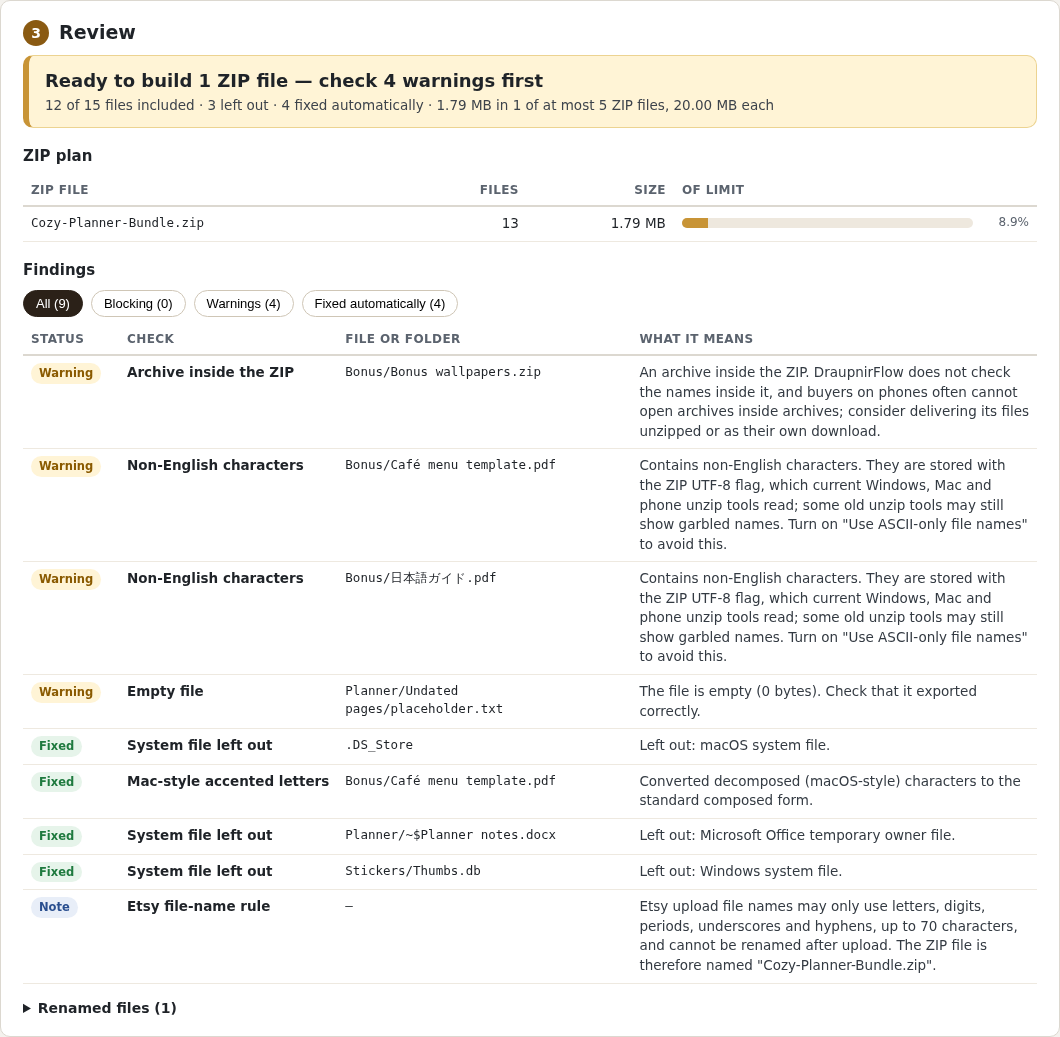
DraupnirFlow 1.0.1 comes with a fictional practice folder, Cozy Planner Bundle: 15 files including a .DS_Store, a Thumbs.db, an Office lock file, an empty placeholder, a ZIP inside the folder and two names with non-English letters. In the accepted test run it was checked with the Etsy preset: at most 5 ZIP files of 20,000,000 bytes each.
Each finding and a decision
- Left out:
.DS_Store,Stickers/Thumbs.dband the Office lock filePlanner/~$Planner notes.docx. Nothing to decide. - Fixed: the accents in
Bonus/Café menu template.pdfwere stored in decomposed (macOS-style) form and were converted to the standard composed form. The name looks the same. - Archive inside the ZIP:
Bonus/Bonus wallpapers.zip. DraupnirFlow does not check the names inside it. Decision: deliver the wallpapers unzipped, or as their own download, if you can. - Non-English characters:
Café menu template.pdfand日本語ガイド.pdfare stored with the ZIP UTF-8 flag. Decision: keep them if your buyers expect those names; otherwise turn on Use ASCII-only file names. - Empty file:
Planner/Undated pages/placeholder.txtis 0 bytes. Decision: replace it with the real pages or remove it before you build. - Etsy file-name note: the ZIP is named
Cozy-Planner-Bundle.zip, which fits Etsy’s naming rule.
In this practice folder the four warnings are deliberate, and warnings do not stop the build. Build ZIP files produced Cozy-Planner-Bundle.zip: 1,788,188 bytes and 13 files (the 12 product files plus How to open these files.txt), together with a text report of every check and change and the ZIP’s SHA-256 checksum.
A second, larger fictional folder, Spring Printables Shop Bundle (44 files, 45.21 MB), cannot fit in one upload. With the same preset DraupnirFlow planned three ZIP files and renamed files whose names Windows refuses, for example Planner/CON.pdf to Planner/CON_.pdf and Planner/Notes: 2027.txt to Planner/Notes - 2027.txt.
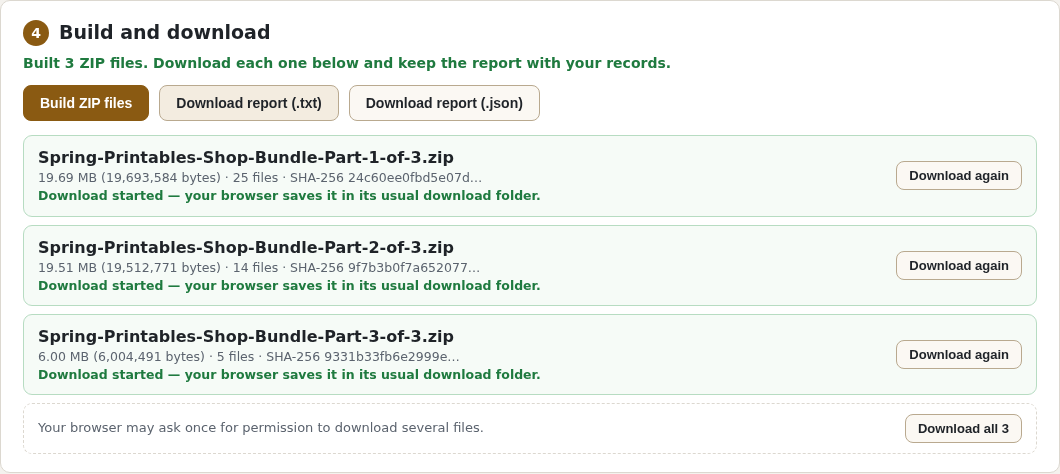
Result in the accepted 1.0.1 test run: the 15-file practice folder became one 1,788,188-byte ZIP with 13 files, 3 system files left out and 4 warnings to review; the 45.21 MB folder became three independent ZIP files, each below 20,000,000 bytes. Nothing was uploaded, and no Etsy upload was part of the test.
The Cozy Planner Bundle, the ZIP built from it and its report are in the free guide ZIP linked below. The larger Spring Printables folder is not in the free ZIP.
A free check before you zip
You can do the same preparation without DraupnirFlow. This Python script uses only the standard library (Python 3.8 or later). It lists files to leave out and names to look at, and adds up what is left. It does not change, rename or zip anything.
import os, sys, unicodedata

LIMIT = 20_000_000  # Etsy's "20 MB", read as 20,000,000 bytes
LEAVE_OUT = {'.DS_Store', 'Thumbs.db', 'desktop.ini', '__MACOSX'}
RESERVED = {'CON', 'PRN', 'AUX', 'NUL', *(f'{d}{n}' for d in ('COM', 'LPT') for n in range(1, 10))}

def problems(name):
    found = []
    if any(c in '<>:"\\|?*' or ord(c) < 32 for c in name): found.append('character Windows refuses')
    if name.split('.')[0].upper() in RESERVED: found.append('name Windows reserves')
    if name.endswith((' ', '.')): found.append('ends with a space or a period')
    if not unicodedata.is_normalized('NFC', name): found.append('accents in decomposed (Mac-style) form')
    if not name.isascii(): found.append('non-English letters')
    return found

root, total, count, seen = sys.argv[1], 0, 0, {}
for folder, dirs, files in os.walk(root):
    dirs.sort(); files.sort()
    for name in dirs + files:
        rel = os.path.relpath(os.path.join(folder, name), root)
        if name in LEAVE_OUT or name.startswith(('~$', '._')):
            print('leave out:', rel)
            if name in dirs: dirs.remove(name)
            continue
        notes = problems(name)
        if rel.lower() in seen: notes.append('same name as ' + seen[rel.lower()] + ' apart from case')
        seen[rel.lower()] = rel
        if name in files:
            size = os.path.getsize(os.path.join(folder, name))
            total, count = total + size, count + 1
            if size == 0: notes.append('empty file')
            if size >= LIMIT: notes.append('at least 20,000,000 raw bytes; check its final ZIP size after compression')
            if name.lower().endswith(('.zip', '.rar', '.7z')): notes.append('archive inside the download')
        for note in notes: print('check:', rel, '-', note)

minimum_stored = -(-total // LIMIT)
print(f'{count} files, {total:,} bytes before zipping.')
if count:
    print(f'Raw-size estimate without compression: at least {minimum_stored} ZIP file(s).')
    print('Headers, an opening guide and grouping can need more space; compression can reduce it.')
    print(f'Build and measure every final ZIP: each must be under {LIMIT:,} bytes, with at most 5 files.')
else:
    print('No product files found; nothing to package.')
Save it as check_download.py and run python3 check_download.py "Cozy Planner Bundle". On the fictional practice folder it lists .DS_Store, ~$Planner notes.docx and Thumbs.db to leave out; flags the nested archive, decomposed and non-English names and the empty file; and reports 12 files and 1,786,819 bytes before zipping. Its raw-size estimate assumes no compression and excludes ZIP overhead: it is not a packing plan. Build and measure the finished ZIP files.
Then rename what it flags, group the files into complete useful downloads, compress each group and check the actual ZIP byte size. Regroup if needed. On Linux, Info-ZIP’s zip can leave the system files out while it builds the archive. Run it from inside the product folder:
zip -r -X -D ../Cozy-Planner-Bundle.zip . -x '*.DS_Store' '*Thumbs.db' '*desktop.ini' '*~$*' '*__MACOSX*' '*/._*' '._*'In a test on Linux with Info-ZIP Zip 3.0 and a UTF-8 locale, this made a 1,787,671-byte ZIP with the 12 product files, and the two names with non-English letters were stored with the UTF-8 flag. It does not fix names or split anything, and other ZIP tools may store names differently. Check each ZIP’s exact size in bytes and open it once before you upload it.
The script is a rough check. It does not look inside archives, check path-length limits or catch every name that a particular unzip app dislikes.
If a buyer can’t open a download
- Ask which file it is and what they see: an error, garbled names or missing files. If they use the Etsy app, point them to Purchases on Etsy.com in a browser.
- Fix the cause in your source folder, not only in the ZIP: rename, remove or regroup the files, then build and open the ZIP files again.
- Upload the corrected ZIP under its final name, because Etsy file names can’t be edited after upload, and keep your notes or report with the listing.
Common mistakes
- Uploading split-archive parts. Send complete ZIP files instead, each under the limit.
- Trusting a rounded size. File managers round, and some count a megabyte as 1,048,576 bytes. Check the exact byte count of each ZIP.
- Spaces or symbols in the ZIP name. Etsy’s rule allows letters, digits, periods, underscores and hyphens, and the name can’t be changed after upload.
- Zipping the folder with its system files.
.DS_Store,__MACOSXandThumbs.dbend up in front of the buyer. - Putting a ZIP inside the ZIP to save a slot. Group the files into separate complete ZIP files instead.
- Never opening the result. Extract every ZIP once yourself, ideally on another computer, before the listing goes live.
Limits and next steps
- DraupnirFlow prepares files on your computer. It does not upload to Etsy or any other shop and cannot guarantee that Etsy accepts a file or that every unzip app opens it.
- It was tested only in desktop Chrome 152 on Linux with fictional files, and its output was checked with Linux ZIP readers. Windows, macOS, phones, other browsers and real Etsy uploads were not tested.
- It builds independent ZIP files, not split archives. It handles up to 1.5 GB per job in browser memory (the largest tested job was 45 MB) and does not inspect file contents or the archives inside your product.
- It treats Etsy’s 20 MB as 20,000,000 bytes; other shops need Custom limits. Perunlight is not affiliated with Etsy, and Etsy can change its rules: check its help pages before you rely on the numbers above.
Next: if you have DraupnirFlow, run the practice folder first, then your own product folder, and keep the text report with the listing. The DraupnirFlow setup guide covers opening the app, settings and troubleshooting. Without it, use the free check and the ZIP command above, and open every result yourself.
Perunlight product
Build the ZIP files with DraupnirFlow
DraupnirFlow is a paid offline browser app: $12 USD, one-time purchase, version 1.0.1, no account or subscription. It runs the name checks above on a folder or an old ZIP, leaves out system files, renames files whose names Windows refuses, plans independent ZIP files within your limits and saves a report of every change. Tested in desktop Chrome 152 on Linux only.
Get DraupnirFlow · $12Read the setup guide
The free ZIP contains the manual, practice folder, example ZIP and report, but not the app. The paid app automates the checks and packaging; the free script and manual ZIP method above work without it.