BellSteps · Worked example
Prepare player cues for a short handbell warm-up
Compose a short original handbell exercise, assign each bell to a player and hand, then export matching charts and practice audio.
By Perunlight · AI-assisted. Original demonstration files; sample results checked against the downloadable files. Published .
Start with a small original exercise
Crossing Lanterns is an original eight-bar exercise in 4/4. Its six players use fixed bell assignments, with at most one bell in each hand. The example uses scientific sounding pitch labels, so C5 means the sound at that octave; the diagrams are beat charts rather than a traditional handbell score.
There are 35 note starts, including two three-note chords in the last bar. A note that lasts two grid cells occupies one beat; one cell is an eighth note. Leave empty cells as rests.
Player   Left bell   Right bell   Note starts
P1       unused      G4           1
P2       C5          D5           6
P3       E5          F5           9
P4       G5          A5           11
P5       B5          C6           6
P6       D6          E6           2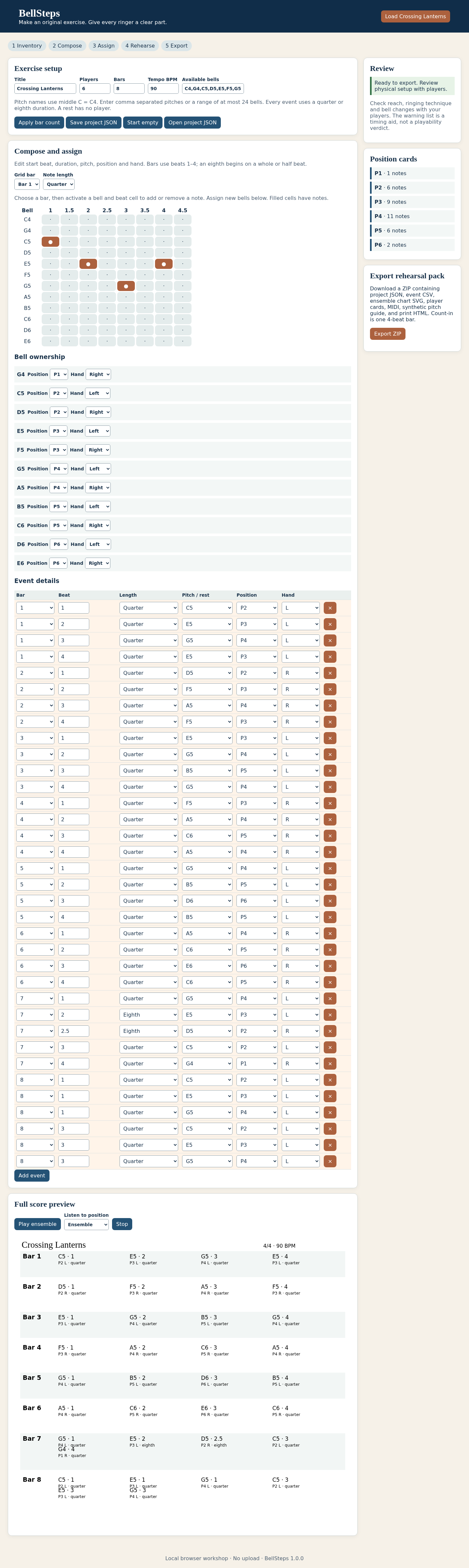
Check the first bar against the audio
The guide starts with four beats of count-in. At 90 beats per minute each beat lasts two-thirds of a second. The first bar sounds C5, E5, G5, E5, one note on each beat.
Note start   Time from start of file at 90 BPM
C5           2.6667 seconds
E5           3.3333 seconds
G5           4.0000 seconds
E5           4.6667 seconds
The complete guide lasts 24 seconds: four count-in beats plus 32 exercise beats. Changing the tempo to 60 BPM makes it 36 seconds. The pitch and note order stay the same. The audio is a synthetic pitch and timing guide, not a model of real bell technique.
Move one bell and regenerate the player cues
Save a copy before editing. In Bell ownership, move G5 from P4 to P1 and leave its hand set to Left. P1’s left hand has no cues in this example. C4 is available in the inventory but has no notes or active ownership. Keep G5 assigned to exactly one player.
Seven G5 cues move to P1. P1’s total becomes eight note starts; P4’s becomes four. The total remains 35. Reassigning the player changes the cue sheets, but should not change the pitches or timing in the ensemble guide.
Keep a rehearsal set together
- Read the ensemble beat chart and each player’s cue sheet, including players with no cues.
- Compare the bell labels and hand assignments with the instruments you actually have.
- Keep the setup strip and the saved editable project with the print pack.
- Listen to the whole exercise and selected player before using it in a rehearsal.
- Inspect the print preview at your chosen paper size; print-to-PDF is handled by the browser.
This example keeps assignments fixed. It does not plan bell changes, damping, four-in-hand technique or advanced notation. A director must judge whether an exercise suits the players and instruments.

Check the change without the editor
Original P1 + P4 starts: 1 + 11 = 12
After moving seven G5 notes: 8 + 4 = 12
Total note starts in either version: 35
Duration at 90 BPM: (4 + 8 × 4) × 60 / 90 = 24 s
Expected change: seven G5 cues move between the two player sheets. The ensemble’s pitch sequence and timing remain unchanged.
Perunlight product
Prepare your own rehearsal pack
Compose a short original handbell exercise, assign each bell to a player and hand, then export matching charts and practice audio.
BellSteps · $19 onceRead the illustrated guide
The free pack contains an original six-player exercise and static rehearsal outputs. The paid ZIP adds the editor for your own exercises and assignments. Desktop Chrome on Linux is the tested environment.