Step-by-step guide
BellSteps
Compose a short original handbell exercise, assign each bell to a player and hand, then export matching charts and practice audio.
You write short original handbell warm-ups and want ensemble and player cues to stay tied to the same editable exercise.
Before you start
- Desktop Google Chrome on Linux is the tested environment.
- Extract the complete buyer ZIP and open index.html in desktop Google Chrome on Linux. The original Crossing Lanterns exercise opens immediately. No account, server or network connection is required.
- Four to twelve players, at most one bell per hand and 24 unique sounding pitches from C4 to C7. These are scientific pitch labels and beat charts, not engraved handbell staff notation.
Your first result
Open Crossing Lanterns
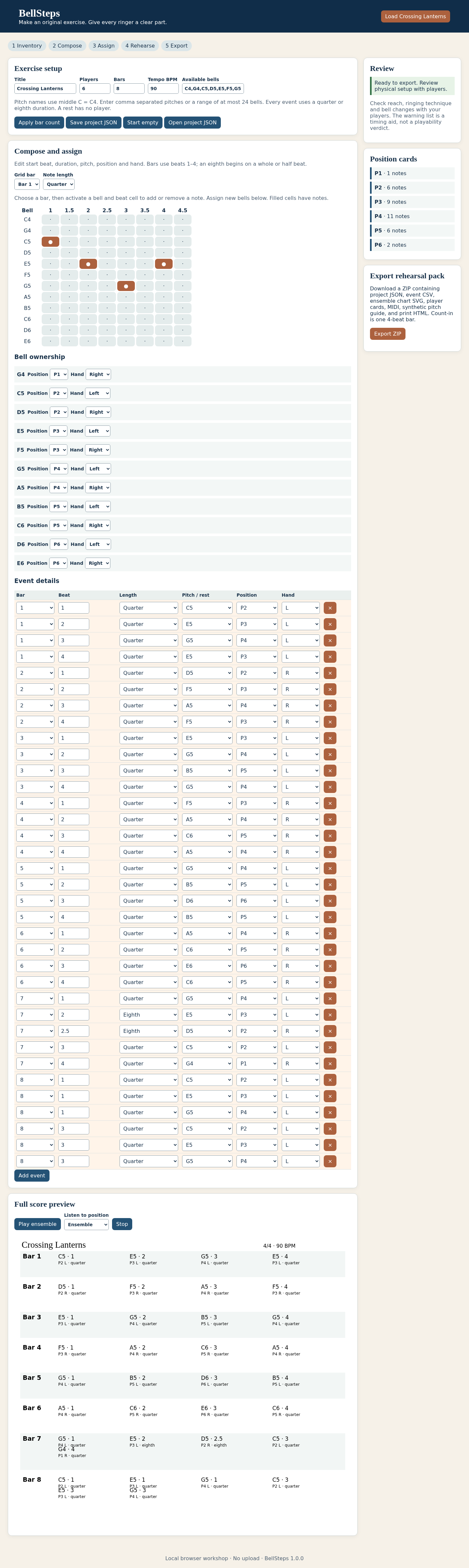
Extract the full buyer ZIP and open index.html in desktop Chrome. Inspect the original eight-bar, six-player exercise at 90 BPM.
Review the setup
Check the pitch inventory and each player's left/right bell. Middle C is C4. Review actual availability and physical reach with your players.
Write the rhythm
Use the rhythmic grid and event controls to create quarter or eighth notes. Read the review messages before listening or exporting.
Move a bell assignment
In Bell ownership, move G5 from P4 to P1 and leave its hand set to Left. P1 has no left-hand cues in the example. All seven G5 cues move together. Save and reopen the edited project.
Listen to the exercise
Choose ensemble or a numbered player and start playback. The synthetic guide demonstrates pitches and timing; it does not model a real handbell performance.
Save and print
Save the project JSON, then export the rehearsal ZIP. Open print-pack.html in Chrome to print or save a PDF. Keep the CSV, SVG, MIDI and WAV alongside your editable master.
A worked example
Crossing Lanterns
Input: Eight bars, six players and 35 note onsets at 90 BPM, including eighth notes and two three-note chords.
- Read the initial player onset counts: 1, 6, 9, 11, 6 and 2.
- Listen to C5, E5, G5 and E5 on the four beats of bar 1.
- Move G5 from P4 left to P1’s unused left hand and regenerate the cues.
- Export again at 60 BPM to compare the longer practice duration.
Expected result: The original 90 BPM guide lasts 24 seconds including its four-beat count-in; at 60 BPM it lasts 36 seconds. Moving G5 changes the player counts to 8, 6, 9, 4, 6 and 2 while retaining the same pitches and timing.
See the working tool
Actual screenshots from the downloadable app. Start with the free example and follow the steps below.
1. Compose the original warm-up
2. Review the narrow layout

Troubleshooting
Export is blocked
Resolve the named invalid rhythm, missing pitch or conflicting assignment in Review.
A player has no notes
A no-cues sheet is intentional for a player with no onsets in the exercise. Check the setup before rehearsal.
Audio does not start
Press Play after opening the app, check browser audio permissions and system volume, then try again.
An imported project is rejected
Use BellSteps project JSON within the documented file limit. Retain your current work while correcting the named field.
A printed page is wrong
Open the generated HTML in Chrome, inspect every page in print preview and check paper and scaling settings.
Compatibility & limits
- Four to twelve players, at most one bell per hand and 24 unique sounding pitches from C4 to C7. These are scientific pitch labels and beat charts, not engraved handbell staff notation.
- One to sixteen bars of 4/4, eighth or quarter durations, 60–180 integer BPM and at most 512 events. Project JSON imports are limited to 250 KB. No score import, tuplets, dynamics or hand-swap planning.
- Audio is a synthetic pitch and timing guide, with a four-beat count-in. Physical reach, technique, realistic bell timbre and rehearsal suitability are unverified.
- PDFs are created using Chrome's print dialog from the exported HTML. Check page breaks and your printer settings before handing out the charts.
- Tested in desktop Chrome on Linux. Save project JSON before closing; other browsers and operating systems are unverified.
Need a hand?
Tell us the product, host application and version, what you tried, and the exact error. Contact support with a fictional example; keep private customer files and passwords out of your message.