Task walkthrough · ZoryaTag
Prepare tagged audio copies and a matching CSV
A main mix, an instrumental and a short edit share track details, but each version needs the right file, name and recording code. Use this small exercise to keep those details together and check the delivery before sending it.
A Perunlight workflow for ZoryaTag, our paid offline audio delivery app. Written with AI assistance and checked against its free fictional Lumen Harbor files and an independent browser export from version 1.0.1 in Chrome 152 on Linux. The short audio samples, names and identifiers are invented for practice. Published .
Separate shared track details from version details
Keep the artist, writers, publisher and other shared information in one track record. Give each version its own label, source filename and ISRC. Before editing anything, keep the original audio files in their own folder.
For this exercise, Glass Tide has Main, Instrumental and 30s versions. The instrumental source is glass_tide_inst_v3.wav. Its expected delivery name is Lumen Harbor - Glass Tide - Instrumental.wav, its embedded title is Glass Tide (Instrumental), and its fictional ISRC is QZXX12600002.
Open examples/lumen-harbor-catalog.csv in the free pack as text to inspect the per-version rows. Compare them with examples/expected/Generic-Library-metadata.csv. Treat IPI values as text so the leading zeros remain visible.
Find and correct the deliberate 90% total
The built-in example starts with two Glass Tide writers at 50% and 40%. For the invented exercise, their intended shares are 50% each. This gives you a visible error to resolve before exporting.
- With the paid download, extract the ZIP and open ZoryaTag.html in Chrome on Linux. Choose Load example catalog.
- Read the Check step: Glass Tide’s writer shares total 90%. Choose Show to reach the writer table.
- Change M. Reyes from 40 to 50. Check that the displayed total becomes 100%.
- Choose Check delivery. Confirm that all nine versions have the intended audio file and that no blocking problems remain.
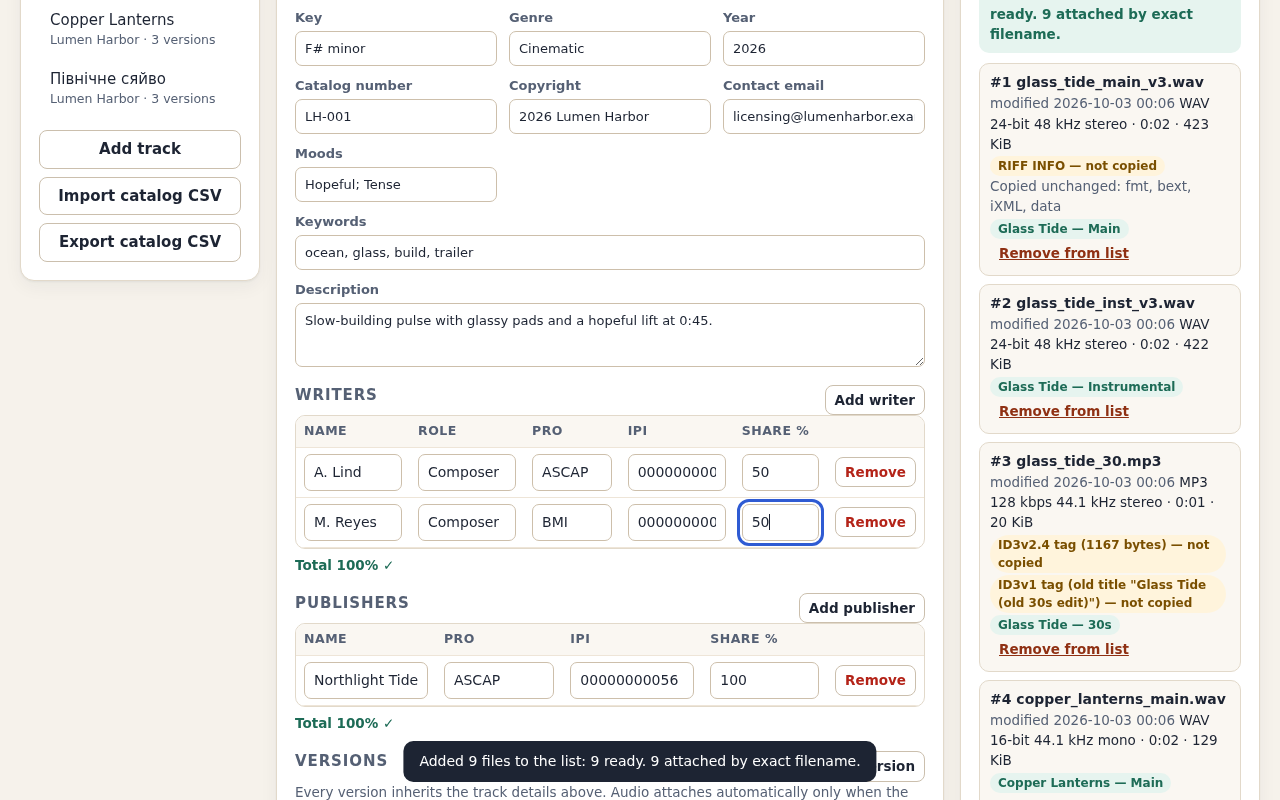
Expected: three tracks, nine versions, a 100% writer total for Glass Tide and no blocking problems. The split check verifies arithmetic on your entries; it does not verify ownership or registrations.
Review the filenames and build the copies
Keep the Generic library template selected for this exercise. Review the output names before continuing. The template defines the names and spreadsheet columns; it is an example, not a receiving library’s specification.
- Check the Glass Tide instrumental’s source, output name and ISRC against the values above.
- Choose Continue to export. Read the acknowledgement about old tags and artwork.
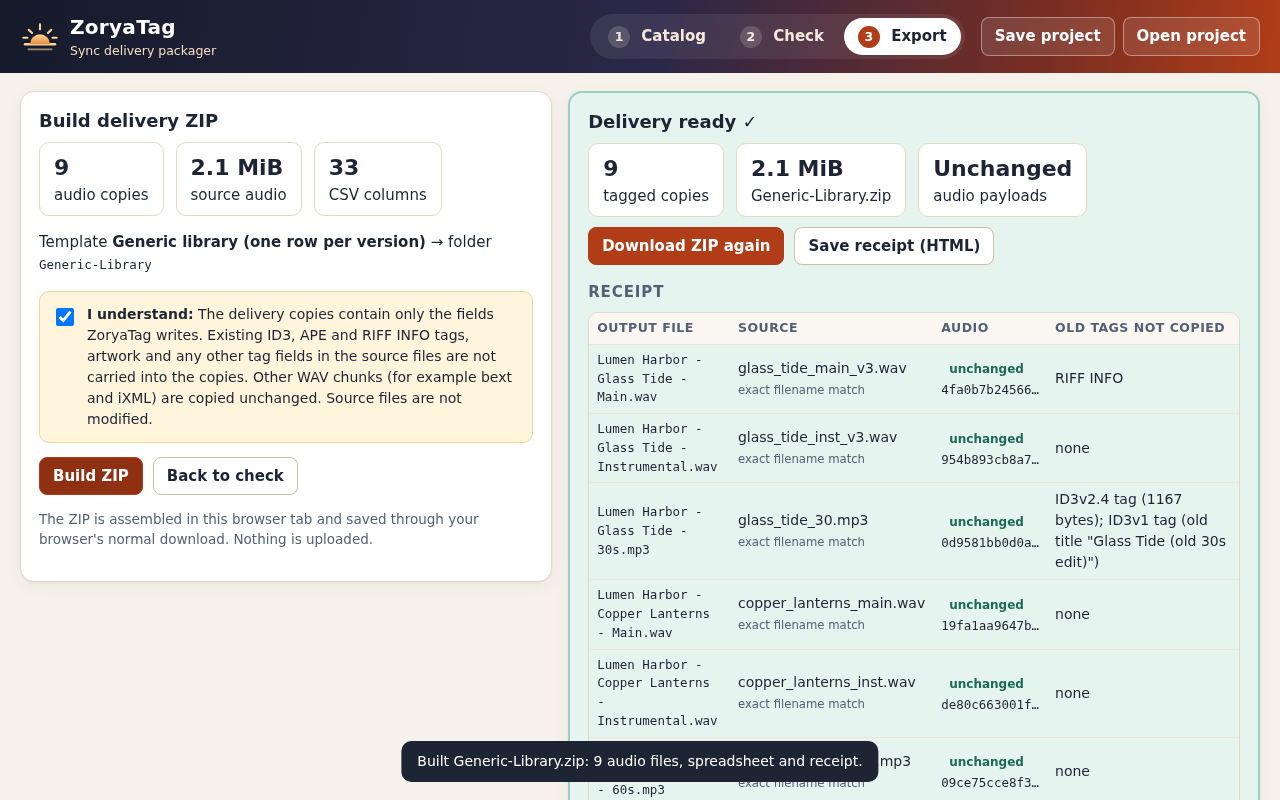
- Tick the acknowledgement only after checking that the listed replacement behavior suits this delivery. Choose Build ZIP.
- Save Generic-Library.zip and extract it into a new folder for inspection. Keep the originals separately.
ZoryaTag writes new tags into copies. The example’s Glass Tide 30s MP3 has stale leading and trailing tags; those tags are removed in its output copy. Existing artwork and fields outside ZoryaTag’s written field list are not carried over. For WAV files, the app replaces RIFF INFO and ID3 tags while preserving the other supported chunks, including audio data, bext and iXML.
Compare the CSV, audio names and receipt
Generic-Library/
  audio/                         9 WAV and MP3 copies
  Generic-Library-metadata.csv   9 data rows
  receipt.html
receipt.json- Count six WAV copies and three MP3 copies, with one CSV row per version.
- Match each CSV File Name to the corresponding audio filename and receipt entry.
- For Glass Tide / Instrumental, check QZXX12600002 and writer shares of 50 and 50.
- Compare the exported CSV with examples/expected/Generic-Library-metadata.csv in the free pack.
- Open receipt.html and review the source attachment, written fields, omitted tags and matching before/after audio-payload hashes.
In our checked nine-file export, the CSV exactly matched the expected file. Independently comparing the original and output bytes confirmed unchanged audio payloads for all nine files and unchanged non-tag chunks in the six WAV files. Complete file hashes can change when embedded tags change; use the audio-payload comparison for this check.
A tag viewer may show field identifiers as well as labels. The ID3v2.3 specification defines TIT2 for a title and TSRC for an ISRC. ZoryaTag’s receipt lists the fields it wrote, so you can compare those values with an independent tag viewer that supports the file type.
Player and receiving-system behavior can differ. Check a copy in your own receiving workflow and follow that recipient’s requirements. No music-library submission or acceptance is established by this exercise.
Repeat with a small batch of your own files
Start an empty catalog or import a catalog CSV, then add the audio. Automatic attachment requires one exact filename match. If a name is ambiguous, choose the correct numbered file and inspect its details. The receipt records how it was attached.
Save a project before closing. The project retains the catalog and templates; after reopening, add the original audio files again. Recheck the names, required fields and intended metadata replacements before exporting.
ZoryaTag 1.0.1 was verified in Chrome 152 on Ubuntu Linux. It supports the WAV and MP3 variants listed in the setup guide, with up to 100 selected files including rejected entries, 128 MiB per file and 512 MiB total. All bounds apply together. A selection exceeding the remaining file count is refused as a whole.
AIFF, FLAC, M4A, OGG and RF64 are outside this release’s input scope. It does not edit sound, detect BPM or key, look up registrations or guarantee that a recipient will accept the files. Start with a small delivery whose inputs and expected metadata you can inspect.
Perunlight product
Prepare a delivery with ZoryaTag
$24 USD, one-time purchase. Keep tracks and versions in one catalog, review names and checks, and export tagged WAV/MP3 copies with a matching CSV and receipt. Includes the offline HTML app, illustrated manual and fictional practice files.
Get ZoryaTag · $24Read the complete setup guide
The practice files, expected metadata and manual are free. The app is in the paid download.