ZoryaTag · Offline audio delivery app 1.0.1 · Chrome on Linux
One track catalog. Tagged copies and a matching spreadsheet.
Prepare a delivery ZIP of renamed WAV and MP3 copies, selected metadata, a matching CSV and a receipt. Keep one track record for its main mix, instrumental and other versions.
Use this when one track has several deliverable versions and you want their names, embedded fields and spreadsheet to agree. Original files are read without being modified. Check the receiving library or supervisor’s requirements before sending.
$24 USD · one-time purchase
Continue to checkoutStep-by-step guide
No subscription. Final total and tax appear at checkout.
Inspect a complete example before buying
Contains fictional audio, catalog, templates, expected outputs and the illustrated manual. The app is included in the paid download.
- Runs offline: One HTML app in Chrome on Linux; audio stays on your computer.
- Copies and CSV: The same output names appear in the audio ZIP, spreadsheet and receipt.
- Review old tags: Copies replace old tags and artwork with the supported catalog fields.
What it helps you do
For composers preparing supported audio files for a library or supervisor. Review writer and publisher totals, per-version ISRCs and the exact file names before exporting. Generic editable templates help organise the delivery; confirm the recipient’s actual requirements.
What is in your download
- ZoryaTag.html (the app)
- manual/ (illustrated manual)
- examples/ (fictional Lumen Harbor catalog: 6 WAV, 3 MP3, project file, catalog CSV, expected spreadsheet and receipt)
- templates/ (3 editable delivery templates)
- README.txt, LICENSE.txt, NOTICE.txt, CHANGELOG.md
A practical example
Lumen Harbor: three tracks, nine versions
Start with
Fictional catalog with six WAV files and three MP3 files. Glass Tide begins with writer shares of 50% and 40%.
Get this result
Generic-Library.zip contains nine audio copies, a nine-row CSV, receipt.html and receipt.json. Glass Tide (Instrumental) carries ISRC QZXX12600002 and the 50%/50% writer split. Audio-payload hashes match the sources; the old Glass Tide 30s MP3 title tags are replaced.
Free illustrated manual, fictional audio catalog, templates and expected output (app not included)
Examples use fictional or synthetic data. Follow this example step by step.
Catalog, check, then export
Actual ZoryaTag 1.0.1 screens in Chrome on Linux with the fictional Lumen Harbor example.
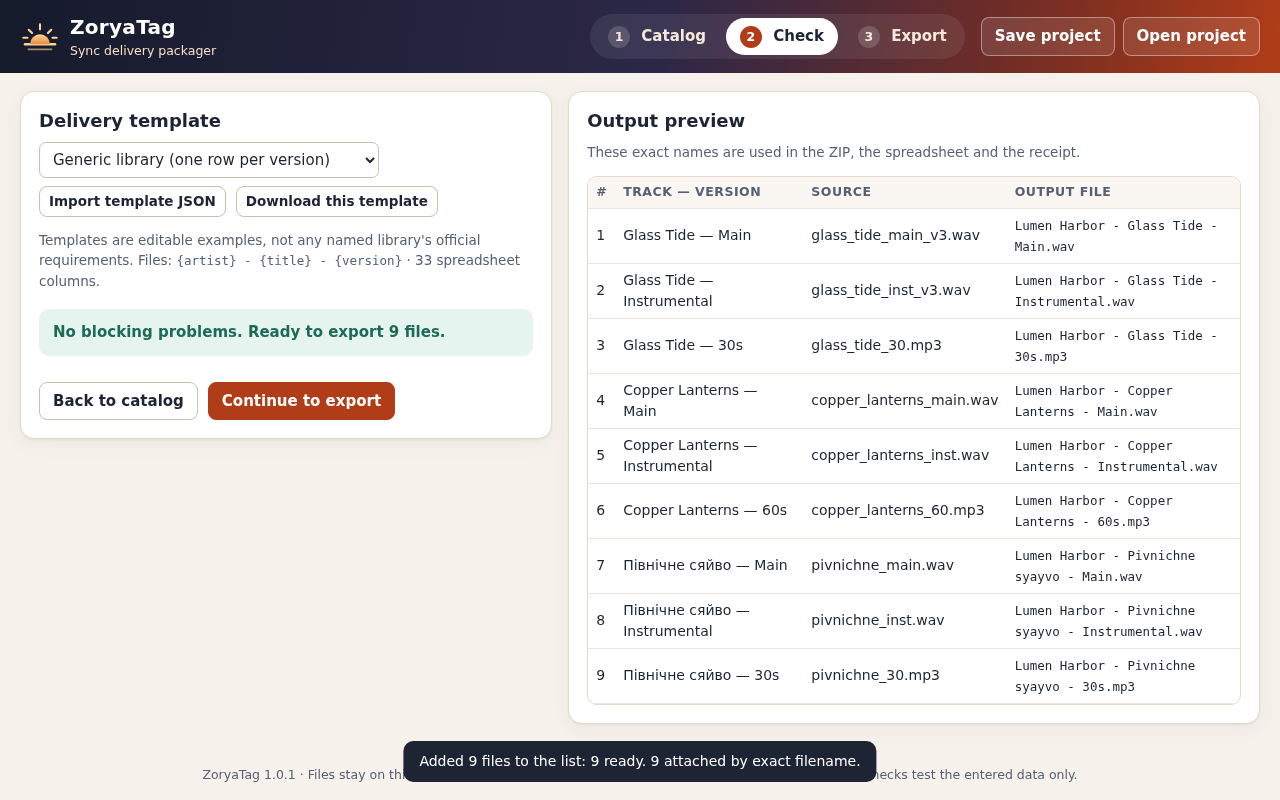
Review all nine names
The fictional Lumen Harbor catalog has three tracks and three versions each. Review the exact file names before building the delivery ZIP. View full size Correct the writer total
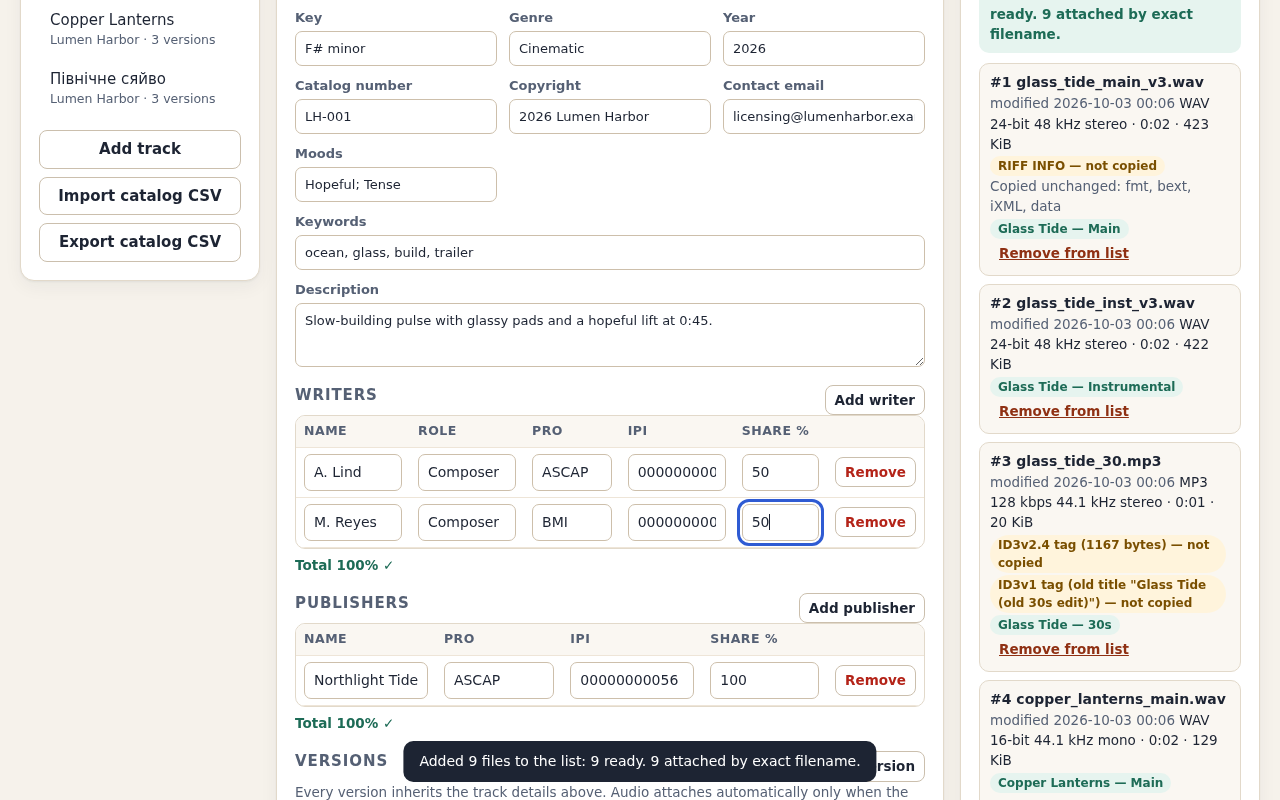
The example begins at 90%. Changing M. Reyes to 50% clears the arithmetic check; this does not verify ownership. View full size Inspect the delivery receipt
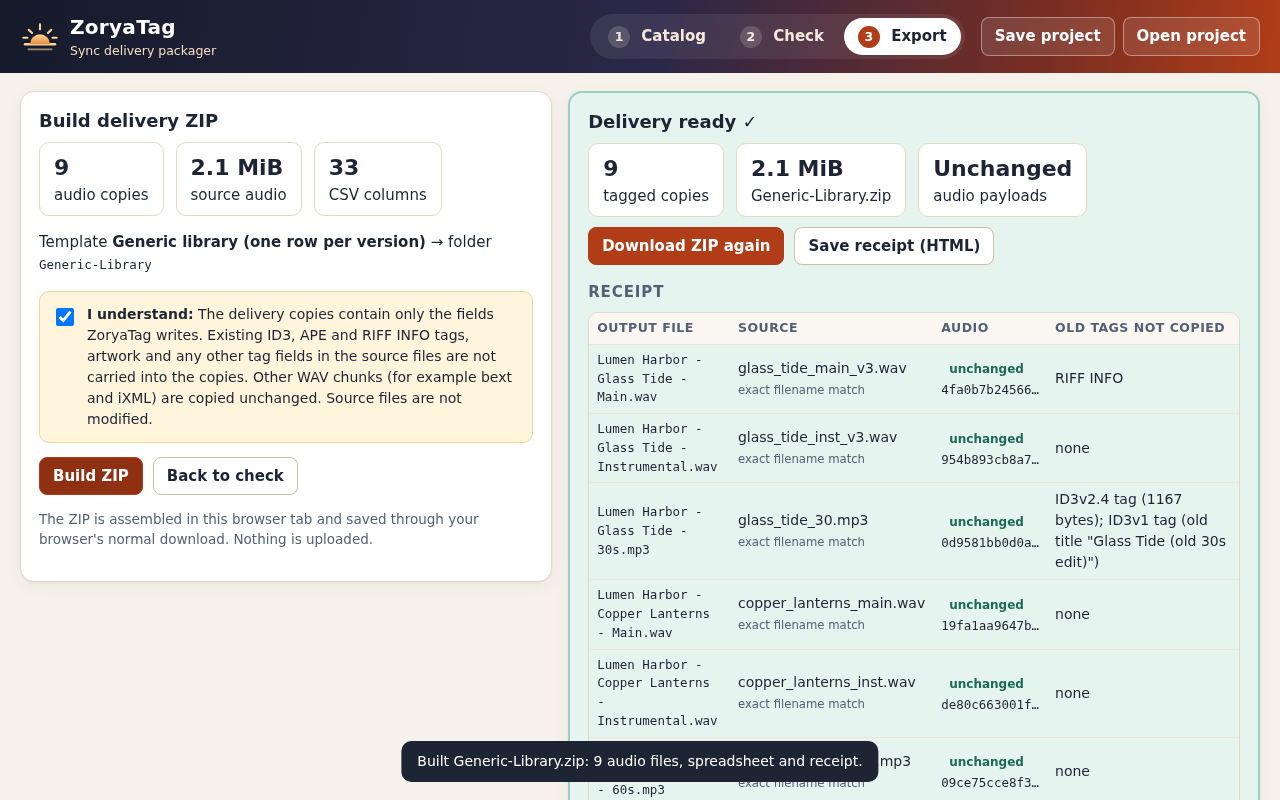
The receipt records the source for each copy and the tags replaced. Review both the files and the spreadsheet before sending. View full size
How it works
Build the catalog
Enter track fields once, then attach each version’s source file.
Review the delivery
Fix blocking checks and inspect the exact output names.
Export and inspect
Download tagged copies, the matching CSV and a receipt.
Before you buy
- Desktop Google Chrome on Linux. Verified in Chrome 152 on Ubuntu 22.04; other environments are unverified.
- Extract the full buyer ZIP and open ZoryaTag.html. No installation, account or network connection is required.
- Supported WAV or Layer III MP3: up to 100 files, 128 MiB each and 512 MiB total. A large batch may use more than 2 GB of browser memory.
- Your reviewed track, writer, publisher and version information. ZoryaTag does not determine ownership or verify identifiers against registries.
Extract ZoryaTag-1.0.1.zip and open ZoryaTag.html in desktop Google Chrome on Linux. Load the example catalog, correct the deliberate split error and export nine tagged copies. No installer, account or internet connection is needed.
Compatibility & limits
Only desktop Google Chrome 152 on Ubuntu 22.04 was tested. Other browsers and operating systems are unverified. Up to 100 files in the list, including rejected files, 128 MiB each and 512 MiB total; the stored ZIP must remain under 1 GiB. A 480 MiB test peaked at about 2.2 GiB of browser memory. Copies receive only the fields ZoryaTag writes. Existing ID3, APE and RIFF INFO tags, artwork and other tag fields are not carried over; confirm this before export. Other WAV chunks, including bext and iXML, are copied unchanged. WAV PCM and IEEE float, including supported extensible WAV, and Layer III MP3 only. No AIFF, FLAC, M4A, OGG, RF64/BW64, compressed WAV, Lyrics3/TAG+ MP3, artwork or bext/iXML editing. Characters outside the Basic Multilingual Plane, including emoji, block export. RIFF INFO uses UTF-8; some older readers use a Windows code page and many players ignore WAV tags. Share totals, ISRC and IPI checks verify entered arithmetic and format only. They do not verify ownership, registrations or licensing rights. Templates are generic examples. No named music library, DISCO or player ingest has been tested. Confirm the recipient’s current requirements and inspect a test delivery. Versions inherit track fields; only version label, ISRC and audio are specific to a version. No audio editing, key/BPM detection, loudness processing or uploads.
Get ZoryaTag
Perpetual use of the purchased version on your devices for personal or internal commercial work. Keep reasonable backups and modify your own copy; do not redistribute or resell original proprietary code. Third-party licenses and any existing preview permissions retain their rights.
Before payment, save the private recovery code shown by checkout. After Paddle confirms payment, use it to download your ZIP or return for it later. No subscription, future update or email delivery is promised. See the illustrated steps.
$24 USD · once
Buy download