Step-by-step guide
ZoryaTag
Prepare a ZIP of consistently named, tagged WAV/MP3 copies with a matching spreadsheet and audio-payload receipt.
Use this when one track has several deliverable versions and you want their names, embedded fields and spreadsheet to agree. Original files are read without being modified. Check the receiving library or supervisor’s requirements before sending.
Before you start
- Desktop Google Chrome on Linux. Verified in Chrome 152 on Ubuntu 22.04; other environments are unverified.
- Extract the full buyer ZIP and open ZoryaTag.html. No installation, account or network connection is required.
- Supported WAV or Layer III MP3: up to 100 files, 128 MiB each and 512 MiB total. A large batch may use more than 2 GB of browser memory.
- Your reviewed track, writer, publisher and version information. ZoryaTag does not determine ownership or verify identifiers against registries.
Your first result
Open and try the supplied catalog
Extract the entire ZIP and open
ZoryaTag.htmlin Chrome on Linux. Choose Load example catalog. The fictional example contains three tracks and nine audio versions.Correct the deliberate split error
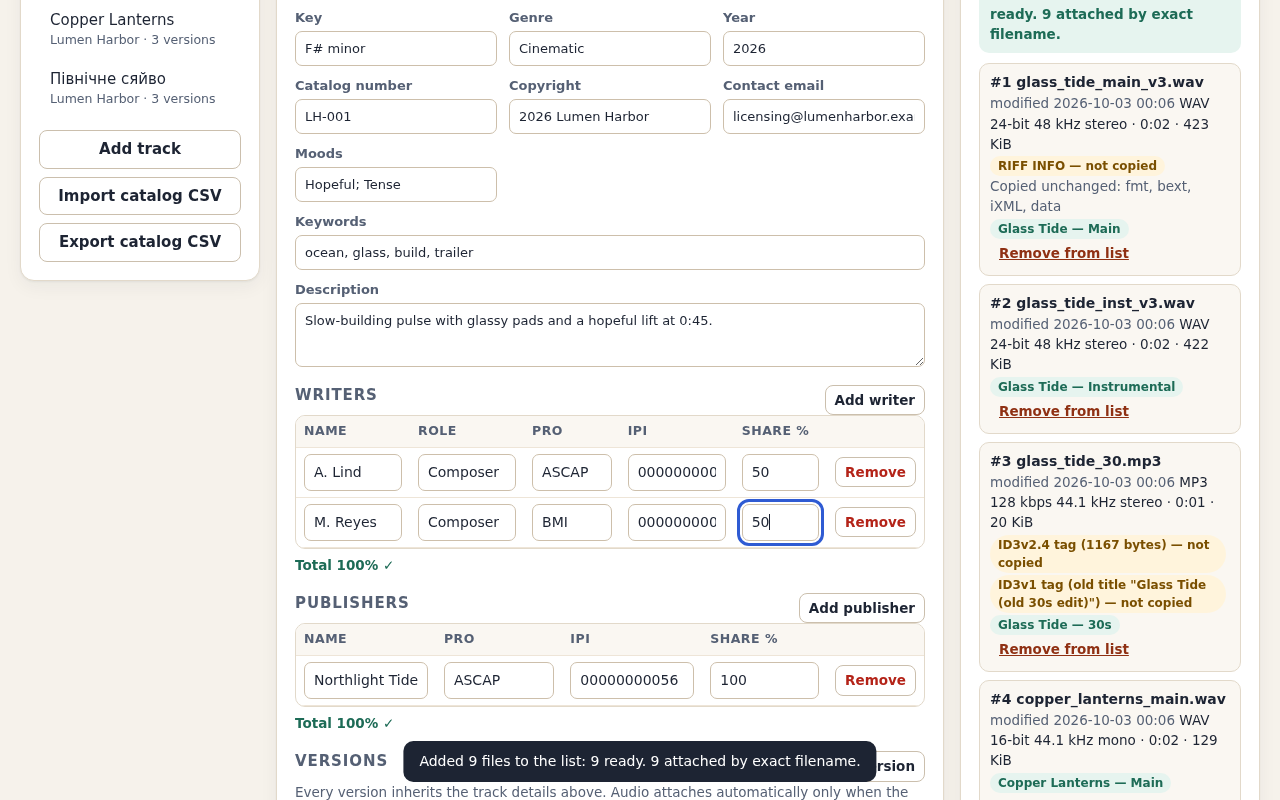
The Check screen reports that Glass Tide writer shares total 90%. Choose Show, change M. Reyes’s share from 40 to 50, then choose Check delivery. Expect nine files and no blocking problems.
Review the names and tag replacement
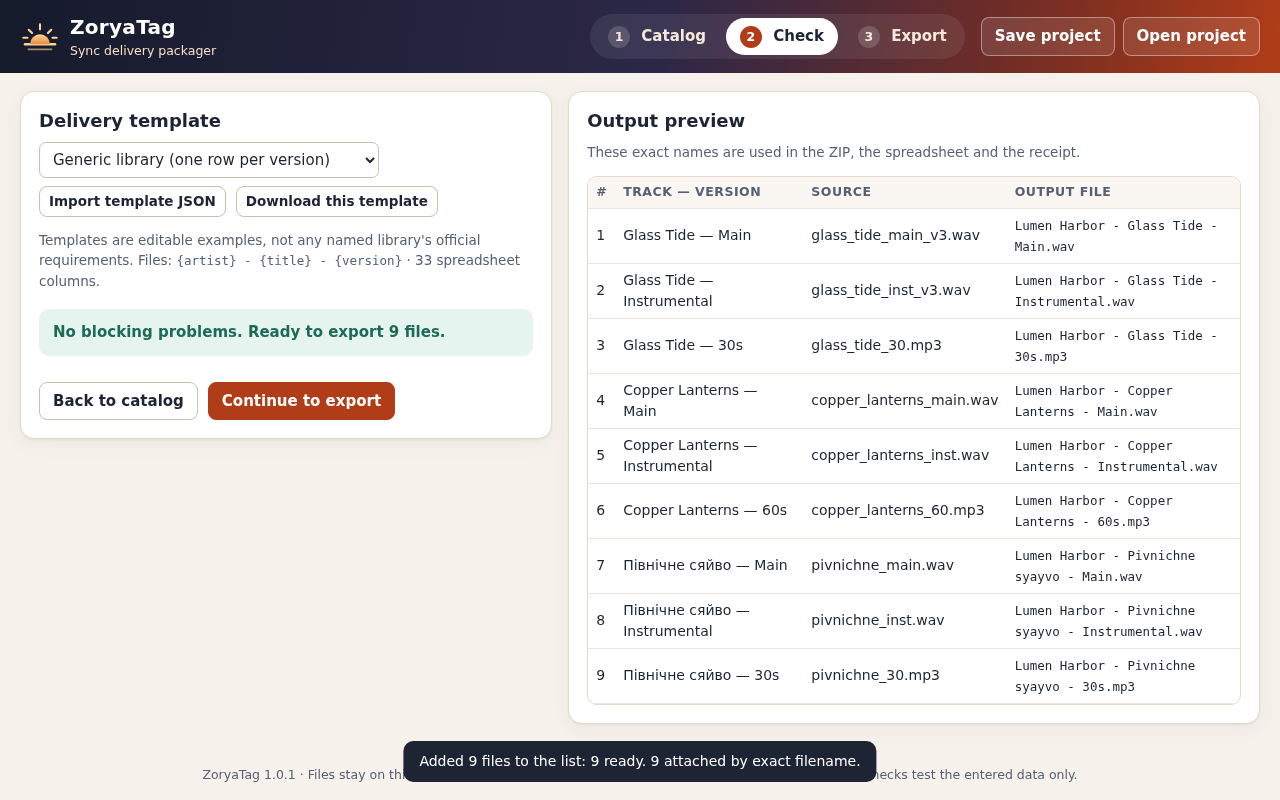
Choose the Generic library (one row per version) template. Inspect every source and output name. Continue to Export and read the acknowledgement: old ID3, APE and RIFF INFO tags, artwork and fields outside this schema are not carried over into the new copies.
Build and inspect the example ZIP
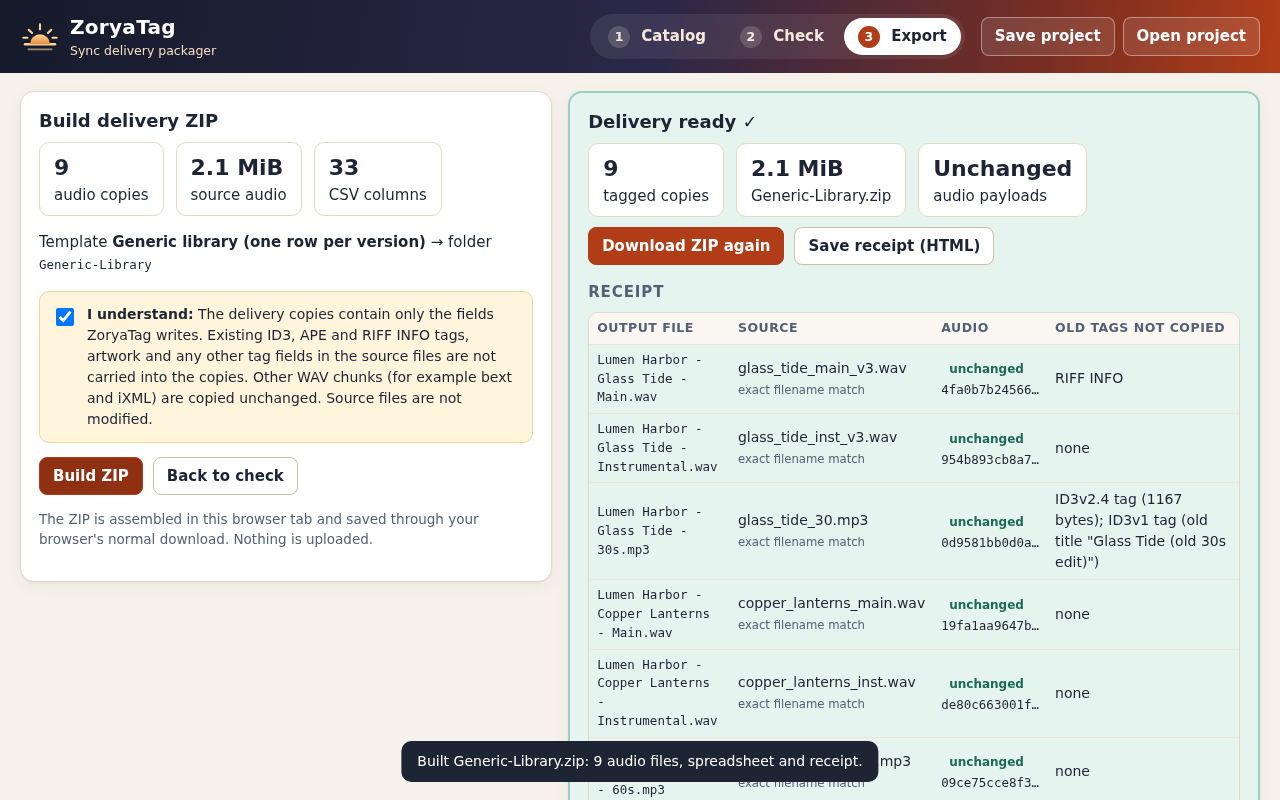
Confirm the acknowledgement and choose Build ZIP. Extract the download, open
Generic-Library/receipt.html, and compare its nine audio rows and CSV with the expected files in the example pack. The receipt records source/output hashes and matching audio-payload hashes.Attach your own versions carefully
Start an empty catalog, import its CSV, or open a saved project. Add track details, writers and publishers, then label each version and enter its ISRC. Add the audio files. Automatic attachment requires an exact, unique filename; otherwise choose the file explicitly. Check every attachment before export.
Save the catalog and adapt a template
Use Save project for a lossless project JSON. The delivery CSV is a spreadsheet, not a project backup. Templates specify names, columns and required fields; bundled templates are generic examples. Save the project, inspect a small output in the receiving workflow, then prepare the batch. To remove the app, delete its extracted folder while retaining projects and deliveries you need.
A worked example
Lumen Harbor: three tracks, nine versions
Input: Fictional catalog with six WAV files and three MP3 files. Glass Tide begins with writer shares of 50% and 40%.
- Load example catalog and use Show to reach the writer-share problem.
- Set M. Reyes to 50% and choose Generic library (one row per version).
- Review names, confirm tag replacement and build the delivery ZIP.
Expected result: Generic-Library.zip contains nine audio copies, a nine-row CSV, receipt.html and receipt.json. Glass Tide (Instrumental) carries ISRC QZXX12600002 and the 50%/50% writer split. Audio-payload hashes match the sources; the old Glass Tide 30s MP3 title tags are replaced.
Catalog, check, then export
Actual ZoryaTag 1.0.1 screens in Chrome on Linux with the fictional Lumen Harbor example.
1. Review all nine names
2. Correct the writer total
3. Inspect the delivery receipt
Troubleshooting
The selected files do not fit in the audio list
A selection exceeding the remaining room in the 100-file list is refused as a whole. Remove files or choose a smaller selection. Rejected files count toward the list limit; read each rejection reason and the ready/rejected totals.
A version shows 'no audio'
Make its Source filename match the file name exactly, or choose the file from the version's list.
RF64/BW64 or 'not a RIFF/WAVE file'
Export a standard WAV (not RF64/large-file) or convert AIFF/FLAC to WAV first.
MP3 refused for Lyrics3, TAG+ or several ID3v2 tags
Remove those tags in your usual tagger and add the file again.
A player shows no WAV tags
Many players ignore WAV metadata; send the spreadsheet and check tags with a tagger that reads WAV ID3 chunks.
Build ZIP stays disabled
Fix every problem on the Check step and tick the acknowledgement.
Compatibility & limits
- Only desktop Google Chrome 152 on Ubuntu 22.04 was tested. Other browsers and operating systems are unverified.
- Up to 100 files in the list, including rejected files, 128 MiB each and 512 MiB total; the stored ZIP must remain under 1 GiB. A 480 MiB test peaked at about 2.2 GiB of browser memory.
- The 100-file limit counts rejected files too. A selection that does not fit is refused before any of its files are read; an accepted selection reports exact added, ready and rejected counts.
- Copies receive only the fields ZoryaTag writes. Existing ID3, APE and RIFF INFO tags, artwork and other tag fields are not carried over; confirm this before export. Other WAV chunks, including bext and iXML, are copied unchanged.
- WAV PCM and IEEE float, including supported extensible WAV, and Layer III MP3 only. No AIFF, FLAC, M4A, OGG, RF64/BW64, compressed WAV, Lyrics3/TAG+ MP3, artwork or bext/iXML editing.
- Characters outside the Basic Multilingual Plane, including emoji, block export. RIFF INFO uses UTF-8; some older readers use a Windows code page and many players ignore WAV tags.
- Share totals, ISRC and IPI checks verify entered arithmetic and format only. They do not verify ownership, registrations or licensing rights.
- Templates are generic examples. No named music library, DISCO or player ingest has been tested. Confirm the recipient’s current requirements and inspect a test delivery.
- Versions inherit track fields; only version label, ISRC and audio are specific to a version. No audio editing, key/BPM detection, loudness processing or uploads.
Need a hand?
Tell us the product, host application and version, what you tried, and the exact error. Contact support with a fictional example; keep private customer files and passwords out of your message.