Step-by-step guide
Skadira
Straighten a selected Blender quad UV strip. Select one continuous strip of quad faces and straighten its UVs into a rectangular grid while leaving the mesh geometry in place.
You have one open strip of quad faces (a road, belt, ribbon, trim or pipe section) whose UV island is curved or uneven, and you want its UVs laid out as a straight, evenly spaced rectangle without changing the mesh.
Before you start
- Blender 4.5 LTS (any 4.5.x). The add-on refuses Blender 4.6 and newer until they are tested.
- A mesh with a UV map. You select one continuous, unbranched strip of quads in Edit Mode.
- Checked on Linux with Blender 4.5.14. Windows and macOS have not been checked yet.
- The purchased skadira-0.1.1-guide-bundle.zip download. It contains program/skadira-0.1.0.zip; the program itself is unchanged from the earlier release.
Your first result
Download and extract your bundle
Buy the Skadira bundle at /store/skadira/ and extract skadira-0.1.1-guide-bundle.zip. Keep program/skadira-0.1.0.zip zipped: Blender installs that inner ZIP. Open GUIDE.html for this manual and PRACTICE.txt for the worked exercise.
Install it in Blender
In Blender 4.5 open Edit › Preferences › Add-ons. Click the ▾ menu at the top right of the list, choose Install from Disk…, and select skadira-0.1.0.zip. Make sure Skadira UV Strip Straighten is ticked. To remove it later, use the same list: the add-on's ▾ menu › Uninstall.
Select one strip
Click one mesh object, press Tab for Edit Mode and switch to face select (press 3). Select one continuous strip of quads: no triangles, no branches, not a closed ring. Only one object may be in Edit Mode.
Open the Skadira tab
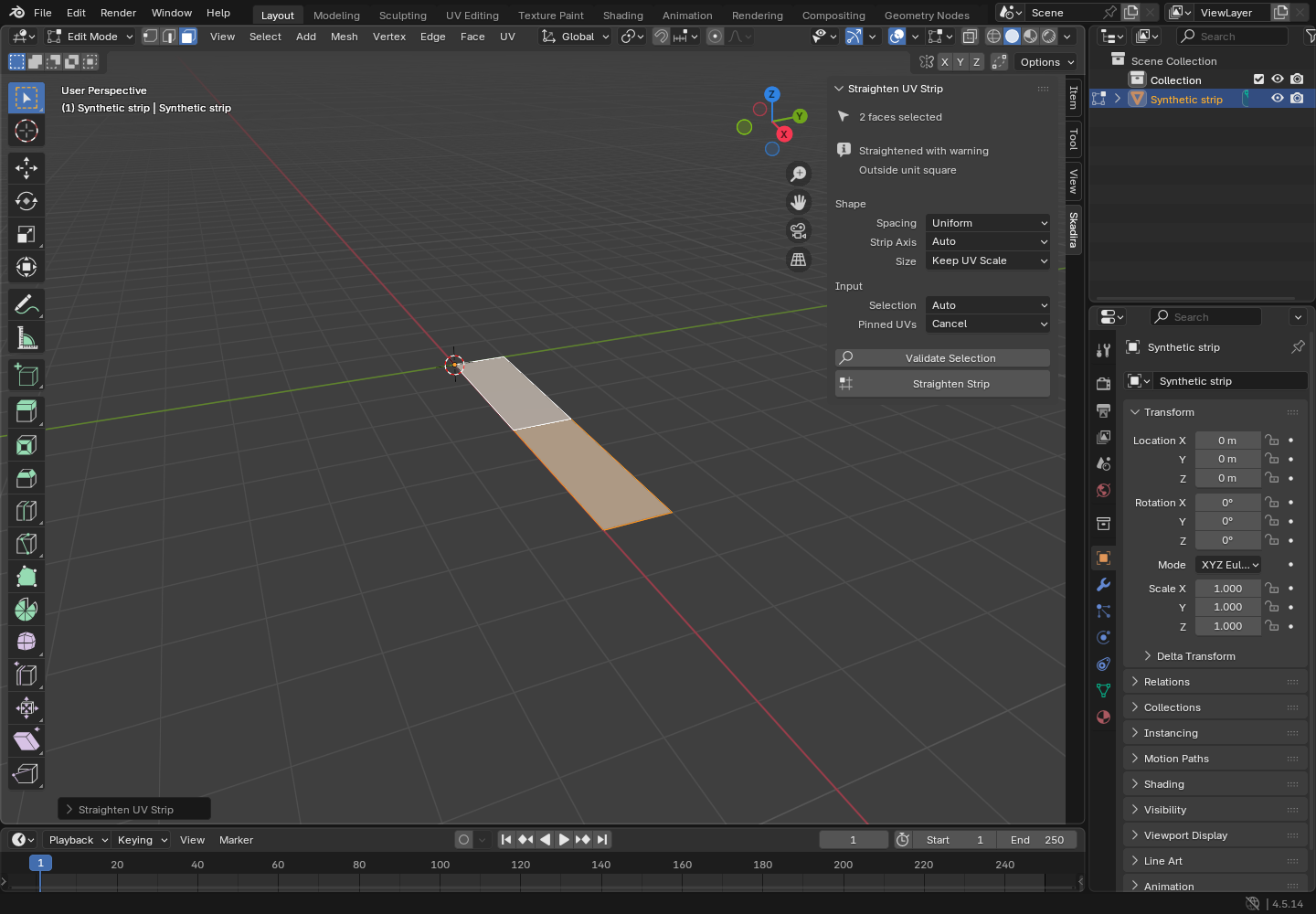
In the 3D Viewport or the UV Editor press N to open the sidebar and click the Skadira tab. The Straighten UV Strip panel shows what it needs next (for example “Select one quad strip”) and how many faces are selected. The same two commands are also at the end of the UV menu (U in Edit Mode) as Validate UV Strip and Straighten UV Strip.
Validate first
Click Validate Selection. It only checks the strip and changes nothing. On success the panel says “Strip is valid”; a refusal names the next step, for example “Deselect tris and ngons” or “Deselect one face to open it”.
Adjust options if needed
Shape: Spacing (Uniform or Edge Length), Strip Axis (Auto, U or V) and Size (Keep UV Scale or Unit). Input: Selection (Auto, Mesh or UV) and Pinned UVs (Cancel or Move). The defaults suit most strips; Edge Length keeps long quads long, Unit makes the longer side exactly 1.0.
Straighten
Click Straighten Strip. The strip's UVs become an axis-aligned rectangle; other islands, other UV maps, pin flags and the mesh itself stay as they were. The panel says “Strip straightened”. The Straighten UV Strip redo panel at the bottom left lets you change Spacing or Strip Axis without selecting again.
Undo or save
Ctrl+Z undoes the whole straighten in one step. Nothing is saved automatically: to keep the new UVs, save your .blend file (File › Save). The panel settings are stored in that .blend file too; the add-on writes nothing else to disk and uses no network.
A worked example
Straighten a curved ribbon
Input: examples/skadira/curved-ribbon.blend: a fictional ribbon of 4 quads bent through 90 degrees, whose UVs follow the curve. All four faces are already selected.
- Install Skadira as above, then open examples/skadira/curved-ribbon.blend with File › Open….
- Click the object Curved ribbon, press Tab for Edit Mode and open the sidebar's Skadira tab with N.
- Click Validate Selection.
- Click Straighten Strip, then look at the UVs in the UV Editor (for example in the UV Editing workspace).
Expected result: Validate reports a valid strip: 4 quads, 5 cross-sections, uniform spacing, rectangle 0.7023 x 0.1000 UV, and nothing changes. Straighten Strip turns the curved UV arc into a straight rectangle of the same size with five evenly spaced cross-sections, inside the 0 to 1 UV square. The mesh does not move. Ctrl+Z brings the curve back.
Troubleshooting
The buttons are greyed out or the Skadira tab is missing.
The commands work only in Edit Mode on one mesh object; the tooltip then says “Enter Edit Mode on a mesh object first”. Also check that Skadira UV Strip Straighten is ticked in Preferences › Add-ons and that you are running Blender 4.5.x.
The strip is refused, for example CLOSED_LOOP, BRANCHING_STRIP, NON_QUAD_FACE or DISCONNECTED_SELECTION.
Nothing was changed. Select one open, connected strip of quads: deselect one face to open a ring, remove side branches, and deselect triangles and ngons. The panel's second line names the next step.
The panel says “Pinned UVs block run” and “Unpin or set Move”.
The strip contains pinned UVs and Pinned UVs is set to Cancel. Unpin them, or set Pinned UVs to Move: pinned UVs then move but keep their pin flag.
The result says “Straightened with warning” and “Outside unit square”.
With Size set to Keep UV Scale, a strip that is longer than one UV unit extends past the 0 to 1 square. Set Size to Unit to make the longer side exactly 1.0, or move and scale the island yourself.
The panel asks you to “Select full UV faces”.
With UV sync selection off, Selection: Auto reads the UV Editor's selection. Select the same faces in the UV Editor, or set Selection to Mesh.
INCONSISTENT_WINDING or “Recalculate normals”.
Neighbouring quads face opposite ways. Use Mesh › Normals › Recalculate Outside, then validate again.
Compatibility & limits
- One open strip of quads on one object at a time. It is not a general unwrap, packing, UDIM or mesh-repair tool.
- Blender 4.5 LTS only; checked on Linux with 4.5.14. Windows, macOS and other 4.5 patch versions are not checked yet. Work on a copy of important scenes.
- No automatic updates: to update, install a newer ZIP from the Skadira page the same way.
- Free software under GPL-3.0-or-later: you may use, study, share and change it under that licence. The full text is inside the ZIP (LICENSE and COPYING.md).
- One continuous open quad strip only. No general unwrap, packing, UDIM, branching, multi-object editing or mesh repair. Host GUI checked on Blender 4.5.14 Linux; macOS and Windows unverified.
Need a hand?
Tell us the product, host application and version, what you tried, and the exact error. Contact support with a fictional example; keep private customer files and passwords out of your message.