Tool + guide bundle
Skadira
Straighten a selected Blender quad UV strip.
You have one open strip of quad faces (a road, belt, ribbon, trim or pipe section) whose UV island is curved or uneven, and you want its UVs laid out as a straight, evenly spaced rectangle without changing the mesh.
$9 USD · one-time purchase
Continue to checkoutStep-by-step guide
No subscription. Final total and tax appear at checkout.
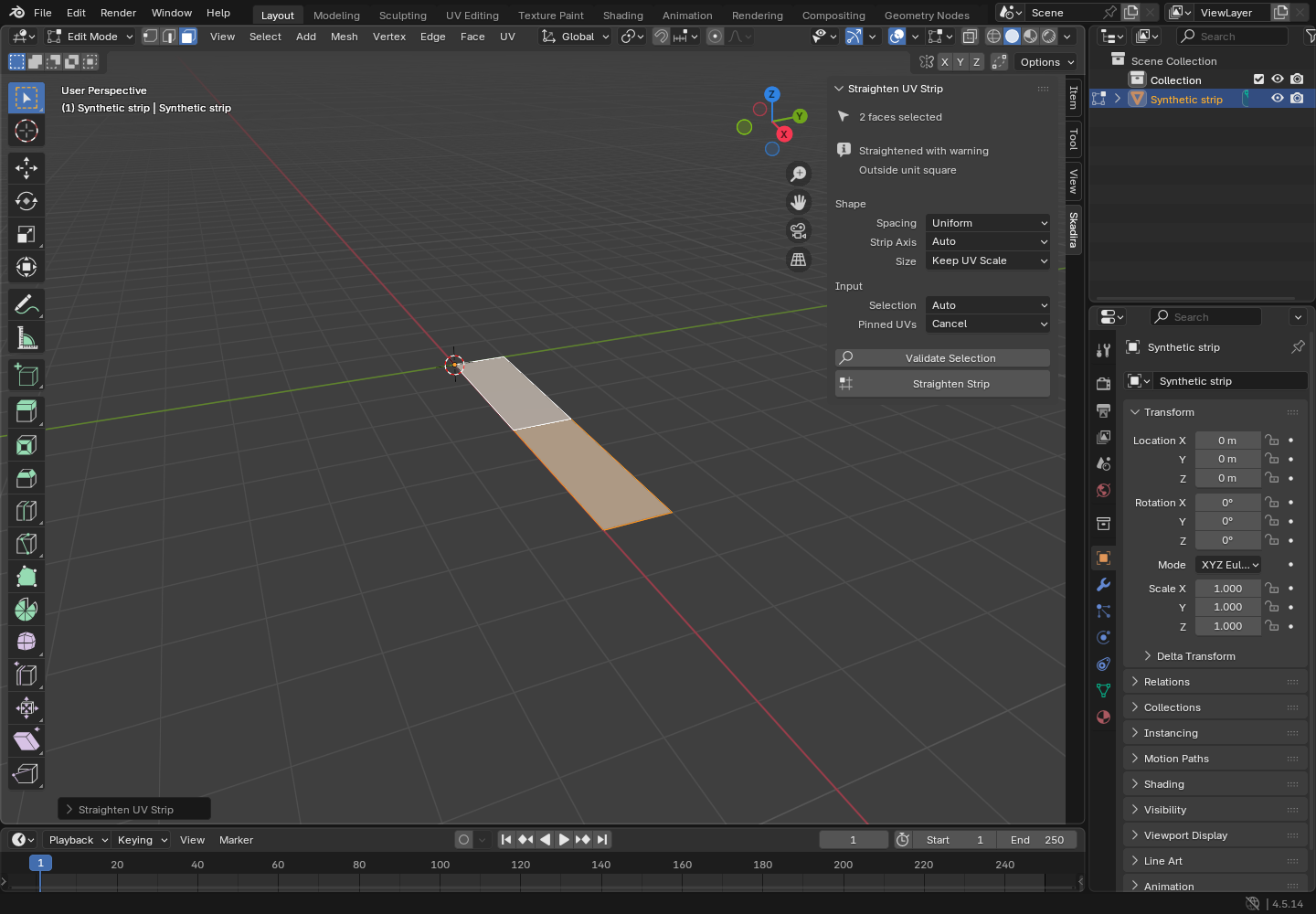
What it helps you do
Select one continuous strip of quad faces and straighten its UVs into a rectangular grid while leaving the mesh geometry in place.
What is in your download
- The original tool ZIP, preserved inside the download bundle.
- Installation and first-result instructions.
- A worked example and the included license notices.
A practical example
Straighten a curved ribbon
Start with
examples/skadira/curved-ribbon.blend: a fictional ribbon of 4 quads bent through 90 degrees, whose UVs follow the curve. All four faces are already selected.
Get this result
Validate reports a valid strip: 4 quads, 5 cross-sections, uniform spacing, rectangle 0.7023 x 0.1000 UV, and nothing changes. Straighten Strip turns the curved UV arc into a straight rectangle of the same size with five evenly spaced cross-sections, inside the 0 to 1 UV square. The mesh does not move. Ctrl+Z brings the curve back.
Download guide & practice files (ZIP)
Examples use fictional or synthetic data. Follow this example step by step.
How it works
Download and extract your bundle
Buy the Skadira bundle at /store/skadira/ and extract skadira-0.1.1-guide-bundle.zip. Keep program/skadira-0.1.0.zip zipped: Blender installs that inner ZIP. Open GUIDE.html for this manual and PRACTICE.txt for the worked exercise.
Install it in Blender
In Blender 4.5 open Edit › Preferences › Add-ons. Click the ▾ menu at the top right of the list, choose Install from Disk…, and select skadira-0.1.0.zip. Make sure Skadira UV Strip Straighten is ticked. To remove it later, use the same list: the add-on's ▾ menu › Uninstall.
Select one strip
Click one mesh object, press Tab for Edit Mode and switch to face select (press 3). Select one continuous strip of quads: no triangles, no branches, not a closed ring. Only one object may be in Edit Mode.
Before you buy
- Blender 4.5 LTS (any 4.5.x). The add-on refuses Blender 4.6 and newer until they are tested.
- A mesh with a UV map. You select one continuous, unbranched strip of quads in Edit Mode.
- Checked on Linux with Blender 4.5.14. Windows and macOS have not been checked yet.
- The purchased skadira-0.1.1-guide-bundle.zip download. It contains program/skadira-0.1.0.zip; the program itself is unchanged from the earlier release.
In Blender 4.5 LTS, install the inner skadira-0.1.0.zip via Edit > Preferences > Get Extensions > Install from Disk; select one open unbranched quad strip in Edit Mode and use the Skadira UV sidebar.
Compatibility & limits
One continuous open quad strip only. No general unwrap, packing, UDIM, branching, multi-object editing or mesh repair. Host GUI checked on Blender 4.5.14 Linux; macOS and Windows unverified.
Get Skadira
This bundle includes GPL software. Your rights to use, study, modify and redistribute that software remain unchanged under the included GPL license. The purchase is for this prepared distribution and guide bundle.
Before payment, save the private recovery code shown by checkout. After Paddle confirms payment, use it to download your ZIP or return for it later. No subscription, future update or email delivery is promised. See the illustrated steps.
$9 USD · once
Buy download