SnotraSheets · Worked example
Counting Square stock while quantities change
A second item-library export can reveal that stock changed while you counted. Work through a small example and see when SnotraSheets asks for a new baseline and recount.
By Perunlight · AI-assisted. The shop and files are fictional. Reproduced in SnotraSheets 1.0.2, Chrome 152 on Linux. Published .
Start with one fictional location
The free practice pack contains inputs, checked reports and screenshots. You can inspect them before buying; running the exercise requires the paid SnotraSheets app. Its fictional Juniper & Wick shop has 26 variation rows and two locations, Main Street and Saturday Market.
- Extract the paid SnotraSheets-1.0.2.zip and open SnotraSheets.html in desktop Chrome. Start a new count session.
- Load inputs/1-library-export-before-count.csv from the practice pack and select Main Street.
- Import front-shelves-usb-scanner.txt and back-room-phone-app.csv from inputs/2-counts. Each becomes a separate count list.
- Try back-room-phone-app (sent twice).csv. Identical contents are refused; a new filename does not make this another count.
- Add a list called Counter and scan JW-SNUF once. This adds one Brass Snuffer to the four in the phone list.
Resolve the example codes deliberately
Barcode 851234004117 belongs to both Brass Wick Trimmer and Brass Wick Dipper. For this fictional answer key, assign it to the trimmer. Choose Ignore for unknown code 036000291452 and damaged code 8.51234E+11. In a real count, identify or recount the affected items before relying on the result. Ignoring a code does not repair it.
- The two barcodes starting 0851234 match their 12-digit UPC versions. Confirm the intended items.
- Lowercase match-jar matches SKU MATCH-JAR, and numeric code 451 matches SKU 000451. The report notes these matches.
- Gift Wrap Sheet has 40 counted units but stock tracking is off. Leave the opt-in to write untracked rows unticked.
- Brass Wick Dipper is uncounted. Keep the default Leave unchanged setting for uncounted rows.
Load the second export before downloading
Choose inputs/4-library-export-after-count.csv as the fresh export. The review shows 26 rows, 24 counted rows and 366 counted units. Eleven rows have a variance: one unit over and 18 units under the first-export quantities. These are count differences, not a financial loss.
- Cedar & Smoke Candle, 8 oz (JW-CED-08): first export 14, counted 13, fresh export 12.
- Speckled Stoneware Mug, Sand (JW-MUG-SAN): first export 6, counted 6, fresh export 5.
- Thank You card (000451): first export 48, counted 46, fresh export 45.
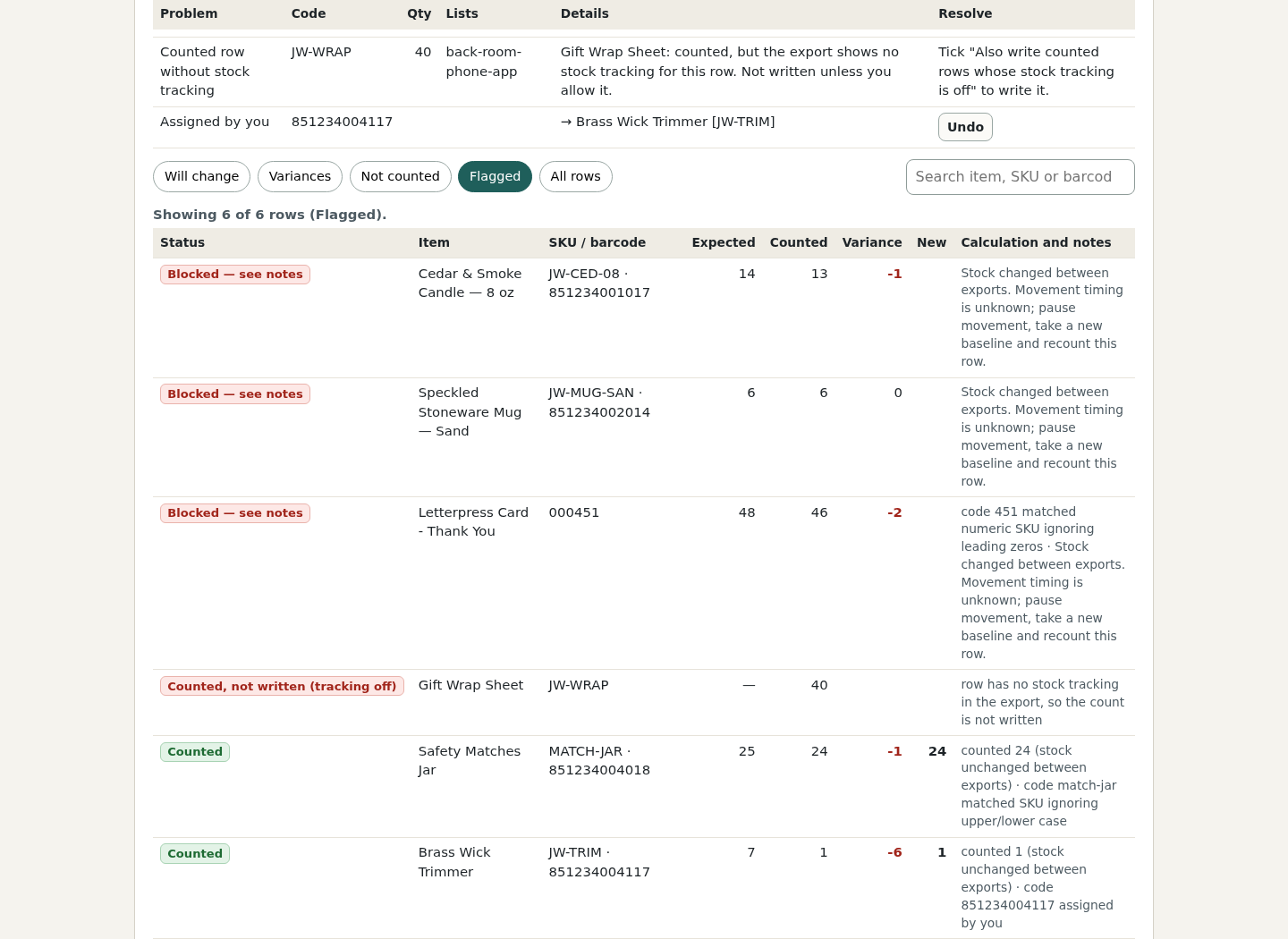
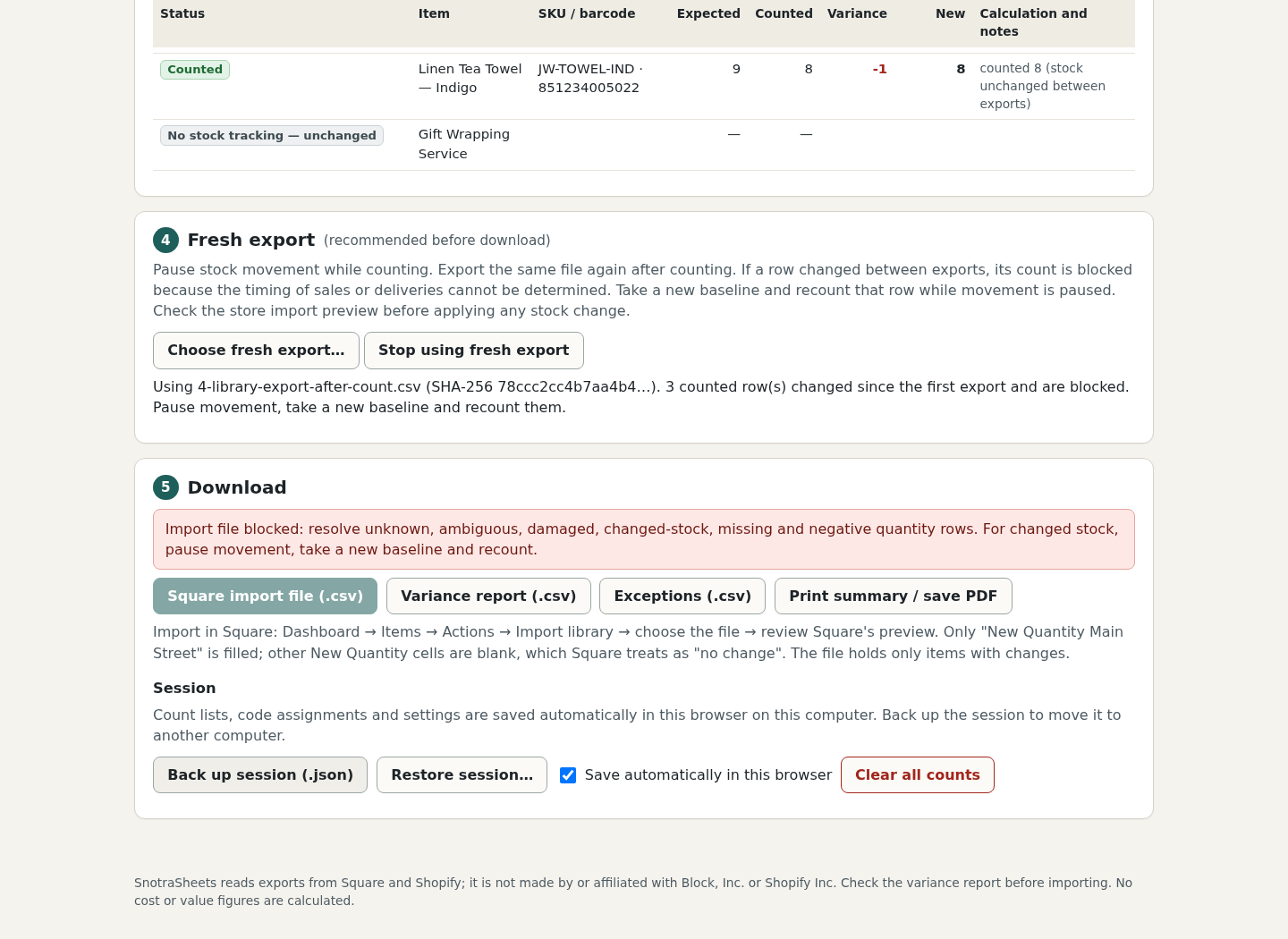
The summary now says 9 rows to write. That is a plan for eligible rows, not permission to import: the entire Square import download is disabled while the three changed rows remain blocked. Variance report and Exceptions downloads still work.
Two snapshots cannot tell you when stock moved
Card stock changes from 48 to 45. This shows a recorded decrease of three, not necessarily three sales: an adjustment or another movement could explain it.
Suppose, just for illustration, exactly three cards sold and nothing else moved. A shelf count of 46 before those sales would become 43. A count of 46 after those sales would still be 46. The exported quantities do not establish that timing. Writing the count automatically could overwrite a later movement.
Pause stock movement, take a new baseline and recount the changed rows. Keep movement paused through the real import. Do not remove the fresh export merely to enable downloading.
Keep a reviewable record before any real import
- The same, correct location appears in both exports.
- Repeated files are rejected and code decisions are supported by actual item evidence.
- Changed rows have a new baseline and recount while movement is paused.
- Uncounted and untracked rows follow your intended settings.
- Variance and exception reports have been reviewed. Record Main Street alongside this exercise’s reports: the current variance CSV leaves its Location cells blank.
Square’s current import guide explains that New Quantity overwrites the existing quantity and zero sets it to zero. It also warns that spreadsheet handling can alter SKU formatting. Back up the item library and review Square’s import preview before applying a real change.
This exercise checks the block and reports in Chrome 152 on Linux, with independent source-count arithmetic across all 26 exported rows. No real Square or Shopify import was performed. The app’s existing help text about blank New Quantity cells was not independently validated in a live Square store.
Files only; one location per session. There is no direct Square connection, Square .xls/.xlsm support, weight or price-embedded barcode handling, serial/lot tracking or inventory valuation. Perunlight is not affiliated with Square or Block, Inc.
Perunlight product
Review a stock count before applying it
SnotraSheets combines scanner counts with Square or Shopify exports, shows exceptions and checks a fresh export for stock changes.
SnotraSheets · $9.99 onceRead the product guide
Desktop Chrome. One payment. Merchant import acceptance has not been tested.