Online studio + offline ZIP
SvarogCut
Create cutting patterns online with five free plans and SVG, DXF and PDF exports. A purchase adds larger online projects and a separate offline edition.
You have measured parts or a sheet-metal form and need a reviewable layout before fabrication.
Open online studio · 5 free plansOnline + offline ZIP · $5.99
Five free successful plans per browser profile, up to 10 parts and 5 types per plan; SVG, DXF, tiled A4 PDF and project JSON included. One $5.99 purchase: up to 200 parts and 50 types per online plan, plus offline ZIP 1.0.1. Paid online access allows up to 200 stored plans within seven days and eight new calculations per minute. Seven days is plan retention, not the purchase term. Save your files before expiry. The purchased offline version has perpetual local use; hosted availability is not guaranteed indefinitely. No recurring charge.
See it in use
Check parts for a measured panel box
A screenshot walkthrough with fictional practice data. Select a step to explore.
The online studio screen and measured-box view are separate real demonstrations. The box SVG is in the free pack; physical cutting is unverified.
1. Start with
Check parts for a measured panel box
The guide’s box is 300 × 200 × 120 mm in 6 mm material.
Sample files and contents
Outside box 300 × 200 × 120 mm; material thickness 6 mm; no lid.
Practice files and guides are free. The complete app is included only where the product page says so.
2. In the app
Try it in three steps
- Load the panel-box example and inspect outside dimensions.
- Check one bottom and four wall part sizes.
- Set sheet spacing, resolve unplaced parts and export sheets.
Show every click and setting
- Choose Panel box and Load example. Outside dimensions are 300 × 200 × 120 mm, material 6 mm, without a lid.
- The bottom is 300 × 200 mm, two long walls are 300 × 114 mm and two short walls are 188 × 114 mm. The full-footprint bottom sits under the walls.
- Set your sheet, edge margins and part spacing. Resolve unplaced parts; export each sheet separately as SVG, DXF or tiled A4 PDF.
3. The result
A separate demonstration
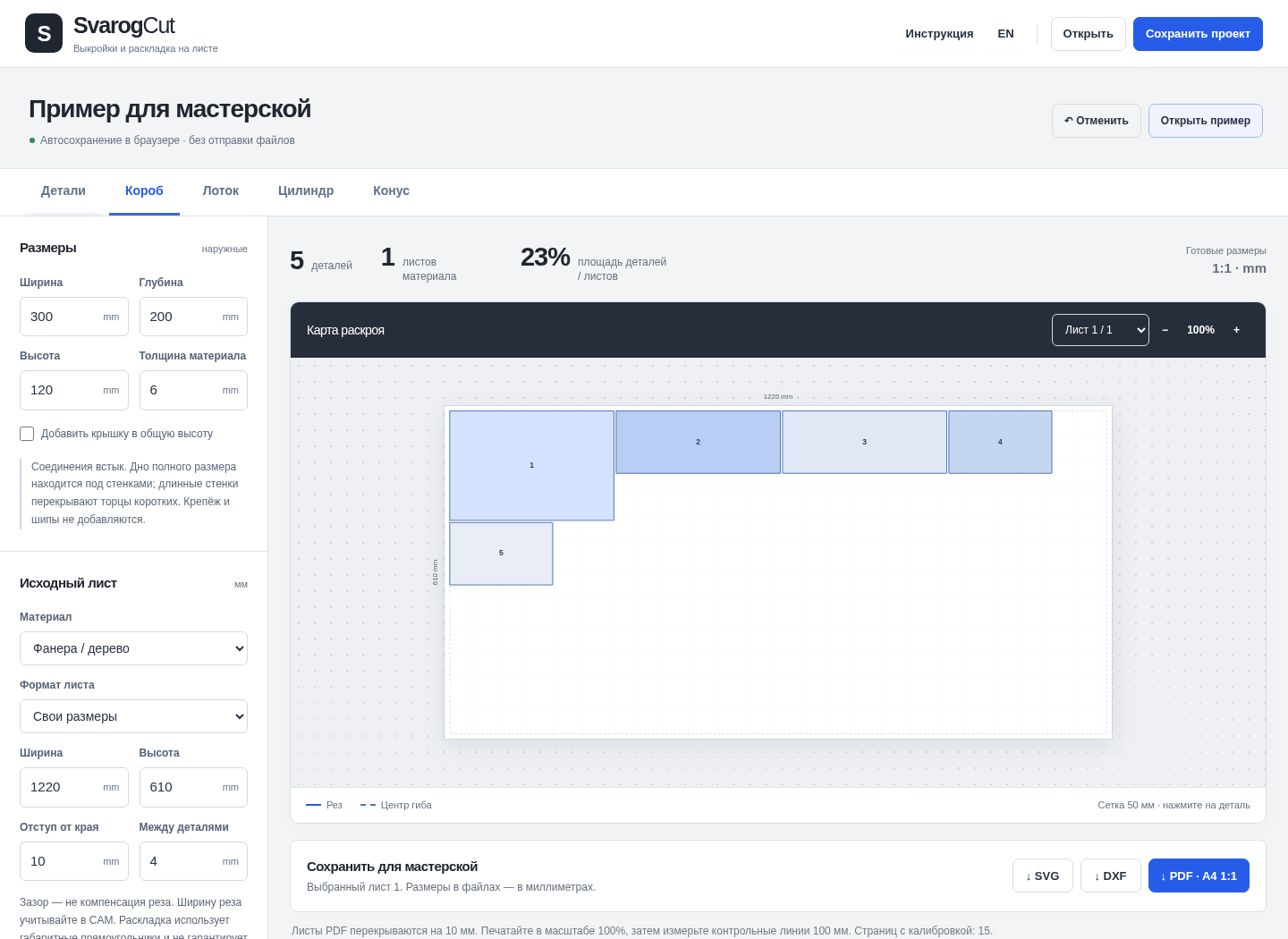
The separate offline-app screenshot shows five butt-jointed panels: one 300 × 200, two 300 × 114 and two 188 × 114 mm. Physical assembly is unverified.
The online studio screen and measured-box view are separate real demonstrations. The box SVG is in the free pack; physical cutting is unverified.
What to check in the practice result
Five panels: one 300 × 200 mm, two 300 × 114 mm and two 188 × 114 mm. These are numerical checks, not a physical assembly test.
Online studio: from parts to files
Open the editor
Choose a rectangle, circle, triangle or polygon, add holes and quantities. For a developed form choose a box, tray, cylinder or cone. The online interface offers English and Russian.
Edit and keep a project copy
Undo / Redo retains up to 40 project steps in this tab. Ctrl/Cmd+Z, Ctrl/Cmd+Shift+Z or Ctrl+Y work outside text fields. Editing is free; download project JSON before leaving.
Calculate your layout
Set the sheet, edge margin and part spacing. Calculate, inspect each sheet and check the unplaced list. Five successful plans are free, with up to 10 parts and five types per plan.
Export and verify
Download SVG or DXF in millimetres, tiled A4 PDF at 1:1 or a ZIP of all sheets. Exporting an existing result does not spend another calculation. Print at 100% and measure the calibration bars.
Use a confirmed purchase
Enter your SvarogCut recovery code in the studio. It opens higher online limits and the separate offline ZIP 1.0.1. Save your files: stored plans expire after seven days.
Files and limits
- Online JSON is svarogcut-online v1. Offline 1.0.1 cannot open it; the online studio can import and convert older svarogcut v1 offline projects.
- Nominal geometry and conservative placement; no optimal nesting, kerf compensation or machine toolpath. Check the actual material and a physical prototype.
Offline ZIP 1.0.1: setup
- Extract the ZIP and open START-HERE.html, then SvarogCut.html in desktop Chrome. No installation, account or internet is needed. Russian / English interface and guides.
- Desktop Chrome 152 on Linux is the verified browser. Phone layouts were checked at 320 / 390 px, but real iPhone / Safari file opening is unverified.
- Measure your actual material and validate a physical prototype before production.
Offline ZIP 1.0.1: first result
Open the full application
Extract the entire ZIP. Open START-HERE.html and choose SvarogCut.html in desktop Chrome. Select RU or EN.
Start with a known example
Choose Panel box and Load example. Outside dimensions are 300 × 200 × 120 mm, material 6 mm, without a lid.
Check how the panels fit
The bottom is 300 × 200 mm, two long walls are 300 × 114 mm and two short walls are 188 × 114 mm. The full-footprint bottom sits under the walls.
Inspect the sheet and export
Set your sheet, edge margins and part spacing. Resolve unplaced parts; export each sheet separately as SVG, DXF or tiled A4 PDF.
Measure before fabrication
For PDF use Actual size / 100%, never Fit. Measure both 100 mm calibration bars. Review CUT and BEND layers in your target software and make a trial piece.
Keep an editable copy
Save project as JSON. Local autosave can be cleared by the browser; keep your own file backup.
A worked example
A measured panel box
Input: Outside box 300 × 200 × 120 mm; material thickness 6 mm; no lid.
- Choose Panel box and Load example. Outside dimensions are 300 × 200 × 120 mm, material 6 mm, without a lid.
- The bottom is 300 × 200 mm, two long walls are 300 × 114 mm and two short walls are 188 × 114 mm. The full-footprint bottom sits under the walls.
- Set your sheet, edge margins and part spacing. Resolve unplaced parts; export each sheet separately as SVG, DXF or tiled A4 PDF.
Expected result: Five panels: one 300 × 200 mm, two 300 × 114 mm and two 188 × 114 mm. These are numerical checks, not a physical assembly test.
More application screens
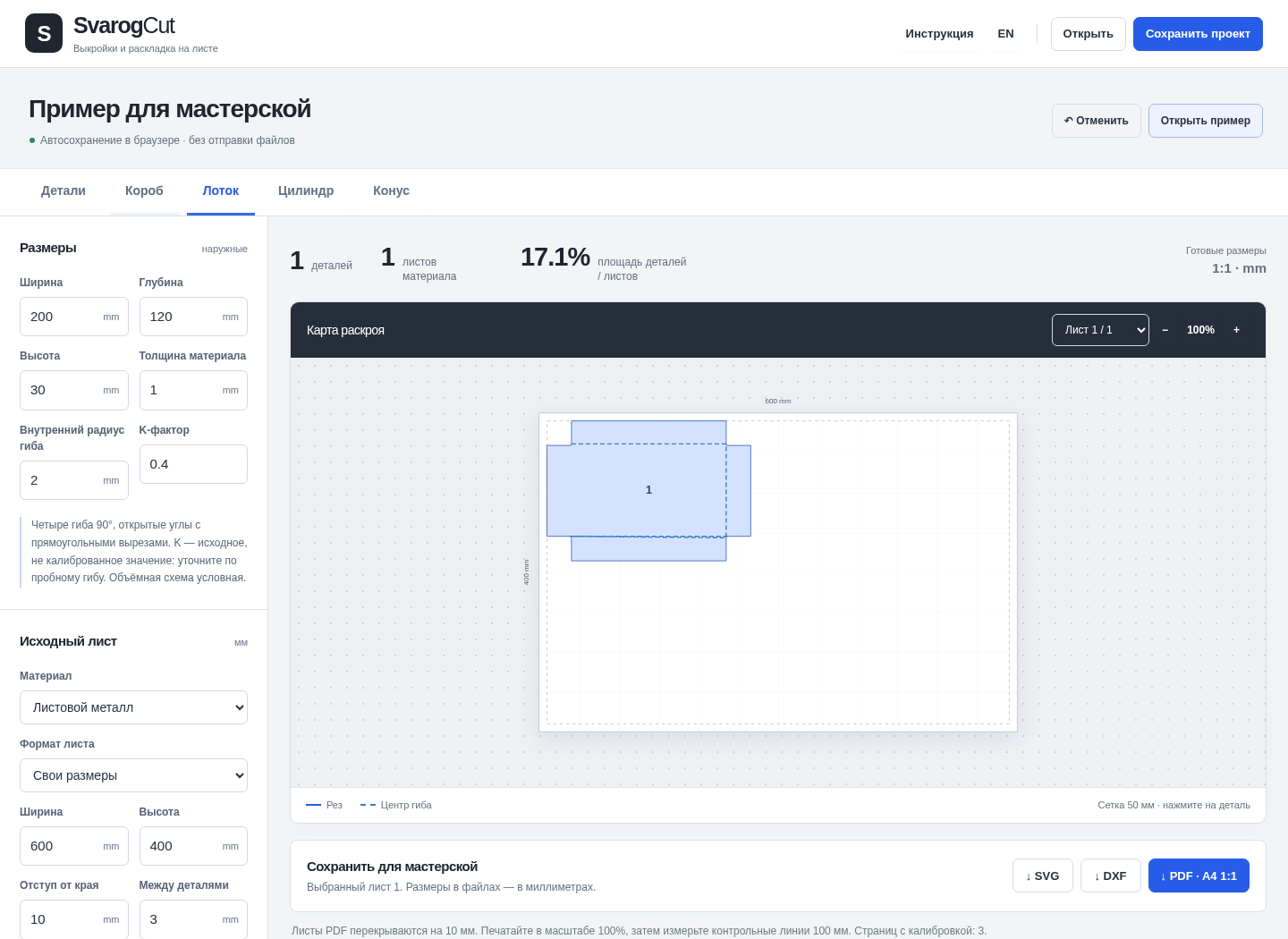
Actual online and offline screens
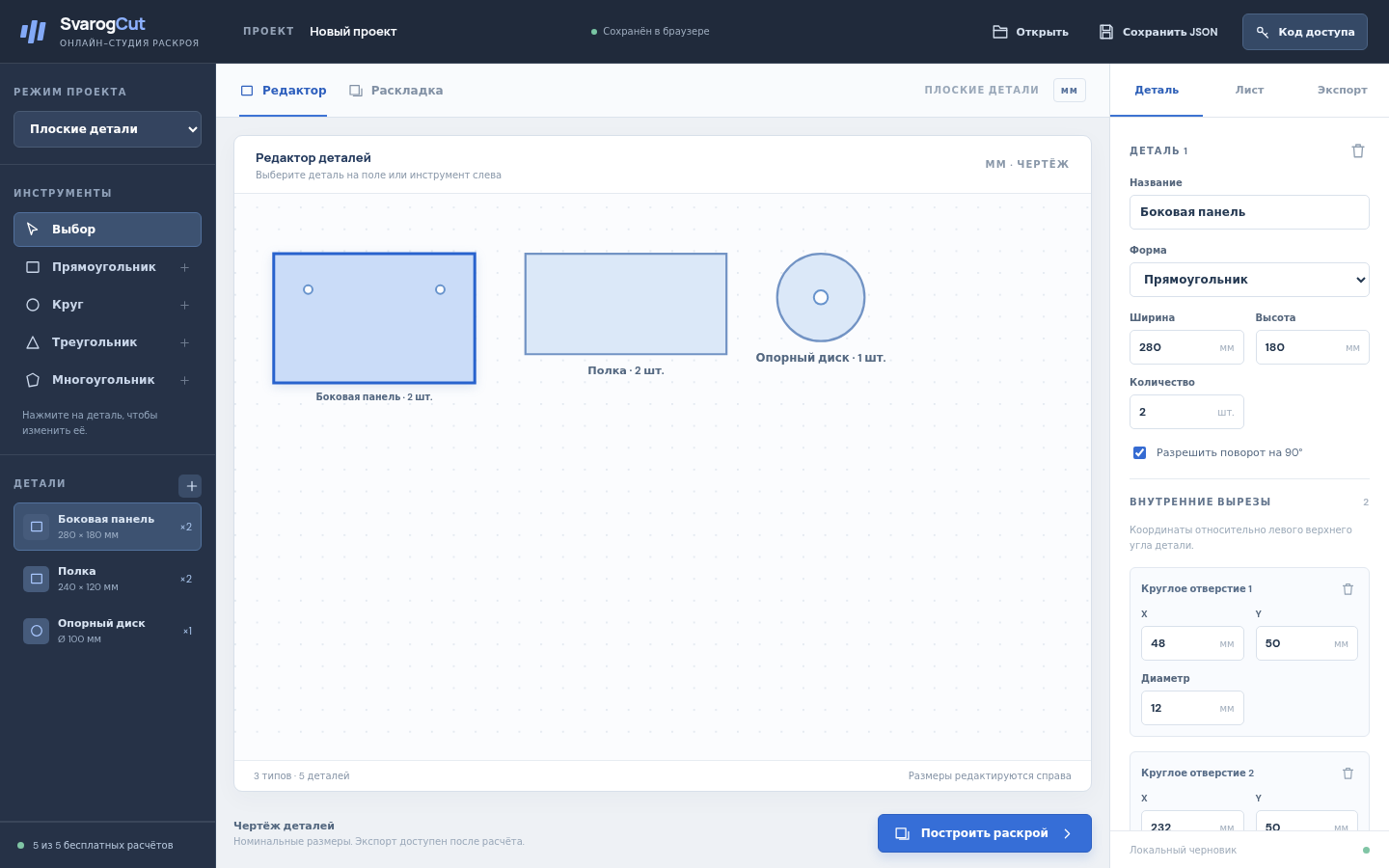
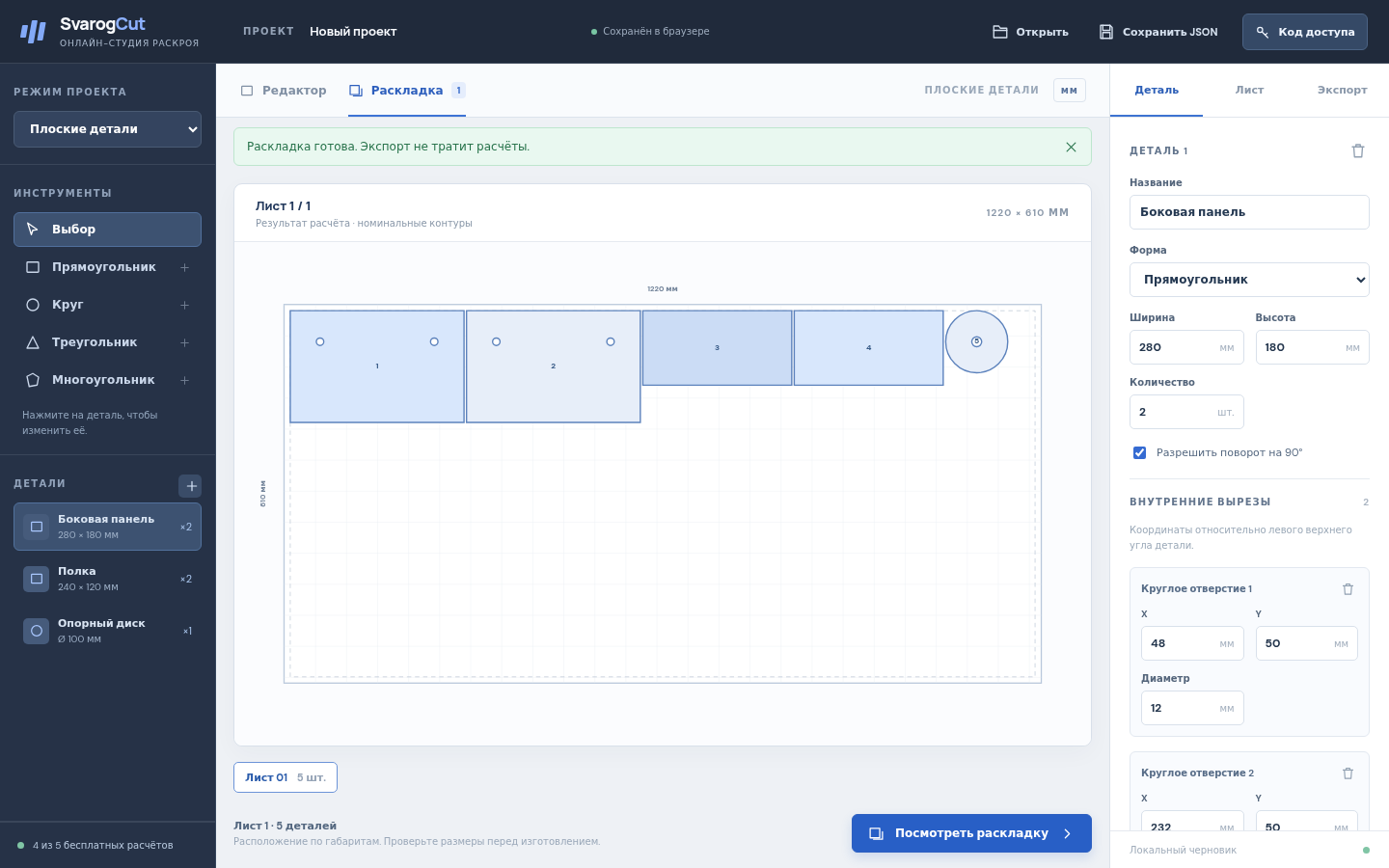
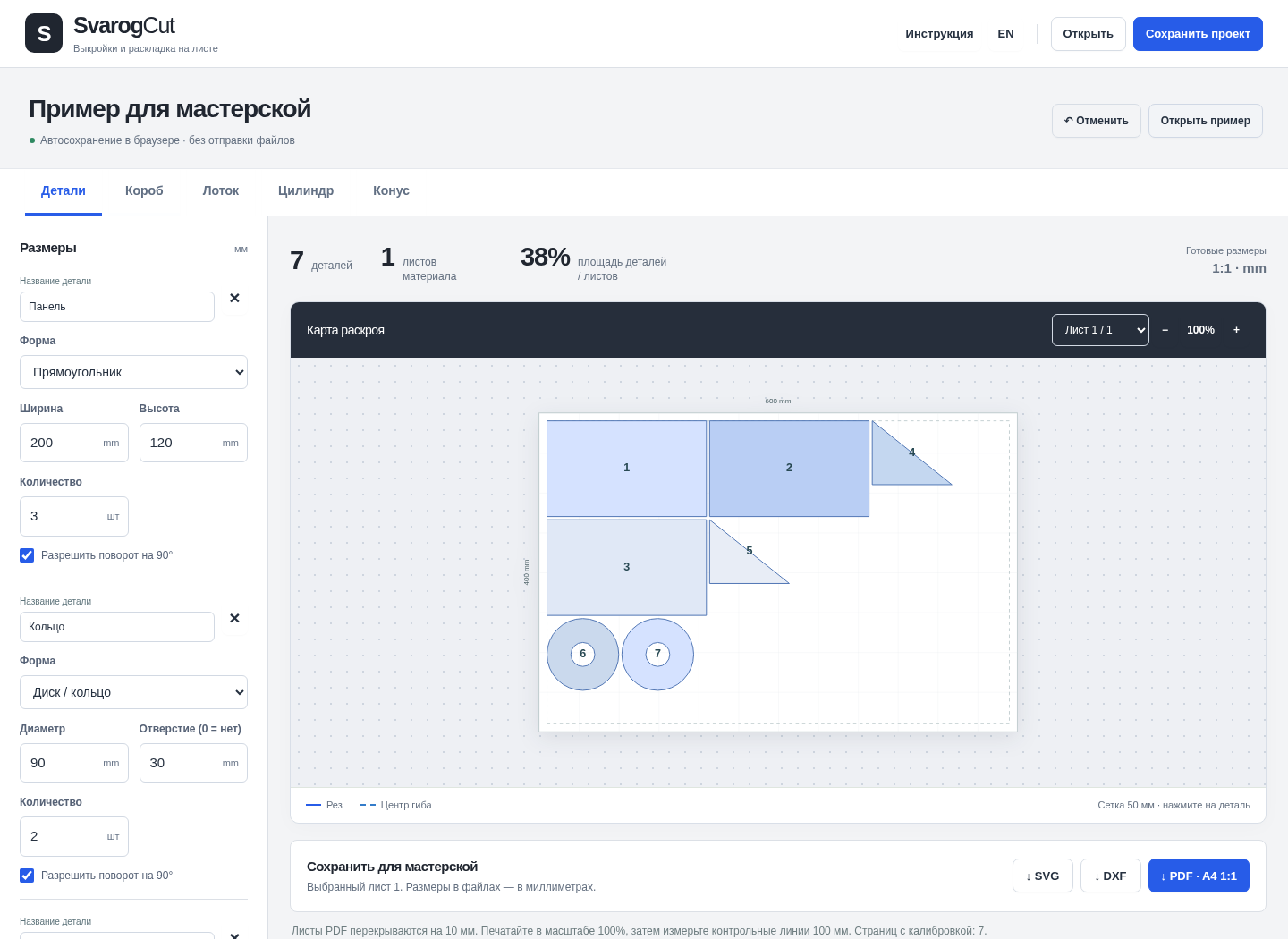
Browser screenshots from the tested online studio and accepted offline 1.0.1 edition.
1. Online editor
2. Calculated sheet layout
3. A box from measured panels
4. Flat shapes on a sheet
5. A bent tray blank
Troubleshooting
The application opens as a preview, not an app
Extract the whole ZIP and open the HTML in desktop Chrome. Real iPhone / Safari behavior is unverified.
My online calculations have run out
Free access includes five successful plans per browser profile. Use the SvarogCut purchase code to unlock larger online plans and the included offline ZIP; exports of an existing plan use no extra calculation.
An export does not match the physical result
Check units, material assumptions and output scale in the target software, then validate a small physical prototype. Manufacturing settings are not calculated for you.
Compatibility & limits
- Conservative bounding-box placement, not optimal nesting. Nominal geometry and explicit material assumptions; no strength or toolpath calculation. Physical cutting, bending, printing and machine-specific CAD/CAM are unverified. Checked in desktop Chrome 152 on Linux; real iPhone / Safari and other browsers are unverified.
- Online studio: five useful plans per browser profile, up to 10 parts and five types each, with SVG/DXF/PDF and JSON exports. The $5.99 purchase also unlocks larger online plans using the same code as the separate offline ZIP.
- The free guide ZIP contains fixed examples and documentation only, not either complete application.
- No future updates, cloud sync or email delivery are promised. Keep the private purchase recovery code and downloaded ZIP.
Need a hand?
Tell us the product, host application and version, what you tried, and the exact error. Contact support with a fictional example; keep private customer files and passwords out of your message.