Step-by-step guide
SvarogLoad
Plan mixed rectangular cargo in the online studio or the purchased offline app. Inspect a 3D arrangement and hand over a numbered crew sheet.
You occasionally load mixed rectangular cartons or crates and need a local, reviewable plan to discuss with the loading team.
Five free successful plans per browser profile, up to 20 pieces and 5 types per plan; CSV manifest, PNG, browser-print crew sheet and project JSON included. One $5.99 purchase: up to 200 pieces and 30 types per online plan, plus offline ZIP 1.0.0. Paid online access allows up to 200 stored plans within seven days and eight new calculations per minute. Seven days is plan retention, not the purchase term. Save your files before expiry. The purchased offline version has perpetual local use; hosted availability is not guaranteed indefinitely. No recurring charge.
See it in use
Review a fictional mixed shipment
A screenshot walkthrough with fictional practice data. Select a step to explore.
1. Start with
Review a fictional mixed shipment
The demo has 34 cargo pieces for a 6000 mm body.
Sample files and contents
Inner body 6000 × 2400 × 2400 mm; rear door 2300 × 2300 mm; payload 8000 kg. Three cargo types, 34 pieces.
Practice files and guides are free. The complete app is included only where the product page says so.
2. In the app
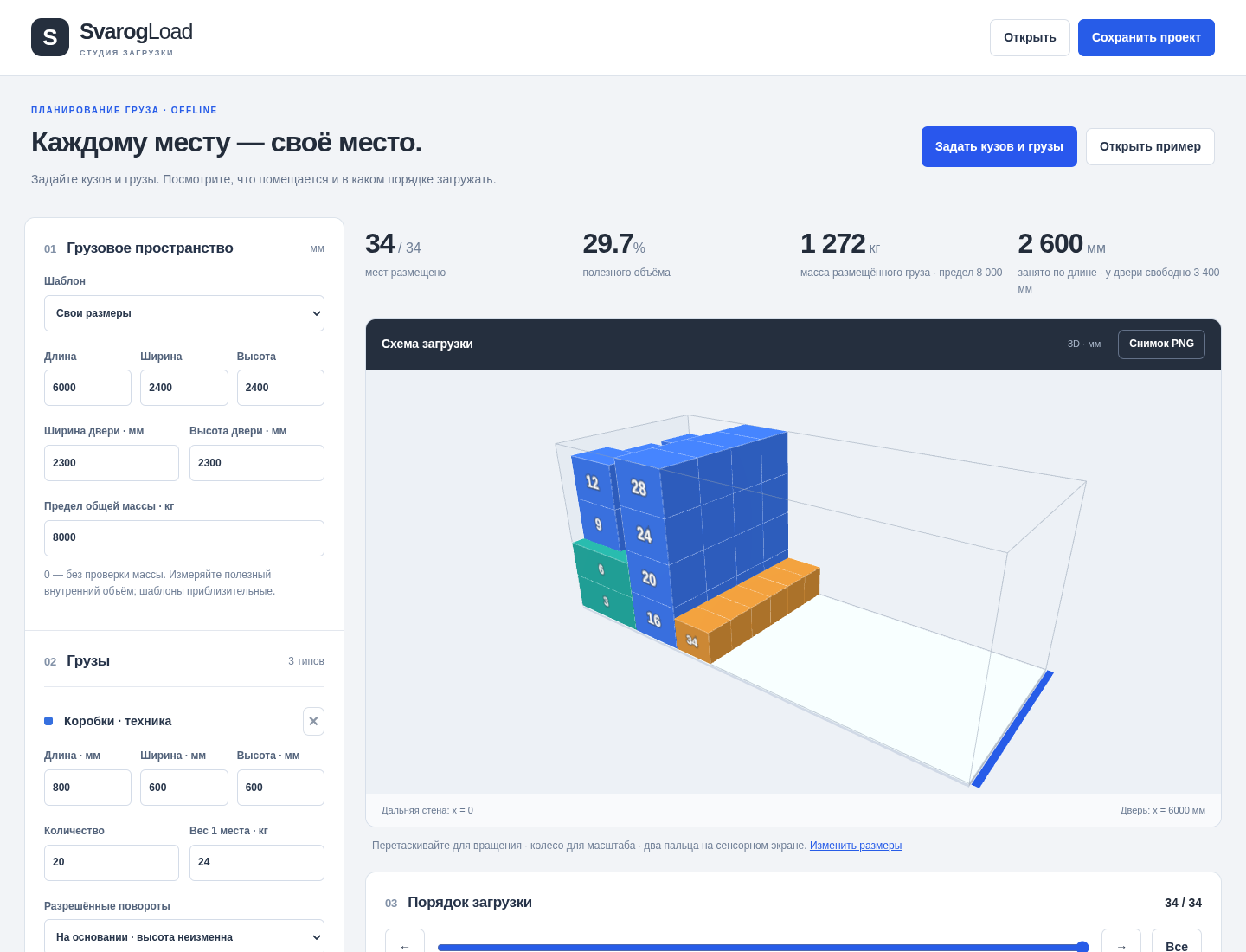
Try it in three steps
- Open the saved load project.
- Inspect 3D and top/side views while stepping through placement.
- Print the crew sheet and match rows to numbered pieces.
Show every click and setting
- Open the included demo.svarogload.json or use Открыть пример.
- Inspect the 3D view and top/side diagrams, then step through placement.
- Print the crew sheet and match table rows to numbered pieces.
3. The result
Inspect the result
The printed first page shows numbered views and a support table. The synthetic plan uses 2600 mm of body length; real loading is unverified.
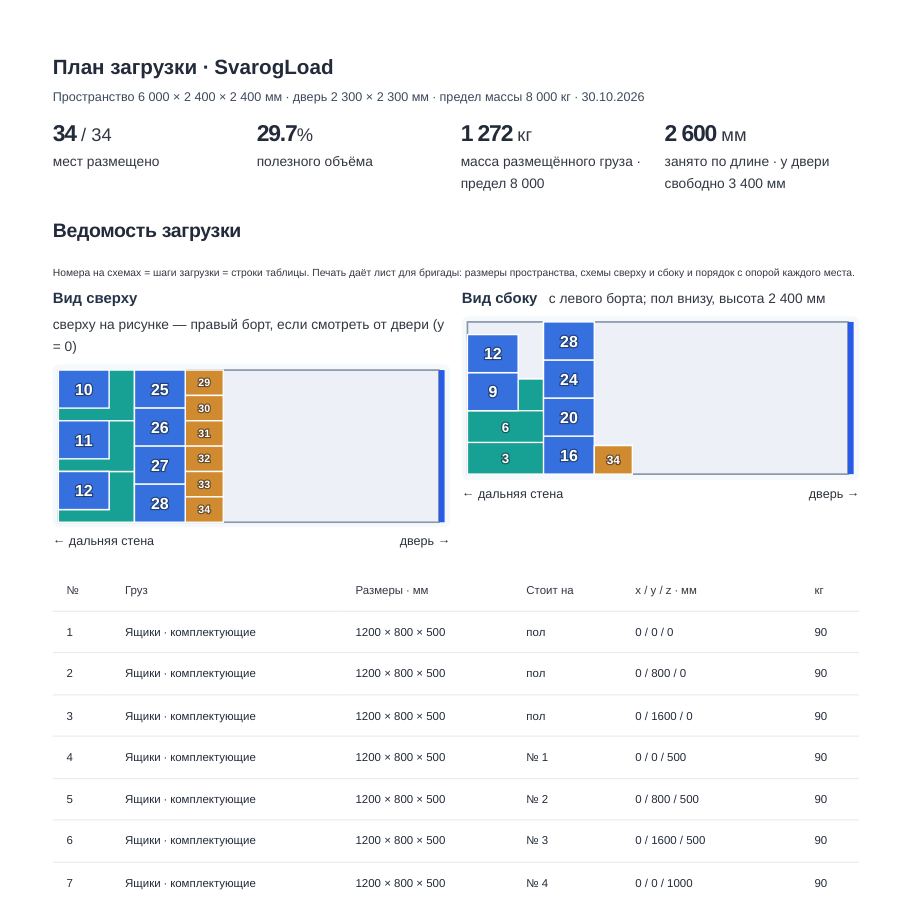
What to check in the practice result
The included demo places 34 pieces, using 2600 mm of body length and leaving 3400 mm to the door. These are synthetic geometric results, not a real loading validation.
This fictional example is shown in the working interface and in the supplied result. Review the guide before using your own files.
Online studio: from cargo to a crew sheet
Enter the measured space
Open the online studio and choose English or Russian. Enter internal dimensions, door opening and payload. Presets are approximate examples; confirm your measurements.
Add cargo types
Enter dimensions, quantities, masses, allowed rotations and whether loading on top is permitted. Free plans allow five types and 20 pieces.
Calculate and review
Calculate a plan, inspect the unplaced reasons and match numbered pieces in the 3D view and manifest. Existing exports do not spend another calculation.
Save and hand over
Save JSON for editing, CSV for the numbered manifest, PNG for the view and a browser-print crew sheet. Review the actual loading process with the responsible person.
Use your purchase code
A confirmed SvarogLoad purchase opens up to 30 types and 200 pieces per online plan, plus offline version 1.0.0. Stored online plans expire after seven days; save your files yourself.
- Browser-local drafts are not a permanent archive. Save your project JSON and exports. Paid access allows up to 200 stored plans within seven days and eight new calculations per minute.
- Geometry planning only: no axle loads, centre of gravity, full ingress path, strength or restraint design. The offline app remains in Russian with an English quick start.
Before you start
- Extract the ZIP and open START-HERE.html, then the app in desktop Chrome with WebGL 2. Runs locally without a server or account. Russian interface and illustrated guide; English quick start. Save JSON yourself; there is no autosave.
- Chrome on Linux is verified. WebGL 2 is needed for 3D; top/side views and the table are separate. Real iOS / Safari opening is unverified.
- Confirm dimensions and constraints on the actual vehicle, cargo and loading process.
Your first result
Open the local app
Extract the full ZIP. Open START-HERE.html and the app in desktop Chrome. The controls are in Russian.
Set the measured space
Enter inner length, width, height, rear-door dimensions and payload. Use actual measurements; presets are approximate examples.
Describe each cargo type
Enter one-piece dimensions, quantity and mass. Select permitted rotations and forbid loading on top where needed.
Inspect the arrangement
Check unplaced reasons. Use the step slider and match piece numbers to the top/side views and table. Support references identify which piece is below.
Correct inputs without losing context
Invalid fields are marked. The previous valid plan stays dimmed, but saving, PNG and printing remain blocked until the input is corrected.
Keep and hand over the plan
Save editable JSON, export PNG or print / save the crew sheet as PDF. Review door passage, handling, support strength and load security with the person responsible for loading.
A worked example
A fictional mixed shipment
Input: Inner body 6000 × 2400 × 2400 mm; rear door 2300 × 2300 mm; payload 8000 kg. Three cargo types, 34 pieces.
- Open the included demo.svarogload.json or use Открыть пример.
- Inspect the 3D view and top/side diagrams, then step through placement.
- Print the crew sheet and match table rows to numbered pieces.
Expected result: The included demo places 34 pieces, using 2600 mm of body length and leaving 3400 mm to the door. These are synthetic geometric results, not a real loading validation.
More application screens
Actual screens from SvarogLoad
Real offline app, fictional cargo. Diagrams help communicate a preliminary arrangement; they do not certify the load.
1. Review the load in one workspace
2. Hand over a numbered plan
Troubleshooting
The old plan is dimmed and export is disabled
Correct the red-marked field. The old plan is retained for context only; browser printing shows an invalid-plan notice until recovery.
Some pieces are not shown in one diagram
Orthographic views can hide pieces behind others, and very small pieces have no visible number. Use the complete numbered table and 3D steps.
The app opens as a file preview
Extract the entire ZIP and open the app in desktop Chrome. Phone file opening and Safari are unverified.
Compatibility & limits
- Rectangular loads only; heuristic placement, single full-base support and door cross-section checks. No full ingress path, box/support strength, axle loads, centre of gravity, restraints or safety/compliance certification. Up to 30 cargo types / 200 pieces. Zero mass omits that item mass; zero payload disables the aggregate mass limit. Physical loading and paper printing are unverified.
- Online plans are accessible for seven days. Online drafts save in this browser when storage is available. Save project JSON and exports yourself; there is no permanent cloud archive. The offline ZIP remains version 1.0.0 with perpetual local use.
- The free ZIP contains only documentation, images and synthetic example files.
Need a hand?
Tell us the product, host application and version, what you tried, and the exact error. Contact support with a fictional example; keep private customer files and passwords out of your message.