Step-by-step guide
Tyrvika
Track a fixed-pair pickleball season and standings. Enter fixed teams and completed pickleball scores; the workbook calculates standings using the documented tie-break rule.
You organise a small club or ladder season with fixed pairs (up to 16 teams and 120 matches) and want standings that update as soon as you type a score, with a clear, agreed tie-break rule.
The guide and practice files are free to read and download. The complete program is in the paid download; the free practice pack does not include it.
See it in use
Enter a four-team pickleball ladder
A screenshot walkthrough with fictional practice data. Select a step to explore.
1. Start with
Enter a four-team pickleball ladder
The free pack has four fictional pairs and six fixtures.
Sample files and contents
examples/tyrvika/teams.csv (four fictional pairs) and examples/tyrvika/matches.csv (six fixtures: five played, one postponed).
Practice files and guides are free. The complete app is included only where the product page says so.
2. In the app
Try it in three steps
- Enter all four teams on Teams.
- Enter five played matches and one postponed match on Matches.
- Open Standings to see the calculated ranking.
Show every click and setting
- On Teams type the four names from teams.csv next to Team IDs 1 to 4 and keep Active as Yes.
- On Matches type the six rows from matches.csv into rows with Match ID 1 to 6: date, Team A ID, Team B ID, Status and the two scores. Leave the scores of the postponed match empty.
- Open Standings.
3. The result
Inspect the result
Google Sheets placed Birch Paddles first and Willow Volleys second. Both won twice; point differences of +3 and +2 broke the tie. The postponed match was not counted.
| Team / rank | Won–lost | Point difference |
|---|---|---|
| 1 · Birch Paddles | 2–1 | +3 |
| 2 · Willow Volleys | 2–1 | +2 |
| 3 · Kettle Dinks | 1–1 | -1 |
| 4 · Quarry Lobs | 0–2 | -4 |
What to check in the practice result
Column H shows no issue. Standings, 5 matches counted: 1. Birch Paddles MP 3, W 2, L 1, PF 30, PA 27, Diff +3; 2. Willow Volleys MP 3, W 2, L 1, PF 30, PA 28, Diff +2; 3. Kettle Dinks MP 2, W 1, L 1, PF 18, PA 19, Diff -1; 4. Quarry Lobs MP 2, W 0, L 2, PF 18, PA 22, Diff -4. Birch Paddles and Willow Volleys are level on wins; point differential puts Birch Paddles first. The postponed match 6 does not count.
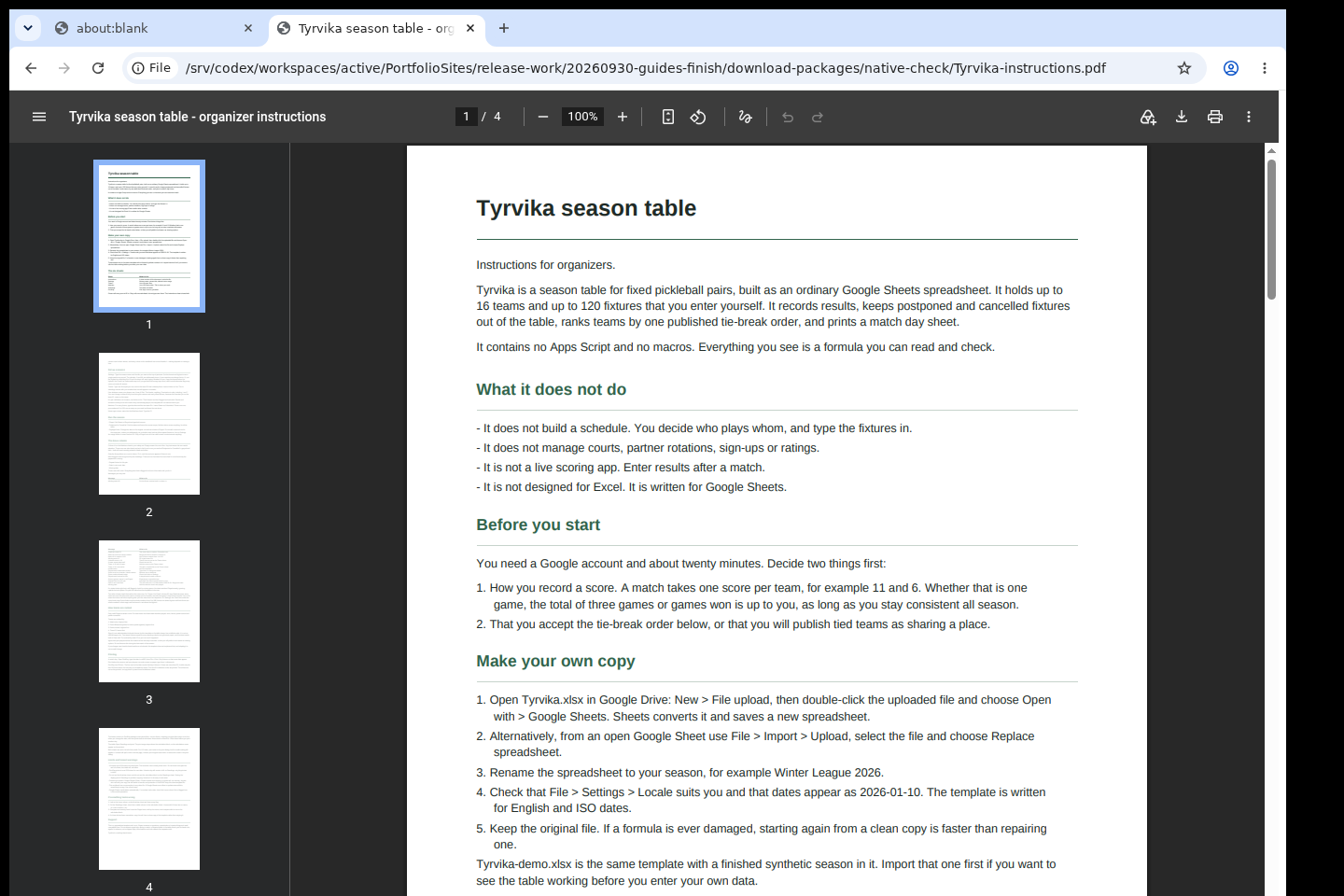
Four fictional teams, five played matches and one postponed match. The result below was calculated in Google Sheets; the working image shows the PDF instructions.
See the workflow at a glance
Choose a short explanation, then follow the worked example below. Check the requirements and compatibility before using your own files.
Five played matches. One postponed. A clear table.
Two pairs have two wins each. Which one leads the fictional autumn ladder? Tyrvika's example puts Birch Paddles ahead of Willow Volleys on point differential, while the postponed sixth fixture stays out of the totals. Enter your teams and existing fixtures, then review the standings. The template supports up to 16 teams and 120 pre-entered fixtures; it does not generate a schedule. Google Sheets calculations were checked, but organiser acceptance, GUI editing and physical printing have not been verified. Explore the four-team example first.
View the illustrated card
Before you start
- A Google account and Google Sheets in a web browser. The .xlsx files are only the way the template travels; Excel is not a supported target.
- Your list of teams and fixtures. Tyrvika does not create a schedule for you.
- The purchased tyrvika-0.1.1-guide-bundle.zip download. It contains program/tyrvika-preview-20260929.zip.
Your first result
Download and extract your bundle
Buy the Tyrvika bundle at /store/tyrvika/ and extract tyrvika-0.1.1-guide-bundle.zip. Then extract program/tyrvika-preview-20260929.zip into a separate folder. The app/, extension/, samples/ and docs/ paths below refer to that extracted program folder. GUIDE.html and examples/ in the outer bundle contain this manual and its practice material.
Put it into Google Sheets
Open drive.google.com, upload app/Tyrvika.xlsx, right-click it and choose Open with › Google Sheets. Keep the original file as a clean copy. The workbook has the sheets Instructions, Settings, Teams, Matches, Standings and PrintDay. Green cells are yours to fill in; grey cells are calculated, so do not type over them.
Settings
Fill in Season name, Season title and Organizer. Check Lowest allowed score and Highest allowed score (0 and 99 by default) and Allow repeat fixtures (No by default). The tie-break policy is printed on this sheet.
Teams
Team IDs 1 to 16 are fixed. Type a Team name next to each ID you use and keep Active as Yes. Every result is linked by Team ID, so you can rename a pair mid-season without breaking anything.
Matches
Enter every fixture once, in advance: Match ID, Date (yyyy-mm-dd), Team A ID, Team B ID, with Status left at Scheduled. After a match, set Status to Played and type Score A and Score B. Postponed and Cancelled rows never count. Column H (Issue) shows the row's first problem, for example a missing date or a score outside the allowed range; a row with an issue is not counted.
Standings
Standings update automatically: Pos, Team ID, Team, MP (matches played), W, L, PF (points for), PA (points against), Diff and Note. Order: 1. match wins, 2. point differential, 3. points scored, 4. Team ID (lowest first). Step 4 is only an administrative tie-break; the Note column marks any team separated only by it. Agree the rule with your players before the season.
Print a match day
On PrintDay type the date next to Match day:, then print with File › Print. Fixtures for exactly that date are listed with empty score boxes for results not yet entered. Clear the Notes column before printing another day.
Saving and your data
Google Sheets saves your copy automatically in your Google Drive; nothing is sent to the publisher. To give others their own sheet, share it read-only and ask them to use File › Make a copy.
A worked example
A four-team autumn ladder
Input: examples/tyrvika/teams.csv (four fictional pairs) and examples/tyrvika/matches.csv (six fixtures: five played, one postponed).
- On Teams type the four names from teams.csv next to Team IDs 1 to 4 and keep Active as Yes.
- On Matches type the six rows from matches.csv into rows with Match ID 1 to 6: date, Team A ID, Team B ID, Status and the two scores. Leave the scores of the postponed match empty.
- Open Standings.
Expected result: Column H shows no issue. Standings, 5 matches counted: 1. Birch Paddles MP 3, W 2, L 1, PF 30, PA 27, Diff +3; 2. Willow Volleys MP 3, W 2, L 1, PF 30, PA 28, Diff +2; 3. Kettle Dinks MP 2, W 1, L 1, PF 18, PA 19, Diff -1; 4. Quarry Lobs MP 2, W 0, L 2, PF 18, PA 22, Diff -4. Birch Paddles and Willow Volleys are level on wins; point differential puts Birch Paddles first. The postponed match 6 does not count.
Troubleshooting
A result is missing from the standings.
Check column H (Issue) on that Matches row. Typical causes: Status is not Played, a score is blank or outside the allowed range, the date is not a real date, or a Team ID is missing or not on the Teams sheet. The Issue text names the exact problem.
Two teams are tied and separated only by Team ID.
That is the template's administrative step 4, marked in the Note column. Decide with your players how to settle it; head-to-head is not calculated.
A formula was overwritten.
Grey cells are calculated. Undo (Ctrl+Z) or copy your green input cells into a fresh copy of the template.
Compatibility & limits
- Fixed pairs only, up to 16 teams and 120 fixtures. No schedule generator, brackets, live scoring, ratings or head-to-head tie-break.
- Built for Google Sheets; checked by importing into Google Sheets. Excel, mobile screens and physical printing are not checked.
- The original program keeps its included preview permissions: you may use it, including for real seasons, but not sell or redistribute it (see PREVIEW-PERMISSION.md).
- Up to 16 teams and 120 pre-entered fixtures. No schedule generator, macros or Apps Script. Google Sheets formula calculations checked; GUI editing, physical printing and organizer acceptance unverified.
Need a hand?
Tell us the product, host application and version, what you tried, and the exact error. Contact support with a fictional example; keep private customer files and passwords out of your message.