Task walkthrough · IdunnBacklist
Update the author page without rebuilding every book
A new book or biography change can leave older titles pointing readers to an outdated catalog. Start with a separate author page in each finished EPUB, review its replacement, and create new copies for the destination links you choose.
A Perunlight workflow for IdunnBacklist, our paid offline EPUB author-page updater. Written with AI assistance and checked against its free fictional backlist, independent ZIP/XML comparisons and the accepted app review in Chrome 152 on Linux. Mira Fen and these books are invented examples, not a customer case study. Published .
Read one original page and its replacement
Mira Fen's fictional backlist contains Lantern Harbor, The Brass Tide and Winter Signal. Each original EPUB already has a separate Also by Mira Fen page. The sample uses one shared catalog and biography to produce an Amazon-link and a Neutral-link edition of each title: three books become six copies.
- Extract the free ZIP and open manual/index.html for the illustrated steps.
- Open the original Lantern Harbor EPUB from examples/ in your reader. Find its Also by Mira Fen contents entry.
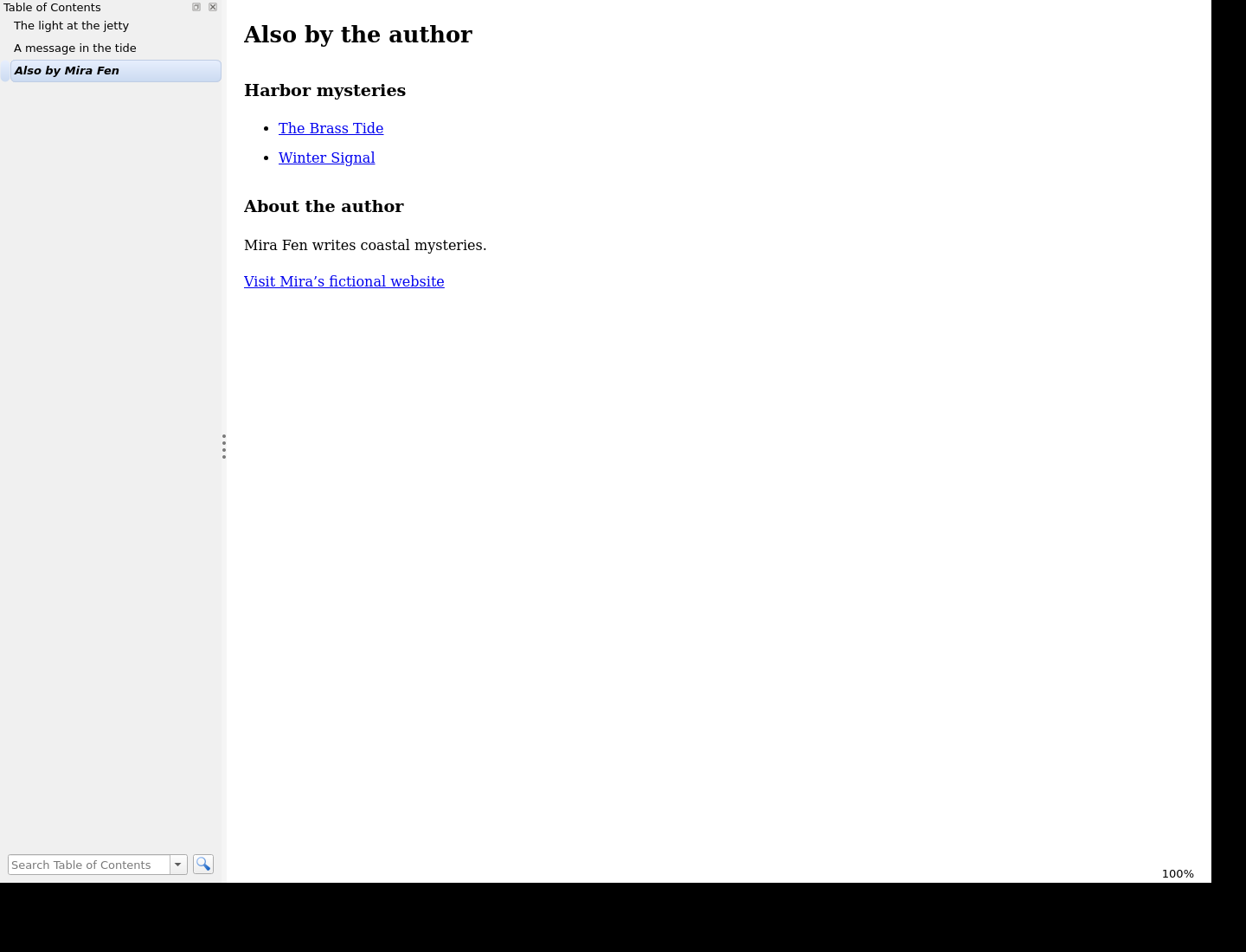
- Extract examples/IdunnBacklist-editions.zip. Open harbor-1-neutral.epub and return to the same contents entry.
- Compare the author page with the expected text below, then open report.html beside the six EPUBs.
Current book: Lantern Harbor (harbor-1)

Also by Mira Fen:
  The Brass Tide → https://example.com/books/harbor-2
  Winter Signal  → https://example.com/books/harbor-3

Mira Fen writes coastal mysteries.
Contact: https://example.com/mira

The current book is omitted from its own list.
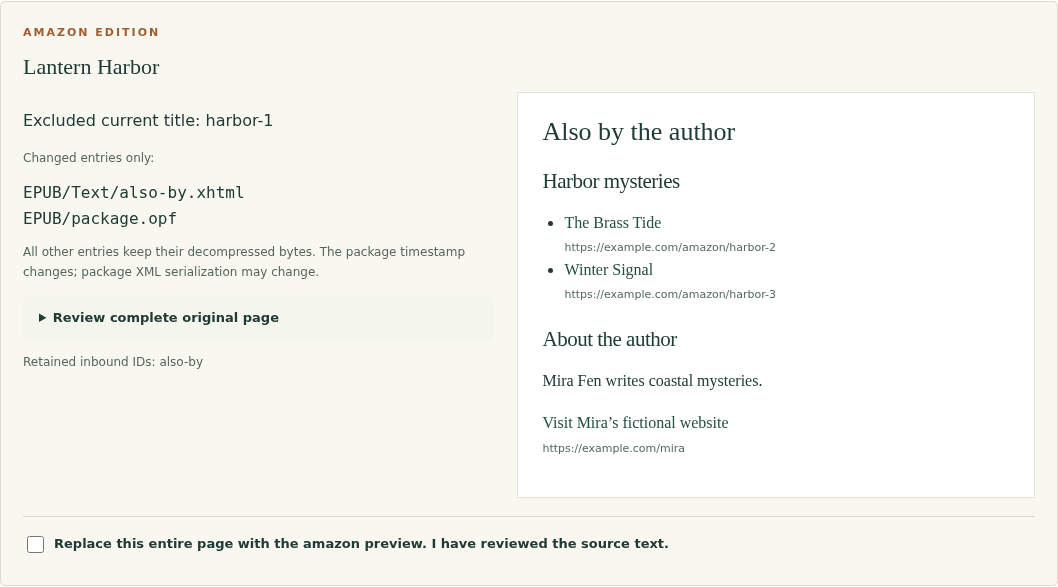
With the paid application, extract the complete ZIP and open app/IdunnBacklist.html in Chrome on Linux. Choose Try the fictional backlist. For each title, explicitly select Also by Mira Fen — EPUB/Text/also-by.xhtml and its matching harbor-1, harbor-2 or harbor-3 catalog ID. These choices are deliberately not preselected.
Choose the page before changing its contents
IdunnBacklist replaces all contents of one chosen XHTML page. Expand Read all source text and check that it contains only the standalone author/catalog material you intend to replace. If the last chapter and author note share a page, split them in your authoring tool first.
The catalog ID tells the app which title to omit from that book's generated list. A filename alone is not a reliable identity. Verify each mapping against the displayed original book and catalog title before preparing previews.
Keep the example's Amazon and Neutral editions selected and click Prepare previews. Read all six previews. Approve each whole-page replacement separately, then choose Export reviewed editions. Changing inputs or settings invalidates earlier approvals.
Check the books as well as the report
- Expect six EPUBs and report.html/report.json in the editions ZIP: two editions for each of three original books.
- In each author page, find the other two books and confirm that the current title is absent.
- In the Neutral edition, inspect the /books/harbor-* destinations. In the Amazon edition, inspect the corresponding /amazon/harbor-* destinations. These are placeholder links, not retailer listings.
- Check that each report row names its source and output SHA-256. Match the edition and filename to the book you opened.
- Use the original contents entry, increase the reader font size and return to the preceding chapter. Check the reading experience before uploading your own editions.
Expected: six reviewed EPUB copies. Each has one replaced author page, the selected destination links and the shared biography. The other chapter and navigation contents remain intact.
An independent ZIP/XML check found exactly two changed decompressed entries in each sample: EPUB/Text/also-by.xhtml and EPUB/package.opf. The package XML's only semantic change is its modification timestamp. The member list, other chapter bytes, navigation document and author-page target ID were retained. ZIP compression, timestamps and overall file bytes can change, so comparing only the whole-file hash cannot tell you which content changed.
The practice editions passed EPUBCheck 5.4.0, and the sample was opened in a native reader. Your own books still need review in the readers and publishing workflow you use. Selecting an Amazon or Kobo URL column does not establish retailer acceptance.
Keep one catalog for the next update
The CSV has seven fixed columns: book_id, title, series, order, amazon_url, kobo_url and neutral_url. Keep stable unique IDs and use complete HTTPS destinations. Choose up to three link columns when exporting. A blank destination produces plain title text and requires an explicit acknowledgement.
Enter the biography and optional contact label/link once. Save project before closing the application. The project contains catalog text, settings, mappings and source hashes; it contains neither manuscript files nor approval state.
To reopen a saved project, select the exact original EPUB bytes again. Renamed files are acceptable when their hashes match. A changed manuscript requires a new workspace. Make new previews and approvals after loading: a saved project does not silently authorize replacements.
Use it with supported finished EPUBs
- Keep backups, then start a new workspace and apply your own catalog and biography.
- Add supported DRM-free EPUB 3 books and explicitly map their standalone author pages and catalog identities.
- Select the destination columns you need, read the full original text and review every replacement.
- Export new copies into a separate folder. Read them and inspect the preservation reports before publishing.
- Save the project together with its exact original books for future catalog updates.
IdunnBacklist 1.0.0 was verified in Chrome 152 on Linux. It supports a narrow set of UTF-8, single-package, reflowable EPUB 3 books whose selected page contains exactly one h1. EPUB 2, DRM/encryption and font obfuscation, fixed layouts, scripts, media overlays and some uncommon valid structures are refused. It does not split chapters, append a new page or repair an EPUB.
The limits are ten books, 10 MiB compressed per book, 50 MiB compressed and 60 MiB expanded per batch, and three output editions. Large batches need substantial browser memory. There is no autosave or live link checking. Windows, macOS, mobile operating systems, physical e-readers and retailer submission were not tested.
Read the complete setup guide for all file and catalog limits, refusal cases and project recovery steps. Start with a small backed-up batch and verify its outputs in your own publishing workflow.
Perunlight product
Refresh a supported backlist with IdunnBacklist
$19 USD, one-time purchase. Replace a selected standalone author page across supported EPUB 3 books, review every edition and download new copies with preservation reports. Includes the offline app, illustrated guide and fictional practice books.
Get IdunnBacklist · $19Read the setup guide
Verified in Chrome on Linux. Existing standalone page required; review new copies before publishing.