Step-by-step guide
VarSeal
Add your own usage text and an IPTC/PLUS Data Mining value to JPEG copies, then keep a record of what was written and what was refused.
Use this for a reviewed delivery of supported JPEG exports when you want embedded notices, a client summary and per-file receipts. You supply the statements. The app does not enforce them or prevent downstream metadata removal.
Before you start
- Desktop Chrome on Linux; Chrome 152 was tested. Other browsers, operating systems and mobile devices are unverified.
- Extract the whole ZIP and keep VarSeal.html beside app/. No account, connection, ExifTool or command line is required for normal use.
- Supported JPEG copies intended for delivery and your own usage, rights and contact text. Start with the included fictional exercise.
Your first result
Open the app and try the example
Extract
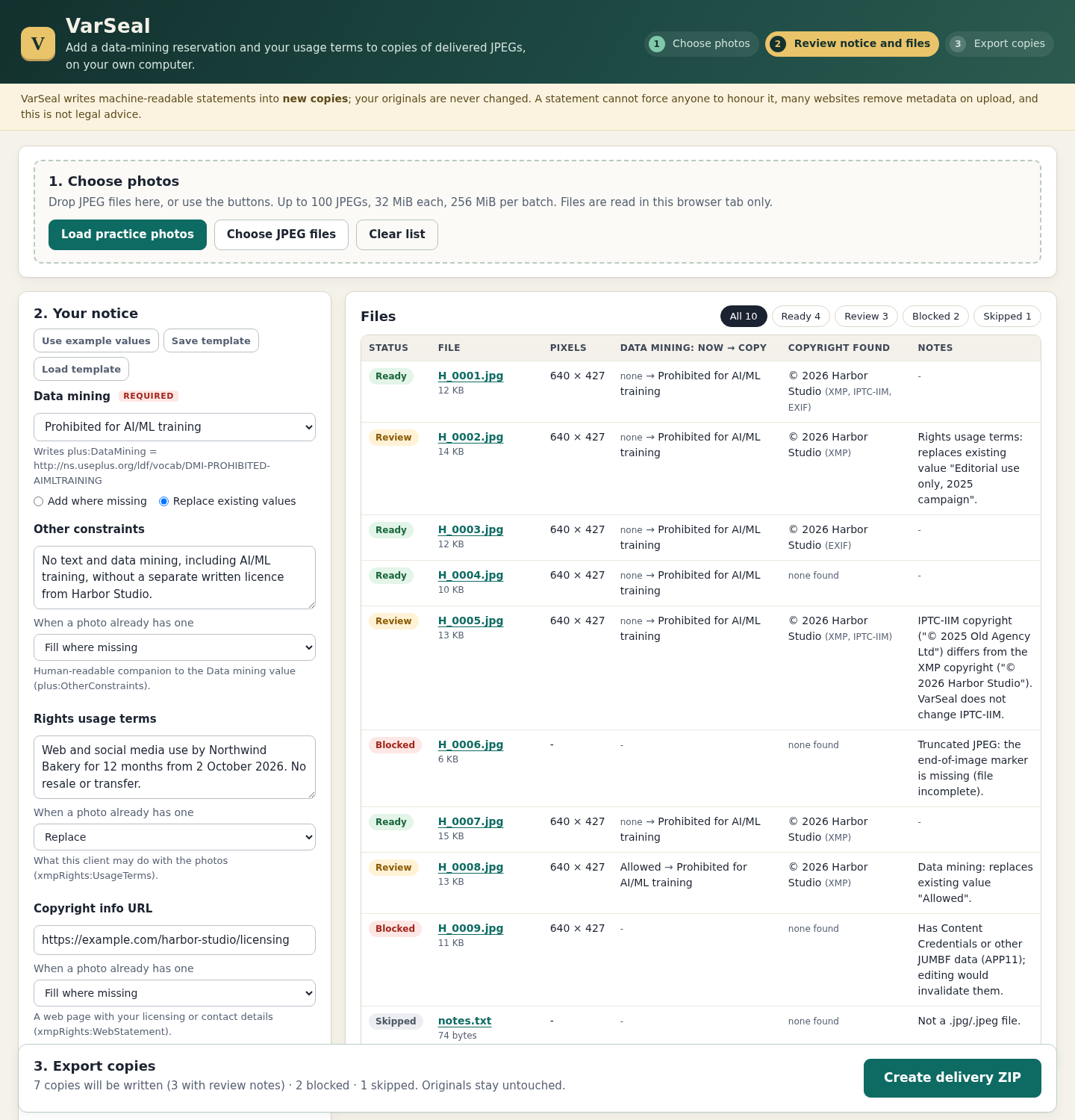
VarSeal-1.0.1.zip, openVarSeal.htmlin Chrome, then click Load practice photos and Use example values. Expect Ready 4 · Review 3 · Blocked 2 · Skipped 1. These are fictional inputs, not a real client delivery.Inspect a planned change
Select
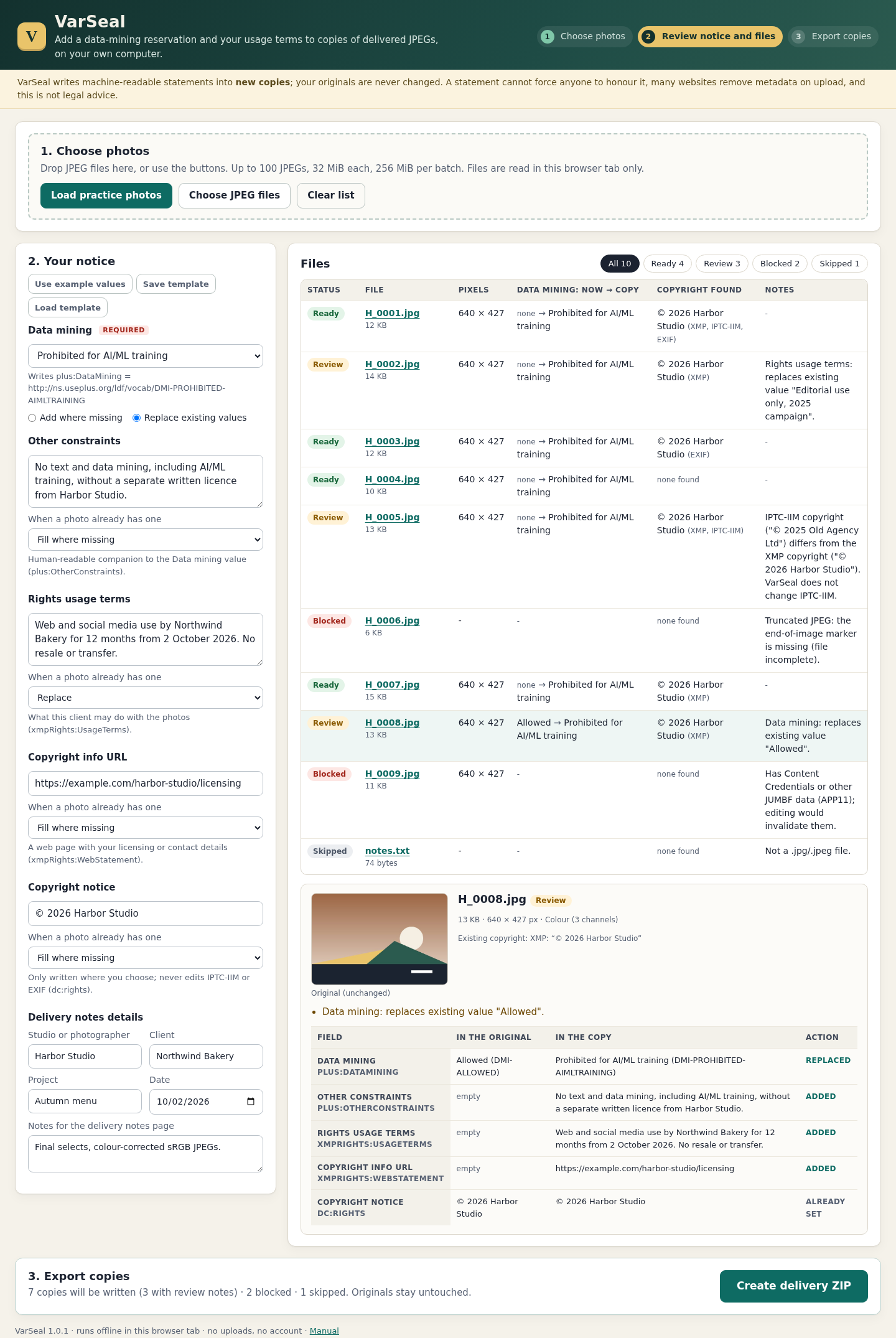
H_0008.jpg. Its existing Data mining value is Allowed; the example changes it to Prohibited for AI/ML training because Replace existing values is selected. The default Add where missing keeps an existing value and reports it for review. Inspect the before-and-after fields for each file marked Review.Export and inspect the practice result
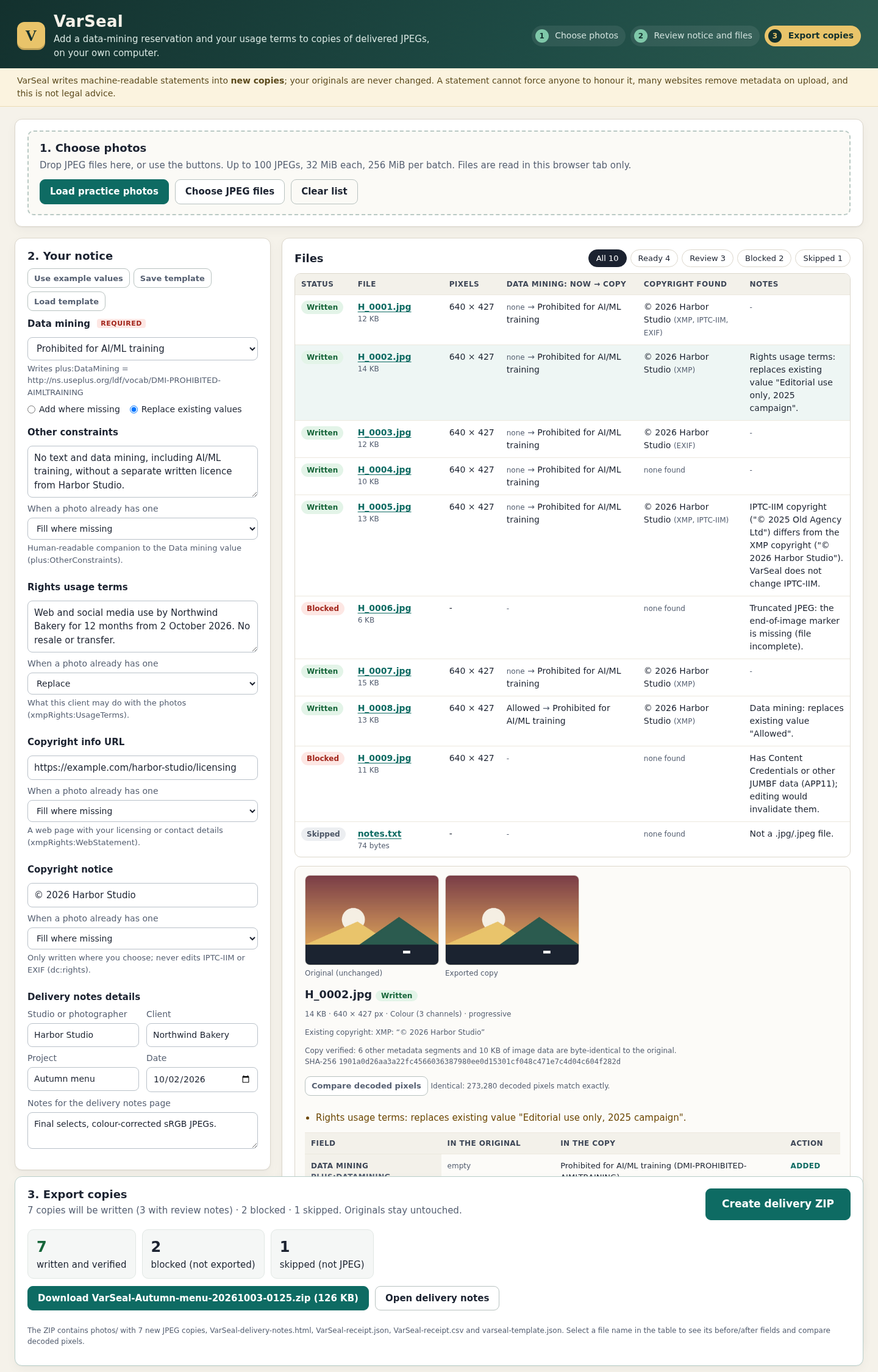
Click Create delivery ZIP, then the download button. Expect seven written and verified copies, two blocked files and one skipped text file. Extract the ZIP and open
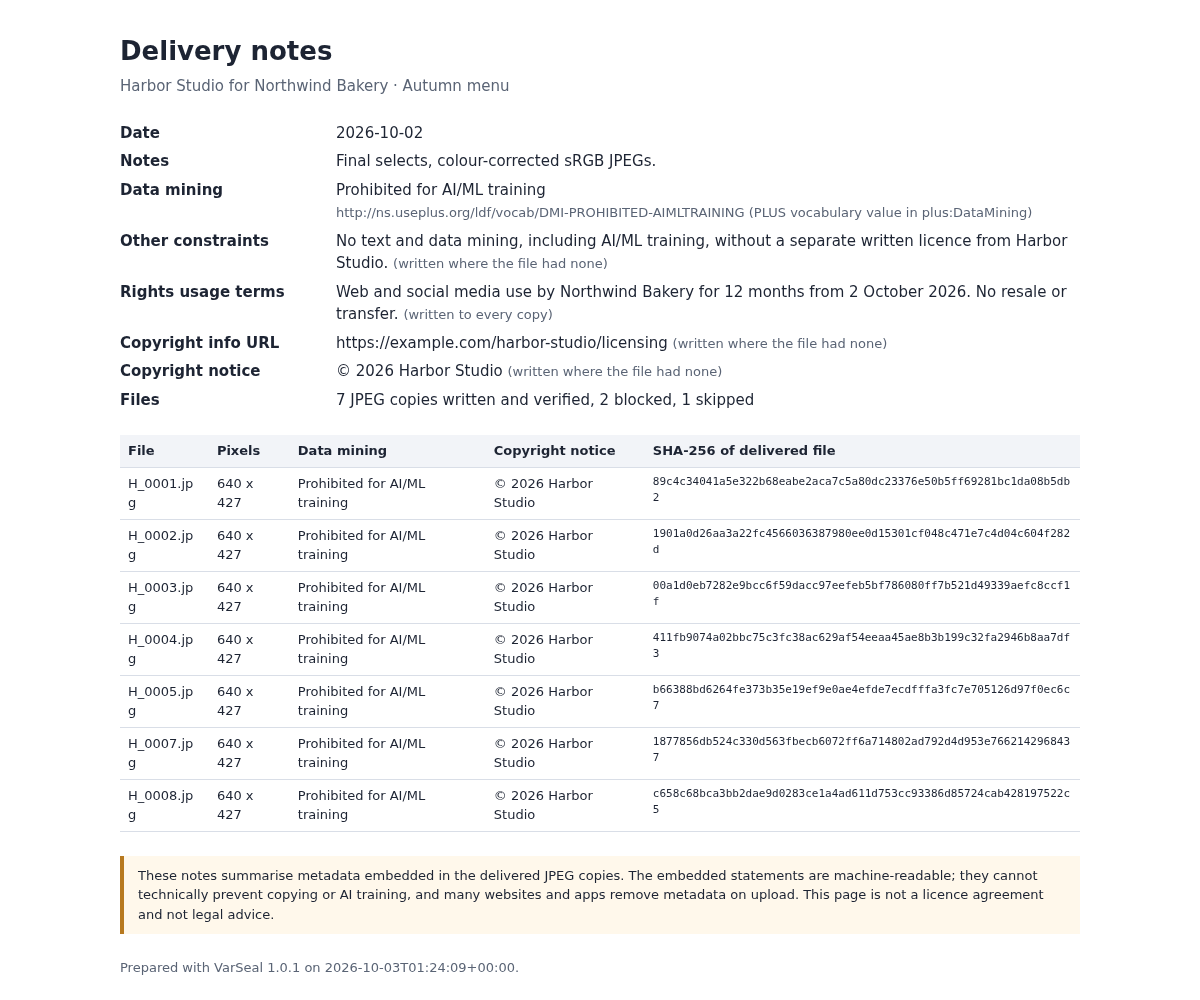
VarSeal-delivery-notes.html. Compare thephotos/files and JSON/CSV receipt with the free pack'sexpected-output/. Creation timestamps can differ.Prepare your own delivery
Choose Clear list, then Choose JPEG files or drop files onto the page. Select your Data mining value. For usage terms, other constraints, copyright URL and copyright notice, choose Keep existing, Fill where missing or Replace. Fill or Replace requires nonblank text; a blank field never erases existing text. Enter your own studio, client and project details.
Review conflicts and refused files
Read each Review and Blocked note before export. A Review file will still be written. IPTC-IIM and EXIF values are never changed, even if they disagree with XMP. No change means no new copy is needed. Open a blocked file's details for the specific reason and obtain a supported export if appropriate; Content Credentials cannot be retained through this editing workflow.
Keep the output and template
The ZIP contains new copies in
photos/, HTML delivery notes, JSON and CSV receipts, andvarseal-template.json. Each read input and written copy has a SHA-256. Files not opened, including unsupported extensions or oversized inputs, have their real size and reason but no input hash. Use Save template and Load template for recurring notice text. Closing the tab discards the current list; there is no autosave. Delete the extracted app folder to uninstall, keeping any outputs you need.
A worked example
Harbor Studio: seven copies from ten fictional inputs
Input: Nine synthetic JPEGs, including a truncated file, conflicting metadata and an APP11 fixture, plus notes.txt.
- Load practice photos and Use example values.
- Review H_0008 changing Allowed to the selected AI/ML training notice and H_0005 retaining its conflicting IPTC-IIM value.
- Create and download the delivery ZIP, then inspect its receipts and notes.
Expected result: Seven JPEG copies are written; H_0006 and H_0009 are blocked, and notes.txt is skipped. Every written copy has the selected Data Mining URI. Non-XMP segments and decoded pixels were independently verified unchanged for the practice outputs. notes.txt is listed as 74 bytes with input_read false and no input SHA-256.
Review a notice and inspect the delivery
Actual VarSeal 1.0.1 screens in Chrome on Linux using fictional Harbor Studio data.
1. Inspect the before-and-after fields
2. Check the exported result
3. Read the client summary
Troubleshooting
The page is unstyled or inactive
Extract the complete archive and keep VarSeal.html beside its app folder.
Create delivery ZIP is disabled
Read the Export panel: select a Data mining value, fill required text for Fill/Replace, and use a valid http or https copyright URL.
A file is blocked
Inspect the specific reason. VarSeal refuses unsafe or unsupported structures; obtain an appropriate supported JPEG from your authoring workflow before trying again.
Some files were not added
Split batches above 100 files or 256 MiB. A file above 32 MiB is listed but not opened.
Metadata disappears after upload
A destination may strip it. Check the file actually delivered; VarSeal cannot control another service's processing.
Compatibility & limits
- Chrome 152 on Linux and first-party synthetic JPEGs were tested. Lightroom, Capture One, Photo Mechanic and darktable export interoperability remains unverified.
- JPEG only; no TIFF, PNG, WebP, HEIC/AVIF, RAW/DNG or XMP sidecars. Up to 100 inputs, 32 MiB per file, 256 MiB per batch and 2,000 characters per text field. Exact maximum successful batch size was not independently exercised.
- Writes five XMP properties: Data Mining, Other Constraints, Rights Usage Terms, Web Statement and Copyright Notice. IPTC-IIM, EXIF, captions and keywords remain unchanged. Conflicts can remain and are reported.
- Damaged JPEGs, Content Credentials/JUMBF APP11, Extended/duplicate/malformed XMP, DTD-bearing XML and oversized results are refused. Original files are never overwritten.
- Receipt hashes cover bytes actually read or written. Files not opened have input_read false, their size and a reason, with no input digest.
- No persistent session or autosave. Save a template and download the results before closing. The optional browser pixel comparison is additional; independent acceptance used external decoded-pixel comparison.
- Data Mining is a machine-readable statement, not technical enforcement. Websites may remove metadata. VarSeal does not create a licence agreement or provide legal advice. See the [IPTC Photo Metadata User Guide](https://www.iptc.org/std/photometadata/documentation/userguide/#data-mining) for the field's meaning.
Need a hand?
Tell us the product, host application and version, what you tried, and the exact error. Contact support with a fictional example; keep private customer files and passwords out of your message.