Step-by-step guide
VolosTally
Prepare monthly family lesson statements from exported calendar entries and the rules you choose.
Use this when you teach privately, keep lessons in a calendar, and want to explain a month’s calculated lesson charges by family. Bring an exported ICS calendar and a student roster; review the original calendar and your own policies before relying on a total.
Before you start
- Desktop Chrome on Linux; Chrome 152 was verified. Other browsers and operating systems are untested.
- Extract the complete buyer ZIP and open app/index.html. Keep the accompanying files together. The application runs offline.
- A supported UTF-8 ICS calendar and a CSV roster with stable family/student IDs, rates and any opening balances. Start with the fictional example to learn the workflow.
Your first result
Start with the fictional studio
Extract
VolosTally-1.0.1.zip, openapp/index.htmland choose Try the fictional sample. It uses March 2026,America/New_York, USD and four students in three families. The selected rules are examples, not a recommended billing policy.Confirm the title assignments
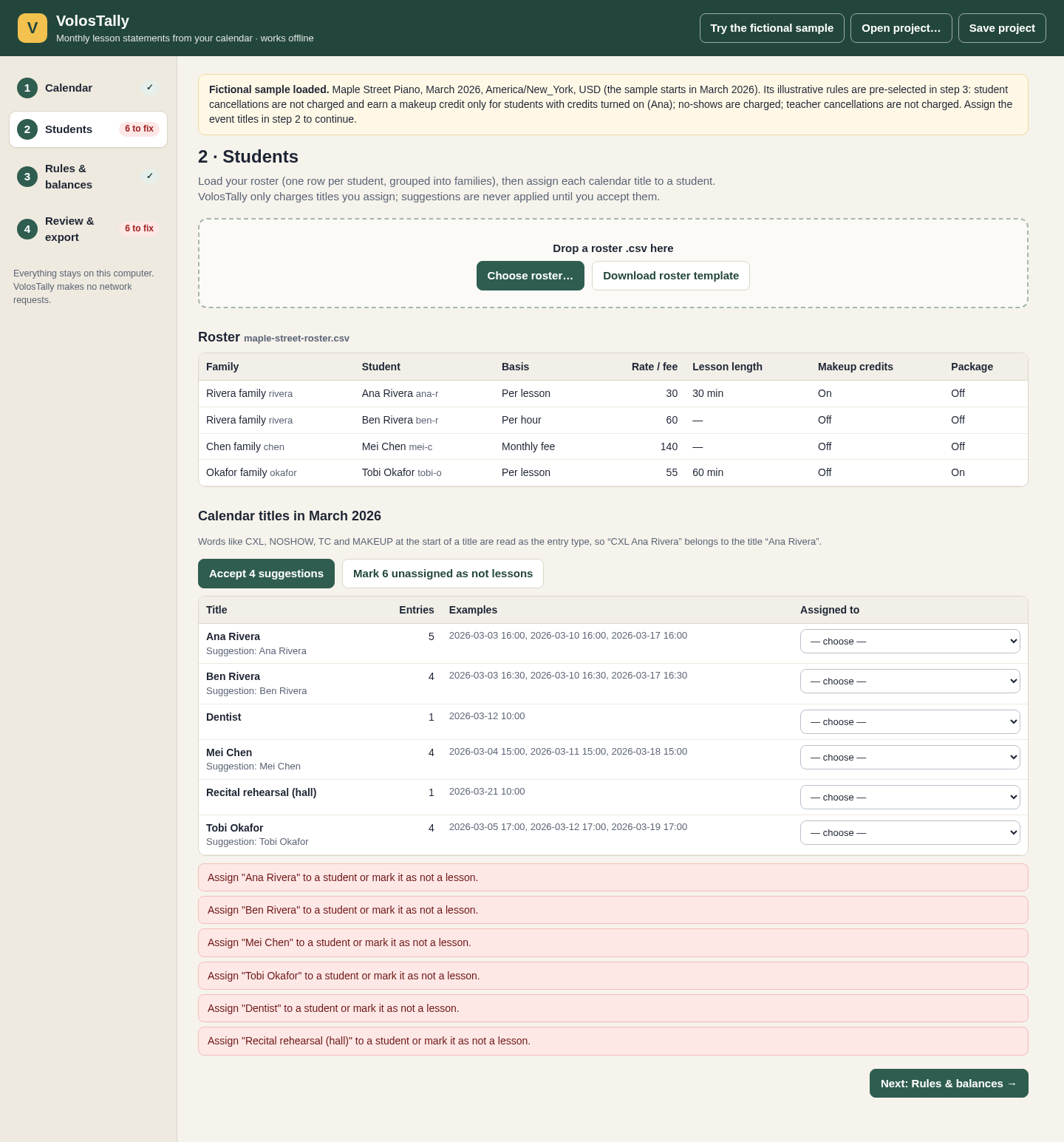
Go to Students, accept the four student suggestions and mark the two remaining titles as not lessons:
DentistandRecital rehearsal (hall). Suggestions do not assign a student until you accept them. Each event belongs to at most one student.Read the rules and expected totals
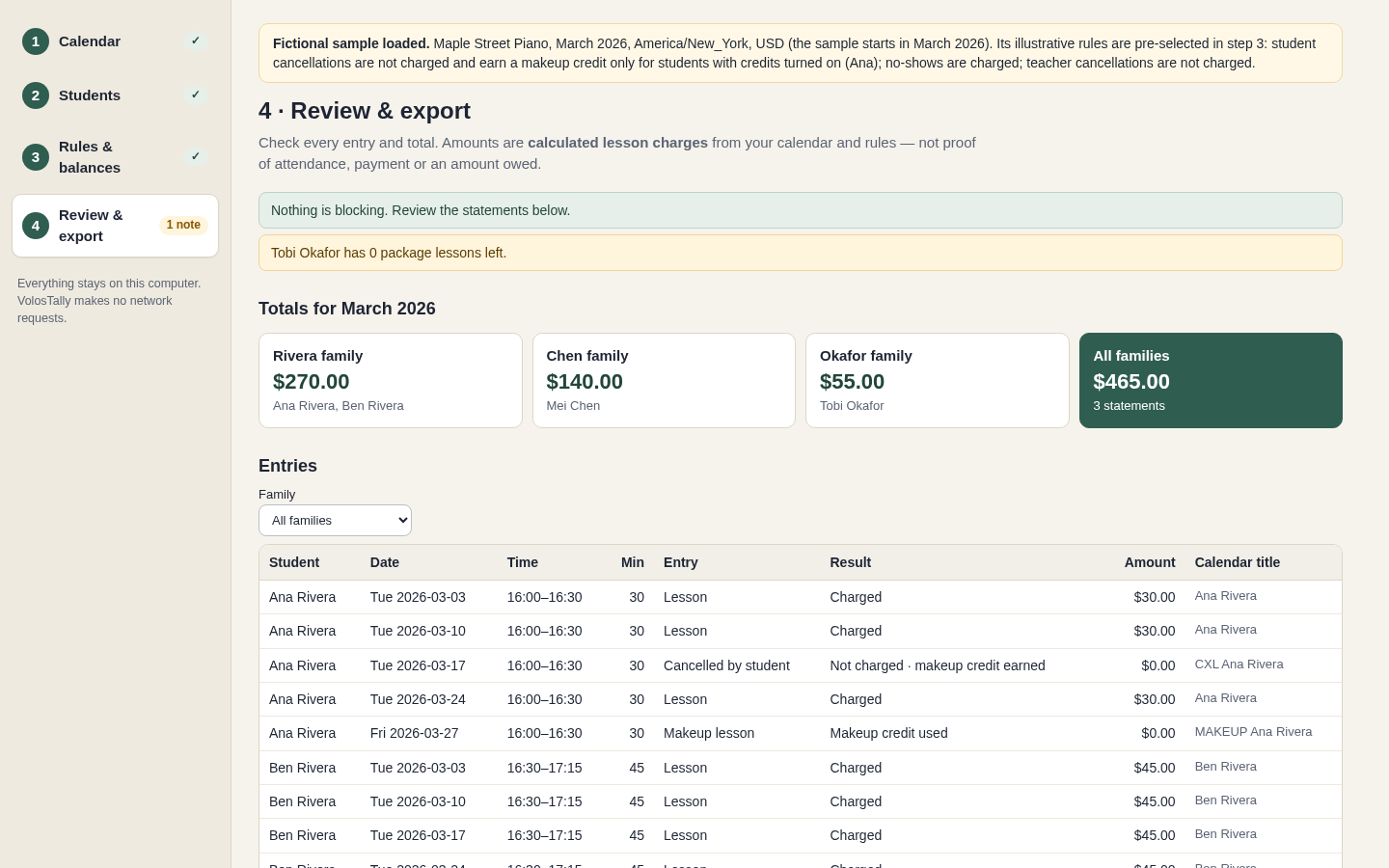
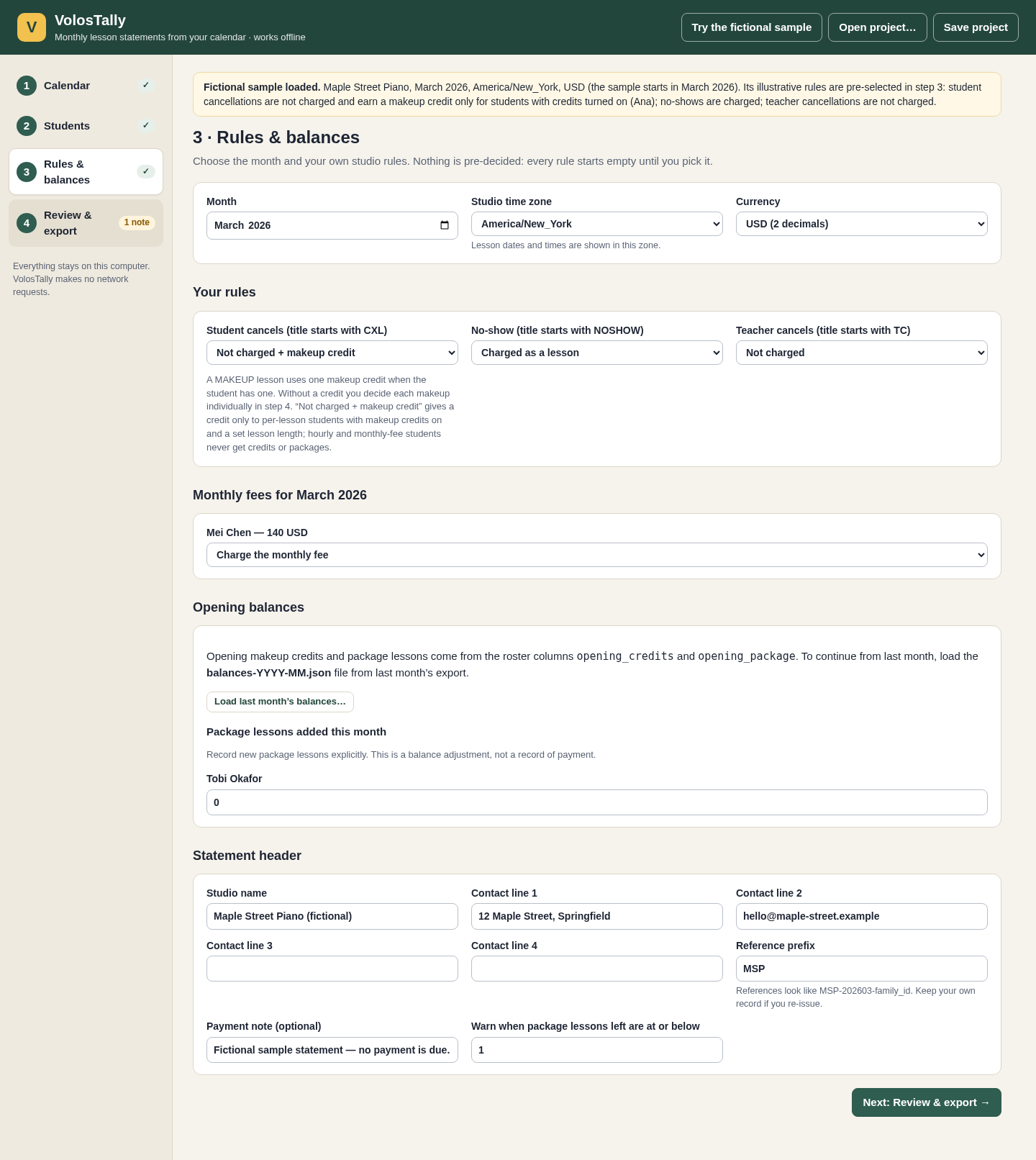
Under Rules & balances, inspect the sample policy: student cancellations earn a credit where eligible, no-shows are charged, teacher cancellations are not charged and Mei’s monthly fee is charged. In Review & export, expect Rivera $270, Chen $140, Okafor $55, total $465. Tobi has zero package lessons left. Check the dated entries as well as the totals.
Export and read a statement
Resolve all red items, tick I have reviewed these calculated statements, then export the month package. Extract it and open
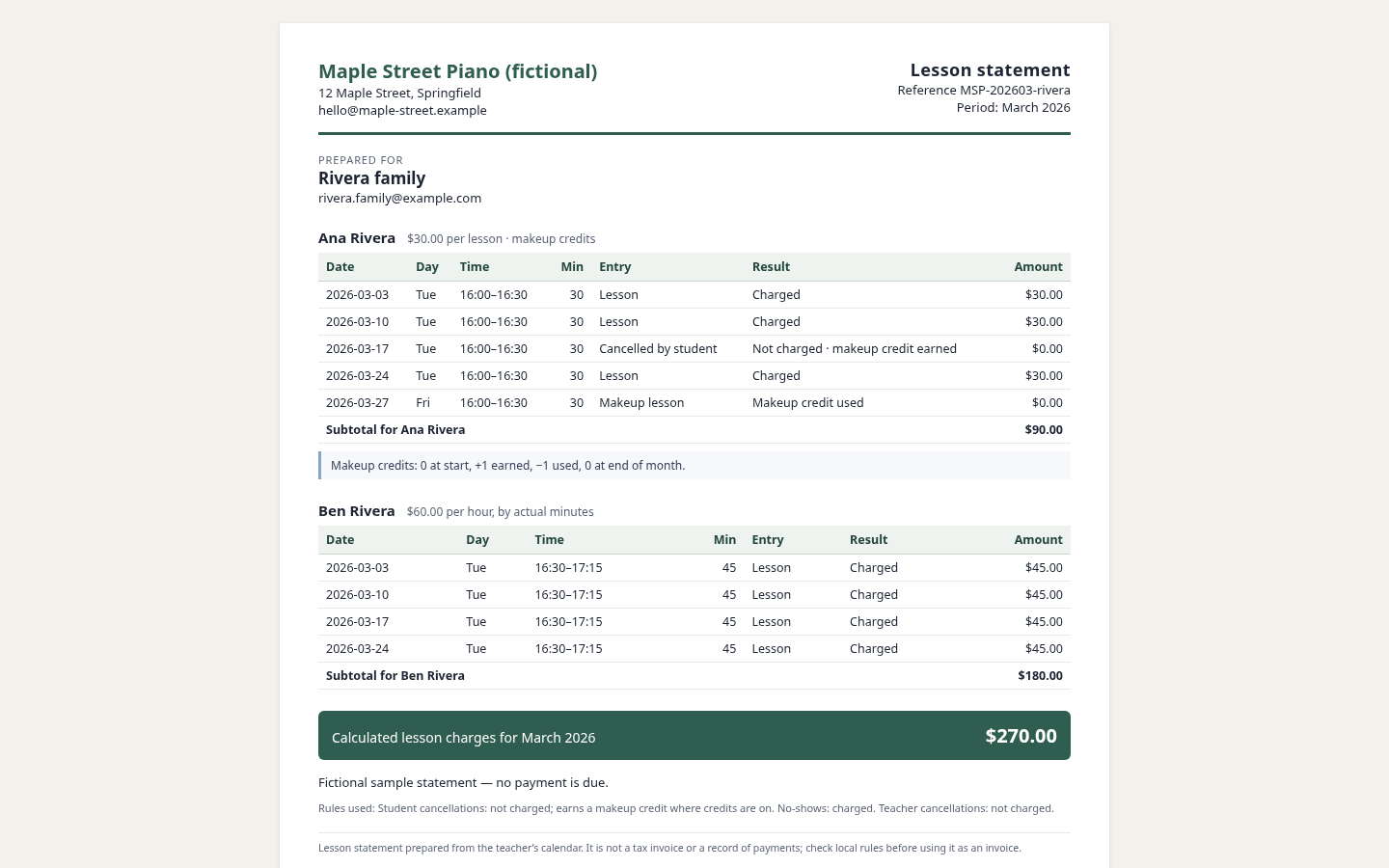
statements-2026-03.htmlin Chrome. The Rivera statement groups Ana and Ben and totals $270. Use Print → Save as PDF for a PDF. Thefamilies/folder contains separate family HTML files.Keep the ledger and carry balances
The ZIP also contains
ledger-2026-03.csv, the family summary CSV,balances-2026-03.jsonand the review text. Carry the balance file into April: expected family totals become $225, $140 and $275, total $640. Ana ends April with one makeup credit. Ben’s April 28 occurrence has moved to May 5 and is not an April charge.Prepare your own month
Start fresh and load supported calendar files. Inspect unreadable entries. Load your roster CSV or use the template. Set stable IDs, the lesson/hour/monthly-fee basis, plain numeric amounts, and a fixed lesson length for credits or packages. Accept only correct assignments. Choose the month, IANA studio time zone, currency, all policy choices and each monthly-fee decision. A malformed roster is rejected as a whole.
Review changes and save your work
Inspect each dated result, amount and balance. Resolve unsupported entries, assignment conflicts and any makeup decision. Statement text outside the bundled font’s coverage blocks export and identifies the field. Any input change clears review approval. Save project downloads the calendar, roster, settings and decisions; reopen it to continue and review again before export. There is no autosave. Keep original inputs and exported packages; delete the extracted app folder to uninstall.
A worked example
Maple Street: $465 in March, $640 in April
Input: Fictional four-student roster and calendar in America/New_York. Ana: $30 per lesson with credits; Ben: $60/hour; Mei: $140 monthly fee; Tobi: $55 per lesson with three opening package lessons.
- Accept the four student assignments and exclude the two non-lesson titles.
- Inspect the March rules, dated entries and family totals; export after review.
- Load March’s closing balance file for April and recalculate.
Expected result: March: Ana $90 and Ben $180 make Rivera $270; Chen $140; Okafor $55 after three package lessons, total $465. April: Rivera $225, Chen $140, Okafor $275, total $640. Ana has one unused credit at April’s close. Ben’s moved lesson belongs to May, not April.
From calendar entries to a readable family statement
Actual VolosTally screens in Chrome on Linux using the invented Maple Street Piano sample.
1. Confirm who each lesson belongs to
2. Choose the rules you actually use
3. Read each dated lesson
Troubleshooting
Export is disabled
Resolve every red item and required decision, then tick the review box. Changing any input invalidates that approval.
An event could not be read
Read its exact reason and correct the source calendar, then export it again. Mark it as not a lesson only when it truly should be excluded.
The time zone is not recognised
Use a supported IANA name such as America/New_York. Windows time-zone names are unsupported.
A balance file is rejected
Use the file that closes the immediately preceding month. Reopening its own closing month rebuilds from that month’s opening balances, so the same month is not deducted twice. Unrelated months are blocked.
A name or header cannot be printed
The message identifies the field and unsupported character. Use an agreed supported spelling or a different statement workflow; the app does not silently transliterate names.
A calendar or roster is invalid text
Export UTF-8 text and check the documented file limits. XLSX workbooks are not loaded directly.
Compatibility & limits
- Verified with Chrome 152 on Linux, opening the application from disk. Other browsers, operating systems and touch operation were not tested.
- UTF-8 ICS files or an unencrypted ZIP of ICS files. Limits: 50 calendar files, 20 MB expanded calendar data, 5,000 entries in one month and 200 students. Real exports from Google, Apple and Outlook were not tested.
- Daily, weekly and monthly recurrence within the documented support list; skipped, added and moved single occurrences. Yearly/hourly rules, several advanced recurrence fields, THISANDFUTURE changes, period RDATEs and Windows time-zone names are unsupported and listed as unreadable.
- All-day, non-positive, sub-minute and over-12-hour entries cannot be charged. Lessons starting in a skipped or repeated clock-change hour are blocked. Conflicting copies of a calendar event require resolution.
- Makeup credits and lesson packages apply only to per-lesson students with a fixed lesson length. A calendar event cannot be split among students. Monthly-fee students need an explicit charge/no-charge decision for each month.
- Whole calendar months and one selected currency at a time. Amounts are calculated lesson charges from imported entries and chosen rules; they do not prove attendance, payment or an amount owed. This is not a tax-invoice, accounting, payment, email or scheduling system.
- Statements use a bundled font. Text outside its supported character set blocks export with a field-specific message; not all scripts or emoji are supported. Do not substitute a different name without the family’s agreement.
- PDFs use Chrome Print → Save as PDF. Physical printing is untested. Save a project before closing; there is no autosave. Keep original inputs and exported month packages separately.
Need a hand?
Tell us the product, host application and version, what you tried, and the exact error. Contact support with a fictional example; keep private customer files and passwords out of your message.